Accessing domain management
Access to domain management requires an administration project named
admin- to be present in your domain.
Amazon SageMaker Unified Studio creates this project automatically, and it controls who can access domain
management.accountID
All members of the administration project are granted access to domain management and have a designation of Administrator. To remove a user's access to domain management, remove them from this project.
The administration project is created under the following conditions:
-
Quick setup flow – The project is created automatically for new domains.
-
Manual setup flow – The project is created when you enable the Tooling blueprint.
After the administration project is created, you can access domain management from two locations:
-
From the AWS SageMaker console – Navigate to your domain in the SageMaker console. In the domain details page, choose Domain management at the top of the page. This opens domain management in a new tab.
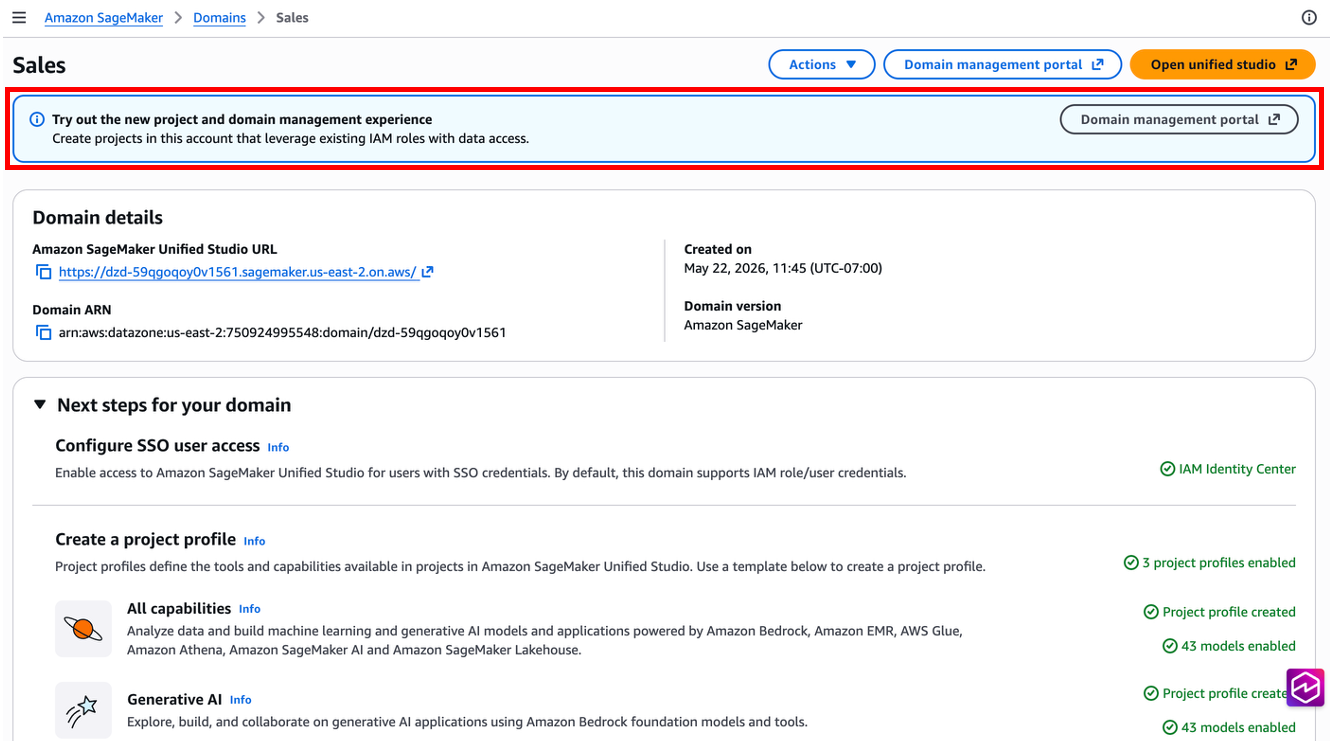
-
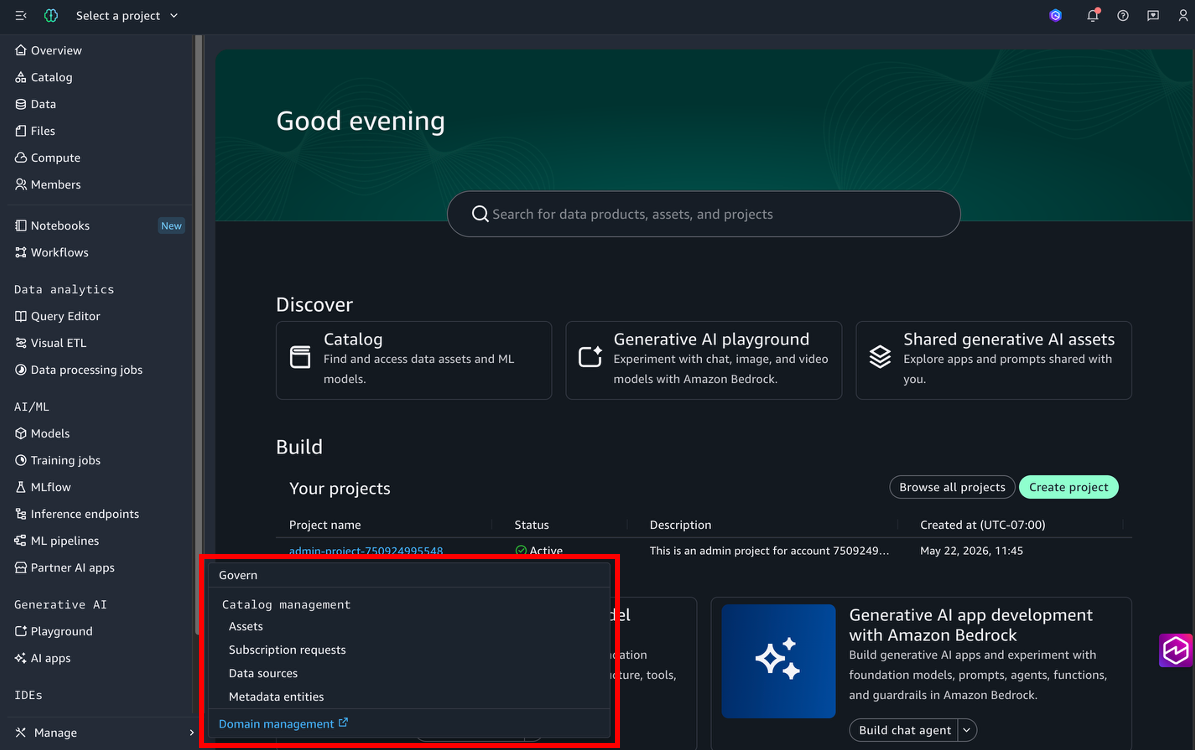
From the Amazon SageMaker Unified Studio portal – Log in to the Amazon SageMaker Unified Studio portal. In the left navigation panel, choose Domain management. This opens domain management in a new tab.
If the Domain management link is not present, your user either doesn't have access to domain management or the administration project has not been created. For more information, see Setting up access to domain management.
Setting up access to domain management
To access domain management, an administration project named
admin- must exist in the domain. This
project controls who can access domain management. You might need to take additional
steps to set up access to domain management in the following scenarios.accountID
Note
To set up access to domain management, the Tooling blueprint must first be
enabled. Choose the Domain management button in the banner of
the domain details page in the SageMaker console. You are prompted to enable the
Tooling blueprint. As part of the blueprint enablement, an administration project
named admin- is created. Return to
the domain details page and choose the Domain management button
in the banner to access domain management.accountID
If an administration project exists in the domain
If an administration project (for example,
admin-) already exists in your
domain, take the following steps to set up access to domain management:accountID
-
In the AWS SageMaker console on the domain details page, choose the Domain management button in the banner at the top. The SageMakerStudioAdminIAMDefaultExecutionPolicy IAM policy is updated for the administration project's provisioning IAM role. This also runs an update project action on the administration project, which can take a few minutes to complete. Domain management is not accessible until the project update completes.
-
You can also set up access to domain management from the Tooling blueprint. On the Provisioning tab, choose Update project. This performs an update project action to attach the SageMakerStudioAdminIAMDefaultExecutionPolicy AWS managed policy to the administration project's execution role.

If an administration project does not exist in the domain
If an administration project does not exist in your domain, take the following steps to create it and set up access to domain management:
-
In the AWS SageMaker console on the domain details page, choose the Domain management button in the banner at the top. Choose Set up to create the administration project. This begins the process to create the
admin-project for your domain. A banner confirmation appears when domain management is successfully set up. You can now access domain management using the methods described in Accessing domain management.accountID -
You can also set up access to domain management from the Tooling blueprint. On the Provisioning tab, choose Create to create the administration project. After the project is successfully created, you can access domain management using the methods described in Accessing domain management.

-
From the Amazon SageMaker Unified Studio portal, a banner displays for root domain owners with an action button to domain management. If the administration project has not been created, a popup directs you to the AWS Management Console to create the project using the steps above.
