기계 번역으로 제공되는 번역입니다. 제공된 번역과 원본 영어의 내용이 상충하는 경우에는 영어 버전이 우선합니다.
(레거시) Connect AI 에이전트와 함께 생성형 AI 기반 셀프 서비스 사용
중요
레거시 셀프 서비스는 새 기능 업데이트를 수신하지 않습니다. 새로운 구현의 경우 자율적인 다단계 추론, MCP 도구 통합 및 지속적인 대화를 제공하는 에이전트 셀프 서비스를 사용하는 것이 좋습니다.
작은 정보
AWS 워크숍: Connect AI 에이전트 셀프 서비스 사용자 지정
Connect AI 에이전트는 채팅 및 음성(IVR) 채널에서 고객 셀프 서비스 사용 사례를 지원합니다. 다음을 수행할 수 있습니다.
-
고객 질문에 답변합니다.
-
단계별 지침을 제공합니다.
-
예약 일정 변경 및 여행 예약과 같은 작업을 완료합니다.
고객이 추가 도움이 필요한 경우 Connect AI 에이전트는 전체 대화의 컨텍스트를 유지하면서 에이전트에게 원활하게 전달합니다.
기본 시스템 도구
Connect AI 에이전트는 기본적으로 작동하는 다음과 같은 기본 제공 도구와 함께 제공됩니다out-of-the-box
-
QUESTION: 다른 도구가 쿼리를 직접 해결할 수 없는 경우 답변을 제공하고 관련 정보를 수집합니다.
-
ESCALATION: 고객이 인적 지원을 요청할 때 에이전트에게 자동으로 전송됩니다.
참고
ESCALATION을 선택하면 고객 입력 가져오기 블록의 오류 분기를 가져옵니다.
-
CONVERSATION: 특정 고객 의도가 없을 때 기본 대화에 참여합니다.
-
COMPLETE: 고객 요구 사항이 충족되면 상호 작용을 완료합니다.
-
FOLLOW_UP_QUESTION: 고객과의 대화형 정보 수집 대화를 활성화합니다. 이 도구 사용에 대한 자세한 내용은 FOLLOW_UP_QUESTION 도구 섹션을 참조하세요.
이러한 기본 도구를 특정 요구 사항에 맞게 사용자 지정할 수 있습니다.
셀프 서비스 설정
다음 단계에 따라 셀프 서비스용 Connect AI 에이전트를 활성화합니다.
-
AMAZON.QinConnectIntent를 활성화하여 Amazon Lex 봇에서 AI 에이전트 연결을 활성화합니다. 지침은 Connect AI 에이전트 의도 생성 섹션을 참조하세요.
-
흐름에 Connect 어시스턴트 블록을 추가합니다.
-
흐름에 고객 입력 가져오기 블록을 추가하여 다음을 지정합니다.
-
Connect AI 에이전트가 고객 상호 작용을 처리하기 시작해야 하는 경우.
-
처리해야 하는 상호 작용 유형입니다.
지침은 흐름 생성 및 대화형 AI 봇 추가 섹션을 참조하세요.
-
-
(선택 사항) 흐름에 연락처 속성 확인 블록을 추가하고 Connect AI 에이전트가 대화 전환을 완료한 후 어떤 일이 발생하는지 결정하도록 구성합니다. 확인할 속성 섹션에서 속성을 다음과 같이 설정합니다.
-
Set Namespace = Lex
-
Set Key = Session attributes
-
Set Session Attribute Key = Tool
Connect AI 에이전트는 선택한 도구 이름을 Lex 세션 속성으로 저장합니다. 그런 다음 연락처 속성 확인 블록을 사용하여 이 세션 속성에 액세스할 수 있습니다.
-
-
(선택 사항) Connect AI 에이전트가 선택한 도구를 기반으로 라우팅 로직을 정의합니다.
-
COMPLETE 응답을 라우팅하여 상호 작용을 종료합니다.
-
사용자 지정 도구 응답(예: trip_BOOKING)을 특정 워크플로로 라우팅합니다.
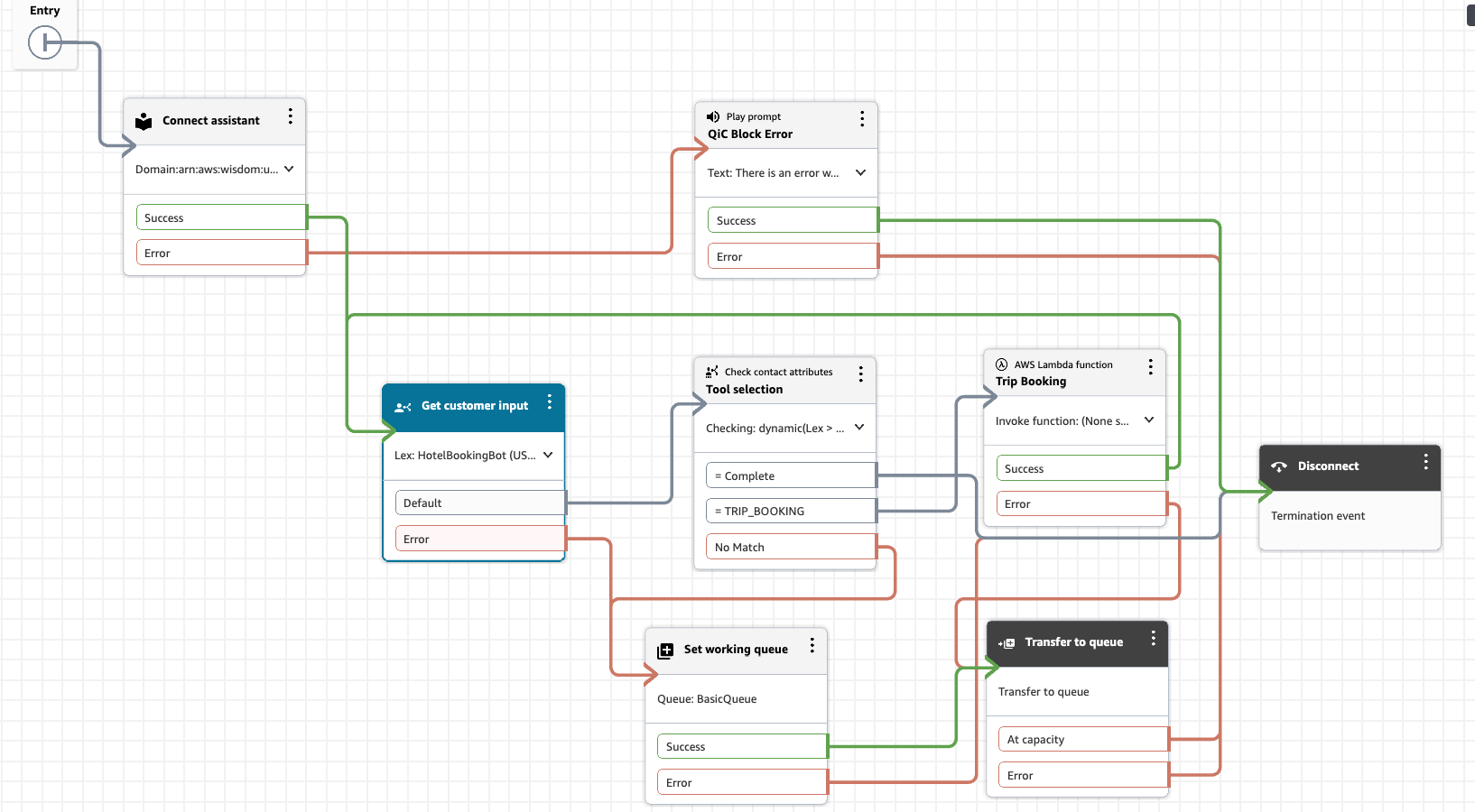
다음 이미지는 Connect AI 에이전트가 결정한 내용을 기반으로 라우팅 결정을 내리는 방법의 예를 보여줍니다.
-
셀프 서비스에 대한 사용자 지정 작업
사용자 지정 도구를 추가하여 Connect AI 에이전트의 기능을 확장할 수 있습니다. 이러한 도구는 다음과 같습니다.
-
고객을 위한 차선책을 제시합니다.
-
기존 Amazon Lex 봇에 태스크를 위임합니다.
-
특수 사용 사례를 처리합니다.
AI 프롬프트에 사용자 지정 도구를 추가할 때:
-
Connect AI 에이전트가 적절한 작업을 선택하는 데 도움이 되는 관련 예제를 포함합니다.
-
연락처 속성 확인 블록을 사용하여 분기 로직을 생성합니다.
-
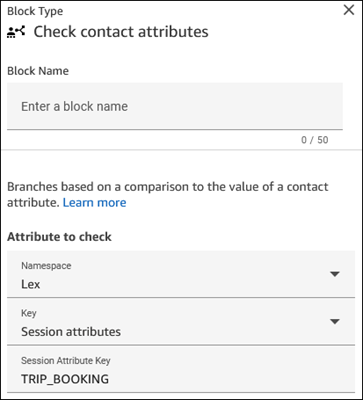
연락처 속성 확인을 구성할 때 확인할 속성 섹션에서 사용자 지정 도구의 이름을 입력합니다.
다음 이미지는 TRIP_BOOKING이라는 사용자 지정 도구가 지정되었음을 보여 줍니다.
-
예: 고객 의도 모호화
에이전트로 라우팅하기 전에 정보를 수집하는 생성형 AI 어시스턴트를 생성할 수 있습니다. 여기에는 다음이 필요합니다.
-
지식 기반 구성이 없습니다.
-
정보를 수집하기 위한 간단한 지침입니다.
-
에이전트에게 정보를 제시하기 위한 단계별 가이드입니다. 자세한 내용은 고객 연결에서 고객 응대가 시작될 때 에이전트 워크스페이스에 고객 응대 컨텍스트 표시 단원을 참조하십시오.
다음은 명확성을 위한 도구 정의의 예입니다. CONVERSATION을 제외한 모든 기본 도구를 제거하고 HANDOFF라는 새로운 사용자 지정 도구를 추가할 수 있습니다.
tools:
- name: CONVERSATION
  description: Continue holding a casual conversation with the customer.
  input_schema:
    type: object
    properties:
      message:
        type: string
        description: The message you want to send next to hold a conversation and get an understanding of why the customer is calling.
    required:
    - message
- name: HANDOFF
  description: Used to hand off the customer engagement to a human agent with a summary of what the customer is calling about.
  input_schema:
    type: object
    properties:
      message:
        type: string
        description: Restatement to the customer of what you believe they are calling about and any pertinent information. MUST end with a statement that you are handing them off to an agent. Be as concise as possible.
      summary:
        type: string
        description: A list of reasons the customer has reached out in the format <SummaryItems><Item>Item one</Item><Item>Item two</Item></SummaryItems>. Each item in the Summary should be as discrete as possible.
    required:
    - message
    - summary
예: 고객에게 작업 권장
흐름을 Connect Customer 사용하여에서 차선책 작업을 구성할 수 있습니다. 자동화된 작업을 구성하고 단계별 가이드를 생성하여 고객에게 UI 기반 작업을 제공할 수도 있습니다. 자세한 내용은 Connect Customer 에이전트 워크스페이스를 설정하는 Step-by-step 가이드 단원을 참조하십시오. Connect AI 에이전트는 선택한 도구 이름을 Lex 세션 속성으로 저장합니다. 그런 다음 연락처 속성 확인 흐름 블록을 사용하여 속성에 액세스할 수 있습니다.
다음은 여행을 예약하기 위한 도구 정의의 예입니다.
-name: TRIP_BOOKING
  description: Tool to transfer to another bot who can do trip bookings. Use this tool only when the last message from the customer indicates they want to book a trip or hotel.
  input_schema:
    type: object
    properties:
      message:
        type: string
        description: The polite message you want to send while transferring to the agent who can help with booking.
    required:
    - message
고객 응대 속성 확인 흐름 블록을 사용하여 Connect AI 에이전트가 선택한 도구를 결정할 때 분기 결정을 내려 해당 사용자에 대한 관련 step-by-step 가이드를 선택할 수 있습니다. 예를 들어 고객이 셀프 서비스 채팅 상호 작용 중에 여행을 예약하려는 경우 다음을 수행할 수 있습니다.
-
흐름의 TRIP_BOOKING 도구 응답과 일치시킵니다.
-
해당 단계별 가이드로 라우팅됩니다.
-
단계별 인터페이스를 고객의 채팅 창에 직접 표시합니다.
채팅에서 단계별 가이드 구현에 대한 자세한 내용은 Connect Customer 채팅에 step-by-step 가이드 배포 섹션을 참조하세요.
FOLLOW_UP_QUESTION 도구
FOLLOW_UP_QUESTION 도구는 고객과의 대화형 정보 수집 대화를 활성화하여 Connect AI 에이전트 셀프 서비스 기능을 개선합니다. 이 도구는 기본 및 사용자 지정 도구와 함께 작동합니다. 어떤 조치를 취할지 결정하기 전에 필요한 정보를 수집하는 데 도움이 됩니다.
다음 코드는 FOLLOW_UP_QUESTION 도구의 구성을 보여 줍니다.
- name: FOLLOW_UP_QUESTION
  description: Ask follow-up questions to understand customer needs, clarify intent,
and collect additional information throughout the conversation. Use this to gather
required details before selecting appropriate actions.
  input_schema:
type: object
properties:
  message:
    type: string
    description: The message you want to send next in the conversation with the
      customer. This message should be grounded in the conversation, polite, and
      focused on gathering specific information.
required:
  - message
FOLLOW_UP_QUESTION 도구는 Connect AI 에이전트가 수행할 작업을 결정하기 전에 필요한 정보를 수집할 수 있도록 하여 정의된 도구를 보완합니다. 특히 다음과 같은 경우에 유용합니다.
-
의도 모호화
고객의 의도가 명확하지 않은 경우 적절한 조치를 선택하기 전에 이 도구를 사용하여 명확한 질문을 하세요.
-
정보 수집
태스크를 완료하거나 질문에 답변하는 데 필요한 세부 정보를 수집합니다.
FOLLOW_UP_QUESTION 사용 사례 예
사기를 보고하도록 설계된 셀프 서비스 봇의 경우 CONFIRM_SUBMISSION이라는 도구를 정의하여 고객으로부터 특정 정보를 수집할 수 있습니다.
- name: CONFIRM_SUBMISSION
  description: Confirm all collected information and finalize the report submission.
  input_schema:
type: object
properties:
  message:
    type: string
    description: A message reviewing all of the collected information and asking
      for final confirmation before submission.
  report_details:
    type: string
    description: The user's report or complaint details
  reporter_info:
    type: string
    description: Reporter's contact information (if provided) or "Anonymous"
  subject_info:
    type: string
    description: Information about the individual or business being reported
required:
  - message
  - report_details
  - reporter_info
  - subject_info
그러나 다음 예시에서 보여 주는 것처럼, FOLLOW_UP_QUESTION 도구를 사용하여 이 정보를 단계별로 수집할 수 있습니다.
- name: FOLLOW_UP_QUESTION
  description: Ask follow-up questions to understand customer needs and collect additional
information throughout the complaint process. Use this for all information gathering
steps including confidentiality preferences, contact info, subject details etc.
  input_schema:
type: object
properties:
  message:
    type: string
    description: The message you want to send next in the conversation with the
      customer. This message should be grounded in the conversation and polite.
      Use this for asking clarification questions, collecting contact information,
      gathering subject details, and all other follow-up steps in the complaint
      process.
required:
  - message
프롬프트 지침
프롬프트에 지침을 추가하여 셀프 서비스 봇이 FOLLOW_UP_QUESTION 도구를 사용하는 시기를 안내합니다. 예제:
CRITICAL: Use FOLLOW_UP_QUESTION for all information gathering steps after the initial analysis.
Do NOT proceed to other tools until you have collected all required information. Use this tool
to disambiguate customer intent when unclear.

When using FOLLOW_UP_QUESTION:
1. Ask one specific question at a time
2. Focus on collecting required information for the most likely intent
3. Be conversational but direct
4. Acknowledge information the customer has already provided
5. Only move to other tools (like CONFIRM_SUBMISSION or TRIP_BOOKING) when you have all required
   information
대화 예제
다음은 사용 중인 FOLLOW_UP_QUESTION 도구를 보여 주는 세 가지 예제 대화입니다.
-
예시 1: 고객이 사기 보고에 대해 질문하면 모델은 고객으로부터 정보(예:
report_details,reporter_info,subject_info)를 수집하여 보고서를 생성해야 합니다. CONFIRM_SUBMISSION 도구라는 사용자 지정 도구를 사용하여 정보를 수집하는 대신이 예제에서는 FOLLOW_UP_QUESTION 도구를 사용하여 필요한 정보 수집을 시작하는 방법을 보여 줍니다. -
예제 2: 이 예제에서는 동일한 테마를 계속 진행하여 FOLLOW_UP_QUESTION 도구를 사용하여 리포터의 연락처 정보를 검색할 수 있는 대체 정보를 보여 줍니다.
-
예제 3: 이 예제는 모델이 고객의 모호한 요청에 응답하고 FOLLOW_UP_QUESTION 도구를 사용하여 사물을 명확히 하는 방법을 나타냅니다.
<examples>
<example>
    <conversation>
        [CUSTOMER] I want to report someone who I think is committing fraud
    </conversation>
    <thinking>
        The customer wants to report fraud. I need to collect specific information
        including details about the suspected fraud, reporter information, and
        subject information. I'll start by asking about the suspected fraudulent activity.
    </thinking>
    <tool>
        [FOLLOW_UP_QUESTION(message="I'd be happy to help you report suspected fraud.
        Could you please describe the fraudulent activity you've observed?")]
    </tool>
</example>

<example>
    <conversation>
        [AGENT] Can you provide me your full address?
        [CUSTOMER] I don't feel comfortable sharing my address
    </conversation>
    <thinking>
        The caller declined to share their address. I should respect their privacy
        concerns while still trying to collect alternative contact information.
    </thinking>
    <tool>
        [FOLLOW_UP_QUESTION(message="I understand your privacy concerns. That's
        completely fine. Would you be comfortable providing a phone number or email
        address instead? Or you can choose to remain anonymous.")]
    </tool>
</example>

<example>
    <conversation>
        [CUSTOMER] I'm not getting my benefit payments anymore
    </conversation>
    <thinking>
        The customer is reporting a payment issue. This sounds like a general service
        issue rather than fraud. I should clarify if they need assistance with their benefits.
    </thinking>
    <tool>
        [FOLLOW_UP_QUESTION(message="I'm sorry to hear about the issue with your payments.
        To help me understand better, could you tell me when you last received a payment
        and if you've received any notification about why they stopped?")]
    </tool>
</example>
</examples>
