本文為英文版的機器翻譯版本,如內容有任何歧義或不一致之處,概以英文版為準。
# 部署用於即時推論的模型
即時推論非常適合具有即時、互動、低延遲需求的推論工作負載。本節說明如何使用即時推論,以互動方式從模型取得預測。
若要在 Autopilot 實驗中部署產生最佳驗證指標的模型,您有多種選項。例如,在 SageMaker Studio Classic 中使用 Autopilot 時,您可以自動或手動部署模型。您也可以使用 SageMaker API 手動部署 Autopilot 模型。
以下索引標籤顯示三個用於部署模型的選項。這些指示假設您已在 Autopilot 中建立模型。如果您沒有模型,則請參閱[使用 AutoML API 建立表格式資料的迴歸或分類任務](autopilot-automate-model-development-create-experiment.md)。若要查看每個選項的範例,請開啟每個索引標籤。
## 使用 Autopilot 使用者介面 (UI) 進行部署
Autopilot 使用者介面包含實用的下拉式功能表、切換、工具提示等,可協助您完成模型部署。您可以使用下列程序之一部署:自動或手動。
+ **自動部署**:將 Autopilot 實驗中的最佳模型自動部署到端點
1. 在 SageMaker Studio Classic 中[建立實驗](https://docs.aws.amazon.com/sagemaker/latest/dg/autopilot-automate-model-development-create-experiment.html)。
1. 將**自動部署**值切換為**是**。
**注意**
**如果區域中端點執行個體的預設資源配額或客戶配額過於限制,則自動部署將會失敗。**在超參數最佳化 (HPO) 模式中,您至少需要有兩個 ml.m5.2xlarge 執行個體。在集成模式中,您必須至少有一個 ml.m5.12xlarge 執行個體。如果發生與配額相關的失敗,您可以[要求提高 SageMaker AI 端點執行個體的服務限制](https://docs.aws.amazon.com/servicequotas/latest/userguide/request-quota-increase.html)。
+ **手動部署**:將 Autopilot 實驗中的最佳模型手動部署到端點
1. 在 SageMaker Studio Classic 中[建立實驗](https://docs.aws.amazon.com/sagemaker/latest/dg/autopilot-automate-model-development-create-experiment.html)。
1. 將**自動部署**值切換為**否**。
1. 在**模型名稱**下選取您想要部署的模型。
1. 選取位於排行榜右側的橘色**部署和進階設定**按鈕。隨即開啟新索引索引標籤。
1. 設定端點名稱、執行個體類型和其他選用資訊。
1. 選取橘色的**部署模型**,部署到端點。
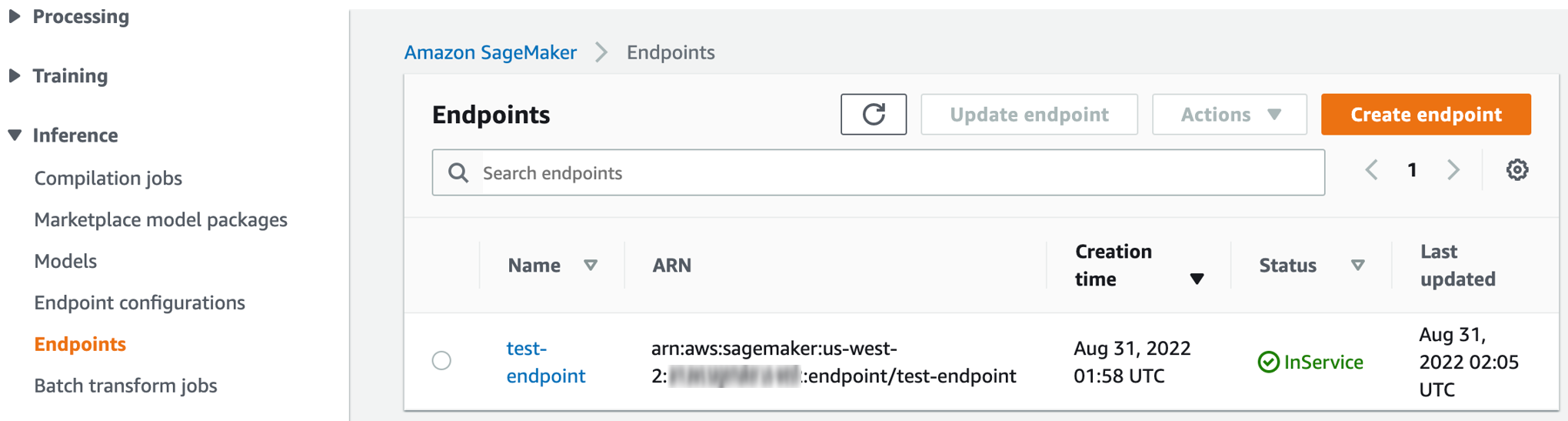
1. 瀏覽至端點區段,在 [https://console.aws.amazon.com/sagemaker/](https://console.aws.amazon.com/sagemaker/) 檢查端點建立程序的進度。該區段位於導覽面板的**推論**下拉式功能表。
1. 端點狀態從**建立**變更為 **InService** (如下所示) 之後,返回 Studio Classic 並調用端點。
## 使用 SageMaker API 進行部署
您也可以使用 **API 呼叫**部署模型,取得即時推論。本節顯示此程序使用 AWS Command Line Interface (AWS CLI) 程式碼片段的五個步驟。
如需適用於 Python (boto3) 的 AWS CLI 命令和 AWS SDK 的完整程式碼範例,請直接依照下列步驟開啟索引標籤。
1. **取得候選定義**
從 [InferenceContainers](https://docs.aws.amazon.com/sagemaker/latest/APIReference/API_AutoMLCandidate.html#sagemaker-Type-AutoMLCandidate-InferenceContainers) 取得候選容器定義。這些候選定義可用來建立 SageMaker AI 模型。
下列範例使用 [DescribeAutoMLJob](https://docs.aws.amazon.com/sagemaker/latest/APIReference/API_DescribeAutoMLJob.html) API 取得最佳模型候選項目的候選定義。請參閱下列 AWS CLI 命令做為範例。
```
aws sagemaker describe-auto-ml-job --auto-ml-job-name {{}} --region {{}}
```
1. **列出候選項目**
下列範例使用 [ListCandidatesForAutoMLJob](https://docs.aws.amazon.com/sagemaker/latest/APIReference/API_ListCandidatesForAutoMLJob.html) API 列出所有候選項目。請參閱 AWS CLI 命令作為範例。
```
aws sagemaker list-candidates-for-auto-ml-job --auto-ml-job-name {{}} --region {{}}
```
1. **建立 SageMaker AI 模型**
使用上一個步驟中的容器定義,利用 [CreateModel](https://docs.aws.amazon.com/sagemaker/latest/APIReference/API_CreateModel.html) API 建立一個 SageMaker AI 模型。請參閱下列 AWS CLI 命令做為範例。
```
aws sagemaker create-model --model-name '{{}}' \
--containers ['{{, {{}}, {{}}]' \
--execution-role-arn '{{}}' --region '{{}}
```
1. **建立一個端點組態**
下列範例使用 [CreateEndpointConfig](https://docs.aws.amazon.com/sagemaker/latest/APIReference/API_CreateEndpointConfig.html) API 建立一個端點組態。請參閱下列 AWS CLI 命令做為範例。
```
aws sagemaker create-endpoint-config --endpoint-config-name '{{}}' \
--production-variants '{{}}' \
--region '{{}}'
```
1. **建立端點**
下列 AWS CLI 範例使用 [CreateEndpoint](https://docs.aws.amazon.com/sagemaker/latest/APIReference/API_CreateEndpoint.html) API 來建立端點。
```
aws sagemaker create-endpoint --endpoint-name '{{}}' \
--endpoint-config-name '{{}}' \
--region '{{}}'
```
使用 [DescribeEndpoint](https://docs.aws.amazon.com/sagemaker/latest/APIReference/API_DescribeEndpoint.html) API來檢查端點部署的進度。請參閱下列 AWS CLI 命令做為範例。
```
aws sagemaker describe-endpoint —endpoint-name '{{}}' —region {{}}
```
`EndpointStatus`變更為後`InService`,端點即可用於即時推論。
1. **調用端點**
下列命令結構會調用端點以進行即時推論。
```
aws sagemaker invoke-endpoint --endpoint-name '{{}}' \
--region '{{}}' --body '{{}}' [--content-type] '{{}}' {{}}
```
下列索引標籤包含完整的程式碼範例,說明如何使用適用於 Python 的 AWS SDK (boto3) 或 AWS CLI部署模型。
------
#### [ AWS SDK for Python (boto3) ]
1. 使用下列程式碼範例**取得候選定義**。
```
import sagemaker
import boto3
session = sagemaker.session.Session()
sagemaker_client = boto3.client('sagemaker', region_name={{'us-west-2'}})
job_name = {{'test-auto-ml-job'}}
describe_response = sm_client.describe_auto_ml_job(AutoMLJobName=job_name)
# extract the best candidate definition from DescribeAutoMLJob response
best_candidate = describe_response['BestCandidate']
# extract the InferenceContainers definition from the caandidate definition
inference_containers = best_candidate['InferenceContainers']
```
1. 使用下列程式碼範例**建立模型**。
```
# Create Model
model_name = '{{test-model}}'
sagemaker_role = '{{arn:aws:iam:444455556666:role/sagemaker-execution-role}}'
create_model_response = sagemaker_client.create_model(
ModelName = model_name,
ExecutionRoleArn = sagemaker_role,
Containers = inference_containers
)
```
1. 使用下列程式碼範例**建立端點組態**。
```
endpoint_config_name = '{{test-endpoint-config}}'
instance_type = '{{ml.m5.2xlarge}}'
# for all supported instance types, see
# https://docs.aws.amazon.com/sagemaker/latest/APIReference/API_ProductionVariant.html#sagemaker-Type-ProductionVariant-InstanceType # Create endpoint config
endpoint_config_response = sagemaker_client.create_endpoint_config(
EndpointConfigName=endpoint_config_name,
ProductionVariants=[
{
"VariantName": "{{variant1}}",
"ModelName": model_name,
"InstanceType": instance_type,
"InitialInstanceCount": {{1}}
}
]
)
print(f"Created EndpointConfig: {endpoint_config_response['EndpointConfigArn']}")
```
1. 使用下列程式碼範例**建立端點**並部署模型。
```
# create endpoint and deploy the model
endpoint_name = '{{test-endpoint}}'
create_endpoint_response = sagemaker_client.create_endpoint(
EndpointName=endpoint_name,
EndpointConfigName=endpoint_config_name)
print(create_endpoint_response)
```
使用下列程式碼範例**檢查建立端點的狀態**。
```
# describe endpoint creation status
status = sagemaker_client.describe_endpoint(EndpointName=endpoint_name)["EndpointStatus"]
```
1. 使用下列命令結構,**調用端點**進行即時推論。
```
# once endpoint status is InService, you can invoke the endpoint for inferencing
if status == "InService":
sm_runtime = boto3.Session().client('sagemaker-runtime')
inference_result = sm_runtime.invoke_endpoint(EndpointName='{{test-endpoint}}', ContentType='{{text/csv}}', Body='{{1,2,3,4,class}}')
```
------
#### [ AWS Command Line Interface (AWS CLI) ]
1. 使用下列程式碼範例**取得候選定義**。
```
aws sagemaker describe-auto-ml-job --auto-ml-job-name '{{test-automl-job}}' --region {{us-west-2}}
```
1. 使用下列程式碼範例**建立模型**。
```
aws sagemaker create-model --model-name '{{test-sagemaker-model}}'
--containers '[{
"Image": "{{348316444620.dkr.ecr.us-west-2.amazonaws.com/sagemaker-sklearn-automl:2.5-1-cpu-py3}}", amzn-s3-demo-bucket1
"ModelDataUrl": "{{s3://amzn-s3-demo-bucket/output/model.tar.gz}}",
"Environment": {
"AUTOML_SPARSE_ENCODE_RECORDIO_PROTOBUF": "1",
"AUTOML_TRANSFORM_MODE": "feature-transform",
"SAGEMAKER_DEFAULT_INVOCATIONS_ACCEPT": "application/x-recordio-protobuf",
"SAGEMAKER_PROGRAM": "sagemaker_serve",
"SAGEMAKER_SUBMIT_DIRECTORY": "/opt/ml/model/code"
}
}, {
"Image": "{{348316444620.dkr.ecr.us-west-2.amazonaws.com/sagemaker-xgboost:1.3-1-cpu-py3}}",
"ModelDataUrl": "{{s3://amzn-s3-demo-bucket/output/model.tar.gz}}",
"Environment": {
"MAX_CONTENT_LENGTH": "20971520",
"SAGEMAKER_DEFAULT_INVOCATIONS_ACCEPT": "text/csv",
"SAGEMAKER_INFERENCE_OUTPUT": "predicted_label",
"SAGEMAKER_INFERENCE_SUPPORTED": "predicted_label,probability,probabilities"
}
}, {
"Image": "{{348316444620.dkr.ecr.us-west-2.amazonaws.com/sagemaker-sklearn-automl:2.5-1-cpu-py3}}", {{aws-region}}
"ModelDataUrl": "{{s3://amzn-s3-demo-bucket/output/model.tar.gz}}",
"Environment": {
"AUTOML_TRANSFORM_MODE": "inverse-label-transform",
"SAGEMAKER_DEFAULT_INVOCATIONS_ACCEPT": "text/csv",
"SAGEMAKER_INFERENCE_INPUT": "predicted_label",
"SAGEMAKER_INFERENCE_OUTPUT": "predicted_label",
"SAGEMAKER_INFERENCE_SUPPORTED": "predicted_label,probability,labels,probabilities",
"SAGEMAKER_PROGRAM": "sagemaker_serve",
"SAGEMAKER_SUBMIT_DIRECTORY": "/opt/ml/model/code"
}
}]' \
--execution-role-arn '{{arn:aws:iam::1234567890:role/sagemaker-execution-role}}' \
--region '{{us-west-2}}'
```
如需其他詳細資訊,請參閱[建立模型](https://awscli.amazonaws.com/v2/documentation/api/latest/reference/sagemaker/create-model.html)。
`create model` 命令以下列格式傳回回應。
```
{
"ModelArn": "{{arn:aws:sagemaker:us-west-2:1234567890:model/test-sagemaker-model}}"
}
```
1. 使用下列程式碼範例**建立端點組態**。
```
aws sagemaker create-endpoint-config --endpoint-config-name '{{test-endpoint-config}}' \
--production-variants '[{"VariantName": "{{variant1}}",
"ModelName": "{{test-sagemaker-model}}",
"InitialInstanceCount": 1,
"InstanceType": "{{ml.m5.2xlarge}}"
}]' \
--region {{us-west-2}}
```
`create endpoint` 組態命令會以下列格式傳回回應。
```
{
"EndpointConfigArn": "{{arn:aws:sagemaker:us-west-2:1234567890:endpoint-config/test-endpoint-config}}"
}
```
1. 使用下列程式碼範例**建立端點**。
```
aws sagemaker create-endpoint --endpoint-name '{{test-endpoint}}' \
--endpoint-config-name '{{test-endpoint-config}}' \
--region {{us-west-2}}
```
`create endpoint` 命令以下列格式傳回回應。
```
{
"EndpointArn": "{{arn:aws:sagemaker:us-west-2:1234567890:endpoint/test-endpoint}}"
}
```
使用下列[描述端點](https://docs.aws.amazon.com/cli/latest/reference/sagemaker/describe-endpoint.html) CLI 程式碼範例,檢查端點部署的進度。
```
aws sagemaker describe-endpoint --endpoint-name '{{test-endpoint}}' --region {{us-west-2}}
```
先前的進度檢查會以下列格式傳回回應。
```
{
"EndpointName": "{{test-endpoint}}",
"EndpointArn": "{{arn:aws:sagemaker:us-west-2:1234567890:endpoint/test-endpoint}}",
"EndpointConfigName": "{{test-endpoint-config}}",
"EndpointStatus": "Creating",
"CreationTime": 1660251167.595,
"LastModifiedTime": 1660251167.595
}
```
`EndpointStatus` 變更為 `InService` 後,端點即可用於即時推論。
1. 使用下列命令結構,**調用端點**進行即時推論。
```
aws sagemaker-runtime invoke-endpoint --endpoint-name '{{test-endpoint}}' \
--region '{{us-west-2}}' \
--body '{{1,51,3.5,1.4,0.2}}' \
--content-type '{{text/csv}}' \
'{{/tmp/inference_output}}'
```
如需更多選項,請參閱[調用端點](https://awscli.amazonaws.com/v2/documentation/api/latest/reference/sagemaker-runtime/invoke-endpoint.html)。
------
## 從不同帳戶部署模型
您可以使用與產生模型之原始帳戶不同的帳戶部署 Autopilot 模型。本節說明如何執行下列操作,實作跨帳戶模型部署: 授予許可,扮演您要當成部署來源之帳戶 (產生帳戶) 角色。 從部署帳戶撥打電話至 `DescribeAutoMLJob`,取得模型資訊。 從產生帳戶授予模型成品的存取權限。
1. **授予部署帳戶的許可**
若要扮演產生帳戶的角色,您必須授予許可至部署帳戶。這可讓部署帳戶描述產生帳戶中的 Autopilot 任務。
下列範例使用具有受信任 `sagemaker-role` 實體的產生帳戶。此範例顯示如何授予部署帳戶識別碼 111122223333 的許可,扮演產生帳戶的角色。
```
"Statement": [
{
"Effect": "Allow",
"Principal": {
"Service": [
"sagemaker.amazonaws.com"
],
"AWS": [ "{{111122223333}}"]
},
"Action": "sts:AssumeRole"
}
```
識別碼 111122223333 的新帳戶現在可以扮演產生帳號的角色。
接下來,從部署帳戶呼叫 `DescribeAutoMLJob` API,取得產生帳戶所建立之任務的描述。
下列程式碼範例描述部署帳戶的模型。
```
import sagemaker
import boto3
session = sagemaker.session.Session()
sts_client = boto3.client('sts')
sts_client.assume_role
role = '{{arn:aws:iam::111122223333:role/sagemaker-role}}'
role_session_name = "{{role-session-name}}"
_assumed_role = sts_client.assume_role(RoleArn=role, RoleSessionName=role_session_name)
credentials = _assumed_role["Credentials"]
access_key = credentials["AccessKeyId"]
secret_key = credentials["SecretAccessKey"]
session_token = credentials["SessionToken"]
session = boto3.session.Session()
sm_client = session.client('sagemaker', region_name='{{us-west-2}}',
aws_access_key_id=access_key,
aws_secret_access_key=secret_key,
aws_session_token=session_token)
# now you can call describe automl job created in account A
job_name = "{{test-job}}"
response= sm_client.describe_auto_ml_job(AutoMLJobName=job_name)
```
1. 將**部署帳戶的存取權授予產生帳戶**中的模型成品。
部署帳戶僅需要產生帳戶中模型成品的存取權即可部署成品。這些位於模型產生期間在原始 `CreateAutoMLJob` API 呼叫中指定的 [S3OutPutPath](https://docs.aws.amazon.com/sagemaker/latest/APIReference/API_AutoMLOutputDataConfig.html#sagemaker-Type-AutoMLOutputDataConfig-S3OutputPath)。
若要授予部署帳戶模型成品的存取權,請選擇下列其中一個選項:
1. 從產生帳戶將 `ModelDataUrl` 的[存取權授予](https://aws.amazon.com/premiumsupport/knowledge-center/cross-account-access-s3/)部署帳戶。
接下來,您必須授予部署帳戶扮演該角色的許可。請遵循[即時推論步驟](https://docs.aws.amazon.com/sagemaker/latest/dg/autopilot-deploy-models.html#autopilot-deploy-models-realtime)進行部署。
1. 將產生帳戶之原始 [S3OutputPath](https://docs.aws.amazon.com/sagemaker/latest/APIReference/API_AutoMLOutputDataConfig.html#sagemaker-Type-AutoMLOutputDataConfig-S3OutputPath) 的[模型成品](https://aws.amazon.com/premiumsupport/knowledge-center/copy-s3-objects-account/)複製到產生帳戶。
若要授予模型成品的存取權,您必須定義 `best_candidate` 模型,並將模型容器重新指派給新帳戶。
下列範例顯示如何定義 `best_candidate` 模型並重新指派 `ModelDataUrl`。
```
best_candidate = automl.describe_auto_ml_job()['BestCandidate']
# reassigning ModelDataUrl for best_candidate containers below
new_model_locations = ['{{new-container-1-ModelDataUrl}}', '{{new-container-2-ModelDataUrl}}', '{{new-container-3-ModelDataUrl}}']
new_model_locations_index = 0
for container in best_candidate['InferenceContainers']:
container['ModelDataUrl'] = new_model_locations[new_model_locations_index++]
```
指派此容器之後,請遵循 [使用 SageMaker API 進行部署](#autopilot-deploy-models-api) 中的步驟進行部署。
若要在即時推論構建承載,請參閱筆記本範例,[定義測試承載](https://aws.amazon.com/getting-started/hands-on/machine-learning-tutorial-automatically-create-models)。若要從 CSV 檔案建立承載並調用端點,請參閱[自動建立機器學習模型](https://aws.amazon.com/getting-started/hands-on/create-machine-learning-model-automatically-sagemaker-autopilot/#autopilot-cr-room)中的**使用模型預測**一節。