

本文為英文版的機器翻譯版本，如內容有任何歧義或不一致之處，概以英文版為準。

# 使用 Amazon 增強版 AI 進行人工審核
<a name="a2i-use-augmented-ai-a2i-human-review-loops"></a>

當您使用 Amazon Rekognition、Amazon Textract 或自訂機器學習 (ML) 模型等人工智慧應用程式時，您可以使用 Amazon 增強版 AI 對低可信度預測或隨機預測樣本進行人工審核。
<a name="what-is-amazon-augmented-ai-a2i"></a>
**什麼是 Amazon 增強版 AI？**  
Amazon 增強版 AI (Amazon A2I) 是一項服務，透過消除與構建人工審核系統或管理大量人工審核人員相關的繁重工作，提供所有開發人員機器學習 (ML) 預測的人工審核資料。

許多機器學習 (ML) 應用程式需要人工審核低可信度預測，以確保結果正確無誤。例如，由於掃描品質低或筆跡較差，從掃描的抵押申請表中擷取資訊可能需要人工審核。建立人工審核系統可能耗時又昂貴，因為需要實作複雜的程序或*工作流程*、撰寫自訂軟體來管理審核任務和結果，並且需要管理大量審核者。

Amazon A2I 可簡化機器學習 (ML) 應用程式的人工審核建置和管理作業。Amazon A2I 針對常見的機器學習 (ML) 使用案例提供內建的人工審核工作流程，例如內容審核和從文件擷取文字。您也可以建立自己的工作流程，適用於建立在 SageMaker AI 或任何其他工具上的機器學習 (ML) 模型。當模型無法達到高可信度的預測或持續稽核預測時，使用 Amazon A2I，您可以允許人工審核者介入。
<a name="a2i-use-cases-intro"></a>
**Amazon A2I 使用案例範例**  
下列範例示範如何使用 Amazon A2I 將人工審核循環整合至機器學習 (ML) 應用程式。對於每一個例子，您可以在[使用 Amazon A2I 的使用案例和範例](a2i-task-types-general.md)中找到一個 Jupyter 筆 記本來示範這個工作流程。
+ **將 Amazon A2I 與 Amazon Textract 搭配使用** - 讓人員在單頁文件中審核重要的鍵值對，或讓 Amazon Textract 隨機取樣並將資料集中的文件傳送給人員進行審核。
+ **將 Amazon A2I 與 Amazon Rekognition 搭配使用** - 如果 Amazon Rekognition 回傳低可信度分數，請人工審核不安全的影像是否有明確的成人或暴力內容，或讓 Amazon Rekognition 隨機抽樣並把您的資料集中的影像傳送給人員進行審核。
+ **使用 Amazon A2I 審核即時機器學習 (ML) 推論** — 使用 Amazon A2I 審核部署到 SageMaker AI 託管端點的模型所做的即時、低可信度推論，並使用 Amazon A2I 輸出資料逐步訓練模型。
+ **搭配使用 Amazon A2I 與 Amazon Comprehend** — 讓人員審核有關文字資料 (例如情緒分析、文字語法和實體偵測) 的 Amazon Comprehend 推論。
+ **搭配使用 Amazon A2I 與 Amazon Transcribe** – 使用人工審核 Amazon Transcribe 視訊或音訊文件的轉錄。使用轉錄人工審核循環的結果，來建立自訂詞彙並改善類似視訊或音訊內容的未來轉錄。
+ **搭配使用 Amazon A2I 與 Amazon Translate** — 使用人工審核從 Amazon Translate 交還的低信度翻譯。
+ **使用 Amazon A2I 審核表格式資料** — 使用 Amazon A2I 將人工審核循環整合到使用表格資料的機器學習 (ML) 應用程式中。

![\[Amazon 增強版 AI - 它是如何運作的\]](http://docs.aws.amazon.com/zh_tw/sagemaker/latest/dg/images/amazon-augmented-ai-how-it-works.png)


**Topics**
+ [開始使用 Amazon 增強版 AI](a2i-getting-started.md)
+ [使用 Amazon A2I 的使用案例和範例](a2i-task-types-general.md)
+ [建立人工審核工作流程 (API)](a2i-create-flow-definition.md)
+ [刪除人工審核工作流程](a2i-delete-flow-definition.md)
+ [建立和啟動人工循環](a2i-start-human-loop.md)
+ [刪除人工循環](a2i-delete-human-loop.md)
+ [建立和管理工作者任務範本](a2i-instructions-overview.md)
+ [監控和管理您的人工循環](a2i-monitor-humanloop-results.md)
+ [Amazon A2I 輸出資料](a2i-output-data.md)
+ [Amazon 增強版 AI 中的許可和安全性](a2i-permissions-security.md)
+ [在 Amazon 增強版 AI Amazon CloudWatch Events 中使用](a2i-cloudwatch-events.md)
+ [在 Amazon 增強版 AI 中使用 API](a2i-api-references.md)

# 開始使用 Amazon 增強版 AI
<a name="a2i-getting-started"></a>

若要開始使用 Amazon 增強版 AI，請檢閱[Amazon A2I 的核心元件](a2i-getting-started-core-components.md)和[使用增強版 AI 的先決條件](a2i-getting-started-prerequisites.md)。然後，使用下列文件來了解如何使用 Amazon A2I 主控台和 API。
+ [教學課程：在 Amazon A2I 主控台中開始使用](a2i-get-started-console.md)
+ [教學課程：開始使用 Amazon A2I API](a2i-get-started-api.md)

您還可以遵循 Jupyter 筆記本教學課程開始使用 Amazon A2I API。請參閱[使用 Amazon A2I 的使用案例和範例](a2i-task-types-general.md)查看筆記本和使用案例清單。

# Amazon A2I 的核心元件
<a name="a2i-getting-started-core-components"></a>

請檢閱下列術語，以熟悉 Amazon A2I 的核心元件。

## 任務類型
<a name="a2i-task-type-get-started"></a>

您將 Amazon A2I 整合到 AI/ML 工作流程之中定義 Amazon A2I *任務類型*。

Amazon A2I 支援：
+ 兩種*內建任務類型*：[Amazon Textract 鍵值對擷取](https://docs.aws.amazon.com/sagemaker/latest/dg/a2i-textract-task-type.html)和 [Amazon Rekognition Image 審核](https://docs.aws.amazon.com/sagemaker/latest/dg/a2i-rekognition-task-type.html)。
+ 一個[自訂任務類型](https://docs.aws.amazon.com/sagemaker/latest/dg/a2i-task-types-custom.html)：使用自訂任務類型將人工審核循環集成到*任何*機器學習工作流程。您可以使用自訂任務類型，將 Amazon A2I 與其他 AWS 服務整合，例如 Amazon Comprehend、Amazon Transcribe 和 Amazon Translate，以及您自己的自訂機器學習工作流程。如需詳細資訊，請參閱 [使用 Amazon A2I 的使用案例和範例](a2i-task-types-general.md)。

選取下表中的索引標籤，以查看說明 Amazon A2I 如何處理每個任務類型的圖表。使用上述清單中的連結選取任務類型頁面，以深入瞭解該任務類型。

------
#### [ Amazon Textract – Key-value pair extraction ]

此影像說明 Amazon A2I 內建工作流程與 Amazon Textract。左側描述建立了 Amazon Textract 人工審核工作流程所需的資源：Amazon S3 儲存貯體、啟動條件、工作者任務範本和工作團隊。這些資源可用來建立人工審核工作流程或流程定義。該箭頭指向工作流程的下一個步驟：使用 Amazon Textract 設定人工審核工作流程的人工循環。第二個箭頭直接從此步驟指向另一個步驟，在此其中人工審核工作流程指定之啟動條件有得到滿足。這樣即會啟動人工循環的建立。在影像右側，人工循環分三個步驟描述：1) 會產生工作者使用者介面和工具並將任務提供給工作者、2) 工作者審核輸入資料，最後、3) 結果儲存在 Amazon S3 中。

![\[Amazon A2I 內建工作流程與 Amazon Textract\]](http://docs.aws.amazon.com/zh_tw/sagemaker/latest/dg/images/a2i/diagrams/product-page-diagram_A21-Components_Textract@2x.png)


------
#### [ Amazon Rekognition – Image moderation ]

此影像說明Amazon A2I 內建工作流程與 Amazon Rekognition。左側描述了建立 Amazon Rekognition 人工審核工作流程所需的資源：Amazon S3 儲存貯體、啟動條件、工作者任務範本和工作團隊。這些資源可用來建立人工審核工作流程或流程定義。該箭頭指向工作流程中的下一個步驟：使用 Amazon Rekognition 設定人工審核工作流程的人工循環。第二個箭頭直接從此步驟指向另一個步驟，在此其中人工審核工作流程指定之啟動條件有得到滿足。這樣即會啟動人工循環的建立。在影像右側，人工循環分三個步驟描述：1) 會產生工作者使用者介面和工具並將任務提供給工作者、2) 工作者審核輸入資料，最後、3) 結果儲存在 Amazon S3 中。

![\[Amazon A2I 內建工作流程與 Amazon Rekognition\]](http://docs.aws.amazon.com/zh_tw/sagemaker/latest/dg/images/a2i/diagrams/product-page-diagram_A2I-Components_Rekognition@2x.png)


------
#### [ Custom Task Type ]

下列影像描述了 Amazon A2I 自訂工作流程。自訂機器學習 (ML) 模型可用來產生預測。用戶端應用程式會利用使用者定義的條件篩選這些預測，並判斷是否需要人工審核。如果是這樣，便會將這些預測傳送到 Amazon A2I 進行人工審核。Amazon A2I 會收集 Amazon S3 中的人工審核結果，而這些結果可以由用戶端應用程式存取。如果篩選器確定不需要人工審核，則可以將預測直接饋送至用戶端應用程式。

![\[Amazon A2I 自訂工作流程\]](http://docs.aws.amazon.com/zh_tw/sagemaker/latest/dg/images/a2i/diagrams/product-page-diagram_A2I-Components_Custom@2x.png)


------

## 人工審核工作流程 (流程定義)
<a name="a2i-getting-started-human-review-workflow"></a>

您可以使用人工審核工作流程來指定您的人工*工作團隊*、使用*工作者任務範本*設定您的工作者使用者介面，以及提供工作者應該如何完成審核任務的相關資訊。

對於內建任務類型，您也可以使用人工審核工作流程來識別觸發人工循環的條件。例如，Amazon Rekognition 可以使用機器學習執行圖像內容審核。如果 Amazon Rekognition 的可信度太低，您可以使用人工審核工作流程，指定將影像傳送給人類進行內容審核。

您可以使用人工審核工作流程建立多個人工循環。

您可以在 SageMaker AI 主控台中或使用 SageMaker API 建立流程定義。若要進一步了解這兩個選項，請參閱[建立人工審核工作流程 (API)](a2i-create-flow-definition.md)。

**工作團隊**  
*工作團隊*是一群人力工作者，您會將您的人工審核任務傳送給他們。

建立人工審核工作流程時，您可以指定單一工作團隊。

您的工作團隊可以來自 [Amazon Mechanical Turk 人力資源](https://docs.aws.amazon.com/sagemaker/latest/dg/sms-workforce-management-public.html)、[供應商管理的人力資源](https://docs.aws.amazon.com/sagemaker/latest/dg/sms-workforce-management-vendor.html)，或您自己的[私有人力資源](https://docs.aws.amazon.com/sagemaker/latest/dg/sms-workforce-private.html)。使用私有人力資源時，您可以建立多個工作團隊。每個工作團隊可以用於多個人工審核工作流程。若要了解如何建立人力資源和工作團隊，請參閱[人力資源](sms-workforce-management.md)。

**工作者任務範本和人工任務使用者介面**  
您會使用*工作者任務範本*來建立人工審核任務的工作者使用者介面 (*人工任務使用者介面*)。

人工任務使用者介面會顯示您的輸入資料，如文件或影像，以及給工作者的說明。它也提供工作者完成您的任務所使用的互動式工具。

對於內建任務類型，您必須使用針對該任務類型提供的 Amazon A2I 工作者任務範本。

## 人工循環
<a name="a2i-getting-started-human-loop"></a>

*人工循環*用於建立單一人工審核工作。對於每個人工審核工作，您可以選擇傳送*任務*的工作者數量，以審核單一資料物件。例如，如果您針對影像分類標籤工作，將每個物件的工作者人數設定為 `3`，則會有三個工作者對每個輸入影像進行分類。增加每個物件的工作者數量可以提高標籤準確性。

使用人工審核工作流程建立人工循環，如下所示：
+ 對於內建任務類型，人工審核工作流程中指定的條件會決定何時要建立人工循環。
+ 人工審核任務會傳送至人工審核工作流程中指定的工作團隊。
+ 人工審核工作流程中指定的工作者任務範本可用來轉譯為人工任務使用者介面。

**何時建立人工循環？**

當您使用其中一個*內建任務類型*時，當符合人工審核工作流程中指定的條件時，對應的 AWS 服務會代表您建立並啟動人工循環。 例如：
+ 當您將增強版 AI 與 Amazon Textract 搭配使用時，您可以使用 API 作業 `AnalyzeDocument`，整合 Amazon A2I 到文件審核任務中。每次 Amazon Textract 傳回符合您在人工審核工作流程中指定條件的鍵值對的推論時，即會建立人工循環。
+ 當您將增強版 AI 與 Amazon Rekognition 搭配使用時，您可以使用 API 作業 `DetectModerationLabels`，整合 Amazon A2I 到圖片內容審核任務中。每次 Amazon Rekognition 傳回符合您在人工審核工作流程中指定條件的影像內容相關推論時，即會建立人工循環。

使用*自訂任務類型時*，您可以使用[Amazon 增強版 AI 執行期 API](https://docs.aws.amazon.com/augmented-ai/2019-11-07/APIReference/Welcome.html)啟動人工循環。當您呼叫 `StartHumanLoop` 自訂應用程式時，會將任務傳送給人工審核者。

若要瞭解如何建立和啟動人工循環，請參閱[建立和啟動人工循環](a2i-start-human-loop.md)。

為了產生這些資源並建立人工審核工作流程，Amazon A2I 整合多個 API，包括 Amazon 增強版 AI 執行期模型、SageMaker API 以及與您任務類型相關聯的 API。如需詳細資訊，請參閱 [在 Amazon 增強版 AI 中使用 API](a2i-api-references.md)。

**注意**  
AWS 當您搭配 Amazon Textract 等 AWS 其他服務使用增強版 AI 時，區域可用性可能會有所不同。在您 AWS 用來與 AWS 這些服務互動的相同區域中建立增強版 AI 資源。如需所有 服務 AWS 的區域可用性，請參閱[區域表](https://aws.amazon.com/about-aws/global-infrastructure/regional-product-services/)。

# 使用增強版 AI 的先決條件
<a name="a2i-getting-started-prerequisites"></a>

Amazon A2I 會使用在 IAM、SageMaker AI 和 Amazon S3 中的資源來建立和執行您的人工審核工作流程。當您建立人工審核工作流程時，可以在 Amazon A2I 主控台中建立其中一些資源。若要了解作法，請參閱[教學課程：在 Amazon A2I 主控台中開始使用](a2i-get-started-console.md)。

若要使用 Amazon A2I，您需要下列資源：
+ 與輸入和輸出資料的工作流程位於相同 AWS 區域的一或多個 Amazon S3 儲存貯體。若要建立一個儲存貯體，請依照 *Amazon Simple Storage Service 控制台使用者指南*中[建立儲存貯體](https://docs.aws.amazon.com/AmazonS3/latest/user-guide/create-bucket.html)提供的說明操作。
+ 具有建立人工審核工作流程所需許可的 IAM 角色，以及具有許可能存取增強版 AI 的 IAM 使用者或角色。如需詳細資訊，請參閱[Amazon 增強版 AI 中的許可和安全性](a2i-permissions-security.md)。
+ 您的人工審核工作流程的公有、私有或廠商人力資源。如果您計劃使用私有人力資源，則需要在 AWS 與 Amazon A2I 工作流程相同的區域中預先設定。若要深入了解這些人力資源類型，請參閱[人力資源](sms-workforce-management.md)。
**重要**  
若要了解涵蓋 Amazon 增強版 AI 的合規計劃，請參閱[合規計劃範圍內的AWS 服務](https://aws.amazon.com/compliance/services-in-scope/)。如果您將 Amazon 增強版 AI 與其他 AWS 服務 （例如 Amazon Rekognition 和 Amazon Textract) 搭配使用，請注意，Amazon 增強版 AI 可能不在與其他 服務相同的合規計劃範圍內。您必須對使用 Amazon 增強版 AI 的方式負責，包括瞭解服務如何處理或存放客戶資料，以及對資料環境合規性的任何影響。您應該與您的 AWS 客戶團隊討論工作負載目標；他們可協助您評估服務是否適合您提議的使用案例和架構。

# 教學課程：在 Amazon A2I 主控台中開始使用
<a name="a2i-get-started-console"></a>

下列教學課程將介紹如何開始使用 Amazon A2I 主控台中的 Amazon A2I。

本教學課程可讓您選擇將增強版 AI 與 Amazon Textract 搭配使用以供文件審核，或將其與 Amazon Rekognition 搭配使用以供影像內容審核。

## 先決條件
<a name="a2i-getting-started-console-prerequisites"></a>

若要開始使用 Amazon A2I，請完成下列先決條件。
+ 在與輸入和輸出資料的工作流程相同的 AWS 區域中建立 Amazon S3 儲存貯體。例如，如果您在 us-east-1 中將 Amazon A2I 與 Amazon Textract 搭配使用，請在 us-east-1 中建立您的儲存貯體。若要建立一個儲存貯體，請依照 *Amazon Simple Storage Service 控制台使用者指南*中[建立儲存貯體](https://docs.aws.amazon.com/AmazonS3/latest/user-guide/create-bucket.html)提供的說明操作。
+ 執行以下任意一項：
  + 如果您想要使用 Amazon Textract 完成教學課程，請下載此映像並將其放置在 Amazon S3 儲存貯體中。  
![\[簡短的求職申請\]](http://docs.aws.amazon.com/zh_tw/sagemaker/latest/dg/images/a2i/getting-started/sample-document-final.png)
  + 如果您想要使用 Amazon Rekognition 完成教學課程，請下載下列映像並將其放置在 Amazon S3 儲存貯體中。  
![\[穿著比基尼在海灘上做瑜伽的女人\]](http://docs.aws.amazon.com/zh_tw/sagemaker/latest/dg/images/a2i/getting-started/yoga_swimwear_resized.jpg)

**注意**  
Amazon A2I 主控台內嵌在 SageMaker AI 主控台中。

## 步驟 1：建立工作團隊
<a name="a2i-get-started-console-step-1"></a>

首先，在 Amazon A2I 主控台中建立工作團隊，並將自己新增為工作者，以便您可以預覽工作者審核任務。

**重要**  
本教學課程會使用私有工作團隊。Amazon A2I 私有人力資源是在 SageMaker AI 主控台的 Ground Truth 區域中進行設定，可在 Amazon A2I 和 Ground Truth 之間共用。

**使用工作者電子郵件建立私有人力資源**

1. 開啟位在 [https://console.aws.amazon.com/sagemaker/](https://console.aws.amazon.com/sagemaker/) 的 SageMaker AI 主控台。

1. 在瀏覽窗格中，選擇**Ground Truth** 之下的 ** Labeling workforces(標籤人力資源)**。

1. 選擇 **Private (私有)**，然後選擇 **Create private team (建立私有團隊)**。

1. 選擇**透過電子郵件邀請新的工作者**。

1. 如需本教學課程，請輸入您的電子郵件以及您希望能夠預覽人工任務使用者介面的任何其他電子郵件。在電子郵件地址方塊中，您可以貼上或輸入最多 50 個電子郵件地址的清單 (以逗號分隔)。

1. 輸入組織名稱和聯絡人電子郵件。

1. 選擇性地選擇要團隊訂閱的 Amazon SNS 主題，以便在有新的 Ground Truth 標籤工作可用時，透過電子郵件通知工作者。Ground Truth 會支援 Amazon SNS 通知，而增強版 AI 則不予以支援。如果您為工作者訂閱 Amazon SNS 通知，他們只會收到有關 Ground Truth 標籤工作通知。他們不會收到有關增強版 AI 任務的通知。

1.  選擇 **Create private team (建立私有團隊)**。

如果您將自己加入私有工作團隊，則您會收到一封來自 `no-reply@verificationemail.com` 且包含登入資訊的電子郵件。使用此電子郵件中的連結重設密碼並登入您的工作者入口網站。這是您建立人工循環時人工審核任務顯示的地方。

## 步驟 2：建立人工審核工作流程
<a name="a2i-get-started-console-step-2"></a>

在此步驟中，您將建立人工審核工作流。針對特定[任務類型](https://docs.aws.amazon.com/sagemaker/latest/dg/a2i-task-types-general.html)建立每個人工審核工作流程。本教學課程可讓您在內建任務類型之間進行選擇：Amazon Rekognition 和 Amazon Textract。

**建立人工審核工作流程：**

1. 在 [https://console.aws.amazon.com/a2i](https://console.aws.amazon.com/a2i/) 開啟增強版 AI 主控台，以存取**人工審核工作流程**頁面。

1. 選取**建立人工審核工作流程**。

1. 在**工作流程設定**中，輸入工作流程**名稱**、**S3 儲存貯**體和您為此教學課程建立的 **IAM 角色**，並`AmazonAugmentedAIIntegratedAPIAccess`連接 AWS 受管政策。

1. 針對**任務類型**，選取 **Textract - 鍵值對擷取**或 **Rekognition - Image 審核**。

1. 選取您從下表中選擇的任務類型，以取得該任務類型的指示。

------
#### [ Amazon Textract – Key-value pair extraction ]

   1. 選擇 **根據表單鍵值可信度分數或缺少特定表單鍵值時觸發對特定表單鍵值的人工審核**。

   2. 針對**鍵值名稱**，請輸入 `Mail Address`。

   3. 設定介於 `0` 到 `99` 之間的識別可信度閾值。

   4. 在`0`和`99`之間設定資格可信度閾值。

   5. 選擇 **針對 Amazon Textract 所識別且可信度分數在指定範圍內的所有表單鍵，觸發人工審核**。

   6. 在 `0` 和 `90` 之間設定識別可信度閾值。

   7. 在`0`和`90`之間設定資格可信度閾值。

   如果 Amazon Textract 對於 `Mail Address` 和其鍵值傳回的可信度分數小於 `99`，或對於文件中偵測到的任何鍵值對傳回的可信度分數小於 `90`，則會啟動人工審核。

   下列影像會顯示 Amazon Textract 表單擷取 - 調用 Amazon A2I 主控台的人工審核區段的條件。在影像中，會勾選後續段落中說明的兩種觸發類型的核取方塊，並且會將 `Mail Address` 用作第一個觸發的**鍵值名稱**。識別可信度閾值是使用在表單中偵測到的鍵值對的可信度分數來定義，且設定介於 0 到 99 之間。資格可信度閾值是使用表單中鍵和值中包含的文字的可信度分數定義的，且設定介於 0 到 99 之間。

![\[Amazon A2I 主控台顯示調用人工檢閱的條件區段。\]](http://docs.aws.amazon.com/zh_tw/sagemaker/latest/dg/images/a2i/getting-started/Textract-conditions.png)


------
#### [ Amazon Rekognition – Image moderation ]

   1. 選擇**針對 Amazon Rekognition 識別的標籤並根據標籤可信度分數，觸發人工審核**。

   2. 設定介於 `0` 到 `98` 之間的**閾值**。

   如果 Amazon Rekognition 對於影像內容審核工作傳回的可信度分數小於 `98`，則會啟動人工審核。

   下列影像會顯示您可以如何選取**根據標籤可信度分數而觸發由 Amazon Rekognition 所識別標籤的人工審核**選項，並在 Amazon A2I 主控台中輸入介於 0 到 98 之間的**閾值**。

![\[Amazon A2I 主控台顯示調用人工檢閱的條件區段。\]](http://docs.aws.amazon.com/zh_tw/sagemaker/latest/dg/images/a2i/getting-started/Rek-conditions.png)


------

1. 在**工作者任務範本建立**之下，選取**從預設範本建立**。

1. 輸入**範本名稱**。

1. 在**任務說明**欄位中，輸入下列文字：

   `Read the instructions carefully and complete the task.`

1. 在**工作者**之下，選取**私有**。

1. 選取您建立的私有團隊。

1. 選擇**建立**。

建立人工審核工作流後，該工作流將顯示在**人工審核工作流程**頁面。當**狀態**為 `Active` 時，請複製並儲存工作流程 ARN。下一個步驟需要此值。

## 步驟 3：啟動一個人工循環
<a name="a2i-get-started-console-step-3"></a>

您必須使用 API 作業來啟動人工循環。您可以使用各種特定於語言的 SDK，並與這些 API 作業互動。要查看每個 SDK 的文件，請參閱**另請參閱**部分，如下列影像所示。

![\[另請參閱 Amazon Textract API 文件一節的螢幕擷取畫面\]](http://docs.aws.amazon.com/zh_tw/sagemaker/latest/dg/images/a2i/getting-started/see-also.png)


如需本教學課程，您會使用下列其中一個 API：
+ 如果您選擇 Amazon Textract 任務類型，則您會使用此 `[AnalyzeDocument](https://docs.aws.amazon.com/textract/latest/dg/API_AnalyzeDocument.html)` 作業。
+ 如果您選擇 Amazon Rekognition 任務類型，則使用此 `[DetectModerationLabels](https://docs.aws.amazon.com/rekognition/latest/dg/API_DetectModerationLabels.html)` 操作。

您可以使用 SageMaker 筆記本執行個體 （建議新使用者使用） 或 AWS Command Line Interface () 與這些 APIs 互動AWS CLI。選擇下列其中一個選項，以進一步了解這些選項：
+ 要瞭解有關和設置筆記本實例的詳細資訊，請參閱[Amazon SageMaker 筆記本執行個體](nbi.md)。
+ 若要進一步了解並開始使用 AWS CLI，請參閱*AWS Command Line Interface 《 使用者指南*》中的[什麼是 AWS 命令列界面？](https://docs.aws.amazon.com/cli/latest/userguide/cli-chap-welcome.html)。

使用 適用於 Python (Boto3) 的 AWS SDK，在下表中選取您的任務類型，以查看 Amazon Textract 和 Amazon Rekognition 的範例請求。

------
#### [ Amazon Textract – Key-value pair extraction ]

下列範例使用 適用於 Python (Boto3) 的 AWS SDK 在 us-west-2 `analyze_document`中呼叫 。將紅色斜體文字取代為您的資源。如果您使用的是 Amazon Mechanical Turk 人力資源，請包括 [https://docs.aws.amazon.com/augmented-ai/2019-11-07/APIReference/API_HumanLoopDataAttributes.html](https://docs.aws.amazon.com/augmented-ai/2019-11-07/APIReference/API_HumanLoopDataAttributes.html) 參數。有關詳細資訊，請參閱`[analyze\$1document](https://boto3.amazonaws.com/v1/documentation/api/latest/reference/services/textract.html#Textract.Client.analyze_document)`文件中的*適用於 Python (Boto) 的 AWS SDK API 參考*。

```
   response = client.analyze_document(
         Document={
                "S3Object": {
                    "Bucket": "amzn-s3-demo-bucket", 
                    "Name": "document-name.pdf"
                }
         },
         HumanLoopConfig={
            "FlowDefinitionArn":"arn:aws:sagemaker:us-west-2:111122223333:flow-definition/flow-definition-name",
            "HumanLoopName":"human-loop-name",
            "DataAttributes" : {
                "ContentClassifiers":["FreeOfPersonallyIdentifiableInformation","FreeOfAdultContent"]
            }
         },
         FeatureTypes=["TABLES", "FORMS"])
```

------
#### [ Amazon Rekognition – Image moderation ]

下列範例使用 適用於 Python (Boto3) 的 AWS SDK 在 us-west-2 `detect_moderation_labels`中呼叫 。將紅色斜體文字取代為您的資源。如果您使用的是 Amazon Mechanical Turk 人力資源，請包括 [https://docs.aws.amazon.com/augmented-ai/2019-11-07/APIReference/API_HumanLoopDataAttributes.html](https://docs.aws.amazon.com/augmented-ai/2019-11-07/APIReference/API_HumanLoopDataAttributes.html) 參數。有關詳細資訊，請參閱`[detect\$1moderation\$1labels](https://boto3.amazonaws.com/v1/documentation/api/latest/reference/services/rekognition.html#Rekognition.Client.detect_moderation_labels)`文件中的*適用於 Python (Boto) 的 AWS SDK API 參考*。

```
   response = client.detect_moderation_labels(
            Image={
                "S3Object":{
                    "Bucket": "amzn-s3-demo-bucket", 
                    "Name": "image-name.png"
                }
            },
            HumanLoopConfig={
               "FlowDefinitionArn":"arn:aws:sagemaker:us-west-2:111122223333:flow-definition/flow-definition-name",
               "HumanLoopName":"human-loop-name",
               "DataAttributes":{
                    ContentClassifiers:["FreeOfPersonallyIdentifiableInformation"|"FreeOfAdultContent"]
                }
             })
```

------

## 步驟 4：在主控台中檢視人工循環狀態
<a name="a2i-get-started-console-step-4"></a>

當您啟動人工循環時，您可以在 Amazon A2I 主控台中檢視其狀態。

**若要檢視您的人工循環狀態**

1. 在 [https://console.aws.amazon.com/a2i](https://console.aws.amazon.com/a2i/) 開啟增強版 AI 主控台，以存取**人工審核工作流程**頁面。

1. 選取您用來啟動人工循環的人工審核工作流程。

1. 在**人工循環**區段，您可以查看您的人工循環。在**狀態**資料欄中檢視其狀態。

## 步驟 5：下載輸出資料
<a name="a2i-get-started-console-step-5"></a>

您的輸出資料會儲存在您建立人工審核工作流程時指定的 Amazon S3 儲存貯體中。

**若要檢視您的 Amazon A2I 輸出資料**

1. 開啟 [Amazon S3 主控台](https://console.aws.amazon.com/s3/)。

1. 在本範例的步驟 2 中，選取您在建立人工審核工作流程時指定的 Amazon S3 儲存貯體。

1. 開始於人工審核工作流程之後命名的資料夾，選取具有下列命名慣例的資料夾以切換至您的輸出資料：

   ```
   s3://output-bucket-specified-in-human-review-workflow/human-review-workflow-name/YYYY/MM/DD/hh/mm/ss/human-loop-name/output.json
   ```

1. 選取 `output.json`，然後選擇 **Download (下載)**。

# 教學課程：開始使用 Amazon A2I API
<a name="a2i-get-started-api"></a>

本教學課程說明在開始使用 Amazon A2I 時您可以使用的 API 作業。

若要使用 Jupyter 筆記本來執行這些作業，請從 [使用 Amazon A2I 的使用案例和範例](a2i-task-types-general.md) 中選取 Jupyter 筆記本並使用 [將 SageMaker 筆記本執行個體與 Amazon A2I Jupyter 筆記本搭配使用](a2i-task-types-general.md#a2i-task-types-notebook-demo)，瞭解如何在 SageMaker AI 筆記本執行個體中進行使用。

要瞭解有關可與 Amazon A2I 配合使用的 API 作業的更多資訊，請參閱[在 Amazon 增強版 AI 中使用 API](a2i-api-references.md)。

## 建立私有工作團隊
<a name="a2i-get-started-api-create-work-team"></a>

您可以建立私有工作團隊，並將自己新增為工作者，以便預覽 Amazon A2I。

如果您不熟悉 Amazon Cognito，建議您使用 SageMaker AI 主控台來建立私有人力資源，並將您自己新增為私有工作者。如需說明，請參閱[步驟 1：建立工作團隊](a2i-get-started-console.md#a2i-get-started-console-step-1)。

如果您熟悉 Amazon Cognito，則您可以使用下列指示以使用 SageMaker API 建立私有工作團隊。建立工作團隊後，請注意工作團隊 ARN (`WorkteamArn`)。

要瞭解有關私有人力資源和其他可用組態的詳細資訊，請參閱[私有人力資源](sms-workforce-private.md)。

**建立私有人力資源**  
如果您尚未建立私有人力資源，則您可以使用 [Amazon Cognito 使用者集區](https://docs.aws.amazon.com/cognito/latest/developerguide/cognito-user-identity-pools.html)進行建立。確認您已將自己新增至此使用者集區。您可以使用 適用於 Python (Boto3) 的 AWS SDK `[create\$1workforce](https://boto3.amazonaws.com/v1/documentation/api/latest/reference/services/sagemaker.html#SageMaker.Client.create_workforce)`函數建立私有工作團隊。有關其他特定於語言的 SDK，請參閱[建立人力資源](https://docs.aws.amazon.com/sagemaker/latest/APIReference/API_CreateWorkforce.html#API_CreateWorkforce_SeeAlso)。

```
    
    response = client.create_workforce(
        CognitoConfig={
            "UserPool": "Pool_ID",
            "ClientId": "app-client-id"
        },
        WorkforceName="workforce-name"
    )
```

**建立私有工作團隊**  
在 AWS 區域中建立私有人力資源以設定和啟動人工循環後，您可以使用 適用於 Python (Boto3) 的 AWS SDK `[create\$1workteam](https://boto3.amazonaws.com/v1/documentation/api/latest/reference/services/sagemaker.html#SageMaker.Client.create_workteam)`函數建立私有工作團隊。有關其他特定於語言的 SDK，請參閱`[CreateWorkteam](https://docs.aws.amazon.com/sagemaker/latest/APIReference/API_CreateWorkteam.html#API_CreateWorkteam_SeeAlso)`。

```
    response = client.create_workteam(
        WorkteamName="work-team-name",
        WorkforceName= "workforce-name",
        MemberDefinitions=[
            {
                "CognitoMemberDefinition": {
                    "UserPool": "<aws-region>_ID",
                    "UserGroup": "user-group",
                    "ClientId": "app-client-id"
                },
            }
        ]
    )
```

存取您的工作團隊 ARN，如下所示：

```
    workteamArn = response["WorkteamArn"]
```

**列出您帳戶中的私有工作團隊**  
如果您已建立私有工作團隊，則可以使用 適用於 Python (Boto3) 的 AWS SDK `[list\$1workteams](https://boto3.amazonaws.com/v1/documentation/api/latest/reference/services/sagemaker.html#SageMaker.Client.list_workteams)`函數列出帳戶中指定 AWS 區域中的所有工作團隊。有關其他特定於語言的 SDK，請參閱`[ListWorkteams](https://docs.aws.amazon.com/sagemaker/latest/APIReference/API_ListWorkteams.html#API_ListWorkteams_SeeAlso)`。

```
    response = client.list_workteams()
```

如果您的帳戶中有許多工作團隊，則您可能想要使用 `MaxResults`、`SortBy`、和 `NameContains` 來篩選結果。

## 建立人工審核工作流程
<a name="a2i-get-started-api-create-human-review-workflow"></a>

您可以使用 Amazon A2I `[CreateFlowDefinition](https://docs.aws.amazon.com/sagemaker/latest/APIReference/API_CreateFlowDefinition.html)` 作業來建立人工審核工作流程。建立人工審核工作流程之前，您需要建立人工任務使用者介面。您可以使用 `[CreateHumanTaskUi](https://docs.aws.amazon.com/sagemaker/latest/APIReference/API_CreateHumanTaskUi.html)` 作業來執行此動作。

如果您將 Amazon A2I 與 Amazon Textract 或 Amazon Rekognition 搭配使用，您可以使用 JSON 指定啟動條件。

### 建立人工任務使用者介面
<a name="a2i-get-started-api-worker-task-template"></a>

如果您要建立與 Amazon Textract 或 Amazon Rekognition 整合搭配使用的人工審核工作流程，則需要使用和修改預先製作的工作者任務範本。對於所有自訂整合，您可以使用自己的自訂工作者任務範本。使用下表瞭解如何使用兩個內建整合的工作者任務範本來建立人工任務使用者介面。將範本取代為您自己的範本，以自訂此請求。

------
#### [ Amazon Textract – Key-value pair extraction ]

若要進一步了解此類範本，請參閱[Amazon Textract 的自訂範本範例](a2i-custom-templates.md#a2i-custom-templates-textract-sample)。

```
template = r"""
<script src="https://assets.crowd.aws/crowd-html-elements.js"></script>
{% capture s3_uri %}http://s3.amazonaws.com/{{ task.input.aiServiceRequest.document.s3Object.bucket }}/{{ task.input.aiServiceRequest.document.s3Object.name }}{% endcapture %}
<crowd-form>
  <crowd-textract-analyze-document 
      src="{{ s3_uri | grant_read_access }}" 
      initial-value="{{ task.input.selectedAiServiceResponse.blocks }}" 
      header="Review the key-value pairs listed on the right and correct them if they don"t match the following document." 
      no-key-edit="" 
      no-geometry-edit="" 
      keys="{{ task.input.humanLoopContext.importantFormKeys }}" 
      block-types='["KEY_VALUE_SET"]'>
    <short-instructions header="Instructions">
        <p>Click on a key-value block to highlight the corresponding key-value pair in the document.
        </p><p><br></p>
        <p>If it is a valid key-value pair, review the content for the value. If the content is incorrect, correct it.
        </p><p><br></p>
        <p>The text of the value is incorrect, correct it.</p>
        <p><img src="https://assets.crowd.aws/images/a2i-console/correct-value-text.png">
        </p><p><br></p>
        <p>A wrong value is identified, correct it.</p>
        <p><img src="https://assets.crowd.aws/images/a2i-console/correct-value.png">
        </p><p><br></p>
        <p>If it is not a valid key-value relationship, choose No.</p>
        <p><img src="https://assets.crowd.aws/images/a2i-console/not-a-key-value-pair.png">
        </p><p><br></p>
        <p>If you can’t find the key in the document, choose Key not found.</p>
        <p><img src="https://assets.crowd.aws/images/a2i-console/key-is-not-found.png">
        </p><p><br></p>
        <p>If the content of a field is empty, choose Value is blank.</p>
        <p><img src="https://assets.crowd.aws/images/a2i-console/value-is-blank.png">
        </p><p><br></p>
        <p><strong>Examples</strong></p>
        <p>Key and value are often displayed next or below to each other.
        </p><p><br></p>
        <p>Key and value displayed in one line.</p>
        <p><img src="https://assets.crowd.aws/images/a2i-console/sample-key-value-pair-1.png">
        </p><p><br></p>
        <p>Key and value displayed in two lines.</p>
        <p><img src="https://assets.crowd.aws/images/a2i-console/sample-key-value-pair-2.png">
        </p><p><br></p>
        <p>If the content of the value has multiple lines, enter all the text without line break. 
        Include all value text even if it extends beyond the highlight box.</p>
        <p><img src="https://assets.crowd.aws/images/a2i-console/multiple-lines.png"></p>
    </short-instructions>
    <full-instructions header="Instructions"></full-instructions>
  </crowd-textract-analyze-document>
</crowd-form>
"""
```

------
#### [ Amazon Rekognition – Image moderation ]

若要進一步了解此類範本，請參閱[Amazon Rekognition 的自訂範本範例](a2i-custom-templates.md#a2i-custom-templates-rekognition-sample)。

```
template = r"""
<script src="https://assets.crowd.aws/crowd-html-elements.js"></script>
{% capture s3_uri %}http://s3.amazonaws.com/{{ task.input.aiServiceRequest.image.s3Object.bucket }}/{{ task.input.aiServiceRequest.image.s3Object.name }}{% endcapture %}

<crowd-form>
  <crowd-rekognition-detect-moderation-labels
    categories='[
      {% for label in task.input.selectedAiServiceResponse.moderationLabels %}
        {
          name: "{{ label.name }}",
          parentName: "{{ label.parentName }}",
        },
      {% endfor %}
    ]'
    src="{{ s3_uri | grant_read_access }}"
    header="Review the image and choose all applicable categories."
  >
    <short-instructions header="Instructions">
      <style>
        .instructions {
          white-space: pre-wrap;
        }
      </style>
      <p class="instructions">Review the image and choose all applicable categories.
If no categories apply, choose None.

<b>Nudity</b>
Visuals depicting nude male or female person or persons

<b>Partial Nudity</b>
Visuals depicting covered up nudity, for example using hands or pose

<b>Revealing Clothes</b>
Visuals depicting revealing clothes and poses

<b>Physical Violence</b>
Visuals depicting violent physical assault, such as kicking or punching

<b>Weapon Violence</b>
Visuals depicting violence using weapons like firearms or blades, such as shooting

<b>Weapons</b>
Visuals depicting weapons like firearms and blades
    </short-instructions>

    <full-instructions header="Instructions"></full-instructions>
  </crowd-rekognition-detect-moderation-labels>
</crowd-form>"""
```

------
#### [ Custom Integration ]

以下是可用於自訂整合的範例範本。這個範本會用於此[筆記本](https://github.com/aws-samples/amazon-a2i-sample-jupyter-notebooks/blob/master/Amazon%20Augmented%20AI%20(A2I)%20and%20Comprehend%20DetectSentiment.ipynb)，展示了與 Amazon Comprehend 的自訂整合。

```
template = r"""
<script src="https://assets.crowd.aws/crowd-html-elements.js"></script>

<crowd-form>
    <crowd-classifier
      name="sentiment"
      categories='["Positive", "Negative", "Neutral", "Mixed"]'
      initial-value="{{ task.input.initialValue }}"
      header="What sentiment does this text convey?"
    >
      <classification-target>
        {{ task.input.taskObject }}
      </classification-target>
      
      <full-instructions header="Sentiment Analysis Instructions">
        <p><strong>Positive</strong> sentiment include: joy, excitement, delight</p>
        <p><strong>Negative</strong> sentiment include: anger, sarcasm, anxiety</p>
        <p><strong>Neutral</strong>: neither positive or negative, such as stating a fact</p>
        <p><strong>Mixed</strong>: when the sentiment is mixed</p>
      </full-instructions>

      <short-instructions>
       Choose the primary sentiment that is expressed by the text. 
      </short-instructions>
    </crowd-classifier>
</crowd-form>
"""
```

------

使用上述指定的範本，您可以使用 適用於 Python (Boto3) 的 AWS SDK `[create\$1human\$1task\$1ui](https://boto3.amazonaws.com/v1/documentation/api/latest/reference/services/sagemaker.html#SageMaker.Client.create_human_task_ui)`函數建立範本。有關其他特定於語言的 SDK，請參閱`[CreateHumanTaskUi](https://docs.aws.amazon.com/sagemaker/latest/APIReference/API_CreateHumanTaskUi.html#API_CreateHumanTaskUi_SeeAlso)`。

```
    
    response = client.create_human_task_ui(
        HumanTaskUiName="human-task-ui-name",
        UiTemplate={
            "Content": template
        }
    )
```

此回應元素包含人工任務使用者介面 ARN。儲存此項目，如下所示：

```
    humanTaskUiArn = response["HumanTaskUiArn"]
```

### 建立 JSON 以指定啟動條件
<a name="a2i-get-started-api-activation-conditions"></a>

對於 Amazon Textract 和 Amazon Rekognition 內建整合，您可以將啟動條件儲存在 JSON 物件中，並在您的 `CreateFlowDefinition` 請求中使用此條件。

接下來，選擇一個標籤以查看可用於這些內建整合的範例啟動條件。有關啟動條件選項的其他資訊，請參閱[Amazon 增強版 AI 中，適用於 JSON 結構描述的人工循環啟動條件](a2i-human-fallback-conditions-json-schema.md)。

------
#### [ Amazon Textract – Key-value pair extraction ]

此範例指定文件中特定鍵值 (例如 `Mail address`) 的條件。如果 Amazon Textract 的可信度超出此處設定的閾值，則會將文件傳送給人員進行審核，並提示工作者啟動人工循環的特定鍵值。

```
      import json  

      humanLoopActivationConditions = json.dumps(
        {
            "Conditions": [
                {
                  "Or": [
                    
                    {
                        "ConditionType": "ImportantFormKeyConfidenceCheck",
                        "ConditionParameters": {
                            "ImportantFormKey": "Mail address",
                            "ImportantFormKeyAliases": ["Mail Address:","Mail address:", "Mailing Add:","Mailing Addresses"],
                            "KeyValueBlockConfidenceLessThan": 100,
                            "WordBlockConfidenceLessThan": 100
                        }
                    },
                    {
                        "ConditionType": "MissingImportantFormKey",
                        "ConditionParameters": {
                            "ImportantFormKey": "Mail address",
                            "ImportantFormKeyAliases": ["Mail Address:","Mail address:","Mailing Add:","Mailing Addresses"]
                        }
                    },
                    {
                        "ConditionType": "ImportantFormKeyConfidenceCheck",
                        "ConditionParameters": {
                            "ImportantFormKey": "Phone Number",
                            "ImportantFormKeyAliases": ["Phone number:", "Phone No.:", "Number:"],
                            "KeyValueBlockConfidenceLessThan": 100,
                            "WordBlockConfidenceLessThan": 100
                        }
                    },
                    {
                      "ConditionType": "ImportantFormKeyConfidenceCheck",
                      "ConditionParameters": {
                        "ImportantFormKey": "*",
                        "KeyValueBlockConfidenceLessThan": 100,
                        "WordBlockConfidenceLessThan": 100
                      }
                    },
                    {
                      "ConditionType": "ImportantFormKeyConfidenceCheck",
                      "ConditionParameters": {
                        "ImportantFormKey": "*",
                        "KeyValueBlockConfidenceGreaterThan": 0,
                        "WordBlockConfidenceGreaterThan": 0
                      }
                    }
            ]
        }
            ]
        }
    )
```

------
#### [ Amazon Rekognition – Image moderation ]

此處使用的人工循環啟動條件是針對 Amazon Rekognition 內容審核而量身打造的；它們是根據適用於 `Suggestive` 和 `Female Swimwear Or Underwear` 審核標籤的可信度閾值。

```
        import json  

        humanLoopActivationConditions = json.dumps(
        {
            "Conditions": [
                {
                  "Or": [
                    {
                        "ConditionType": "ModerationLabelConfidenceCheck",
                        "ConditionParameters": {
                            "ModerationLabelName": "Suggestive",
                            "ConfidenceLessThan": 98
                        }
                    },
                    {
                        "ConditionType": "ModerationLabelConfidenceCheck",
                        "ConditionParameters": {
                            "ModerationLabelName": "Female Swimwear Or Underwear",
                            "ConfidenceGreaterThan": 98
                        }
                    }
                  ]
               }
            ]
        }
    )
```

------

### 建立人工審核工作流程
<a name="a2i-get-started-api-flow-definition"></a>

本節提供使用先前區段中建立的資源的`CreateFlowDefinition` 適用於 Python (Boto3) 的 AWS SDK 請求範例。有關其他特定於語言的 SDK，請參閱[CreateFlowDefinition](https://docs.aws.amazon.com/sagemaker/latest/APIReference/API_CreateFlowDefinition.html#API_CreateFlowDefinition_SeeAlso)。使用下表中的索引標籤來查看為 Amazon Textract 和 Amazon Rekognition 內建整合建立人工審核工作流程的請求。

------
#### [ Amazon Textract – Key-value pair extraction ]

如果您使用與 Amazon Textract 的內建整合，您必須在 `HumanLoopRequestSource` 中指定 `"AWS/Textract/AnalyzeDocument/Forms/V1"` 供給 `"AwsManagedHumanLoopRequestSource"`。

```
    response = client.create_flow_definition(
        FlowDefinitionName="human-review-workflow-name",
        HumanLoopRequestSource={
            "AwsManagedHumanLoopRequestSource": "AWS/Textract/AnalyzeDocument/Forms/V1"
        }, 
        HumanLoopActivationConfig={
            "HumanLoopActivationConditionsConfig": {
                "HumanLoopActivationConditions": humanLoopActivationConditions
            }
        },
        HumanLoopConfig={
            "WorkteamArn": workteamArn,
            "HumanTaskUiArn": humanTaskUiArn,
            "TaskTitle": "Document entry review",
            "TaskDescription": "Review the document and instructions. Complete the task",
            "TaskCount": 1,
            "TaskAvailabilityLifetimeInSeconds": 43200,
            "TaskTimeLimitInSeconds": 3600,
            "TaskKeywords": [
                "document review",
            ],
        },
        OutputConfig={
            "S3OutputPath": "s3://amzn-s3-demo-bucket/prefix/",
        },
        RoleArn="arn:aws:iam::<account-number>:role/<role-name>",
        Tags=[
            {
                "Key": "string",
                "Value": "string"
            },
        ]
    )
```

------
#### [ Amazon Rekognition – Image moderation ]

如果您使用與 Amazon Rekognition 的內建整合，您必須在 `HumanLoopRequestSource` 中指定 `"AWS/Rekognition/DetectModerationLabels/Image/V3"` 供給 `"AwsManagedHumanLoopRequestSource"`。

```
    response = client.create_flow_definition(
        FlowDefinitionName="human-review-workflow-name",
        HumanLoopRequestSource={
            "AwsManagedHumanLoopRequestSource": "AWS/Rekognition/DetectModerationLabels/Image/V3"
        }, 
        HumanLoopActivationConfig={
            "HumanLoopActivationConditionsConfig": {
                "HumanLoopActivationConditions": humanLoopActivationConditions
            }
        },
        HumanLoopConfig={
            "WorkteamArn": workteamArn,
            "HumanTaskUiArn": humanTaskUiArn,
            "TaskTitle": "Image content moderation",
            "TaskDescription": "Review the image and instructions. Complete the task",
            "TaskCount": 1,
            "TaskAvailabilityLifetimeInSeconds": 43200,
            "TaskTimeLimitInSeconds": 3600,
            "TaskKeywords": [
                "content moderation",
            ],
        },
        OutputConfig={
            "S3OutputPath": "s3://amzn-s3-demo-bucket/prefix/",
        },
        RoleArn="arn:aws:iam::<account-number>:role/<role-name>",
        Tags=[
            {
                "Key": "string",
                "Value": "string"
            },
        ]
    )
```

------
#### [ Custom Integration ]

如果您使用自訂整合，請排除下列參數：`HumanLoopRequestSource`、`HumanLoopActivationConfig`。

```
    response = client.create_flow_definition(
        FlowDefinitionName="human-review-workflow-name",
        HumanLoopConfig={
            "WorkteamArn": workteamArn,
            "HumanTaskUiArn": humanTaskUiArn,
            "TaskTitle": "Image content moderation",
            "TaskDescription": "Review the image and instructions. Complete the task",
            "TaskCount": 1,
            "TaskAvailabilityLifetimeInSeconds": 43200,
            "TaskTimeLimitInSeconds": 3600,
            "TaskKeywords": [
                "content moderation",
            ],
        },
        OutputConfig={
            "S3OutputPath": "s3://amzn-s3-demo-bucket/prefix/",
        },
        RoleArn="arn:aws:iam::<account-number>:role/<role-name>",
        Tags=[
            {
                "Key": "string",
                "Value": "string"
            },
        ]
    )
```

------

建立人工審核工作流後，您可以從響應中檢索流定義 ARN：

```
    humanReviewWorkflowArn = response["FlowDefinitionArn"]    
```

## 建立人工循環
<a name="a2i-get-started-api-create-human-loop"></a>

您用來啟動人工循環的 API 作業取決於您使用的 Amazon A2I 整合。
+ 如果您使用 Amazon Textract 內建整合，請使用 [AnalyzeDocument](https://docs.aws.amazon.com/textract/latest/dg/API_AnalyzeDocument.html) 作業。
+ 如果您使用 Amazon Rekognition 內建整合，請使用 [DetectModerationLabels](https://docs.aws.amazon.com/rekognition/latest/dg/API_DetectModerationLabels.html) 作業。
+ 如果您使用自訂整合，請使用 [StartHumanLoop](https://docs.aws.amazon.com/augmented-ai/2019-11-07/APIReference/API_StartHumanLoop.html) 作業。

使用 適用於 Python (Boto3) 的 AWS SDK，在下表中選取您的任務類型，以查看 Amazon Textract 和 Amazon Rekognition 的範例請求。

------
#### [ Amazon Textract – Key-value pair extraction ]

下列範例使用 適用於 Python (Boto3) 的 AWS SDK 在 us-west-2 `analyze_document`中呼叫 。將紅色斜體文字取代為您的資源。如果您使用的是 Amazon Mechanical Turk 人力資源，請包括 [https://docs.aws.amazon.com/augmented-ai/2019-11-07/APIReference/API_HumanLoopDataAttributes.html](https://docs.aws.amazon.com/augmented-ai/2019-11-07/APIReference/API_HumanLoopDataAttributes.html) 參數。有關詳細資訊，請參閱[分析\$1文件](https://boto3.amazonaws.com/v1/documentation/api/latest/reference/services/textract.html#Textract.Client.analyze_document)文件中的*適用於 Python (Boto) 的 AWS SDK API 參考*。

```
   response = client.analyze_document(
         Document={"S3Object": {"Bucket": "amzn-s3-demo-bucket", "Name": "document-name.pdf"},
         HumanLoopConfig={
            "FlowDefinitionArn":"arn:aws:sagemaker:us-west-2:111122223333:flow-definition/flow-definition-name",
            "HumanLoopName":"human-loop-name",
            "DataAttributes" : {ContentClassifiers:["FreeOfPersonallyIdentifiableInformation"|"FreeOfAdultContent"]}
         }
         FeatureTypes=["FORMS"]
    )
```

只有在 Amazon Textract 對文件分析任務的可信度符合您在人工審核工作流程中指定的啟動條件時，才會建立人工循環。您可以檢查 `response` 元素以確定是否已建立人工循環。要查看此響應中包含的所有內容，請參閱[https://docs.aws.amazon.com/textract/latest/dg/API_HumanLoopActivationOutput.html](https://docs.aws.amazon.com/textract/latest/dg/API_HumanLoopActivationOutput.html)。

```
    if "HumanLoopArn" in analyzeDocumentResponse["HumanLoopActivationOutput"]:
        # A human loop has been started!
        print(f"A human loop has been started with ARN: {analyzeDocumentResponse["HumanLoopActivationOutput"]["HumanLoopArn"]}"
```

------
#### [ Amazon Rekognition – Image moderation ]

下列範例使用 適用於 Python (Boto3) 的 AWS SDK 在 us-west-2 `detect_moderation_labels`中呼叫 。將紅色斜體文字取代為您的資源。如果您使用的是 Amazon Mechanical Turk 人力資源，請包括 [https://docs.aws.amazon.com/augmented-ai/2019-11-07/APIReference/API_HumanLoopDataAttributes.html](https://docs.aws.amazon.com/augmented-ai/2019-11-07/APIReference/API_HumanLoopDataAttributes.html) 參數。有關詳細資訊，請參閱[檢測\$1審核\$1標籤](https://boto3.amazonaws.com/v1/documentation/api/latest/reference/services/rekognition.html#Rekognition.Client.detect_moderation_labels)文件中的*適用於 Python (Boto) 的 AWS SDK API 參考*。

```
   response = client.detect_moderation_labels(
            Image={"S3Object":{"Bucket": "amzn-s3-demo-bucket", "Name": "image-name.png"}},
            HumanLoopConfig={
               "FlowDefinitionArn":"arn:aws:sagemaker:us-west-2:111122223333:flow-definition/flow-definition-name",
               "HumanLoopName":"human-loop-name",
               "DataAttributes":{ContentClassifiers:["FreeOfPersonallyIdentifiableInformation"|"FreeOfAdultContent"]}
             }
    )
```

只有在 Amazon Rekognition 對影像審核任務的可信度符合您在人工審核工作流程中指定的啟動條件時，才會建立人工循環。您可以檢查 `response` 元素以確定是否已建立人工循環。要查看此響應中包含的所有內容，請參閱[https://docs.aws.amazon.com/rekognition/latest/dg/API_HumanLoopActivationOutput.html](https://docs.aws.amazon.com/rekognition/latest/dg/API_HumanLoopActivationOutput.html)。

```
    if "HumanLoopArn" in response["HumanLoopActivationOutput"]:
        # A human loop has been started!
        print(f"A human loop has been started with ARN: {response["HumanLoopActivationOutput"]["HumanLoopArn"]}")
```

------
#### [ Custom Integration ]

下列範例使用 適用於 Python (Boto3) 的 AWS SDK 在 us-west-2 `start_human_loop`中呼叫 。將紅色斜體文字取代為您的資源。如果您使用的是 Amazon Mechanical Turk 人力資源，請包括 [https://docs.aws.amazon.com/augmented-ai/2019-11-07/APIReference/API_HumanLoopDataAttributes.html](https://docs.aws.amazon.com/augmented-ai/2019-11-07/APIReference/API_HumanLoopDataAttributes.html) 參數。有關詳細資訊，請參閱[啟動人工審查循環](https://boto3.amazonaws.com/v1/documentation/api/latest/reference/services/sagemaker-a2i-runtime.html#AugmentedAIRuntime.Client.start_human_loop)文件中的*適用於 Python (Boto) 的 AWS SDK API 參考*。

```
   response = client.start_human_loop(
        HumanLoopName= "human-loop-name",
        FlowDefinitionArn= "arn:aws:sagemaker:us-west-2:111122223333:flow-definition/flow-definition-name",
        HumanLoopInput={"InputContent": inputContentJson},
        DataAttributes={"ContentClassifiers":["FreeOfPersonallyIdentifiableInformation"|"FreeOfAdultContent"]}
   )
```

此範例會將輸入內容儲存在變數 *`inputContentJson`* 中。假設輸入內容包含兩個元素：文字模糊和情緒 (例如 `Positive`、`Negative`、或 `Neutral`)，其格式如下：

```
    inputContent = {
        "initialValue": sentiment,
         "taskObject": blurb
     }
```

關鍵字 `initialValue` 和 `taskObject` 必須相對應工作者任務範本之液體元素中使用的關鍵字。請參閱[建立人工任務使用者介面](#a2i-get-started-api-worker-task-template)中的自訂範本查看範例。

執行下列步驟來建立 `inputContentJson`：

```
    import json
    
    inputContentJson = json.dumps(inputContent)
```

每次呼叫 `start_human_loop` 時會開始一個人工循環。要檢查人工審查循環的狀態，請使用[描述\$1人工\$1循環](https://boto3.amazonaws.com/v1/documentation/api/latest/reference/services/sagemaker-a2i-runtime.html#AugmentedAIRuntime.Client.describe_human_loop)：

```
    human_loop_info = a2i.describe_human_loop(HumanLoopName="human_loop_name")
    print(f"HumanLoop Status: {resp["HumanLoopStatus"]}")
    print(f"HumanLoop Output Destination: {resp["HumanLoopOutput"]}")
```

------

# 使用 Amazon A2I 的使用案例和範例
<a name="a2i-task-types-general"></a>

您可以使用 Amazon 增強版 AI，將人工審核納入*內建任務類型*、Amazon Textract 和 Amazon Rekognition 的工作流程中，或使用*自訂任務類型*的自訂任務。

使用其中一種內建任務類型來建立流程定義時，您可以指定條件，例如啟動人工審核的可信度閾值。當滿足這些條件時，該服務 (Amazon Rekognition 或 Amazon Textract) 代表您建立一個人工循環，並將您的輸入資料直接提供給 Amazon A2I，以便發送給人工審核者。若要進一步了解內建任務類型，使用下列清單：
+ [搭配使用 Amazon 增強版 AI 與 Amazon Textract](a2i-textract-task-type.md)
+ [將 Amazon 增強版 AI 與 Amazon Rekognition 搭配使用](a2i-rekognition-task-type.md)

使用自訂任務類型時，您可以使用 Amazon A2I 執行期 API 來建立並啟動人工循環。使用自訂任務類型，將人工審核工作流程與其他 AWS 服務或您自己的自訂機器學習 (ML) 應用程式合併。
+ 如需詳細資訊，請參閱 [搭配使用自訂任務類型和 Amazon 增強版 AI](a2i-task-types-custom.md)。

下表概述了您可以使用 SageMaker AI Jupyter 筆記本探索的各種 Amazon A2I 使用案例。若要開始使用 Jupyter 筆記本，請使用[將 SageMaker 筆記本執行個體與 Amazon A2I Jupyter 筆記本搭配使用](#a2i-task-types-notebook-demo)中的指示。如需更多範例，請參閱此 [GitHub 儲存庫](https://github.com/aws-samples/amazon-a2i-sample-jupyter-notebooks)。


****  

| **使用案例** | **Description** | **任務類型** | 
| --- | --- | --- | 
|  [將 Amazon A2I 與 Amazon Textract 搭配使用](https://github.com/aws-samples/amazon-a2i-sample-jupyter-notebooks/blob/master/Amazon%20Augmented%20AI%20(A2I)%20and%20Textract%20AnalyzeDocument.ipynb)  |  讓人員在單頁文件中審核重要的索引鍵值對，或讓 Amazon Textract 隨機取樣並將資料集中的文件傳送給人員進行審核。  | 內建 | 
| [將 Amazon A2I 與 Amazon Rekognition 搭配使用](https://github.com/aws-samples/amazon-a2i-sample-jupyter-notebooks/blob/master/Amazon%20Augmented%20AI%20(A2I)%20and%20Rekognition%20DetectModerationLabels.ipynb) |  如果 Amazon Rekognition 回傳低可信度分數，請人工審核不安全的影像是否有明確的成人或暴力內容，或讓 Amazon Rekognition 隨機抽樣並將影像從您的資料集傳送給人員進行審核。  |  內建  | 
| [將 Amazon A2I 與 Amazon Comprehend 搭配使用](https://github.com/aws-samples/amazon-a2i-sample-jupyter-notebooks/blob/master/Amazon%20Augmented%20AI%20(A2I)%20and%20Comprehend%20DetectSentiment.ipynb) |  讓人員審核有關文字資料 (例如情緒分析、文字語法和實體偵測) 的 Amazon Comprehend 推論。  |  Custom  | 
| [將 Amazon A2I 與 Amazon Transcribe 搭配使用](https://github.com/aws-samples/amazon-a2i-sample-jupyter-notebooks/blob/master/A2I-Video-Transcription-with-Amazon-Transcribe.ipynb) |  讓人工審核 Amazon Transcribe 視訊或音訊文件的轉錄。使用轉錄人工審核循環的結果，來建立自訂詞彙並改善類似視訊或音訊內容的未來轉錄。  | Custom | 
| [將 Amazon A2I 與 Amazon Translate 搭配使用](https://github.com/aws-samples/amazon-a2i-sample-jupyter-notebooks/blob/master/Amazon%20Augmented%20AI%20(A2I)%20and%20Amazon%20Translate.ipynb) |  使用人工審核從 Amazon Translate 交還的低信度翻譯。  |  Custom  | 
| [使用 Amazon A2I 審核即時機器學習 (ML) 推論](https://github.com/aws-samples/amazon-a2i-sample-jupyter-notebooks/blob/master/Amazon%20A2I%20with%20Amazon%20SageMaker%20for%20object%20detection%20and%20model%20retraining.ipynb)  |  使用 Amazon A2I 審核部署到 SageMaker AI 託管端點的模型所做的即時、低可信度推論，並使用 Amazon A2I 輸出資料逐步訓練模型。  |  Custom  | 
| [使用 Amazon A2I 來審核表格資料](https://github.com/aws-samples/amazon-a2i-sample-jupyter-notebooks/blob/master/Amazon%20Augmented%20AI%20(Amazon%20A2I)%20Integration%20with%20tabular%20data.ipynb) |  使用 Amazon A2I 將人工審核循環集成到使用表格資料的機器學習 (ML) 應用程式中。  |  Custom  | 

**Topics**
+ [將 SageMaker 筆記本執行個體與 Amazon A2I Jupyter 筆記本搭配使用](#a2i-task-types-notebook-demo)
+ [搭配使用 Amazon 增強版 AI 與 Amazon Textract](a2i-textract-task-type.md)
+ [將 Amazon 增強版 AI 與 Amazon Rekognition 搭配使用](a2i-rekognition-task-type.md)
+ [搭配使用自訂任務類型和 Amazon 增強版 AI](a2i-task-types-custom.md)

## 將 SageMaker 筆記本執行個體與 Amazon A2I Jupyter 筆記本搭配使用
<a name="a2i-task-types-notebook-demo"></a>

如需示範如何將 Amazon A2I 人工審核循環整合至機器學習工作流程的端對端範例，您可以在 SageMaker 筆記本執行個體中使用此 [GitHub 儲存庫](https://github.com/aws-samples/amazon-a2i-sample-jupyter-notebooks)中的 Jupyter 筆記本。

**在 Amazon SageMaker 筆記本執行個體中使用 Amazon A2I 自訂任務類型範例筆記本：**

1. 如果您還沒有 SageMaker 筆記本執行個體，請遵循 [建立教學課程的 Amazon SageMaker 筆記本執行個體](gs-setup-working-env.md) 的說明建立一個。

1. 當筆記本執行個體在作用中，請選擇筆記本執行個體名稱右側的 **Open JupyterLab**。可能需要幾分鐘的時間才能載入 JupyterLab。

1. 選擇新增 GitHub 儲存庫圖示 (![\[Diagonal arrow icon with N and 1 symbols, representing a one-to-many relationship.\]](http://docs.aws.amazon.com/zh_tw/sagemaker/latest/dg/images/icons/Git_squip_add_repo.png))，將 GitHub 儲存庫複製到您的工作空間。

1. 輸入 [amazon-a2i-sample-jupyter-notebooks](https://github.com/aws-samples/amazon-a2i-sample-jupyter-notebooks) 儲存庫 HTTPS URL。

1. 選擇 **CLONE (複製)**。

1. 開啟您要執行的筆記本。

1. 依照筆記本中的指示來設定人工審核工作流程和人工循環，並執行儲存格。

1. 為了避免產生不必要的費用，當您完成示範時，除了刪除演練期間建立的任何 Amazon S3 儲存貯體、IAM 角色和 CloudWatch Events 資源，也要停止並刪除您的筆記本執行個體。

# 搭配使用 Amazon 增強版 AI 與 Amazon Textract
<a name="a2i-textract-task-type"></a>

Amazon Textract 可讓您將文件文字偵測與分析新增至應用程式。Amazon 增強版 AI (Amazon A2I) 直接與 Amazon Textract 的 `AnalyzeDocument` API 作業整合。您可以使用 `AnalyzeDocument` 來分析文件，分析已偵測項目之間的關係。當您將 Amazon A2I 人工審核循環新增至 `AnalyzeDocument` 請求時，Amazon A2I 會監視 Amazon Textract 結果，並在符合流程定義中指定的條件時，將文件傳送給一或多個人力工作者來審核。例如，如果您希望以人工審核特定索引鍵，例如 `Full name:` 及其相關聯的輸入值，您可以建立一個啟動條件，只要偵測到索引鍵 `Full name:`，或該索引鍵的推論可信度落在您指定的範圍內時，就啟動人工審核。

下列影像描述了 Amazon Textract 的 Amazon A2I 內建工作流程。左側描述了建立 Amazon Textract 人工審核工作流程所需的資源：Amazon S3 儲存貯體、啟動條件、工作者任務範本和工作團隊。這些資源可用來建立人工審核工作流程或流程定義。該箭頭指向工作流程的下一個步驟：使用 Amazon Textract 設定人工審核工作流程的人工循環。第二個箭頭直接從此步驟指向另一個步驟，在此其中人工審核工作流程指定之啟動條件有得到滿足。這樣即會啟動人工循環的建立。在影像右側，人工循環分三個步驟描述：1) 會產生工作者使用者介面和工具並將任務提供給工作者、2) 工作者審核輸入資料，最後、3) 結果儲存在 Amazon S3 中。

![\[搭配使用 Amazon 增強版 AI 與 Amazon Textract\]](http://docs.aws.amazon.com/zh_tw/sagemaker/latest/dg/images/a2i/diagrams/product-page-diagram_A21-Components_Textract@2x.png)


使用指定*啟動條件*建立人工審核工作流程或流程定義時，您可以指定何時 Amazon Textract 將任務傳送給人力工作者以供審核。

當您使用 Amazon Textract 任務類型時，您可以設定下列啟動條件：
+ 根據表單鍵可信度分數，啟動特定表單鍵的人工審核。
+ 在缺少特定表單鍵時啟動人工審核。
+ 針對 Amazon Textract 所識別且可信度分數在指定範圍內的所有表單鍵，啟動人工審核。
+ 隨機傳送表單樣本供人工審核。

當您的啟動條件取決於表單鍵可信度分數時，您可以使用兩種類型的預測可信度來啟動人工循環：
+ **識別可信度** - 在表單內偵測到的鍵值對的可信度分數。
+ **資格可信度** - 表單中的鍵和值包含的文字的可信度分數。

在下一節的影像中，**Full Name: Jane Doe (全名：Jane Doe)** 是索引鍵值對，而 **Full Name (全名)** 和 **Jane Doe** 是值。

您可以在建立人工審核工作流程時使用 Amazon SageMaker AI 主控台，或建立人工循環啟動條件的 JSON，並在 `CreateFlowDefinition` API 作業的 `HumanLoopActivationConditions` 參數中指定此 JSON 作為輸入，以設定這些啟動條件。若要了解如何以 JSON 格式指定啟動條件，請參閱[Amazon 增強版 AI 中，適用於 JSON 結構描述的人工循環啟動條件](a2i-human-fallback-conditions-json-schema.md)和[使用人工循環啟動條件 JSON 結構描述與 Amazon Textract](a2i-json-humantaskactivationconditions-textract-example.md)。

**注意**  
搭配 Amazon Textract 使用增強版 AI 時， AWS 請在您用來呼叫 的相同區域中建立增強版 AI 資源`AnalyzeDocument`。

## 開始使用：將人工審核整合至 Amazon Textract 分析文件任務
<a name="a2i-create-textract-human-review"></a>

若要將人工審核整合到 Amazon Textract 文字偵測和分析任務中，您需要建立流程定義，然後使用 Amazon Textract API 將該流程定義整合到您的工作流程中。若要了解如何使用 SageMaker AI 主控台或增強版 AI API 建立流程定義，請參閱下列主題：
+ [建立人工審核工作流程 (主控台)](a2i-create-flow-definition.md#a2i-create-human-review-console)
+ [建立人工審核工作流程 (API)](a2i-create-flow-definition.md#a2i-create-human-review-api)

建立流程定義後，請參閱[使用增強版 AI 搭配 Amazon Textract](https://docs.aws.amazon.com/textract/latest/dg/a2i-textract.html)，了解如何將流程定義整合到 Amazon Textract 任務中。

## 使用 Amazon Textract 和 Amazon A2I 的端對端範例
<a name="a2i-task-types-textract-notebook-demo"></a>

有關示範如何使用控制台將Amazon Textract 與 Amazon A2I 結合使用的端對端範例，請參閱[教學課程：在 Amazon A2I 主控台中開始使用](a2i-get-started-console.md)。

若要了解如何使用 Amazon A2I API 建立和開始人工審核，您可以在 SageMaker 筆記本執行個體中使用 [Amazon 增強版 AI (Amazon A2I) 與 Amazon Textract 的分析文件整合 [範例]](https://github.com/aws-samples/amazon-a2i-sample-jupyter-notebooks/blob/master/Amazon%20Augmented%20AI%20(A2I)%20and%20Textract%20AnalyzeDocument.ipynb)。若要開始使用，請參閱[將 SageMaker 筆記本執行個體與 Amazon A2I Jupyter 筆記本搭配使用](a2i-task-types-general.md#a2i-task-types-notebook-demo)。

## A2I Textract 工作者主控台預覽
<a name="a2i-textract-console-preview"></a>

當工作者在 Amazon Textract 工作流程中獲指派審核任務時，他們可能會看到類似下列的使用者介面：

![\[A2I Textract 工作者主控台中的範例檢閱任務。\]](http://docs.aws.amazon.com/zh_tw/sagemaker/latest/dg/images/a2i-textract-example.png)


您可以在建立人工審核定義時在 SageMaker AI 主控台自訂此介面，或建立和使用自訂範本來自訂此介面。如需進一步了解，請參閱[建立和管理工作者任務範本](a2i-instructions-overview.md)。

# 將 Amazon 增強版 AI 與 Amazon Rekognition 搭配使用
<a name="a2i-rekognition-task-type"></a>

Amazon Rekognition 讓您在應用程式中新增影像分析變得更容易。Amazon Rekognition `DetectModerationLabels` API 作業可直接與 Amazon A2I 整合，因此您可以輕鬆建立人工循環，以審核不安全的影像，例如露骨的成人或暴力內容。您可以透過 `DetectModerationLabels`，使用定義 ARN 來設定人工循環。這可讓 Amazon A2I 分析 Amazon Rekognition 所做的預測，並於結果符合流程定義中設定的條件時，將結果傳送給人員來審核。

下列影像說明 Amazon Rekognition 的 Amazon A2I 內建工作流程。左側描述了建立 Amazon Rekognition 人工審核工作流程所需的資源：Amazon S3 儲存貯體、啟動條件、工作者任務範本和工作團隊。這些資源可用來建立人工審核工作流程或流程定義。該箭頭指向工作流程中的下一個步驟：使用 Amazon Rekognition 設定人工審核工作流程的人工循環。第二個箭頭直接從此步驟指向另一個步驟，在此其中人工審核工作流程指定之啟動條件有得到滿足。這樣即會啟動人工循環的建立。在影像右側，人工循環分三個步驟描述：1) 會產生工作者使用者介面和工具並將任務提供給工作者、2) 工作者審核輸入資料，最後、3) 結果儲存在 Amazon S3 中。

![\[使用 Amazon 增強版 AI 與 Amazon Rekognition\]](http://docs.aws.amazon.com/zh_tw/sagemaker/latest/dg/images/a2i/diagrams/product-page-diagram_A2I-Components_Rekognition@2x.png)


當您使用 Amazon Rekognition 任務類型時，您可以設定下列啟動條件：
+ 針對 Amazon Rekognition 識別的標籤，根據標籤可信度分數來啟動人工審核。
+ 隨機傳送影像樣本供人工審核。

您可以在建立人工審核工作流程時使用 Amazon SageMaker AI 主控台，或建立人工循環啟動條件的 JSON，並在 `CreateFlowDefinition` API 作業的 `HumanLoopActivationConditions` 參數中指定此 JSON 作為輸入，以設定這些啟動條件。若要了解如何以 JSON 格式指定啟動條件，請參閱[Amazon 增強版 AI 中，適用於 JSON 結構描述的人工循環啟動條件](a2i-human-fallback-conditions-json-schema.md)和[使用人工循環啟動條件 JSON 結構描述與 Amazon Rekognition](a2i-json-humantaskactivationconditions-rekognition-example.md)。

**注意**  
搭配 Amazon Rekognition 使用增強版 AI 時， AWS 請在用來呼叫 的相同區域中建立增強版 AI 資源`DetectModerationLabels`。

## 開始使用：將人工審核整合至 Amazon Rekognition Image 影像審核任務
<a name="a2i-create-rekognition-human-review"></a>

若要將人工審核整合至 Amazon Rekognition，請參閱下列主題：
+ [建立人工審核工作流程 (主控台)](a2i-create-flow-definition.md#a2i-create-human-review-console)
+ [建立人工審核工作流程 (API)](a2i-create-flow-definition.md#a2i-create-human-review-api)

建立流程定義後，請參閱[使用增強版 AI 搭配 Amazon Rekognition](https://docs.aws.amazon.com/rekognition/latest/dg/a2i-rekognition.html)，了解如何將流程定義整合到 Amazon Rekognition 任務中。

## 使用 Amazon Rekognition 和 Amazon A2I 的端對端示範
<a name="a2i-task-types-rekognition-notebook-demo"></a>

有關示範如何使用控制台將Amazon評估與 Amazon A2I 結合使用的端對端範例，請參閱[教學課程：在 Amazon A2I 主控台中開始使用](a2i-get-started-console.md)。

若要了解如何使用 Amazon A2I API 建立和啟動人工審核，您可以在 SageMaker 筆記本執行個體中使用 [Amazon 增強版 AI (Amazon A2I) 與 Amazon Rekognition 整合 [範例]](https://github.com/aws-samples/amazon-a2i-sample-jupyter-notebooks/blob/master/Amazon%20Augmented%20AI%20(A2I)%20and%20Rekognition%20DetectModerationLabels.ipynb)。若要開始使用，請參閱[將 SageMaker 筆記本執行個體與 Amazon A2I Jupyter 筆記本搭配使用](a2i-task-types-general.md#a2i-task-types-notebook-demo)。

## A2I Rekognition 工作者主控台預覽
<a name="a2i-rekognition-console-preview"></a>

當工作者在 Amazon Rekognition 工作流程中獲指派審核任務時，他們可能會看到類似下列的使用者介面：

![\[A2I Rekognition 工作者主控台中的範例映像。\]](http://docs.aws.amazon.com/zh_tw/sagemaker/latest/dg/images/a2i-rekognition-example.png)


您可以在建立人工審核定義時在 SageMaker AI 主控台自訂此介面，或建立和使用自訂範本來自訂此介面。如需進一步了解，請參閱[建立和管理工作者任務範本](a2i-instructions-overview.md)。

# 搭配使用自訂任務類型和 Amazon 增強版 AI
<a name="a2i-task-types-custom"></a>

您可以使用 Amazon 增強版 AI (Amazon A2I)，將人工審核 (人工循環) 納入使用*自訂任務類型*的*任何*機器學習工作流程中。此選項為您提供了最大的靈活性，可以自訂將資料物件傳送給人員進行審核的條件，以及工作者使用者介面的外觀和風格。

當您使用自訂任務類型時，您可以建立自訂的人工審核工作流程，並指定在哪些條件下將資料物件直接傳送給您的應用程式中人工審核。

下列影像描述了 Amazon A2I 自訂工作流程。自訂機器學習 (ML) 模型可用來產生預測。用戶端應用程式會利用使用者定義的條件篩選這些預測，並判斷是否需要人工審核。如果是這樣，便會將這些預測傳送到 Amazon A2I 進行人工審核。Amazon A2I 會收集 Amazon S3 中的人工審核結果，而這些結果可以由用戶端應用程式存取。如果篩選器確定不需要人工審核，則可以將預測直接饋送至用戶端應用程式。

![\[搭配使用自訂任務類型和 Amazon 增強版 AI\]](http://docs.aws.amazon.com/zh_tw/sagemaker/latest/dg/images/a2i/diagrams/product-page-diagram_A2I-Components_Custom@2x.png)


使用此頁面上的程序，了解如何使用自訂任務類型將 Amazon A2I 整合到任何機器學習工作流程中。

**要使用流程定義建立人工循環，請將其整合到您的應用程式中並監控結果**

1. 完成 Amazon A2I [使用增強版 AI 的先決條件](a2i-getting-started-prerequisites.md)。注意下列事項：
   + 您存放輸入和輸出資料的 Amazon Simple Storage Service (Amazon S3) 儲存貯體的路徑。
   + 附加必要許可的 (IAM) 角色的 Amazon Resource Name AWS Identity and Access Management (ARN)。
   + (選用) 私有人力資源的 ARN，若您計劃使用私有人力資源。

1. 使用 HTML 元素，建立一個自訂工作者範本，其中 Amazon A2I 用於產生您的工作者任務使用者介面。若要了解如何建立自訂範本，請參閱[建立自訂工作者任務範本](a2i-custom-templates.md)。

1. 使用步驟 2 中的自訂工作者範本，在 Amazon SageMaker AI 主控台中產生工作者任務範本。若要了解作法，請參閱[建立工作者任務範本](a2i-worker-template-console.md#a2i-create-worker-template-console)。

   在下一個步驟中，您建立一個流程定義：
   + 如果您要使用 SageMaker API 建立流程定義，請記下此工作者任務範本的 ARN 以供下一個步驟使用。
   + 如果您使用主控台建立流程定義，則當您選擇**建立人工審核工作流程**時，您的範本會自動顯示在**工作者任務範本**區段中。

1. 建立流程定義時，請提供 S3 儲存貯體、IAM 角色 ARN 和工作者範本的路徑。
   + 若要了解如何使用 SageMaker AI `CreateFlowDefinition` API 建立流程定義，請參閱[建立人工審核工作流程 (API)](a2i-create-flow-definition.md#a2i-create-human-review-api)。
   + 若要了解如何使用 SageMaker AI 主控台建立流程定義，請參閱[建立人工審核工作流程 (主控台)](a2i-create-flow-definition.md#a2i-create-human-review-console)。

1. 使用 [Amazon A2I 執行時期 API](https://docs.aws.amazon.com/augmented-ai/2019-11-07/APIReference/Welcome.html) 設定您的人工循環。若要了解作法，請參閱[建立和啟動人工循環](a2i-start-human-loop.md)。

1. 若要在您的應用程式中控制何時啟動人工審核，請在應用程式中指定據以呼叫 `StartHumanLoop` 的條件。Amazon A2I 與自訂任務類型搭配使用時，無法使用人工循環啟動條件 (例如啟動人工循環的可信度閾值)。每個 `StartHumanLoop` 調用都會導致人工審核。

一旦您啟動人工循環，您可以使用 Amazon 增強版 AI 執行期 API 和 Amazon EventBridge (也稱為 Amazon CloudWatch Events) 來管理和監控您的循環。如需進一步了解，請參閱[監控和管理您的人工循環](a2i-monitor-humanloop-results.md)。

## 使用 Amazon A2I 自訂任務類型的端對端教學課程
<a name="a2i-task-types-custom-notebook-demo"></a>

有關示範如何將 Amazon A2I 整合到各種機器學習 (ML) 工作流程中的端對端範例，請參閱[使用 Amazon A2I 的使用案例和範例](a2i-task-types-general.md)中的表格。若要開始使用這些筆記本之一，請參閱[將 SageMaker 筆記本執行個體與 Amazon A2I Jupyter 筆記本搭配使用](a2i-task-types-general.md#a2i-task-types-notebook-demo)。

# 建立人工審核工作流程 (API)
<a name="a2i-create-flow-definition"></a>

使用 Amazon 增強版 AI (Amazon A2I) *人工審核工作流程*或*流程定義*，來指定下列項目：
+ 對於 Amazon Textract 和 Amazon Rekognition 內建任務類型，據以呼叫人工循環的條件
+ 您的任務所發送到的人力資源
+ 您的人力資源收到的一套指示，稱為*工作者任務範本*
+ 工作者任務的組態，包括接收任務的工作者人數，以及完成任務的時間限制 
+ 儲存您的輸出資料的地方 

您可以在 SageMaker AI 主控台中建立人工審核工作流程，也可以使用 SageMaker AI [https://docs.aws.amazon.com/sagemaker/latest/APIReference/API_CreateFlowDefinition.html](https://docs.aws.amazon.com/sagemaker/latest/APIReference/API_CreateFlowDefinition.html) 作業。您可以在建立流程定義時，使用 Amazon Textract 的主控台和 Amazon Rekognition 任務類型來建立工作者任務範本。

**重要**  
Amazon A2I 自訂任務類型無法使用啟動人工循環的人工循環啟動條件，例如可信度閾值。使用主控台建立自訂任務類型的流程定義時，無法指定啟動條件。使用 Amazon A2I API 建立自訂任務類型的流程定義時，不能設定 `HumanLoopActivationConditionsConfig` 參數的 `HumanLoopActivationConditions` 屬性。若要控制何時啟動人工審核，請在自訂應用程式中指定據以呼叫 `StartHumanLoop` 的條件。在這種情況下，每次 `StartHumanLoop` 調用都會導致人工審核。如需更多詳細資訊，請參閱[搭配使用自訂任務類型和 Amazon 增強版 AI](a2i-task-types-custom.md)。

**先決條件**

若要建立人工審核流程定義，須完成[使用增強版 AI 的先決條件](a2i-getting-started-prerequisites.md)中所述的先決條件。

如果您使用 API 為任何任務類型建立流程定義，或在主控台中建立流程定義時使用自訂任務類型，則須先建立工作者任務範本。如需更多詳細資訊，請參閱[建立和管理工作者任務範本](a2i-instructions-overview.md)。

當您在主控台建立內建任務類型的流程定義時，如果想要預覽工作者任務範本，請使用如[啟用工作者任務範本預覽](a2i-permissions-security.md#permissions-for-worker-task-templates-augmented-ai)所述的政策，確保對您用於建立流程定義的角色，授與許可來存取 Amazon S3 儲存貯體，其中包含您的範本成品。


**Topics**
+ [建立人工審核工作流程 (主控台)](#a2i-create-human-review-console)
+ [建立人工審核工作流程 (API)](#a2i-create-human-review-api)
+ [Amazon 增強版 AI 中，適用於 JSON 結構描述的人工循環啟動條件](a2i-human-fallback-conditions-json-schema.md)

## 建立人工審核工作流程 (主控台)
<a name="a2i-create-human-review-console"></a>

使用此程序可建立使用 SageMaker AI 主控台的 Amazon 增強版 AI (Amazon A2I) 人工審核工作流程。如果您是第一次使用 Amazon A2I，建議您使用組織中的人員來建立私有工作團隊，並在建立流程定義時使用此工作團隊的 ARN。若要了解如何設定私有人力資源及建立工作團隊，請參閱[建立私有人力資源 (Amazon SageMaker AI 主控台)](sms-workforce-create-private-console.md)。如果您已設定私有人力資源，請參閱[使用 SageMaker AI 主控台建立工作團隊](sms-workforce-management-private-console.md#create-workteam-sm-console) 以瞭解如何將工作團隊新增至該人力資源。

如果您將 Amazon A2I 與其中一個內建任務類型搭配使用，當您在主控台建立人工審核工作流程時，您可以使用增強版 AI 提供的預設工作者任務範本來建立工作者指示。若要查看增強版 AI 提供的預設範本範例，請參閱[使用 Amazon A2I 的使用案例和範例](a2i-task-types-general.md)中的內建任務類型。

**建立流程定義 (主控台)**

1. 開啟位於 [https://console.aws.amazon.com/sagemaker/](https://console.aws.amazon.com/sagemaker/) 的 SageMaker AI 主控台。

1. 在導覽窗格的**增強版 AI** 區段下，選擇**人工審核工作流程**，然後選擇**建立人工審核工作流程**。

1. 在**概觀**中，執行下列作業：

   1. 在**名稱**中，輸入唯一的工作流程名稱。名稱必須是小寫、在您帳戶中 AWS 的區域內是唯一的，且最多可有 63 個字元。有效字元包括：a-z、0-9 和- (連字號)。

   1. 在**輸出的 S3 位置**中，輸入您要儲存人工審核結果的 S3 儲存貯體。儲存貯體必須位於與工作流程相同的 AWS 區域。

   1. 針對 **IAM 角色**，選擇具有所需許可的角色。如果您選擇內建任務類型，且想要在主控台預覽工作者範本，請提供連接[啟用工作者任務範本預覽](a2i-permissions-security.md#permissions-for-worker-task-templates-augmented-ai)所述政策類型的角色。

1. 在**任務類型**中，選擇您希望人力工作者執行的任務類型。

1. 如果您選擇 Amazon Rekognition 或 Amazon Textract 任務類型，請指定要調用人工審核的條件。
   + 對於 Amazon Rekognition 影像審核任務，選擇可啟動人工審核的推論可信度分數閾值區間。
   + 對於 Amazon Textract 任務，當缺少特定表單索引鍵或表單索引鍵偵測可信度偏低時，您可以啟動人工審核。在評估文字中的所有表單索引鍵之後，如果可信度低於任何表單索引鍵所需的閾值，您也可以啟動人工審核。兩個變數指定您的可信度閾值：**識別可信度**和**資格可信度**。若要進一步了解這些變數，請參閱[搭配使用 Amazon 增強版 AI 與 Amazon Textract](a2i-textract-task-type.md)。
   + 對於這兩種任務類型，您可以隨機傳送一定百分比的資料物件 (影像或表單) 及其標籤供人工審核。

1. 設定和指定工作者任務範本：

   1. 如果您使用的是 Amazon Rekognition 或 Amazon Textract 任務類型：

      1. 在**建立範本**區段中：
        + 若要使用 Amazon Rekognition 和 Amazon Textract 任務類型的 Amazon A2I 預設範本為工作者建立指示，請選擇**從預設範本建立**。
          + 如果您選擇**從預設範本建立**，請在**工作者任務設計**下建立指示：
            + 在您所在的 AWS 區域中提供唯一的**範本名稱**。
            + 在**指示**區段中，提供如何完成任務的詳細指示。為了幫助工作者獲得更高的準確性，請提供良好和不良範例。
            + (選用) 在**其他指示**，向工作者提供額外的資訊和指示。

              如需建立有效指示的資訊，請參閱[建立良好的工作者指示](a2i-creating-good-instructions-guide.md)。
        + 若要選取您已建立的自訂範本，請從**範本**功能表中選擇該範本，並提供**任務描述**，為工作者簡短描述任務。若要了解如何建立自訂範本，請參閱[建立工作者任務範本](a2i-worker-template-console.md#a2i-create-worker-template-console)。

   1. 如果您使用的是自訂任務類型：

      1. 在**工作者任務範本**區段中，從清單中選擇您的範本。您在 SageMaker AI 主控台建立的所有範本都會出現在此清單中。若要了解如何為自訂任務類型建立範本，請參閱[建立和管理工作者任務範本](a2i-instructions-overview.md)。

1. (可選) 預覽工作者範本：

   對於 Amazon Rekognition 和 Amazon Textract 任務類型，您可以選擇**查看範例工作者任務**來預覽工作者任務使用者介面。

   如果您要為自訂任務類型建立流程定義，則可以使用該 `RenderUiTemplate` 作業預覽工作者任務使用者介面。如需詳細資訊，請參閱[預覽工作者任務範本](a2i-custom-templates.md#a2i-preview-your-custom-template)。

1. 在**工作者**中，選擇人力資源類型。

1. 選擇**建立**。

### 後續步驟
<a name="a2i-next-step-createflowdefinition-console"></a>

建立人工審核工作流程後，它會出現在主控台的**人工審核工作流程**下。若要查看流程定義的 Amazon Resource Name (ARN) 和組態詳細資訊，請選取工作流程名稱來進行選擇。

如果您使用的是內建任務類型，您可以使用流程定義 ARN，使用該 AWS 服務的 API 啟動人工循環 （例如，Amazon Textract API)。若是自訂任務類型，您可以使用 ARN 來啟動使用 Amazon 增強版 AI 執行期 API 的人工循環。若要進一步了解這兩個選項，請參閱[建立和啟動人工循環](a2i-start-human-loop.md)。

## 建立人工審核工作流程 (API)
<a name="a2i-create-human-review-api"></a>

若要使用 SageMaker API 建立流程定義，請使用 `CreateFlowDefinition` 作業。完成[使用增強版 AI 的先決條件](a2i-getting-started-prerequisites.md)之後，請使用下列程序來瞭解如何使用此 API 作業。

如需 `CreateFlowDefinition` 作業的概觀和每個參數的詳細資訊，請參閱 [https://docs.aws.amazon.com/sagemaker/latest/APIReference/API_CreateFlowDefinition.html](https://docs.aws.amazon.com/sagemaker/latest/APIReference/API_CreateFlowDefinition.html)。

**若要建立流程定義 (API)**

1. 輸入 `FlowDeﬁnitionName` 的唯一名稱。名稱在帳戶中的 AWS 區域中必須是唯一的，且最多可有 63 個字元。有效字元包括：a-z、0-9 和- (連字號)。

1. 對於 `RoleArn`，輸入您已設定來授予資料來源存取權的角色 ARN。

1. 對於 `HumanLoopConfig`，輸入有關工作者及他們應該看到什麼的資訊。如需 `HumanLoopConfig` 中每項參數的相關資訊，請參閱 [HumanLoopConfig](https://docs.aws.amazon.com/sagemaker/latest/APIReference/API_CreateFlowDefinition.html#sagemaker-CreateFlowDefinition-request-HumanLoopActivationConfig)。

1. (選用) 如果您使用內建任務類型，請在 `HumanLoopActivationConﬁg` 中提供會啟動人工循環的條件。若要瞭解如何建立 `HumanLoopActivationConﬁg` 參數所需的輸入，請參閱[Amazon 增強版 AI 中，適用於 JSON 結構描述的人工循環啟動條件](a2i-human-fallback-conditions-json-schema.md)。如果您未在此處指定條件，當您提供流程定義給與內建任務類型 （例如 Amazon Textract 或 Amazon Rekognition) 相關聯的 AWS 服務時，該服務會將每個任務傳送給人力工作者以供檢閱。

   如果您使用的是自訂任務類型，則會停用 `HumanLoopActivationConfig`。若要瞭解如何在任務傳送給人力工作者時使用自訂任務類型控制，請參閱[搭配使用自訂任務類型和 Amazon 增強版 AI](a2i-task-types-custom.md)。

1. (選擇性) 如果您使用的是內建任務類型，請在 [HumanLoopRequestSource](https://docs.aws.amazon.com/sagemaker/latest/APIReference/API_HumanLoopRequestSource.html) 參數中指定整合來源 (例如，Amazon Rekognition 或 Amazon Textract)。

1. 對於 `OutputConfig`，請指出於 Amazon Simple Storage Service (Amazon S3) 存放人工循環輸出的位置。

1. (選用) 使用 `Tags` 輸入鍵值對，以協助您分類和組織流程定義。每個標記皆包含由您定義的索引鍵和值。

------
#### [ Amazon Textract – Key-value pair extraction ]

以下是請求使用 適用於 Python (Boto3) 的 AWS SDK建立 Amazon Textract 人工審核工作流程 (流程定義) 的範例。您必須使用 `'AWS/Textract/AnalyzeDocument/Forms/V1'` 來建立一個 Amazon Textract 人工循環。如果您使用的是 Mechanical Turk 人力資源，請僅包括 `PublicWorkforceTaskPrice`。

```
sagemaker_client = boto3.client('sagemaker', aws_region)

response = sagemaker_client.create_flow_definition(
    FlowDefinitionName='ExampleFlowDefinition',
    HumanLoopRequestSource={
         'AwsManagedHumanLoopRequestSource': 'AWS/Textract/AnalyzeDocument/Forms/V1'
    }, 
    HumanLoopActivationConfig={
        'HumanLoopActivationConditionsConfig': {
            'HumanLoopActivationConditions': '{...}'
        }
    },
    HumanLoopConfig={
        'WorkteamArn': 'arn:aws:sagemaker:aws_region:aws_account_number:workteam/private-crowd/workteam_name',
        'HumanTaskUiArn': 'arn:aws:sagemaker:aws_region:aws_account_number:human-task-ui/template_name',
        'TaskTitle': 'Example task title',
        'TaskDescription': 'Example task description.',
        'TaskCount': 123,
        'TaskAvailabilityLifetimeInSeconds': 123,
        'TaskTimeLimitInSeconds': 123,
        'TaskKeywords': [
            'Keyword1','Keyword2'
        ],
        'PublicWorkforceTaskPrice': {
            'AmountInUsd': {
                'Dollars': 123,
                'Cents': 123,
                'TenthFractionsOfACent': 123
            }
        }
    },
    OutputConfig={
        'S3OutputPath': 's3://bucket/path/',
        'KmsKeyId': '1234abcd-12ab-34cd-56ef-1234567890ab'
    },
    RoleArn='arn:aws:iam::aws_account_number:role/role_name',
    Tags=[
        {
            'Key': 'KeyName',
            'Value': 'ValueName'
        },
    ]
)
```

------
#### [ Amazon Rekognition – Image moderation ]

以下是請求使用 適用於 Python (Boto3) 的 AWS SDK建立 Amazon Rekognition 人工審核工作流程 (流程定義) 的範例。您必須使用 `'AWS/Rekognition/DetectModerationLabels/Image/V3'` 建立 Amazon Rekognition 流程定義。如果您使用的是 Mechanical Turk 人力資源，請僅包括 `PublicWorkforceTaskPrice`。

```
sagemaker_client = boto3.client('sagemaker', aws_region)

response = sagemaker_client.create_flow_definition(
    FlowDefinitionName='ExampleFlowDefinition',
    HumanLoopRequestSource={
         'AwsManagedHumanLoopRequestSource': 'AWS/Rekognition/DetectModerationLabels/Image/V3'
    }, 
    HumanLoopActivationConfig={
        'HumanLoopActivationConditionsConfig': {
            'HumanLoopActivationConditions': '{...}'
        }
    },
    HumanLoopConfig={
        'WorkteamArn': 'arn:aws:sagemaker:aws_region:aws_account_number:workteam/private-crowd/workteam_name',
        'HumanTaskUiArn': 'arn:aws:sagemaker:aws_region:aws_account_number:human-task-ui/template_name',
        'TaskTitle': 'Example task title',
        'TaskDescription': 'Example task description.',
        'TaskCount': 123,
        'TaskAvailabilityLifetimeInSeconds': 123,
        'TaskTimeLimitInSeconds': 123,
        'TaskKeywords': [
            'Keyword1','Keyword2'
        ],
        'PublicWorkforceTaskPrice': {
            'AmountInUsd': {
                'Dollars': 123,
                'Cents': 123,
                'TenthFractionsOfACent': 123
            }
        }
    },
    OutputConfig={
        'S3OutputPath': 's3://bucket/path/',
        'KmsKeyId': '1234abcd-12ab-34cd-56ef-1234567890ab'
    },
    RoleArn='arn:aws:iam::aws_account_number:role/role_name',
    Tags=[
        {
            'Key': 'KeyName',
            'Value': 'ValueName'
        },
    ]
)
```

------
#### [ Custom Workflow ]

以下是請求為自訂整合建立人工審核工作流程 (流程定義) 的範例。要建立此類人工審核工作流程，請省略流程定義請求中的 `HumanLoopRequestSource`。如果您使用的是 Mechanical Turk 人力資源，您只需包括 `PublicWorkforceTaskPrice`。

```
sagemaker_client = boto3.client('sagemaker', aws_region)

response = sagemaker_client.create_flow_definition(
    FlowDefinitionName='ExampleFlowDefinition',
    HumanLoopActivationConfig={
        'HumanLoopActivationConditionsConfig': {
            'HumanLoopActivationConditions': '{...}'
        }
    },
    HumanLoopConfig={
        'WorkteamArn': 'arn:aws:sagemaker:aws_region:aws_account_number:workteam/private-crowd/workteam_name',
        'HumanTaskUiArn': 'arn:aws:sagemaker:aws_region:aws_acount_number:human-task-ui/template_name',
        'TaskTitle': 'Example task title',
        'TaskDescription': 'Example task description.',
        'TaskCount': 123,
        'TaskAvailabilityLifetimeInSeconds': 123,
        'TaskTimeLimitInSeconds': 123,
        'TaskKeywords': [
            'Keyword1','Keyword2'
        ],
        'PublicWorkforceTaskPrice': {
            'AmountInUsd': {
                'Dollars': 123,
                'Cents': 123,
                'TenthFractionsOfACent': 123
            }
        }
    },
    OutputConfig={
        'S3OutputPath': 's3://bucket/path/',
        'KmsKeyId': '1234abcd-12ab-34cd-56ef-1234567890ab'
    },
    RoleArn='arn:aws:iam::account_number:role/role_name',
    Tags=[
        {
            'Key': 'KeyName',
            'Value': 'ValueName'
        },
    ]
)
```

------

### 後續步驟
<a name="a2i-next-step-createflowdefinition-api"></a>

成功呼叫 `CreateFlowDefinition` API 作業的傳回值是流程定義 Amazon Resource Name (ARN)。

如果您使用的是內建任務類型，您可以使用流程定義 ARN，使用該 AWS 服務的 API （即 Amazon Textract API) 啟動人工循環。若是自訂任務類型，您可以使用 ARN 來啟動使用 Amazon 增強版 AI 執行期 API 的人工循環。若要進一步了解這兩個選項，請參閱[建立和啟動人工循環](a2i-start-human-loop.md)。

# Amazon 增強版 AI 中，適用於 JSON 結構描述的人工循環啟動條件
<a name="a2i-human-fallback-conditions-json-schema"></a>

`HumanLoopActivationConditions` 是 [https://docs.aws.amazon.com/sagemaker/latest/APIReference/API_CreateFlowDefinition.html](https://docs.aws.amazon.com/sagemaker/latest/APIReference/API_CreateFlowDefinition.html) API 的輸入參數。此參數是 JSON 格式化字串。JSON 模型可以根據建立人工循環所需的條件建模，以根據整合式 AI 服務 API (例如 `Rekognition.DetectModerationLabels` 或 `Textract.AnalyzeDocument`) 的回應來評估這些條件。這種回應被稱為*推論*。例如，Amazon Rekognition 會傳送審核標籤推論，其中具有相關可信度分數。在此範例中，推論是模型對影像適當標籤的最佳估計值。對於 Amazon Textract，推論是根據文字區塊 (*鍵值對*) 之間的關聯 (例如在表單中 `Name:` 與 `Sue` 之間的關聯)，以及文字區塊內或*字詞區塊*的內容 (例如 '名稱')。

以下是 JSON 的結構描述。在最上層，`HumanLoopActivationConditions` 具有 `Conditions` 這個 JSON 陣列。此陣列的每個成員都是獨立條件，如果評估為 `true`，會使 Amazon A2I 建立一個人工循環。每個這種獨立條件可以是簡單條件或複雜條件。簡單條件具有以下屬性：
+ `ConditionType`：此屬性識別條件的類型。與 Amazon A2I 整合的每個 AWS AI 服務 API，都定義其自己一組允許的 `ConditionTypes`。
  + Rekognition `DetectModerationLabels` - 此 API 支援 `ModerationLabelConfidenceCheck` 以及 `Sampling` `ConditionType`值。
  + Textract `AnalyzeDocument` - 此 API 支援`ImportantFormKeyConfidenceCheck`、`MissingImportantFormKey`、和 `Sampling` `ConditionType` 值。
+ `ConditionParameters` – 這是將條件參數化的 JSON 物件。此物件允許的屬性集取決於 `ConditionType` 的值。每個 `ConditionType` 定義自己的一組 `ConditionParameters`。

`Conditions` 陣列的成員可以將複雜條件建模。作法是使用 `And` 和 `Or` 邏輯運算子，以邏輯方式將簡單條件連接起來，並使基本簡單條件巢狀化。最多支援兩層巢狀。

```
{
    "$schema": "http://json-schema.org/draft-07/schema#",
    "definitions": {
        "Condition": {
            "type": "object",
            "properties": {
                "ConditionType": {
                    "type": "string"
                },
                "ConditionParameters": {
                    "type": "object"
                }
            },
            "required": [
                "ConditionType"
            ]
        },
        "OrConditionArray": {
            "type": "object",
            "properties": {
                "Or": {
                    "type": "array",
                    "minItems": 2,
                    "items": {
                        "$ref": "#/definitions/ComplexCondition"
                    }
                }
            }
        },
        "AndConditionArray": {
            "type": "object",
            "properties": {
                "And": {
                    "type": "array",
                    "minItems": 2,
                    "items": {
                        "$ref": "#/definitions/ComplexCondition"
                    }
                }
            }
        },
        "ComplexCondition": {
            "anyOf": [
                {
                    "$ref": "#/definitions/Condition"
                },
                {
                    "$ref": "#/definitions/OrConditionArray"
                },
                {
                    "$ref": "#/definitions/AndConditionArray"
                }
            ]
        }
    },
    "type": "object",
    "properties": {
        "Conditions": {
            "type": "array",
            "items": {
                "$ref": "#/definitions/ComplexCondition"
            }
        }
    }
}
```

**注意**  
與自訂任務類型整合的人工審核工作流程，沒有人工循環啟動條件。自訂任務類型的 `HumanLoopActivationConditions` 參數已停用。

**Topics**
+ [使用人工循環啟動條件 JSON 結構描述與 Amazon Textract](a2i-json-humantaskactivationconditions-textract-example.md)
+ [使用人工循環啟動條件 JSON 結構描述與 Amazon Rekognition](a2i-json-humantaskactivationconditions-rekognition-example.md)

# 使用人工循環啟動條件 JSON 結構描述與 Amazon Textract
<a name="a2i-json-humantaskactivationconditions-textract-example"></a>

搭配使用 Amazon A2I，`AnalyzeDocument` 操作支援在 `ConditionType` 參數中的下列輸入：
+ `ImportantFormKeyConfidenceCheck` – 當推論可信度在文件表單索引鍵和字詞區塊的指定範圍內時，請使用此條件來建立人工循環。*表單索引鍵*是與輸入相關聯文件中的任何字詞。此輸入稱為*值*。同時，表單索引鍵和值被稱為*鍵值對*。*字詞區塊*是指在偵測到之文字區塊內部 Amazon Textract 辨識的字詞。要瞭解有關 Amazon Textract 檔塊的更多資訊，請參閱[文件和阻止對象](https://docs.aws.amazon.com/textract/latest/dg/how-it-works-document-layout.html)在*Amazon Textract 開發人員指南*。
+ `MissingImportantFormKey` – 當 Amazon Textract 未識別文件中的索引鍵及其別名時，請使用此條件來建立人工循環。
+ `Sampling` – 使用此條件，可指定要傳送以供人工審核的表單百分比，而不考慮推論可信度分數。使用此條件來執行下列動作：
  + 稽核機器學習 (ML) 模型，方法是隨機抽樣模型分析的所有表單，並傳送指定的百分比以供人工審核。
  + 使用 `ImportantFormKeyConfidenceCheck` 條件，隨機取樣符合 `ImportantFormKeyConfidenceCheck` 所指定條件的一定百分比的推論，以啟動人工循環，並僅傳送指定的百分比供人工審核。

**注意**  
如果多次向 `AnalyzeDocument` 傳送相同的請求，`Sampling` 的結果不會隨著該輸入的推論而改變。例如，如果您發出一次 `AnalyzeDocument` 請求，且 `Sampling` 不啟用人工循環，則使用相同組態對 `AnalyzeDocument` 發出的後續請求不會啟動人工循環。

## `ImportantFormKeyConfidenceCheck` 輸入和結果
<a name="a2i-textract-importantformkeycofidencecheck"></a>

`ImportantFormKeyConfidenceCheck` `ConditionType` 支援下列 `ConditionParameters`：
+ `ImportantFormKey` – 字串，在 Amazon Textract 偵測到的鍵值對中，代表需要由人力工作者審核的索引鍵。如果此參數的值是特殊囊括值 (\$1)，則全部索引鍵都視為符合條件。您可使用此值來模擬任何鍵值對需人工審核的情況，而這些鍵值對皆滿足特定可信度閾值。
+ `ImportantFormKeyAliases` – 陣列，代表重要表單鍵的替代拼寫或邏輯同等項。
+ `KeyValueBlockConfidenceEquals`
+ `KeyValueBlockConfidenceLessThan`
+ `KeyValueBlockConfidenceLessThanEquals`
+ `KeyValueBlockConfidenceGreaterThan`
+ `KeyValueBlockConfidenceGreaterThanEquals`
+ `WordBlockConfidenceEquals`
+ `WordBlockConfidenceLessThan`
+ `WordBlockConfidenceLessThanEquals`
+ `WordBlockConfidenceGreaterThan`
+ `WordBlockConfidenceGreaterThanEquals`

當您使用 `ImportantFormKeyConfidenceCheck` `ConditionType` 時，`ImportantFormKey`Amazon A2I 會傳送您在和 `ImportantFormKeyAliases` 中指定之鍵值區塊和關聯別名的鍵值區塊和字詞區塊推論，以供人工審核。

建立流程定義時，如果您使用 Amazon SageMaker AI 主控台的**人工審核工作流程**區段中提供的預設工作者任務範本，則透過此啟動條件傳送供人工審核的鍵值和區塊推論會包含在工作者使用者介面中。如果您使用自訂工作者任務範本，則需要包含 `{{ task.input.selectedAiServiceResponse.blocks }}` 元素，才能包含來自 Amazon Textract 的初始值輸入資料 (推論)。如需使用此輸入元素的自訂範本範例，請參閱[Amazon Textract 的自訂範本範例](a2i-custom-templates.md#a2i-custom-templates-textract-sample)。

## `MissingImportantFormKey` 輸入和結果
<a name="a2i-textract-missingimportantformkey"></a>

`MissingImportantFormKey` `ConditionType` 支援下列 `ConditionParameters`：
+ `ImportantFormKey` – 字串，在 Amazon Textract 偵測到的鍵值對中，代表需要由人力工作者審核的索引鍵。
+ `ImportantFormKeyAliases` – 陣列，代表重要表單鍵的替代拼寫或邏輯同等項。

當您使用 `MissingImportantFormKey` `ConditionType` 時，如果 `ImportantFormKey` 中的索引鍵或 `ImportantFormKeyAliases` 中的別名未包含在 Amazon Textract 推論中，會傳送該表單以進行人工審核，而且不包含預測的鍵值對。例如，如果 Amazon Textract 僅識別表單中的 `Address` 和 `Phone`，但缺少 `ImportantFormKey` `Name` (在 `MissingImportantFormKey` 條件類型中)，則會在未偵測到任何表單索引鍵 (`Address` 和 `Phone`) 的情況下，傳送該表單進行人工審核。

如果您使用 SageMaker AI 主控台提供的預設工作者任務範本，則會建立一個任務，要求工作者識別在 `ImportantFormKey` 中的索引鍵及相關值。如果您使用自訂工作者任務範本，則需要包含 `<task.input.humanLoopContext>` 自訂 HTML 元素，以設定此任務。

## 取樣輸入和結果
<a name="a2i-textract-randomsamplingpercentage"></a>

`Sampling` `ConditionType` 支援 `RandomSamplingPercentage``ConditionParameters`。`RandomSamplingPercentage` 的輸入必須是介於 0.01 到 100 之間的實數。這個數字代表的資料百分比符合人工審核的資格，並傳送供人工審核。如果您使用 `Sampling` 條件而不使用任何其他條件，則此數字代表 `AnalyzeDocument` 操作 (根據發送給人工審核的單一請求) 所做的所有推論的百分比。

如果您在沒有任何其他條件類型的情況下指定 `Sampling` 條件，則所有索引鍵值和區塊推論都會傳送給工作者進行審核。

建立流程定義時，如果您使用 SageMaker AI 主控台的**人工審核工作流程**區段中提供的預設工作者任務範本，則透過此啟動條件傳送供人工審核的所有鍵值和區塊推論都會包含在工作者使用者介面中。如果您使用自訂工作者任務範本，則需要包含 `{{ task.input.selectedAiServiceResponse.blocks }}` 元素，才能包含來自 Amazon Textract 的初始值輸入資料 (推論)。如需使用此輸入元素的自訂範本範例，請參閱[Amazon Textract 的自訂範本範例](a2i-custom-templates.md#a2i-custom-templates-textract-sample)。

## 範例
<a name="a2i-json-activation-condition-examples"></a>

雖然只需要一個條件評估為 `true` 就會觸發人工循環，但 Amazon A2I 針對 Amazon Textract 分析的每個物件評估所有條件。對於評估為 `true` 的所有條件，人工審核者必須審核重要表單鍵。

**範例 1：在指定範圍內偵測具有信賴可信度分數的重要表單索引鍵會啟動人工循環**

以下範例顯示 `HumanLoopActivationConditions` JSON，如果滿足下列三個條件中任何一個，則會啟動人工循環：
+ Amazon Textract `AnalyzeDocument` API 傳回鍵值對，其索引鍵為 `Employee Name`、`Name`或 `EmployeeName` 其中一個，且鍵值區塊的可信度小於 60，而構成鍵和值的每個字塊的可信度小於 85。
+ Amazon Textract `AnalyzeDocument` API 傳回鍵值對，其索引鍵為 `Pay Date`、`PayDate`、`DateOfPay`或 `pay-date` 其中一個，且鍵值區塊的可信度小於 65，而構成鍵和值的每個字塊的可信度小於 85。
+ Amazon Textract `AnalyzeDocument` API 傳回鍵值對，其索引鍵為 `Gross Pay`、`GrossPay`或 `GrossAmount` 其中一個，且鍵值區塊的可信度小於 60，而構成鍵和值的每個字塊的可信度小於 85。

```
{
    "Conditions": [
        {
            "ConditionType": "ImportantFormKeyConfidenceCheck",
            "ConditionParameters": {
                "ImportantFormKey": "Employee Name",
                "ImportantFormKeyAliases": [
                    "Name",
                    "EmployeeName"
                ],
                "KeyValueBlockConfidenceLessThan": 60,
                "WordBlockConfidenceLessThan": 85
            }
        },
        {
            "ConditionType": "ImportantFormKeyConfidenceCheck",
            "ConditionParameters": {
                "ImportantFormKey": "Pay Date",
                "ImportantFormKeyAliases": [
                    "PayDate",
                    "DateOfPay",
                    "pay-date"
                ],
                "KeyValueBlockConfidenceLessThan": 65,
                "WordBlockConfidenceLessThan": 85
            }
        },
        {
            "ConditionType": "ImportantFormKeyConfidenceCheck",
            "ConditionParameters": {
                "ImportantFormKey": "Gross Pay",
                "ImportantFormKeyAliases": [
                    "GrossPay",
                    "GrossAmount"
                ],
                "KeyValueBlockConfidenceLessThan": 60,
                "WordBlockConfidenceLessThan": 85
            }
        }
    ]
}
```

**範例 2：使用 `ImportantFormKeyConfidenceCheck`**

在以下範例中，如果 Amazon Textract 偵測到任何鍵值對的鍵值區塊可信度小於 60，且任何基礎字詞區塊的可信度小於 90，則會建立一個人工循環。人工審核者必須審核符合可信度值比較的所有表單鍵值對。

```
{
    "Conditions": [
        {
            "ConditionType": "ImportantFormKeyConfidenceCheck",
            "ConditionParameters": {
                "ImportantFormKey": "*",
                "KeyValueBlockConfidenceLessThan": 60,
                "WordBlockConfidenceLessThan": 90
            }
        }
    ]
}
```

**範例 3：使用取樣**

在下面的範例中，由 Amazon Textract `AnalyzeDocument` 請求產生的推論中，5％ 的推論會傳送給人力工作者審核。Amazon Textract 傳回的所有偵測到的鍵值對都會傳送給工作者進行審核。

```
{
  "Conditions": [
    {
      "ConditionType": "Sampling",
      "ConditionParameters": {
        "RandomSamplingPercentage": 5
      }
    }
  ]
}
```

**範例 4：使用 `MissingImportantFormKey`**

在以下範例中，如果 Amazon Textract 偵測到的索引鍵缺少 `Mailing Address` 或其別名，`Mailing Address:`，則會觸發人工審核。使用預設工作者任務範本時，工作者使用者介面會要求工作者識別索引鍵 `Mailing Address` 或 `Mailing Address:` 及其相關聯的值。

```
{
    "ConditionType": "MissingImportantFormKey",
    "ConditionParameters": {
        "ImportantFormKey": "Mailing Address",
        "ImportantFormKeyAliases": ["Mailing Address:"]
    }
}
```

**範例 5：使用取樣和具有 `And` 運算子的 `ImportantFormKeyConfidenceCheck`**

在此範例中，Amazon Textract 偵測到的鍵值對有 5% 的索引鍵是 `Pay Date`，`PayDate`，`DateOfPay`，或 `pay-date`，其中一個，且鍵值區塊的可信度小於 65，而構成鍵和值的每個字詞區塊的可信度小於 85，此比例的鍵值對會傳送給工作者審核。

```
{
  "Conditions": [
    {
      "And": [
        {
          "ConditionType": "Sampling",
          "ConditionParameters": {
            "RandomSamplingPercentage": 5
          }
        },
        {
          "ConditionType": "ImportantFormKeyConfidenceCheck",
            "ConditionParameters": {
                "ImportantFormKey": "Pay Date",
                "ImportantFormKeyAliases": [
                    "PayDate",
                    "DateOfPay",
                    "pay-date"
                ],
                "KeyValueBlockConfidenceLessThan": 65,
                "WordBlockConfidenceLessThan": 85
            }
        }
      ]
    }
  ]
}
```

**範例 6：使用取樣並且 `ImportantFormKeyConfidenceCheck` 搭配使用 `And` 運算子**

使用此範例來設定人工審核工作流程，一律傳送指定鍵值對的低可信度推論，以供人工審核，並以指定的速率對鍵值對的高可信度推論進行取樣。

在下列範例中，人工審核的啟動方式是以下其中一種：
+ 鍵值對偵測到索引鍵為 `Pay Date`、`PayDate`、`DateOfPay`、`pay-date`，且索引鍵值和字詞區塊可信度小於 60 的其中一個，則會傳送以供人工審核。只有 `Pay Date` 表單索引鍵 (及其別名) 和相關的值會傳送給工作者進行審核。
+ 偵測到的鍵值對中有 5% 的索引鍵是 `Pay Date`、`PayDate`、`DateOfPay`、`pay-date` 其中一個，且鍵值和字詞區塊的可信度大於 90，將會傳送此比例的鍵值對供人工審核。只有 `Pay Date` 表單索引鍵 (及其別名) 和相關的值會傳送給工作者進行審核。

```
{
  "Conditions": [
    {
      "Or": [
       {
          "ConditionType": "ImportantFormKeyConfidenceCheck",
            "ConditionParameters": {
                "ImportantFormKey": "Pay Date",
                "ImportantFormKeyAliases": [
                    "PayDate",
                    "DateOfPay",
                    "pay-date"
                ],
                "KeyValueBlockConfidenceLessThan": 60,
                "WordBlockConfidenceLessThan": 60
            }
        },
        {
            "And": [
                {
                    "ConditionType": "Sampling",
                    "ConditionParameters": {
                        "RandomSamplingPercentage": 5
                    }
                },
                {
                    "ConditionType": "ImportantFormKeyConfidenceCheck",
                        "ConditionParameters": {
                            "ImportantFormKey": "Pay Date",
                            "ImportantFormKeyAliases": [
                                "PayDate",
                                "DateOfPay",
                                "pay-date"
                        ],
                        "KeyValueBlockConfidenceLessThan": 90
                        "WordBlockConfidenceGreaterThan": 90
                    }
                }
            ]
        }
      ]
    }
  ]
}
```

**範例 7：使用取樣並且 `ImportantFormKeyConfidenceCheck` 搭配使用 `Or` 運算子**

在以下範例中，Amazon Textract `AnalyzeDocument` 操作將傳回鍵值對，其索引鍵為 `Pay Date`，`PayDate`，`DateOfPay`，或 `pay-date`，其中一個，且鍵值區塊的可信度小於 65，而構成索引鍵和值的每個字詞區塊的可信度小於 85。此外，所有其他表單中有 5％ 啟動人工循環。對於隨機選擇的每個表單，針對該表單偵測到的所有鍵值對都會傳送給人員進行審核。

```
{
  "Conditions": [
    {
      "Or": [
        {
          "ConditionType": "Sampling",
          "ConditionParameters": {
            "RandomSamplingPercentage": 5
          }
        },
        {
           "ConditionType": "ImportantFormKeyConfidenceCheck",
            "ConditionParameters": {
                "ImportantFormKey": "Pay Date",
                "ImportantFormKeyAliases": [
                    "PayDate",
                    "DateOfPay",
                    "pay-date"
                ],
                "KeyValueBlockConfidenceLessThan": 65,
                "WordBlockConfidenceLessThan": 85
            }
          }
        }
      ]
    }
  ]
}
```

# 使用人工循環啟動條件 JSON 結構描述與 Amazon Rekognition
<a name="a2i-json-humantaskactivationconditions-rekognition-example"></a>

搭配使用 Amazon A2I，Amazon Rekognition `DetectModerationLabels` 操作支援在 `ConditionType` 參數中的下列輸入：
+ `ModerationLabelConfidenceCheck` – 當一個或多個指定標籤的推論可信度很低時，使用此條件類型來建立人工循環。
+ `Sampling` – 使用此條件，可指定要傳送以供人工審核的所有推論百分比。使用此條件來執行下列動作：
  + 稽核機器學習 (ML) 模型，方法是隨機抽樣所有模型的推論，並傳送指定的百分比以供人工審核。
  + 使用 `ModerationLabelConfidenceCheck` 條件，隨機取樣符合 `ModerationLabelConfidenceCheck` 所指定條件的一定百分比的推論，以啟動人工循環，並僅傳送指定的百分比供人工審核。

**注意**  
如果多次向 `DetectModerationLabels` 傳送相同的請求，`Sampling` 的結果不會隨著該輸入的推論而改變。例如，如果您發出一次 `DetectModerationLabels` 請求，且 `Sampling` 不啟動人工循環，則使用相同組態對 `DetectModerationLabels` 發出的後續請求將不會觸發人工循環。

建立流程定義時，如果您使用 Amazon SageMaker AI 主控台的**人工審核工作流程**區段中提供的預設工作者任務範本，則當工作者開啟您的任務時，依這些啟動條件傳送供人工審核的推論會包含在工作者使用者介面中。如果您使用自訂工作者任務範本，則需要包含 `<task.input.selectedAiServiceResponse.blocks>` 自訂 HTML 元素才能存取這些推論。如需使用此 HTML 元素的自訂範本範例，請參閱[Amazon Rekognition 的自訂範本範例](a2i-custom-templates.md#a2i-custom-templates-rekognition-sample)。

## `ModerationLabelConfidenceCheck` 輸入
<a name="a2i-rek-moderationlabelconfidencecheck"></a>

對於 `ModerationLabelConfidenceCheck`，`ConditionType` 支援下列 `ConditionParameters`：
+ `ModerationLabelName` – Amazon Rekognition `DetectModerationLabels` 作業偵測到的 [ModerationLabel](https://docs.aws.amazon.com/rekognition/latest/dg/API_ModerationLabel.html) 的確切 (區分大小寫) 名稱。您可以指定特殊囊括值 (\$1) 來表示任何審核標籤。
+ `ConfidenceEquals`
+ `ConfidenceLessThan`
+ `ConfidenceLessThanEquals`
+ `ConfidenceGreaterThan`
+ `ConfidenceGreaterThanEquals`

當您使用 `ModerationLabelConfidenceCheck` `ConditionType` 時，Amazon A2I 會為您在 `ModerationLabelName` 中指定的標籤傳送標籤推論以供人工審核。

## 取樣輸入
<a name="a2i-rek-randomsamplingpercentage"></a>

`Sampling` `ConditionType` 支援 `RandomSamplingPercentage``ConditionParameters`。`RandomSamplingPercentage` 參數的輸入必須是介於 0.01 到 100 之間的實數。這個數字代表的推論百分比符合人工審核的資格，且將傳送以供人工審核。如果您在沒有任何其他條件的情況下使用 `Sampling` 條件，則此數字代表來自單一 `DetectModerationLabel` 請求的所有推論百分比，將傳送該請求以供人工審核。

## 範例
<a name="a2i-json-rek-activation-condition-examples"></a>

**範例 1：搭配使用 `ModerationLabelConfidenceCheck` 與 `And` 運算子**

當符合下列一或多個條件時，`HumanLoopActivationConditions` 條件的下列範例會啟動人工循環：
+ Amazon Rekognition 偵測可信度在 90 到 99 之間的 `Graphic Male Nudity` 審核標籤。
+ Amazon Rekognition 偵測可信度在 80 到 99 之間的 `Graphic Female Nudity` 審核標籤。

請注意，我們使用 `Or` 和 `And` 邏輯運算子來模擬此邏輯。

雖然在 `Or` 運算子下，兩個條件的任何一個需要評估為 `true`，才會建立一個人工循環，但 Amazon 增強版 AI 會評估所有條件。對於評估為 `true` 的所有條件，人工審核者必須對審核標籤進行審核。

```
{
     "Conditions": [{
         "Or": [{
                 "And": [{
                         "ConditionType": "ModerationLabelConfidenceCheck",
                         "ConditionParameters": {
                             "ModerationLabelName": "Graphic Male Nudity",
                             "ConfidenceLessThanEquals": 99
                         }
                     },
                     {
                         "ConditionType": "ModerationLabelConfidenceCheck",
                         "ConditionParameters": {
                             "ModerationLabelName": "Graphic Male Nudity",
                             "ConfidenceGreaterThanEquals": 90
                         }
                     }
                 ]
             },
             {
                 "And": [{
                         "ConditionType": "ModerationLabelConfidenceCheck",
                         "ConditionParameters": {
                             "ModerationLabelName": "Graphic Female Nudity",
                             "ConfidenceLessThanEquals": 99
                         }
                     },
                     {
                         "ConditionType": "ModerationLabelConfidenceCheck",
                         "ConditionParameters": {
                             "ModerationLabelName": "Graphic Female Nudity",
                             "ConfidenceGreaterThanEquals": 80
                         }
                     }
                 ]
             }
         ]
     }]
}
```

**範例 2：`ModerationLabelConfidenceCheck` 與全部擷取值搭配使用 (\$1)**

在下列範例中，如果偵測到任何審核標籤的可信度大於或等於 75，則會啟動人工循環。人工審核者必須審核可信度分數大於或等於 75 的所有審核標籤。

```
{
    "Conditions": [
        {
            "ConditionType": "ModerationLabelConfidenceCheck",
            "ConditionParameters": {
                "ModerationLabelName": "*",
                "ConfidenceGreaterThanEquals": 75
            }
        }
    ]
}
```

**範例 3：使用取樣**

在下面的範例中，來自 `DetectModerationLabels` 請求的 Amazon Rekognition 推論中，有 5％ 將傳送給人力工作者。使用 SageMaker AI 主控台中提供的預設工作者任務範本時，Amazon Rekognition 傳回的所有審核標籤都會傳送給工作者進行審核。

```
{
  "Conditions": [
    {
      "ConditionType": "Sampling",
      "ConditionParameters": {
        "RandomSamplingPercentage": 5
      }
    }
  ]
}
```

**範例 4：使用取樣並且 `ModerationLabelConfidenceCheck` 搭配使用 `And` 運算子**

在此範例中，`Graphic Male Nudity` 審核標籤的 Amazon Rekognition 推論中有 5% 的可信度大於 50，此比例的推論將傳送給工作者審核。使用 SageMaker AI 主控台中提供的預設工作者任務範本時，只會將 `Graphic Male Nudity` 標籤傳送給工作者進行審核。

```
{
  "Conditions": [
    {
      "And": [
        {
          "ConditionType": "Sampling",
          "ConditionParameters": {
            "RandomSamplingPercentage": 5
          }
        },
        {
          "ConditionType": "ModerationLabelConfidenceCheck",
          "ConditionParameters": {
            "ModerationLabelName": "Graphic Male Nudity",
            "ConfidenceGreaterThan": 50
          }
        }
      ]
    }
  ]
}
```

**範例 5：使用取樣和具有 `And` 運算子的 `ModerationLabelConfidenceCheck`**

使用此範例來設定人工審核工作流程，使其一律傳送指定標籤的低可信度推論，以供人工審核，並以指定的速率對標籤的高可信度推論進行取樣。

在下列範例中，人工審核的啟動方式是以下其中一種：
+ 可信度分數小於 60 的 `Graphic Male Nudity` 審核標籤推論一律會傳送以供人工審核。只會將 `Graphic Male Nudity` 標籤傳送給工作者審核。
+ `Graphic Male Nudity` 審核標籤的所有推論中，有 5% 的可信度分數大於 90，將會傳送此比例的推論供人工審核。只會將 `Graphic Male Nudity` 標籤傳送給工作者審核。

```
{
  "Conditions": [
    {
      "Or": [
        {
          "ConditionType": "ModerationLabelConfidenceCheck",
          "ConditionParameters": {
            "ModerationLabelName": "Graphic Male Nudity",
            "ConfidenceLessThan": 60
          }
        },
        {
            "And": [
                {
                    "ConditionType": "Sampling",
                    "ConditionParameters": {
                        "RandomSamplingPercentage": 5
                    }
                },
                {
                    "ConditionType": "ModerationLabelConfidenceCheck",
                    "ConditionParameters": {
                        "ModerationLabelName": "Graphic Male Nudity",
                        "ConfidenceGreaterThan": 90
                    }
                }
            ]
        }
      ]
    }
  ]
}
```

**範例 6：使用取樣並且 `ModerationLabelConfidenceCheck` 搭配使用 `Or` 運算子**

在下列範例中，如果 Amazon Rekognition 推論回應包含推論可信度大於 50 的 '圖形男性裸體' 標籤，則會建立人工循環。此外，所有其他推論中有 5％ 將啟動一個人工循環。

```
{
  "Conditions": [
    {
      "Or": [
        {
          "ConditionType": "Sampling",
          "ConditionParameters": {
            "RandomSamplingPercentage": 5
          }
        },
        {
          "ConditionType": "ModerationLabelConfidenceCheck",
          "ConditionParameters": {
            "ModerationLabelName": "Graphic Male Nudity",
            "ConfidenceGreaterThan": 50
          }
        }
      ]
    }
  ]
}
```

# 刪除人工審核工作流程
<a name="a2i-delete-flow-definition"></a>

當您刪除人工審核工作流程或在人工循環進行時刪除 AWS 您的帳戶時，人工審核工作流程狀態會變更為 `Deleting`。如果工作者尚未啟動由這些人工循環所建立的任務，則 Amazon A2I 會自動停止並刪除所有相關聯的人工循環。如果人力工作者已經在處理任務，則該任務仍然可用，直到完成或過期為止。只要工作者仍在處理任務，您的人工審核工作流程的狀態為 `Deleting`。如果這些任務已完成，結果會儲存在流程定義所指定的 Amazon S3 儲存貯體中。

刪除流程定義不會移除 S3 儲存貯體中的任何工作者回答。如果任務已完成，但您已刪除 AWS 帳戶，則結果會存放在增強版 AI 服務儲存貯體中 30 天，然後永久刪除。

刪除所有人工循環後，人工審核工作流程將永久刪除。刪除人工審核工作流後，您可以重複使用其名稱來建立新的人工審核工作流。

您可能基於下列任何原因而想要刪除人工審核工作流程：
+ 您已將資料傳送給一群人工審核者，但想要刪除所有未啟動的人工循環，因為您不希望這些工作者再處理這些任務。
+ 用來產生工作者使用者介面的工作者任務範本未正確呈現，或無法正常運作。

刪除人工審核工作流程後，即發生下列變更：
+ 人工審核工作流程不會再出現於 Amazon SageMaker AI 主控台的增強版 AI 區域的**人工審核工作流程**頁面。
+ 當您使用人工審核工作流程名稱作為 API 作業的輸入 [https://docs.aws.amazon.com/sagemaker/latest/APIReference/API_DescribeFlowDefinition.html](https://docs.aws.amazon.com/sagemaker/latest/APIReference/API_DescribeFlowDefinition.html) 或 [https://docs.aws.amazon.com/sagemaker/latest/APIReference/API_DeleteFlowDefinition.html](https://docs.aws.amazon.com/sagemaker/latest/APIReference/API_DeleteFlowDefinition.html)，增強版 AI 即會傳回 `ResourceNotFound` 錯誤。
+ 當您使用 [https://docs.aws.amazon.com/sagemaker/latest/APIReference/API_ListFlowDefinitions.html](https://docs.aws.amazon.com/sagemaker/latest/APIReference/API_ListFlowDefinitions.html)，則刪除的人工審核工作流不包括在結果中。
+ 當您使用人工審核工作流程 ARN 做為一次的輸入，至增強版 AI 執行期 API 作業 `[ListHumanLoops](https://docs.aws.amazon.com/augmented-ai/2019-11-07/APIReference/API_ListHumanLoops.html)`，增強版 AI 傳回 `ResourceNotFoundException`。

## 使用主控台或 SageMaker API 刪除流程定義
<a name="a2i-delete-flow-definition-how-to"></a>

您可以刪除在 SageMaker AI 主控台的增強版 AI 區域的**人工審核工作流程**頁面上的人工審核工作流，或使用 SageMaker AI API。

只能刪除狀態為 `Active` 的流程定義。

**建立人工審核工作流程 (主控台)**

1. 導覽至增強版 AI 主控台，網址為 [https://console.aws.amazon.com/a2i/](https://console.aws.amazon.com/a2i)。

1. 在導覽窗格的**增強版 AI** 區段下，選擇**人工審核工作流程**。

1. 選擇您要刪除的人工審核工作流程的超連結名稱。

1. 在人工審核工作流程的 **Summary (摘要)** 頁面上，選擇**Delete (刪除)**。

1. 在要求您確認是否刪除人工審核工作流程的對話方塊中，選擇 **Delete (刪除)**。

系統會自動將您重新導向至 **Human review workflows (人工審核工作流程)** 頁面。正在刪除人工審核工作流程時，該工作流程的狀態列中會顯示 **Deleting (正在刪除)** 狀態。刪除之後，就不會出現在此頁面的工作流程清單中。

**刪除人工審核工作流程 (API)**  
您可以使用 SageMaker AI [DeleteFlowDefinition](https://docs.aws.amazon.com/sagemaker/latest/APIReference/API_DeleteFlowDefinition.html) API 作業來刪除人工審核工作流程 (流程定義)。[AWS CLI](https://docs.aws.amazon.com/cli/latest/reference/sagemaker/delete-flow-definition.html) 和[各種語言特定開發套件](https://docs.aws.amazon.com/sagemaker/latest/APIReference/API_DeleteFlowDefinition.html#API_DeleteFlowDefinition_SeeAlso)都支援此 API 作業。下表顯示使用 SDK for Python (Boto3) 和 AWS CLI 刪除人工檢閱工作流程 的範例請求*`example-flow-definition`*。

------
#### [ 適用於 Python (Boto3) 的 AWS SDK ]

以下請求範例使用適用 SDK for Python (Boto3) 刪除人工審核工作流程。有關詳細資訊，請參閱[刪除流程定義](https://boto3.amazonaws.com/v1/documentation/api/latest/reference/services/sagemaker.html#SageMaker.Client.delete_flow_definition)，在*適用於 Python 的AWS SDK (Boto) API 參考*。

```
import boto3

sagemaker_client = boto3.client('sagemaker')
response = sagemaker_client.delete_flow_definition(FlowDefinitionName='example-flow-definition')
```

------
#### [ AWS CLI ]

下列請求範例使用 AWS CLI 刪除人工檢閱工作流程。如需詳細資訊，請參閱 *[AWS CLI 命令參考](https://docs.aws.amazon.com/cli/latest/reference/)*中的 [delete-flow-definition](https://docs.aws.amazon.com/cli/latest/reference/sagemaker/delete-flow-definition.html)。

```
$ aws sagemaker delete-flow-definition --flow-definition-name 'example-flow-definition'
```

------

如果動作成功，增強版 AI 會傳回 HTTP 200 回應和空白 HTTP 內文。

# 建立和啟動人工循環
<a name="a2i-start-human-loop"></a>

*人工循環*會啟動您的人工審核工作流程，並將資料審核任務傳送給人力工作者。當您使用其中一個 Amazon A2I 內建任務類型時，對應的 AWS 服務會在符合流程定義中指定的條件時，代表您建立並啟動人工迴圈。如果您的流程定義中未指定任何條件，則會為每個物件建立人工循環。在為自訂任務使用 Amazon A2I 時，人工循環會在應用程式中呼叫 `StartHumanLoop` 時啟動。

使用下列指示來設定具有 Amazon Rekognition 或 Amazon Textract 內建任務類型和自訂任務類型的人工循環。

**先決條件**

若要建立和啟動人工循環，您必須將`AmazonAugmentedAIFullAccess`政策連接至設定或啟動人工循環的 AWS Identity and Access Management (IAM) 使用者或角色。這將是您用來設定將 `HumanLoopConfig` 用於內建任務類型的人工循環的身分。對於自訂任務類型，這將是您用來呼叫 `StartHumanLoop` 的身分。

此外，使用內建任務類型時，您的使用者或角色必須具有叫用與您的任務類型相關聯之 AWS 服務的 API 操作的許可。例如，如果將 Amazon Rekognition 和增強版 AI 搭配使用，您必須連接呼叫 `DetectModerationLabels` 所需的許可。如需您可以用來授予這些許可的以身分為基礎的政策範例，請參閱 [Amazon Rekognition 以身分為基礎的範例政策](https://docs.aws.amazon.com/rekognition/latest/dg/security_iam_id-based-policy-examples.html)和 [Amazon Textract 以身分為基礎的政策範例](https://docs.aws.amazon.com/textract/latest/dg/security_iam_id-based-policy-examples.html)。您也可以使用比較一般的政策 `AmazonAugmentedAIIntegratedAPIAccess`，來授予這些許可。如需更多詳細資訊，請參閱[使用調用 Amazon A2I、Amazon Textract 和 Amazon Rekognition API 作業的許可來建立使用者](a2i-permissions-security.md#a2i-grant-general-permission)。

若要建立和啟動人工循環，您需要流程定義 ARN。若要了解如何建立流程定義 (或人工審核工作流程)，請參閱[建立人工審核工作流程 (API)](a2i-create-flow-definition.md)。

**重要**  
Amazon A2I 要求所有包含人工循環輸入影像資料的 S3 儲存貯體都必須連接 CORS 政策。若要進一步了解此變更，請參閱[CORS 許可要求](a2i-permissions-security.md#a2i-cors-update)。

## 建立並啟動內建任務類型的人工循環
<a name="a2i-human-loop-built-in-task-type"></a>

若要使用內建任務類型來啟動人工循環，請使用相對應服務的 API 來提供您的輸入資料，並設定人工循環。對於 Amazon Textract，您可以使用 `AnalyzeDocument` API 作業。對於 Amazon Rekognition，您可以使用 `DetectModerationLabels` API 作業。您可以使用 AWS CLI 或特定語言 SDK，使用這些 API 操作建立請求。

**重要**  
當您使用內建任務類型建立人工循環時，您可以使用 `DataAttributes` 指定與提供給 `StartHumanLoop` 作業的輸入相關的一組 `ContentClassifiers`。使用內容分類器來宣告您的內容不含個人識別資訊或成人內容。  
若要使用 Amazon Mechanical Turk，請確保您的資料不含個人可識別資訊，包括 HIPAA 受保護的健康資訊。包括 `FreeOfPersonallyIdentifiableInformation` 內容分類器。如果您不使用此內容分類器，SageMaker AI 不會將您的任務傳送至 Mechanical Turk。如果您的資料不含成人內容，亦請包括 `'FreeOfAdultContent'` 分類器。如果您不使用這些內容分類器，SageMaker AI 可能會限制可以檢視您的任務的 Mechanical Turk 工作者。

使用內建任務類型的 AWS 服務 API 啟動 ML 任務後，Amazon A2I 會監控該服務的推論結果。例如，在使用 Amazon Rekognition 執行工作時，Amazon A2I 會檢查每個影像的推論可信度分數，並將其與流程定義中指定的可信度閾值進行比較。如果啟動人工審核任務的條件已滿足，或者您未在流程定義中指定條件，則人工審核任務會傳送給工作者。

### 建立 Amazon Textract 人工循環
<a name="a2i-human-loop-textract"></a>

Amazon A2I 與 Amazon Textract 整合，以便您使用 Amazon Textract API 設定並啟動人工循環。若要將文件檔案傳送至 Amazon Textract 以進行文字分析，請使用 Amazon Textract [`AnalyzeDocument` API 作業](https://docs.aws.amazon.com/textract/latest/dg/API_AnalyzeDocument.html)。若要將人工循環新增至此文件分析工作，您必須設定參數 `HumanLoopConfig`。

設定人工循環時，您在 `HumanLoopConfig` 的 `FlowDefinitionArn` 中指定的流程定義必須位於與 `Document` 參數的 `Bucket` 中指定的儲存貯體相同的 AWS 區域。

下表顯示如何搭配 AWS CLI 和 使用此操作的範例 適用於 Python (Boto3) 的 AWS SDK。

------
#### [ 適用於 Python (Boto3) 的 AWS SDK ]

以下請求範例會使用適用於 Python 的軟體開發套件 (Boto3)。如需詳細資訊，請參閱*適用於 Python 的AWS SDK (Boto) API 參考*中的 [analyze\$1document](https://boto3.amazonaws.com/v1/documentation/api/latest/reference/services/textract.html#Textract.Client.analyze_document)。

```
import boto3

textract = boto3.client('textract', aws_region)

response = textract.analyze_document(
            Document={'S3Object': {'Bucket': bucket_name, 'Name': document_name}},
            FeatureTypes=["TABLES", "FORMS"],
            HumanLoopConfig={
                'FlowDefinitionArn': 'arn:aws:sagemaker:aws_region:aws_account_number:flow-definition/flow_def_name',
                'HumanLoopName': 'human_loop_name',
                'DataAttributes': {'ContentClassifiers': ['FreeOfPersonallyIdentifiableInformation','FreeOfAdultContent']}
            }
          )
```

------
#### [ AWS CLI ]

下列請求範例使用 AWS CLI。如需詳細資訊，請參閱 *[AWS CLI 命令參考](https://docs.aws.amazon.com/cli/latest/reference/)*中的[分析文件](https://docs.aws.amazon.com/cli/latest/reference/textract/analyze-document.html)。

```
$ aws textract analyze-document \
     --document '{"S3Object":{"Bucket":"bucket_name","Name":"document_name"}}' \
     --human-loop-config HumanLoopName="human_loop_name",FlowDefinitionArn="arn:aws:sagemaker:aws-region:aws_account_number:flow-definition/flow_def_name",DataAttributes='{ContentClassifiers=["FreeOfPersonallyIdentifiableInformation", "FreeOfAdultContent"]}' \
     --feature-types '["TABLES", "FORMS"]'
```

```
$ aws textract analyze-document \
     --document '{"S3Object":{"Bucket":"bucket_name","Name":"document_name"}}' \
     --human-loop-config \
          '{"HumanLoopName":"human_loop_name","FlowDefinitionArn":"arn:aws:sagemaker:aws_region:aws_account_number:flow-definition/flow_def_name","DataAttributes": {"ContentClassifiers":["FreeOfPersonallyIdentifiableInformation","FreeOfAdultContent"]}}' \
     --feature-types '["TABLES", "FORMS"]'
```

------

在您使用已設定的人工循環執行 `AnalyzeDocument` 之後，Amazon A2I 會監控 `AnalyzeDocument` 的結果，並根據流程定義的啟動條件對其進行檢查。如果一或多個鍵值對的 Amazon Textract 推論可信度分數符合審核的條件，則 Amazon A2I 會啟動人工審核循環，並將 [https://docs.aws.amazon.com/textract/latest/dg/API_HumanLoopActivationOutput.html](https://docs.aws.amazon.com/textract/latest/dg/API_HumanLoopActivationOutput.html) 物件包含在 `AnalyzeDocument` 回應中。

### 建立 Amazon Rekognition 人工循環
<a name="a2i-human-loop-rekognition"></a>

Amazon A2I 與 Amazon Rekognition 整合，以便您使用 Amazon Rekognition API 設定並啟動人工循環。若要將影像傳送至 Amazon Rekognition 以進行內容審核，請使用 Amazon Rekognition [`DetectModerationLabels` API 作業](https://docs.aws.amazon.com/rekognition/latest/dg/API_DetectModerationLabels.html)。若要設定人工循環，請在設定 `DetectModerationLabels` 時設定 `HumanLoopConfig` 參數。

設定人工循環時，您在 `HumanLoopConfig` 的 `FlowDefinitionArn` 中指定的流程定義必須位於與 `Image` 參數的 `Bucket` 中指定的 S3 儲存貯體相同的 AWS 區域。

下表顯示如何搭配 AWS CLI 和 使用此操作的範例 適用於 Python (Boto3) 的 AWS SDK。

------
#### [ 適用於 Python (Boto3) 的 AWS SDK ]

以下請求範例使用適用於 Python 的軟體開發套件 (Boto3)。如需詳細資訊，請參閱位在*適用於 Python 的AWS SDK (Boto) API 參考*中的 [detect\$1moderation\$1labels](https://boto3.amazonaws.com/v1/documentation/api/latest/reference/services/rekognition.html#Rekognition.Client.detect_moderation_labels)。

```
import boto3

rekognition = boto3.client("rekognition", aws_region)

response = rekognition.detect_moderation_labels( \
        Image={'S3Object': {'Bucket': bucket_name, 'Name': image_name}}, \
        HumanLoopConfig={ \
            'HumanLoopName': 'human_loop_name', \
            'FlowDefinitionArn': , "arn:aws:sagemaker:aws_region:aws_account_number:flow-definition/flow_def_name" \
            'DataAttributes': {'ContentClassifiers': ['FreeOfPersonallyIdentifiableInformation','FreeOfAdultContent']}
         })
```

------
#### [ AWS CLI ]

下列請求範例使用 AWS CLI。如需詳細資訊，請參閱[偵測-審核-標籤](https://docs.aws.amazon.com/cli/latest/reference/rekognition/detect-moderation-labels.html)，位在 *[AWS CLI 命令參考](https://docs.aws.amazon.com/cli/latest/reference/)*。

```
$ aws rekognition detect-moderation-labels \
    --image "S3Object={Bucket='bucket_name',Name='image_name'}" \
    --human-loop-config HumanLoopName="human_loop_name",FlowDefinitionArn="arn:aws:sagemaker:aws_region:aws_account_number:flow-definition/flow_def_name",DataAttributes='{ContentClassifiers=["FreeOfPersonallyIdentifiableInformation", "FreeOfAdultContent"]}'
```

```
$ aws rekognition detect-moderation-labels \
    --image "S3Object={Bucket='bucket_name',Name='image_name'}" \
    --human-loop-config \
        '{"HumanLoopName": "human_loop_name", "FlowDefinitionArn": "arn:aws:sagemaker:aws_region:aws_account_number:flow-definition/flow_def_name", "DataAttributes": {"ContentClassifiers": ["FreeOfPersonallyIdentifiableInformation", "FreeOfAdultContent"]}}'
```

------

在您使用已設定的人工循環執行 `DetectModerationLabels` 之後，Amazon A2I 會監控 `DetectModerationLabels` 的結果，並根據流程定義的啟動條件對其進行檢查。如果影像的 Amazon Rekognition 推論可信度分數符合審核的條件，則 Amazon A2I 會啟動人工審核循環，並在 `DetectModerationLabels` 回應中包含回應元素 `HumanLoopActivationOutput`。

## 建立和啟動自訂任務類型的人工循環
<a name="a2i-instructions-starthumanloop"></a>

若要為自訂人工審核任務設定人工循環，請使用應用程式內的 `StartHumanLoop` 作業。本節提供使用 適用於 Python (Boto3) 的 AWS SDK 和 AWS Command Line Interface () 的人工循環請求範例AWS CLI。有關支援 `StartHumanLoop` 的其他語言特定軟體開發套件的文件，請使用 Amazon 增強版 AI 執行期 API 文件中的 [StartHumanLoop](https://docs.aws.amazon.com/augmented-ai/2019-11-07/APIReference/API_StartHumanLoop.html) 之**另請參閱**小節。請參閱[使用 Amazon A2I 的使用案例和範例](a2i-task-types-general.md)，查看示範如何將 Amazon A2I 用於自訂任務類型的範例。

**先決條件**

若要完成此程序，您需要：
+ 輸入資料格式化為 JSON 格式檔案的字串顯示方式
+ 您的流程定義的 Amazon Resource Name (ARN)

**設定人工循環**

1. 對於 `DataAttributes`，指定一組與提供給 `StartHumanLoop` 作業的輸入有關的 `ContentClassifiers`。使用內容分類器來宣告您的內容不含個人識別資訊或成人內容。

   若要使用 Amazon Mechanical Turk，請確保您的資料不含個人可識別資訊，包括依 HIPAA 規定的受保護的健康資訊，並包括 `FreeOfPersonallyIdentifiableInformation` 內容分類器。如果您不使用此內容分類器，SageMaker AI 不會將您的任務傳送至 Mechanical Turk。如果您的資料不含成人內容，亦請包括 `'FreeOfAdultContent'` 分類器。如果您不使用這些內容分類器，SageMaker AI 可能會限制可以檢視您的任務的 Mechanical Turk 工作者。

1. 對於 `FlowDefinitionArn`，請輸入您的流程定義的 Amazon Resource Name (ARN)。

1. 對於 `HumanLoopInput`，輸入您的輸入資料以做為 JSON 格式檔案的字串顯示方式。建構輸入資料和自訂工作者任務範本，以便在啟動人工循環時將輸入資料正確顯示給人力工作者。請參閱[預覽工作者任務範本](a2i-custom-templates.md#a2i-preview-your-custom-template) 以了解如何預覽您的自訂工作者任務範本。

1. 對於 `HumanLoopName`，請輸入人工循環的名稱。該名稱在您的帳戶中的區域內必須是唯一的，最多可以有 63 個字元。有效字元：a-z、0-9 和 - (連字號)。

**開始人工循環**
+ 若要啟動人工循環，請使用您偏好的語言特定 SDK 提交類似下列範例的請求。

------
#### [ 適用於 Python (Boto3) 的 AWS SDK ]

以下請求範例會使用適用於 Python 的軟體開發套件 (Boto3)。有關詳細資訊，請參閱 [Boto 3 增強版 AI 執行期](https://boto3.amazonaws.com/v1/documentation/api/latest/reference/services/sagemaker-a2i-runtime.html#AugmentedAIRuntime.Client.start_human_loop)，位在*適用於 Python 的AWS SDK (Boto) API 參考*。

```
import boto3

a2i_runtime_client = boto3.client('sagemaker-a2i-runtime')

response = a2i_runtime_client.start_human_loop(
    HumanLoopName='human_loop_name',
    FlowDefinitionArn='arn:aws:sagemaker:aws-region:xyz:flow-definition/flow_def_name',
    HumanLoopInput={
        'InputContent': '{"InputContent": {\"prompt\":\"What is the answer?\"}}'    
    },
    DataAttributes={
        'ContentClassifiers': [
            'FreeOfPersonallyIdentifiableInformation'|'FreeOfAdultContent',
        ]
    }
)
```

------
#### [ AWS CLI ]

下列請求範例使用 AWS CLI。有關詳細資訊，請參閱[啟動-人工循環](https://docs.aws.amazon.com/cli/latest/reference/sagemaker-a2i-runtime/start-human-loop.html)，位在 *[AWS CLI 命令參考](https://docs.aws.amazon.com/cli/latest/reference/)*。

```
$ aws sagemaker-a2i-runtime start-human-loop
        --flow-definition-arn 'arn:aws:sagemaker:aws_region:xyz:flow-definition/flow_def_name' \
        --human-loop-name 'human_loop_name' \
        --human-loop-input '{"InputContent": "{\"prompt\":\"What is the answer?\"}"}' \
        --data-attributes ContentClassifiers="FreeOfPersonallyIdentifiableInformation","FreeOfAdultContent" \
```

------

當您透過直接調用 `StartHumanLoop` 成功啟動人工循環時，回應包括 `HumanLoopARN` 和被設為 `NULL` 的 `HumanLoopActivationResults` 物件。您可以使用此人工循環名稱來監控和管理您的人工循環。

## 後續步驟：
<a name="a2i-next-step-starthumanloop"></a>

在開始人工循環之後，您可以使用 Amazon 增強版 AI 執行期 API 和 Amazon CloudWatch Events 進行管理和監控。如需進一步了解，請參閱[監控和管理您的人工循環](a2i-monitor-humanloop-results.md)。

# 刪除人工循環
<a name="a2i-delete-human-loop"></a>

當您刪除人工循環時，狀態會變更為 `Deleting`。刪除人工循環時，相關聯的人工審核任務將無法再供工作者使用。在下列其中一種情況下，您可能想要刪除人工循環：
+ 用來產生工作者使用者介面的工作者任務範本未正確呈現，或無法正常運作。
+ 單一資料物件意外傳送給工作者多次。
+ 您不再需要人工審核的資料物件。

如果人工循環的狀態是 `InProgress`，則必須在刪除人工循環之前停止該循環。當您停止人工循環時，狀態會在停止時變更為 `Stopping`。當狀態會變更為 `Stopped`，可以刪除人工循環。

如果人力工作者已經在處理任務，而當您停止相關人工循環時，則該任務仍然可用，直到完成或過期為止。只要工作人員仍在處理任務，您的人工循環的狀態為 `Stopping`。如果這些任務已完成，結果會儲存在您的人工審核工作流程所指定的 Amazon S3 儲存貯體 URI 中。如果工作者在未提交工作的情況下離開任務，則會停止工作，且工作者無法返回任務。如果沒有工作者開始處理任務，則會立即停止該工作。

如果您刪除用來建立人工循環 AWS 的帳戶，系統會自動停止並刪除該帳戶。

## 人工循環資料保留與刪除
<a name="a2i-delete-human-loop-data-retention"></a>

當人力工作者完成人工審核任務時，結果會存放在您在用於建立人工循環的人工審核工作流程中指定的 Amazon S3 輸出儲存貯體中。刪除或停止人工循環並不會移除 S3 儲存貯體中的任何背景工作者答案。

此外，Amazon A2I 會暫時在內部存放人工循環輸入和輸出資料，原因如下：
+ 如果您設定人工循環，以便將單一資料物件傳送給多個工作者進行審核，則 Amazon A2I 不會將輸出資料寫入 S3 儲存貯體，直到所有工作者完成審核任務。Amazon A2I 會在內部存放部分答案 (個別工作者的答案)，以便將完整的結果寫入 S3 儲存貯體。
+ 如果您回報低品質的人工審核結果，Amazon A2I 可以調查並回應您的問題。
+ 如果您無法存取或刪除用於建立人工循環的人工審核工作流程中指定的輸出 S3 儲存貯體，且任務已傳送給一或多個工作者，Amazon A2I 需要一個暫時存放人工審核結果的位置。

Amazon A2I 會在人工循環的狀態變更為下列其中一項後 30 天內刪除此資料：`Deleted`、`Stopped` 或 `Completed`。換句話說，資料會在人工循環完成、停止或刪除 30 天後刪除。此外，如果您關閉用來建立關聯人工循環 AWS 的帳戶，則會在 30 天後刪除此資料。

## 使用主控台或 Amazon A2I API ，停止或刪除流程定義
<a name="a2i-delete-human-loop-how-to"></a>

您可以在增強版 AI 主控台或使用 SageMaker API 停止和刪除人工循環。當狀態會變更為 `Deleted`，可以刪除人工循環。

**刪除人工循環 (主控台)**

1. 導覽至增強版 AI 主控台，網址為 [https://console.aws.amazon.com/a2i/](https://console.aws.amazon.com/a2i)。

1. 在導覽窗格的**增強版 AI** 區段下，選擇**人工審核工作流程**。

1. 選擇用於建立要刪除的人工循環的人工審核工作流程的超連結名稱。

1. 在頁面底部的**人工循環**區段中，選取您要停止並刪除的人工循環。

1. 如果人工循環狀態為 `Completed`、`Stopped`、或 `Failed`，請選取**刪除**。

   如果人工循環**狀態**為 `InProgress`，請選取**停止**。當狀態變更為**已停止**時，請選取**刪除**。

**刪除人工循環 (API)**

1. 使用增強版 AI 執行期 API 作業 `[DescribeHumanLoop](https://docs.aws.amazon.com/augmented-ai/2019-11-07/APIReference/API_DescribeHumanLoop.html)` 檢查人工循環的狀態。請參閱下表中使用此作業的範例。

------
#### [ 適用於 Python (Boto3) 的 AWS SDK ]

   下列範例使用了適用於 Python 的 SDK (Boto3) 來描述名為 *example-human-loop* 的人工循環。有關詳細資訊，請參閱*適用於 Python 的AWS SDK (Boto) API 參考*中的 [describe\$1human\$1loop](https://boto3.amazonaws.com/v1/documentation/api/latest/reference/services/sagemaker-a2i-runtime.html#AugmentedAIRuntime.Client.describe_human_loop)。

   ```
   import boto3
   
   a2i_runtime_client = boto3.client('sagemaker-a2i-runtime')
   response = a2i_runtime_client.describe_human_loop(HumanLoopName='example-human-loop')
   human_loop_status = response['HumanLoopStatus']
   print(f'example-human-loop status is: {human_loop_status}')
   ```

------
#### [ AWS CLI ]

   下列範例使用 AWS CLI 描述名為 *example-human-loop* 的人工循環。有關詳細資訊，請參閱 [describe-human-loop](https://docs.aws.amazon.com/cli/latest/reference/sagemaker-a2i-runtime/describe-human-loop.html)，位在 *[AWS CLI 命令參考](https://docs.aws.amazon.com/cli/latest/reference/)*。

   ```
   $ aws sagemaker-a2i-runtime describe-human-loop --human-loop-name 'example-human-loop'
   ```

------

1. 如果流程定義狀態為 `Completed`、`Stopped`、或 `Failed`，請使用增強版 AI 執行期 API 作業 `[DeleteHumanLoop](https://docs.aws.amazon.com/augmented-ai/2019-11-07/APIReference/API_DeleteHumanLoop.html)` 刪除流程定義。

------
#### [ 適用於 Python (Boto3) 的 AWS SDK ]

   下列範例使用適用於 Python 的 SDK (Boto3) 來刪除名為 *example-human-loop* 的人工循環。有關詳細資訊，請參閱*適用於 Python 的AWS SDK (Boto) API 參考*中的 [delete\$1human\$1loop](https://boto3.amazonaws.com/v1/documentation/api/latest/reference/services/sagemaker-a2i-runtime.html#AugmentedAIRuntime.Client.delete_human_loop)。

   ```
   import boto3
   
   a2i_runtime_client = boto3.client('sagemaker-a2i-runtime')
   response = a2i_runtime_client.delete_human_loop(HumanLoopName='example-human-loop')
   ```

------
#### [ AWS CLI ]

   下列範例使用 AWS CLI 刪除名為 *example-human-loop* 的人工循環。有關詳細資訊，請參閱 [delete-human-loop](https://docs.aws.amazon.com/cli/latest/reference/sagemaker-a2i-runtime/delete-human-loop.html)，在 *[AWS CLI 命令參考](https://docs.aws.amazon.com/cli/latest/reference/)*。

   ```
   $ aws sagemaker-a2i-runtime delete-human-loop --human-loop-name 'example-human-loop'
   ```

------

   如果人工循環狀態為 `InProgress`，請使用 `[StopHumanLoop](https://docs.aws.amazon.com/augmented-ai/2019-11-07/APIReference/API_StopHumanLoop.html)` 停止使用人工循環，然後使用 `DeleteHumanLoop` 將其刪除。

------
#### [ 適用於 Python (Boto3) 的 AWS SDK ]

   下列範例使用適用於 Python 的 SDK (Boto3) 來描述名為 *example-human-loop* 的人工循環。有關詳細資訊，請參閱*適用於 Python 的AWS SDK (Boto) API 參考*中的 [stop\$1human\$1loop](https://boto3.amazonaws.com/v1/documentation/api/latest/reference/services/sagemaker-a2i-runtime.html#AugmentedAIRuntime.Client.stop_human_loop)。

   ```
   import boto3
   
   a2i_runtime_client = boto3.client('sagemaker-a2i-runtime')
   response = a2i_runtime_client.stop_human_loop(HumanLoopName='example-human-loop')
   ```

------
#### [ AWS CLI ]

   下列範例使用 AWS CLI 描述名為 *example-human-loop* 的人工循環。有關詳細資訊，請參閱 [stop-human-loop](https://docs.aws.amazon.com/cli/latest/reference/sagemaker-a2i-runtime/stop-human-loop.html)，在 *[AWS CLI 命令參考](https://docs.aws.amazon.com/cli/latest/reference/)*。

   ```
   $ aws sagemaker-a2i-runtime stop-human-loop --human-loop-name 'example-human-loop'
   ```

------

# 建立和管理工作者任務範本
<a name="a2i-instructions-overview"></a>

您可以透過建立*工作者任務範本*來為工作者建立任務使用者介面。工作者任務範本是一個 HTML 檔案，用來顯示您的輸入資料和指示，以協助工作者完成您的任務。

對於 Amazon Rekognition 或 Amazon Textract 任務類型，您可以使用圖形化使用者介面 (GUI) 自訂預先製作的工作者任務範本，並避免與 HTML 程式碼互動。對於此選項，請使用在[建立人工審核工作流程 (主控台)](a2i-create-flow-definition.md#a2i-create-human-review-console)中的指示以在 Amazon SageMaker AI 主控台中建立人工審核工作流程，並自訂工作者任務範本。使用這些指示建立範本後，範本就會出現在[增強版 AI 主控台](https://console.aws.amazon.com/a2i)的工作者任務範本頁面上。

如果您要為自訂任務類型建立人工審核工作流程，則必須使用 HTML 程式碼建立*自訂工作者任務範本*。如需更多詳細資訊，請參閱 [建立自訂工作者任務範本](a2i-custom-templates.md)。

如果您使用 HTML 建立範本，則必須使用此範本在 Amazon A2I 主控台中產生 Amazon A2I *人工任務使用者介面 Amazon Resource Name (ARN)*。此 ARN 的格式如下：`arn:aws:sagemaker:<aws-region>:<aws-account-number>:human-task-ui/<template-name>`。此 ARN 與工作者任務範本資源相關聯，您可以在一或多個人工審核工作流程 (流程定義) 中使用此資源。

使用在 [建立工作者任務範本](a2i-worker-template-console.md#a2i-create-worker-template-console) 中找到的後續指示或使用 [https://docs.aws.amazon.com/sagemaker/latest/APIReference/API_CreateHumanTaskUi.html](https://docs.aws.amazon.com/sagemaker/latest/APIReference/API_CreateHumanTaskUi.html) API 作業，使用工作者任務範本產生人工任務使用者介面 ARN。

**Topics**
+ [建立和刪除工作者任務範本](a2i-worker-template-console.md)
+ [建立自訂工作者任務範本](a2i-custom-templates.md)
+ [建立良好的工作者指示](a2i-creating-good-instructions-guide.md)

# 建立和刪除工作者任務範本
<a name="a2i-worker-template-console"></a>

您可以使用工作者範本來自訂介面和指示，讓工作者在處理您的任務時看到。使用此頁面上的指示，在 Amazon SageMaker AI 主控台增強版 AI 區域中建立工作者任務範本。為 Amazon Textract 和 Amazon Rekognition 任務提供了一個入門範本。若要了解如何使用 HTML Crowd 元素來自訂範本，請參閱[建立自訂工作者任務範本](a2i-custom-templates.md)。

當您在 SageMaker AI 主控台的增強版 AI 區域的工作者任務範本頁面中建立工作者範本時，會產生工作者任務範本 ARN。當您使用 API 作業 [https://docs.aws.amazon.com/sagemaker/latest/APIReference/API_CreateFlowDefinition.html](https://docs.aws.amazon.com/sagemaker/latest/APIReference/API_CreateFlowDefinition.html) 建立一個流程定義時，請使用這個 ARN 作為 `HumanTaskUiArn` 的輸入。在主控台的人工審核工作流程頁面上建立流程定義時，您可以選擇此範本。

如果您要為 Amazon Textract 或 Amazon Rekognition 任務類型建立工作者任務範本資源，則可以在工作者任務範本主控台頁面上預覽從範本產生的工作者使用者介面。您必須將[啟用工作者任務範本預覽](a2i-permissions-security.md#permissions-for-worker-task-templates-augmented-ai)中所述政策連接到用於預覽範本的 IAM 角色。

## 建立工作者任務範本
<a name="a2i-create-worker-template-console"></a>

您可以建立工作者任務範本，請使用 SageMaker AI 主控台和使用 SageMaker API 作業 [https://docs.aws.amazon.com/sagemaker/latest/APIReference/API_CreateHumanTaskUi.html](https://docs.aws.amazon.com/sagemaker/latest/APIReference/API_CreateHumanTaskUi.html)。

**建立工作者任務範本 (主控台)**

1. 在 [https://console.aws.amazon.com/a2i/](https://console.aws.amazon.com/a2i) 開啟 Amazon A2I 主控台。

1. 在左側導覽窗格中的 **Amazon 增強版 AI**，選擇**工作者任務範本**。

1. 選擇**建立範本**。

1. 在**範本名稱**中，輸入唯一名稱。

1. (選用) 輸入 **IAM 角色**，授與 Amazon A2I 代表您呼叫服務所需的許可。

1. 在**範本類型**中，從下拉式清單中選擇範本類型。如果您要為 **Textract - 表單擷取**或 **Rekognition - 影像審核**任務建立範本，請選擇適當的選項。

1. 輸入自訂範本元素，如下所示：
   + 如果您選取 Amazon Textract 或 Amazon Rekognition 任務範本，**範本編輯器**中會自動填入可供您自訂的預設範本。
   + 如果您使用自訂範本，請在編輯器中輸入您預先定義的範本。

1. (選擇性) 若要完成此步驟，您必須提供具有讀取在**步驟 5** 中轉譯在使用者介面上之 Amazon S3 物件的權限的 IAM 角色 ARN。

   如果您正在為 Amazon Textract 或 Amazon Rekognition 建立範本，則只能預覽範本。

   選擇**查看預覽**來預覽工作者看到的介面和指示。這是互動式預覽。完成範例任務並選擇**提交** 後，您會看到剛才執行的任務所產生的輸出。

   如果您要為自訂任務類型建立工作者任務範本，則可以使用 `RenderUiTemplate` 預覽工作者任務使用者介面。如需詳細資訊，請參閱[預覽工作者任務範本](a2i-custom-templates.md#a2i-preview-your-custom-template)。

1. 當您對範例感到滿意時，請選擇**建立**。

建立範本之後，當您在主控台建立人工審核工作流程時，您可以選取該範本。您的範本也會出現在 SageMaker AI 主控台的 **Amazon 增強版 AI** 區段中的**工作者任務範本**之下。選擇您的範本以檢視其 ARN。使用 [https://docs.aws.amazon.com/sagemaker/latest/APIReference/API_CreateFlowDefinition.html](https://docs.aws.amazon.com/sagemaker/latest/APIReference/API_CreateFlowDefinition.html) API 作業時，請使用此 ARN。

**使用工作者任務範本 (API) 建立工作者任務範本**  
若要使用 SageMaker API 作業 [https://docs.aws.amazon.com/sagemaker/latest/APIReference/API_CreateHumanTaskUi.html](https://docs.aws.amazon.com/sagemaker/latest/APIReference/API_CreateHumanTaskUi.html) 產生工作者任務範本，請在 `HumanTaskUiName` 中指定使用者介面的名稱，然後在 `UiTemplate` 下的 `Content` 輸入您的 HTML 範本。查找有關支援此 API 作業的特定語言 SDK 的文件，請參閱 [https://docs.aws.amazon.com/sagemaker/latest/APIReference/API_CreateHumanTaskUi.html](https://docs.aws.amazon.com/sagemaker/latest/APIReference/API_CreateHumanTaskUi.html) 的**另請參閱**部分。

## 刪除工作者任務範本
<a name="sms-delete-worker-task-template"></a>

一旦您已經建立工作者任務範本，您可以進行刪除，請使用 SageMaker AI 主控台或 SageMaker API 作業 [https://docs.aws.amazon.com/sagemaker/latest/APIReference/API_DeleteHumanTaskUi.html](https://docs.aws.amazon.com/sagemaker/latest/APIReference/API_DeleteHumanTaskUi.html)。

當您刪除工作者任務範本時，您無法使用該範本建立的人工審核工作流程 (流程定義) 來啟動人工循環。任何已使用您刪除的工作者任務範本建立的人工循環都會繼續處理，直到完成為止，不會受到影響。

**刪除工作者任務範本 (主控台)**

1. 在 [https://console.aws.amazon.com/a2i/](https://console.aws.amazon.com/a2i) 開啟 Amazon A2I 主控台。

1. 在左側導覽窗格中的 Amazon 增強版 AI，選擇**工作者任務範本**。

1. 選取您要刪除的範本。

1. 選取**刪除**。

1. 出現一個模式以確認您的選擇。選取**刪除**。

**刪除工作者任務範本 (API)**  
若要使用 SageMaker API 作業 [https://docs.aws.amazon.com/sagemaker/latest/APIReference/API_DeleteHumanTaskUi.html](https://docs.aws.amazon.com/sagemaker/latest/APIReference/API_DeleteHumanTaskUi.html) 刪除工作者任務範本，請在 `HumanTaskUiName` 中指定使用者介面的名稱。

# 建立自訂工作者任務範本
<a name="a2i-custom-templates"></a>

*Crowd HTML 元素*是 Web 元件，提供許多任務 Widget 和設計元素，可根據您想要詢問的問題而量身打造。您可以使用這些 Crowd 元素來建立自訂工作者範本，並將此範本與 Amazon 增強版 AI (Amazon A2I) 人工審核工作流程整合，以自訂工作者主控台和指示。

如需 Amazon A2I 使用者可用的所有 HTML crowd 元素的清單，請參閱[Crowd HTML 元素參考](sms-ui-template-reference.md)。針對範本的範例，請參閱 [AWS Github 儲存庫](https://github.com/aws-samples/amazon-a2i-sample-task-uis)，其中包含超過 60 個範例自訂任務範本。

## 在本機開發範本
<a name="developing-templates-locally"></a>

在主控台測試範本處理傳入資料的方式時，您可以將下列程式碼新增至 HTML 檔案頂端，在瀏覽器中測試範本 HTML 和自訂元素的外觀和風格。

```
<script src="https://assets.crowd.aws/crowd-html-elements.js"></script>
```

此作業會載入必要的程式碼來轉譯自訂 HTML 元素。如果您想要以您偏好的編輯器 (而不是主控台) 來開發範本外觀和風格，請使用此程式碼。

此程式碼不會剖析變數。在本機開發時，您可能使用範例內容來取代。

## 使用外部資產
<a name="a2i-custom-template-using-external-assets"></a>

Amazon 增強版 AI 自訂範本可讓您嵌入外部指令碼和樣式表。例如，下列標題會將位於 `https://www.example.com/my-enhancement-styles.css` 的 `text/css` 樣式表名稱 `stylesheet` 內嵌至自訂範本。

**Example**  

```
<script src="https://www.example.com/my-enhancment-script.js"></script>
<link rel="stylesheet" type="text/css" href="https://www.example.com/my-enhancement-styles.css">
```

如果發生錯誤，請確保您的原始伺服器傳送資產的正確 MIME 類型和編碼標題。

例如，遠端指令碼的 MIME 和編碼類型為 `application/javascript;CHARSET=UTF-8`。

遠端樣式表的 MIME 和編碼類型為 `text/css;CHARSET=UTF-8`。

## 追蹤您的變數
<a name="a2i-custom-template-step2-UI-vars"></a>

建立自訂範本時，您必須在其中新增變數，以表示資料片段，這些資料片段可能會依任務或工作者而有所不同。如果您從其中一個範例範本開始，請確定您知道該範本已使用的變數。

例如，對於將增強版 AI 人工審核循環與 Amazon Textract 文字審核任務整合的自訂範本，使用 `{{ task.input.selectedAiServiceResponse.blocks }}` 取得初始值輸入資料。對於 Amazon 增強版 AI (Amazon A2I) 與 Amazon Rekognition 整合，則是使用 `{{ task.input.selectedAiServiceResponse.moderationLabels }}`。對於自訂任務類型，您需要決定任務類型的輸入參數。使用 `{{ task.input.customInputValuesForStartHumanLoop}}`，其中指定 `customInputValuesForStartHumanLoop`。

## Amazon Textract 的自訂範本範例
<a name="a2i-custom-templates-textract-sample"></a>

所有自訂範本都以 `<crowd-form> </crowd-form>` 元素開始和結束。如同標準 HTML `<form>` 元素，所有表單程式碼都應該放置於這些元素間。

對於 Amazon Textract 文件分析任務，請使用 `<crowd-textract-analyze-document>` 元素。它使用以下屬性：
+ `src` – 指定要註釋的影像檔案 URL。
+ `initialValue` – 針對工作者使用者介面中找到的屬性設定初始值。
+ `blockTypes` (必要) – 決定工作者可以執行的分析類型。目前僅支援 `KEY_VALUE_SET`。
+ `keys` (必要) - 指定工作者可新增的新索引鍵和相關文字值。
+ `no-key-edit` (必要) - 防止工作者編輯經由 `initialValue` 傳遞的註釋索引鍵。
+ `no-geometry-edit` - 防止工作者編輯經由 `initialValue` 傳遞的註釋多邊形。

對於 `<crowd-textract-analyze-document>` 元素的子系，您必須有兩個區域。您可以在這些區域中使用任意 HTML 和 CSS 元素。
+ `<full-instructions>` – 工具中**檢視完整說明**連結提供的說明。這可以保留空白，但我們建議您提供完整的指示，以獲得更好的結果。
+ `<short-instructions>` – 在工具側邊欄中顯示的任務簡短描述。這可以保留空白，但我們建議您提供完整的指示，以獲得更好的結果。

 Amazon Textract 範本看起來與下列類似。

**Example**  

```
<script src="https://assets.crowd.aws/crowd-html-elements.js"></script>
{% capture s3_uri %}http://s3.amazonaws.com/{{ task.input.aiServiceRequest.document.s3Object.bucket }}/{{ task.input.aiServiceRequest.document.s3Object.name }}{% endcapture %}

<crowd-form>
  <crowd-textract-analyze-document
    src="{{ s3_uri | grant_read_access }}"
    initial-value="{{ task.input.selectedAiServiceResponse.blocks }}"
    header="Review the key-value pairs listed on the right and correct them if they don't match the following document."
    no-key-edit
    no-geometry-edit
    keys="{{ task.input.humanLoopContext.importantFormKeys }}"
    block-types="['KEY_VALUE_SET']"
  >
    <short-instructions header="Instructions">
      <style>
        .instructions {
          white-space: pre-wrap;
        }
        .instructionsImage {
          display: inline-block;
          max-width: 100%;
        }
      </style>
      <p class='instructions'>Choose a key-value block to highlight the corresponding key-value pair in the document.

If it is a valid key-value pair, review the content for the value. If the content is incorrect, correct it.

The text of the value is incorrect, correct it.
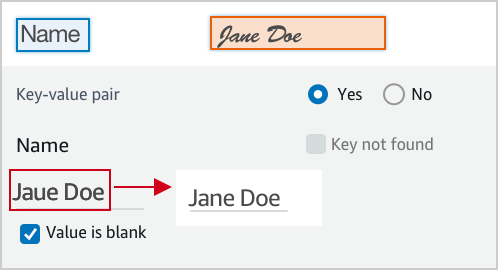
<img class='instructionsImage' src="https://example-site/correct-value-text.png" />

A wrong value is identified, correct it.
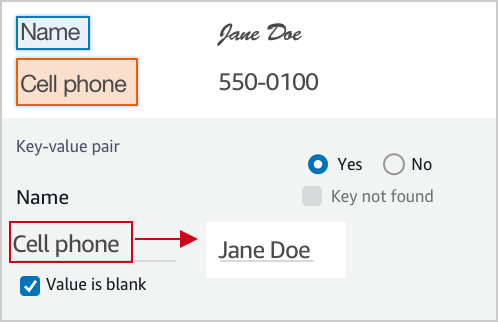
<img class='instructionsImage' src="https://example-site/correct-value.png" />

If it is not a valid key-value relationship, choose No.
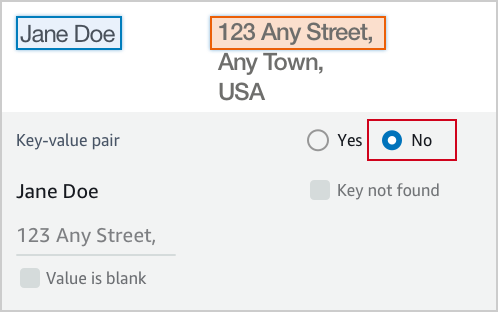
<img class='instructionsImage' src="https://example-site/not-a-key-value-pair.png" />

If you can’t find the key in the document, choose Key not found.
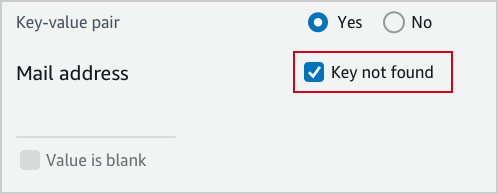
<img class='instructionsImage' src="https://example-site/key-is-not-found.png" />

If the content of a field is empty, choose Value is blank.
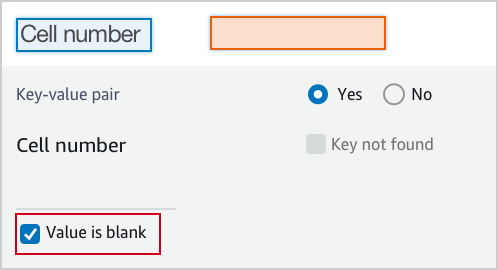
<img class='instructionsImage' src="https://example-site/value-is-blank.png" />

<b>Examples</b>
Key and value are often displayed next to or below to each other.

Key and value displayed in one line.

<img class='instructionsImage' src="https://example-site/sample-key-value-pair-1.png" />

Key and value displayed in two lines.
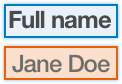
<img class='instructionsImage' src="https://example-site/sample-key-value-pair-2.png" />

If the content of the value has multiple lines, enter all the text without a line break. Include all value text even if it extends beyond the highlight box.
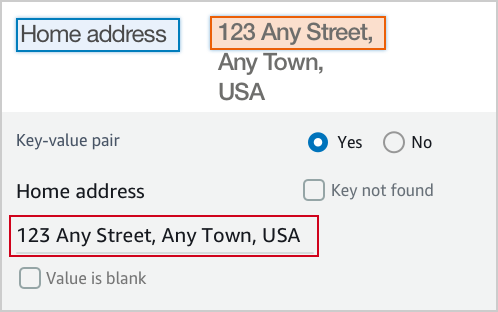
<img class='instructionsImage' src="https://assets.crowd.aws/images/a2i-console/multiple-lines.png" /></p>
    </short-instructions>

    <full-instructions header="Instructions"></full-instructions>
  </crowd-textract-analyze-document>
</crowd-form>
```

## Amazon Rekognition 的自訂範本範例
<a name="a2i-custom-templates-rekognition-sample"></a>

所有自訂範本都以 `<crowd-form> </crowd-form>` 元素開始和結束。如同標準 HTML `<form>` 元素，所有表單程式碼都應該放置於這些元素間。對於 Amazon Rekognition 自訂任務範本，請使用 `<crowd-rekognition-detect-moderation-labels>` 元素。此元素支援下列屬性：
+ `categories` - 字串陣列*或*物件陣列，其中每個物件都有一個 `name` 欄位。
  + 如果以物件形式傳入類別，則情況如下：
    + 顯示的類別是 `name` 欄位的值。
    + 傳回的答案包含所選任何類別的*完整*物件。
  + 如果以字串形式傳入類別，則情況如下：
    + 傳回的答案是所選全部字串的陣列。
+ `exclusion-category` – 您可以設定這個屬性，在使用者介面中的類別下建立按鈕。當使用者選擇此按鈕，所有類別將取消選取並停用。如果工作者再次選擇按鈕，您可以重新讓使用者選擇類別。如果工作者在您選取按鈕後，選取**提交**按鈕來提交任務，該任務將會傳回空陣列。

對於 `<crowd-rekognition-detect-moderation-labels>` 元素的子系，您必須有兩個區域。
+ `<full-instructions>` – 工具中**檢視完整說明**連結提供的說明。這可以保留空白，但我們建議您提供完整的指示，以獲得更好的結果。
+ `<short-instructions>` – 在工具側邊欄中顯示的任務簡短描述。這可以保留空白，但我們建議您提供完整的指示，以獲得更好的結果。

使用這些元素的範本看起來與下列類似。

```
<script src="https://assets.crowd.aws/crowd-html-elements.js"></script>
{% capture s3_uri %}http://s3.amazonaws.com/{{ task.input.aiServiceRequest.image.s3Object.bucket }}/{{ task.input.aiServiceRequest.image.s3Object.name }}{% endcapture %}

<crowd-form>
  <crowd-rekognition-detect-moderation-labels
    categories='[
      {% for label in task.input.selectedAiServiceResponse.moderationLabels %}
        {
          name: "{{ label.name }}",
          parentName: "{{ label.parentName }}",
        },
      {% endfor %}
    ]'
    src="{{ s3_uri | grant_read_access }}"
    header="Review the image and choose all applicable categories."
  >
    <short-instructions header="Instructions">
      <style>
        .instructions {
          white-space: pre-wrap;
        }
      </style>
      <p class='instructions'>Review the image and choose all applicable categories.
If no categories apply, choose None.

<b>Nudity</b>
Visuals depicting nude male or female person or persons

<b>Graphic Male Nudity</b>
Visuals depicting full frontal male nudity, often close ups

<b>Graphic Female Nudity</b>
Visuals depicting full frontal female nudity, often close ups

<b>Sexual Activity</b>
Visuals depicting various types of explicit sexual activities and pornography

<b>Illustrated Nudity or Sexual Activity</b>
Visuals depicting animated or drawn sexual activity, nudity, or pornography

<b>Adult Toys</b>
Visuals depicting adult toys, often in a marketing context

<b>Female Swimwear or Underwear</b>
Visuals depicting female person wearing only swimwear or underwear

<b>Male Swimwear Or Underwear</b>
Visuals depicting male person wearing only swimwear or underwear

<b>Partial Nudity</b>
Visuals depicting covered up nudity, for example using hands or pose

<b>Revealing Clothes</b>
Visuals depicting revealing clothes and poses, such as deep cut dresses

<b>Graphic Violence or Gore</b>
Visuals depicting prominent blood or bloody injuries

<b>Physical Violence</b>
Visuals depicting violent physical assault, such as kicking or punching

<b>Weapon Violence</b>
Visuals depicting violence using weapons like firearms or blades, such as shooting

<b>Weapons</b>
Visuals depicting weapons like firearms and blades

<b>Self Injury</b>
Visuals depicting self-inflicted cutting on the body, typically in distinctive patterns using sharp objects

<b>Emaciated Bodies</b>
Visuals depicting extremely malnourished human bodies

<b>Corpses</b>
Visuals depicting human dead bodies

<b>Hanging</b>
Visuals depicting death by hanging</p>
    </short-instructions>

    <full-instructions header="Instructions"></full-instructions>
  </crowd-rekognition-detect-moderation-labels>
</crowd-form>
```

## 透過 Liquid 新增自動化
<a name="a2i-custom-templates-step2-automate"></a>

自訂範本系統使用 [Liquid](https://shopify.github.io/liquid/) 進行自動化。*Liquid* 是開放原始碼內嵌標記語言。如需詳細資訊及文件，請前往 [Liquid 首頁](https://shopify.github.io/liquid/)。

在 Liquid 中，單邊大括號和百分比符號之間的文字是指示，或執行類似控制流程或迭代之作業的*標記*。雙邊大括號之間的文字是變數，或輸出變數值的*物件*。下列清單包含兩種類型的 Liquid 標記，您可能會發現這些標記對於自動化範本輸入資料處理很有用。如果您選取下列其中一種標記類型，系統會將您重新導向至 Liquid 文件。
+ [控制流程](https://shopify.github.io/liquid/tags/control-flow/)：包括程式設計邏輯運算子例如 `if/else`、`unless` 和 `case/when`。
+ [迭代](https://shopify.github.io/liquid/tags/iteration/)：可讓您使用 for 循環之類的陳述式重複執行程式碼區塊。

  例如，下列程式碼範例將示範如何使用 Liquid `for` 標記建立 `for` 循環。此範例會循環瀏覽 Amazon Rekognition [https://docs.aws.amazon.com/rekognition/latest/dg/API_ModerationLabel.html](https://docs.aws.amazon.com/rekognition/latest/dg/API_ModerationLabel.html) 傳回的資料，並顯示 `moderationLabels` 屬性 `name` 及 `parentName`，供工作者審核：

  ```
   {% for label in task.input.selectedAiServiceResponse.moderationLabels %}
      {
        name: &quot;{{ label.name }}&quot;,
        parentName: &quot;{{ label.parentName }}&quot;,
      },
   {% endfor %}
  ```

### 使用變數篩選條件
<a name="a2i-custom-templates-step2-automate-filters"></a>

除了標準 [Liquid 篩選條件](https://shopify.github.io/liquid/filters/abs/)和動作外，Amazon 增強版 AI (Amazon A2I) 也提供幾個額外的篩選條件。在變數名稱後面加上管線 (`|`) 字元，然後指定篩選條件名稱，即可套用篩選條件。若要串連篩選條件，請使用以下格式。

**Example**  

```
{{ <content> | <filter> | <filter> }}
```

#### 自動逸出和明確逸出
<a name="a2i-custom-templates-step2-automate-filters-autoescape"></a>

根據預設，輸入都經過 HTML 逸出，以避免變數文字和 HTML 之間產生混淆。您可以明確新增 `escape` 篩選條件，讓讀取範本來源的人明白逸出正在進行。

#### escape\$1once
<a name="a2i-custom-templates-step2-automate-escapeonce"></a>

`escape_once` 可確保如果您已逸出程式碼，則不會再次逸出。例如，為了確保 `&amp;` 不會變成 `&amp;amp;`。

#### skip\$1autoescape
<a name="a2i-custom-templates-step2-automate-skipautoescape"></a>

`skip_autoescape` 當您的內容預定用做 HTML 時會有很幫助。例如，邊界框的完整說明中可能有幾段文字和一些影像。

**注意**  
請謹慎使用 `skip_autoescape`。範本中的最佳實務是避免使用 `skip_autoescape` 來傳遞功能性程式碼或標記，除非您非常確定您可以嚴格控制傳遞的內容。如果您傳遞使用者輸入，可能會讓工作者遭受跨網站指令碼攻擊。

#### to\$1json
<a name="a2i-custom-templates-step2-automate-tojson"></a>

`to_json` 會將您提供給 JavaScript 物件標記法 (JSON) 的資料進行編碼。如果你提供物件，它會將該物件序列化。

#### grant\$1read\$1access
<a name="a2i-custom-templates-step2-automate-grantreadaccess"></a>

`grant_read_access` 會接受 Amazon Simple Storage Service (Amazon S3) URI 並將其編碼為 HTTPS URL，含有該資源的短期存取憑證。這能夠將存放在 S3 儲存貯體中的照片、音訊或影片物件顯示給工作者，這些物件在其他情況下無法公開存取。

#### s3\$1presign
<a name="a2i-custom-templates-step2-automate-s3"></a>

 `s3_presign` 篩選條件的運作方式與 `grant_read_access` 篩選條件相同。`s3_presign` 採用 Amazon S3 URI，並將其編碼為具該資源短期存取字符的 HTTPS URL。這能夠將存放在 S3 儲存貯體中的照片、音訊或影片物件顯示給工作者，這些物件在其他情況下無法公開存取。

**Example 變數篩選條件的範例**  
輸入  

```
auto-escape: {{ "Have you read 'James & the Giant Peach'?" }}
explicit escape: {{ "Have you read 'James & the Giant Peach'?" | escape }}
explicit escape_once: {{ "Have you read 'James &amp; the Giant Peach'?" | escape_once }}
skip_autoescape: {{ "Have you read 'James & the Giant Peach'?" | skip_autoescape }}
to_json: {{ jsObject | to_json }}                
grant_read_access: {{ "s3://amzn-s3-demo-bucket/myphoto.png" | grant_read_access }}
s3_presign: {{ "s3://amzn-s3-demo-bucket/myphoto.png" | s3_presign }}
```

**Example**  
Output  

```
auto-escape: Have you read &#39;James &amp; the Giant Peach&#39;?
explicit escape: Have you read &#39;James &amp; the Giant Peach&#39;?
explicit escape_once: Have you read &#39;James &amp; the Giant Peach&#39;?
skip_autoescape: Have you read 'James & the Giant Peach'?
to_json: { "point_number": 8, "coords": [ 59, 76 ] }
grant_read_access: https://s3.amazonaws.com/amzn-s3-demo-bucket/myphoto.png?<access token and other params>
s3_presign: https://s3.amazonaws.com/amzn-s3-demo-bucket/myphoto.png?<access token and other params>
```

**Example 自動化分類範本的範例。**  
若要將這個簡單的文字分類範例自動化，請包括 Liquid 標記 `{{ task.input.source }}`。此範例使用 [crowd-classifier](sms-ui-template-crowd-classifier.md) 元素。  

```
<script src="https://assets.crowd.aws/crowd-html-elements.js"></script>
<crowd-form>
  <crowd-classifier 
    name="tweetFeeling"
    categories="['positive', 'negative', 'neutral', 'cannot determine']"
    header="Which term best describes this tweet?" 
  >
    <classification-target>
       {{ task.input.source }}
    </classification-target>

    <full-instructions header="Analyzing a sentiment">
      Try to determine the feeling the author 
      of the tweet is trying to express. 
      If none seems to match, choose "other."
    </full-instructions>

    <short-instructions>
      Pick the term that best describes the sentiment 
      of the tweet. 
    </short-instructions>

  </crowd-classifier>
</crowd-form>
```

## 預覽工作者任務範本
<a name="a2i-preview-your-custom-template"></a>

若要預覽自訂工作者任務範本，請使用 SageMaker AI `RenderUiTemplate` 作業。您可以搭配 AWS CLI 或偏好的 AWS SDK 使用 `RenderUiTemplate`操作。有關此 API 作業支援的特定語言 SDK 的文件，請參閱 [https://docs.aws.amazon.com/sagemaker/latest/APIReference/API_RenderUiTemplate.html](https://docs.aws.amazon.com/sagemaker/latest/APIReference/API_RenderUiTemplate.html) 的[https://docs.aws.amazon.com/sagemaker/latest/APIReference/API_RenderUiTemplate.html#API_RenderUiTemplate_SeeAlso](https://docs.aws.amazon.com/sagemaker/latest/APIReference/API_RenderUiTemplate.html#API_RenderUiTemplate_SeeAlso) 部分。

**先決條件**

若要預覽工作者任務範本，您使用`RoleArn`的 AWS Identity and Access Management (IAM) 角色 Amazon Resource Name (ARN) 或 ，必須具有存取範本所用 S3 物件的許可。若要了解如何設定角色或使用者，請參閱[啟用工作者任務範本預覽](a2i-permissions-security.md#permissions-for-worker-task-templates-augmented-ai)。

**若要使用 `RenderUiTemplate` 作業預覽工作者任務範本：**

1. 為 **`RoleArn`** 角色提供附加的必要政策以預覽自訂範本。

1. 在 **`Task`** 的 **`Input`** 參數中，提供 JSON 物件，其中包含範本中定義之變數的值。這些是替換 `task.input.source` 變數的變數。例如，如果您在範本中定義 task.input.text 變數，則可以在 JSON 物件中提供變數做為 `text`: `sample text`。

1. 在 **`UiTemplate`** 的 **`Content`** 參數中，插入您的範本。

設定 `RenderUiTemplate` 完成後，請使用您偏好的軟體開發套件或 AWS CLI 提交請求來轉譯範本。如果您請求成功，回應會包含 [https://docs.aws.amazon.com/sagemaker/latest/APIReference/API_RenderUiTemplate.html#API_RenderUiTemplate_ResponseSyntax](https://docs.aws.amazon.com/sagemaker/latest/APIReference/API_RenderUiTemplate.html#API_RenderUiTemplate_ResponseSyntax)，此為可轉譯工作者使用者介面之 HTML 的 Liquid 範本。

**重要**  
若要預覽範本，您需要具有許可的 IAM 角色，以讀取在使用者介面上轉譯的 Amazon S3 物件。如需您可以連接至 IAM 角色以授與這些許可的範例政策，請參閱[啟用工作者任務範本預覽](a2i-permissions-security.md#permissions-for-worker-task-templates-augmented-ai)。

# 建立良好的工作者指示
<a name="a2i-creating-good-instructions-guide"></a>

為人工審核工作建立良好的指示，可以提高工作者完成任務的準確性。您可以修改在建立人工審核工作流程時主控台所提供的預設指示，或者，您可以使用主控台建立自訂工作者範本，再將指示包含在此範本中。在工作者完成其標籤任務的使用者介面頁面上，工作者會看到這些指示。

## 建立良好的工作者指示
<a name="a2i-good-instructions-console"></a>

Amazon 增強版 AI 主控台上有三種指示：
+ **任務描述** – 描述應該提供任務的簡潔說明。
+ **指示** – 這些指示顯示在工作者完成任務的同一個網頁上。這些指示應該提供簡單的參考，向工作者顯示完成任務的正確方法。
+ **其他指示** – 當工作者選擇**檢視完整指示**，出現的對話方塊中會顯示這些指示。我們建議您提供完成任務的詳細說明，並包含幾個範例來顯示極端案例和標籤物件時的其他困難情況。

## 將範例影像新增到您的指示
<a name="sms-using-s3-images"></a>

影像為您的工作者提供有用的範例。若要將可公開存取的影像新增到您的指示，請執行以下作業：

1. 在指示編輯器中將游標移到應該放置影像的位置。

1. 選擇編輯器工具列中的影像圖示。

1. 輸入影像的 URL。

如果指示影像位於不可公開存取的 S3 儲存貯體中，請執行以下作業：
+ 對於影像 URL，請輸入：`{{ 'https://s3.amazonaws.com/your-bucket-name/image-file-name' | grant_read_access }}`。

這樣會轉譯影像 URL 並附加短期、一次性存取碼，讓工作者的瀏覽器可以顯示影像。指示編輯器中會顯示斷裂的影像圖示，但預覽工具時會在轉譯預覽中顯示影像。如需 `grand_read_access` 元素的詳細資訊，請參閱[s3\$1presigngrant\$1read\$1accesss3\$1presign](a2i-custom-templates.md#a2i-custom-templates-step2-automate-grantreadaccess)。

# 監控和管理您的人工循環
<a name="a2i-monitor-humanloop-results"></a>

開始人工審核循環後，可以使用 [Amazon 增強版 AI 執行期 API](https://docs.aws.amazon.com/augmented-ai/2019-11-07/APIReference/Welcome.html) 來檢查傳送至循環的任務結果並進行管理。此外，Amazon A2I 與 Amazon EventBridge (也稱為 Amazon CloudWatch Events) 整合，以便在人工審核循環狀態變更為 `Completed`、`Failed`、或 `Stopped` 時提醒您。至少保證一次此事件交付，這表示在人工循環完成時建立的所有事件都會成功交付至 EventBridge。

使用下列程序瞭解如何使用 Amazon A2I 執行期 API 來監控和管理人工循環。請參閱[在 Amazon 增強版 AI Amazon CloudWatch Events 中使用](a2i-cloudwatch-events.md)，瞭解 Amazon A2I 如何整合 Amazon EventBridge。

**若要檢查輸出資料：**

1. 透過呼叫 [https://docs.aws.amazon.com/augmented-ai/2019-11-07/APIReference/API_DescribeHumanLoop.html](https://docs.aws.amazon.com/augmented-ai/2019-11-07/APIReference/API_DescribeHumanLoop.html) 作業來檢查人工循環的結果。此 API 作業的結果包含循環啟動的原因和結果等相關資訊。

1. 在 Amazon Simple Storage Service (Amazon S3) 中檢查人工循環中的輸出資料。在資料的路徑中，`YYYY/MM/DD/hh/mm/ss` 代表人工審查循環建立日期，包括年 (`YYYY`)、月 (`MM`) 和日 (`DD`)，以及建立時間，包括小時 (`hh`)、分鐘 (`mm`) 和秒 (`ss`)。

   ```
   s3://customer-output-bucket-specified-in-flow-definition/flow-definition-name/YYYY/MM/DD/hh/mm/ss/human-loop-name/output.json
   ```

您可以將此結構與 AWS Glue 或 Amazon Athena 整合，以分割和分析您的輸出資料。如需詳細資訊，請參閱[在 AWS Glue 中管理 ETL 輸出的分割區](https://docs.aws.amazon.com/glue/latest/dg/aws-glue-programming-etl-partitions.html)。

要瞭解有關 Amazon A2I 輸出資料格式的更多資訊，請參閱[Amazon A2I 輸出資料](a2i-output-data.md)。

**若要停止並刪除您的人工循環：**

1. 人工循環開始後，您即可使用 `HumanLoopName` 透過呼叫 [https://docs.aws.amazon.com/augmented-ai/2019-11-07/APIReference/API_StopHumanLoop.html](https://docs.aws.amazon.com/augmented-ai/2019-11-07/APIReference/API_StopHumanLoop.html) 作業來停止人工循環。如果成功停止人工循環，伺服器會傳回 HTTP 200 的反應。

1. 若要刪除狀態等於 `Failed`、`Completed` 或 `Stopped` 的人工循環，請使用 [https://docs.aws.amazon.com/augmented-ai/2019-11-07/APIReference/API_DeleteHumanLoop.html](https://docs.aws.amazon.com/augmented-ai/2019-11-07/APIReference/API_DeleteHumanLoop.html) 作業。

**若要列出人工循環：**

1. 可以透過呼叫 [https://docs.aws.amazon.com/augmented-ai/2019-11-07/APIReference/API_ListHumanLoops.html](https://docs.aws.amazon.com/augmented-ai/2019-11-07/APIReference/API_ListHumanLoops.html) 作業，列出所有作用中人工循環。您可以使用 `CreationTimeAfter` 和 `CreateTimeBefore` 參數，依照循環建立日期篩選人工循環。

1. 如果成功，`ListHumanLoops` 傳回回應元素中的 [https://docs.aws.amazon.com/augmented-ai/2019-11-07/APIReference/API_HumanLoopSummary.html](https://docs.aws.amazon.com/augmented-ai/2019-11-07/APIReference/API_HumanLoopSummary.html) 和 `NextToken` 物件。`HumanLoopSummaries` 包含單一人工循環的相關資訊。例如，它列出一個循環狀態，可以的話，還會列出失敗原因。

   使用 `NextToken` 傳回的字串做為對 `ListHumanLoops` 後續呼叫的輸入，以檢視人工循環的下一頁。

# Amazon A2I 輸出資料
<a name="a2i-output-data"></a>

當您的機器學習工作流程向 Amazon A2I 發送一個資料對象時，將建立一個*人工循環*，並且人工審核者會收到*任務*查看該資料對象。每個人工審核任務的輸出資料儲存在您的人工審核工作流程中指定的 Amazon Simple Storage Service (Amazon S3) 輸出儲存貯體中。在資料的路徑中，`YYYY/MM/DD/hh/mm/ss` 代表人工循環建立日期，包括年 (`YYYY`)、月 (`MM`) 和日 (`DD`)，以及建立時間，包括小時 (`hh`)、分鐘 (`mm`) 和秒 (`ss`)。

```
s3://customer-output-bucket-specified-in-flow-definition/flow-definition-name/YYYY/MM/DD/hh/mm/ss/human-loop-name/output.json
```

輸出資料的內容取決於[任務類型](https://docs.aws.amazon.com/sagemaker/latest/dg/a2i-task-types-general.html) (內建或自訂) 以及您使用的[人力資源](https://docs.aws.amazon.com/sagemaker/latest/dg/sms-workforce-management.html)類型。您的輸出資料一律包括來自人力工作者的回應。此外，輸出資料可能包括有關人工循環、人工審核者 (工作者) 和資料物件的中繼資料。

使用下列區段以進一步了解不同任務類型和人力資源的 Amazon A2I 輸出資料格式。

## 內建任務類型中的輸出資料
<a name="sms-output-data-textract"></a>

Amazon A2I 內建任務類型包括 Amazon Textract 和 Amazon Rekognition。除了人工回應之外，其中一項任務的輸出資料還包括有關人工循環建立原因的詳細資訊，以及用來建立人工循環之整合式服務的相關資訊。使用下表以進一步了解所有內建任務類型的輸出資料結構描述。每個參數的*值*取決於您與 Amazon A2I 搭配使用的服務。有關這些特定於服務的值的詳細資訊，請參閱本節中的第二個表。


****  

| 參數 | 值類型 | 範例數值 | Description | 
| --- | --- | --- | --- | 
| awsManagedHumanLoopRequestSource |  String  | AWS/Rekognition/DetectModerationLabels/Image/V3 或 AWS/Textract/AnalyzeDocument/Forms/V1 | 請求 Amazon A2I 建立人工循環的 API 操作和相關 AWS 服務。這是您用來設定 Amazon A2I 人工循環的 API 作業。 | 
| flowDefinitionArn |  String  | arn:aws:sagemaker:us-west-2:111122223333:flow-definition/flow-definition-name |  用於建立人工循環之人工審核工作流程 (流程定義) 的 Amazon Resource Number (ARN)。  | 
| humanAnswers |  JSON 物件清單  | <pre>{<br />"answerContent": {<br />    "AWS/Rekognition/DetectModerationLabels/Image/V3": {<br />        "moderationLabels": [...]<br />    }<br />},</pre> 或<pre>{<br />    "answerContent": {<br />        "AWS/Textract/AnalyzeDocument/Forms/V1": {<br />            "blocks": [...]<br />    }<br />},</pre> | JSON 物件的清單，其包含 answerContent 中的工作者回應。此物件還會包含提交詳細資訊，以及如果使用私有人力資源，則會包含工作者中繼資料。如需詳細資訊，請參閱 [追蹤工作者活動](#a2i-worker-id-private)。對於從 Amazon Rekognition `DetectModerationLabel` 審核任務產生的人工循環輸出資料，此參數僅包含正面回應。例如，如果工作者選取*無內容*，則不會包含此回應。 | 
| humanLoopName |  String  |  `'human-loop-name'`  | 人工循環的名稱。 | 
| inputContent |  JSON 物件  |  <pre>{<br />    "aiServiceRequest": {...},<br />    "aiServiceResponse": {...},<br />    "humanTaskActivationConditionResults": {...},<br />    "selectedAiServiceResponse": {...}<br />}</pre>  |  請求建立人工迴圈時， AWS 服務傳送至 Amazon A2I 的輸入內容。  | 
| aiServiceRequest |  JSON 物件  | <pre>{<br />    "document": {...},<br />    "featureTypes": [...],<br />    "humanLoopConfig": {...}<br />}</pre>或 <pre>{<br />    "image": {...},<br />    "humanLoopConfig": {...}<br />}</pre> |  傳送至與 Amazon A2I 整合之 AWS 服務的原始請求。例如，如果您將 Amazon Rekognition 與 Amazon A2I 搭配使用，這會包括透過 API 作業 `DetectModerationLabels` 提出的請求。對於 Amazon Textract 整合，這包括透過 `AnalyzeDocument` 提出的請求。  | 
| aiServiceResponse |  JSON 物件  |  <pre>{<br />    "moderationLabels": [...],<br />    "moderationModelVersion": "3.0"<br />}</pre> 或 <pre>{<br />    "blocks": [...],<br />    "documentMetadata": {}<br />}</pre>  |   AWS 服務的完整回應。這是用於確定是否需要人工審核的資料。此對象可能包含不與人工審核者共享的有關資料對象的中繼資料。  | 
| selectedAiServiceResponse |  JSON 物件  |  <pre>{<br />    "moderationLabels": [...],<br />    "moderationModelVersion": "3.0"<br />}</pre> 或 <pre>{<br />    "blocks": [...],<br />    "documentMetadata": {}<br />}</pre>  |  `aiServiceResponse` 的子集，其符合在 `ActivationConditions` 中的啟動條件。 當隨機抽樣推論或所有推論皆初始啟動條件時，`aiServiceResponse` 中列出的所有資料物件將會在 `selectedAiServiceResponse` 中列出。  | 
| humanTaskActivationConditionResults |  JSON 物件  |  <pre>{<br />     "Conditions": [...]<br />}</pre>  |  `inputContent` 中的 JSON 物件，其包含建立人工循環的原因。這包括人工審核工作流程 (流程定義) 中包含的啟動條件 (`Conditions`) 的清單，以及每個條件的評估結果 - 此結果為 `true` 或 `false`。要瞭解有關激活條件的詳細資訊，請參閱[Amazon 增強版 AI 中，適用於 JSON 結構描述的人工循環啟動條件](a2i-human-fallback-conditions-json-schema.md)。  | 

選取下表中的索引標籤，以了解任務類型特定參數，並查看每個內建任務類型的範例輸出資料程式碼區塊。

------
#### [ Amazon Textract Task Type Output Data ]

當您使用 Amazon Textract 內建整合時，在輸出資料中，您可以將 `'AWS/Textract/AnalyzeDocument/Forms/V1'` 視爲 `awsManagedHumanLoopRequestSource` 的值。

該 `answerContent` 參數包含一個 `Block` 物件，該物件包含傳送至 Amazon A2I 的所有區塊人工回應。

該 `aiServiceResponse` 參數還包含一個 `Block` 物件，該物件包含 Amazon Textract 對使用 `AnalyzeDocument` 傳送原始請求的回應。

要瞭解有關區塊物件中看到的參數的詳細資訊，請參閱[區塊](https://docs.aws.amazon.com/textract/latest/dg/API_Block.html)在*Amazon Textract 開發者指南*。

以下是 Amazon A2I 人工審核對 Amazon Textract 文件分析推論的輸出資料範例。

```
{
    "awsManagedHumanLoopRequestSource": "AWS/Textract/AnalyzeDocument/Forms/V1",
    "flowDefinitionArn": "arn:aws:sagemaker:us-west-2:111122223333:flow-definition/flow-definition-name",
    "humanAnswers": [
        {
            "answerContent": {
                "AWS/Textract/AnalyzeDocument/Forms/V1": {
                    "blocks": [...]
                }
            },
            "submissionTime": "2020-09-28T19:17:59.880Z",
            "workerId": "111122223333",
            "workerMetadata": {
                "identityData": {
                    "identityProviderType": "Cognito",
                    "issuer": "https://cognito-idp.us-west-2.amazonaws.com/us-west-2_111111",
                    "sub": "c6aa8eb7-9944-42e9-a6b9-111122223333"
                }
            }
        }
    ],
    "humanLoopName": "humnan-loop-name",
    "inputContent": {
        "aiServiceRequest": {
            "document": {
                "s3Object": {
                    "bucket": "amzn-s3-demo-bucket1",
                    "name": "document-demo.jpg"
                }
            },
            "featureTypes": [
                "TABLES",
                "FORMS"
            ],
            "humanLoopConfig": {
                "dataAttributes": {
                    "contentClassifiers": [
                        "FreeOfPersonallyIdentifiableInformation"
                    ]
                },
                "flowDefinitionArn": "arn:aws:sagemaker:us-west-2:111122223333:flow-definition/flow-definition-name",
                "humanLoopName": "humnan-loop-name"
            }
        },
        "aiServiceResponse": {
            "blocks": [...],
            "documentMetadata": {
                "pages": 1
            }
        },
        "humanTaskActivationConditionResults": {
            "Conditions": [
                {
                    "EvaluationResult": true,
                    "Or": [
                        {
                            "ConditionParameters": {
                                "ImportantFormKey": "Mail address",
                                "ImportantFormKeyAliases": [
                                    "Mail Address:",
                                    "Mail address:",
                                    "Mailing Add:",
                                    "Mailing Addresses"
                                ],
                                "KeyValueBlockConfidenceLessThan": 100,
                                "WordBlockConfidenceLessThan": 100
                            },
                            "ConditionType": "ImportantFormKeyConfidenceCheck",
                            "EvaluationResult": true
                        },
                        {
                            "ConditionParameters": {
                                "ImportantFormKey": "Mail address",
                                "ImportantFormKeyAliases": [
                                    "Mail Address:",
                                    "Mail address:",
                                    "Mailing Add:",
                                    "Mailing Addresses"
                                ]
                            },
                            "ConditionType": "MissingImportantFormKey",
                            "EvaluationResult": false
                        }
                    ]
                }
            ]
        },
        "selectedAiServiceResponse": {
            "blocks": [...]
        }
    }
}
```

------
#### [ Amazon Rekognition Task Type Output Data ]

當您使用 Amazon Textract 內建整合時，在輸出資料中，您可以將字串 `'AWS/Rekognition/DetectModerationLabels/Image/V3'` 視爲 `awsManagedHumanLoopRequestSource` 的值。

此 `answerContent` 參數包含一個 `moderationLabels` 物件，其中包含傳送至 Amazon A2I 之所有審核標籤的人工回應。

該`aiServiceResponse`參數還包括一個`moderationLabels`物件，其中包含 Amazon Rekognition 對傳送至`DetectModerationLabels`的原始請求的回應。

要瞭解有關區塊物件中看到的參數的詳細資訊，請參閱 Amazon Rekognition 開發人員指南中的 [ModerationLabel](https://docs.aws.amazon.com/rekognition/latest/dg/API_ModerationLabel.html)。

以下是 Amazon A2I 人工審核對 Amazon Rekognition 影像內容審核推論的輸出資料範例。

```
{
    "awsManagedHumanLoopRequestSource": "AWS/Rekognition/DetectModerationLabels/Image/V3",
    "flowDefinitionArn": "arn:aws:sagemaker:us-west-2:111122223333:flow-definition/flow-definition-name",
    "humanAnswers": [
        {
            "answerContent": {
                "AWS/Rekognition/DetectModerationLabels/Image/V3": {
                    "moderationLabels": [...]
                }
            },
            "submissionTime": "2020-09-28T19:22:35.508Z",
            "workerId": "ef7294f850a3d9d1",
            "workerMetadata": {
                "identityData": {
                    "identityProviderType": "Cognito",
                    "issuer": "https://cognito-idp.us-west-2.amazonaws.com/us-west-2_111111",
                    "sub": "c6aa8eb7-9944-42e9-a6b9-111122223333"
                }
            }
        }
    ],
    "humanLoopName": "humnan-loop-name",
    "inputContent": {
        "aiServiceRequest": {
            "humanLoopConfig": {
                "flowDefinitionArn": "arn:aws:sagemaker:us-west-2:111122223333:flow-definition/flow-definition-name",
                "humanLoopName": "humnan-loop-name"
            },
            "image": {
                "s3Object": {
                    "bucket": "amzn-s3-demo-bucket1",
                    "name": "example-image.jpg"
                }
            }
        },
        "aiServiceResponse": {
            "moderationLabels": [...],
            "moderationModelVersion": "3.0"
        },
        "humanTaskActivationConditionResults": {
            "Conditions": [
                {
                    "EvaluationResult": true,
                    "Or": [
                        {
                            "ConditionParameters": {
                                "ConfidenceLessThan": 98,
                                "ModerationLabelName": "Suggestive"
                            },
                            "ConditionType": "ModerationLabelConfidenceCheck",
                            "EvaluationResult": true
                        },
                        {
                            "ConditionParameters": {
                                "ConfidenceGreaterThan": 98,
                                "ModerationLabelName": "Female Swimwear Or Underwear"
                            },
                            "ConditionType": "ModerationLabelConfidenceCheck",
                            "EvaluationResult": false
                        }
                    ]
                }
            ]
        },
        "selectedAiServiceResponse": {
            "moderationLabels": [
                {
                    "confidence": 96.7122802734375,
                    "name": "Suggestive",
                    "parentName": ""
                }
            ],
            "moderationModelVersion": "3.0"
        }
    }
}
```

------

## 從自訂任務類型輸出資料
<a name="sms-output-data-custom"></a>

將 Amazon A2I 新增至自訂人工審核工作流程時，您會在從人工審核任務傳回的輸出資料中看到以下參數。


****  

| 參數 | 值類型 | Description | 
| --- | --- | --- | 
|  `flowDefinitionArn`  |  String  |  用於建立人工循環之人工審核工作流程 (流程定義) 的 Amazon Resource Number (ARN)。  | 
|  `humanAnswers`  |  JSON 物件清單  | JSON 物件的清單，其包含 answerContent 中的工作者回應。此參數中的值由從[工作者任務範本](https://docs.aws.amazon.com/sagemaker/latest/dg/a2i-instructions-overview.html)收到的輸出決定。如果您使用的是私有人力資源，則會包含工作者中繼資料。如需詳細資訊，請參閱 [追蹤工作者活動](#a2i-worker-id-private)。 | 
|  `humanLoopName`  | String | 人工循環的名稱。 | 
|  `inputContent`  |  JSON 物件  |  在對 [https://docs.aws.amazon.com/augmented-ai/2019-11-07/APIReference/API_StartHumanLoop.html](https://docs.aws.amazon.com/augmented-ai/2019-11-07/APIReference/API_StartHumanLoop.html) 的請求中將輸入內容傳送到 Amazon A2I。  | 

以下是從與 Amazon A2I 和 Amazon Transcribe 的自訂整合輸出資料的範例。在此範例中，`inputContent` 由下列項目組成：
+ Amazon S3 中的 .mp4 檔案路徑和影片標題
+ 從 Amazon Transcribe 傳回的轉錄 (從 Amazon Transcribe 輸出資料剖析)
+ 工作者任務範本用來剪輯 .mp4 檔案，並向工作者顯示影片相關部分的開始和結束時間

```
{
    "flowDefinitionArn": "arn:aws:sagemaker:us-west-2:111122223333:flow-definition/flow-definition-name",
    "humanAnswers": [
        {
            "answerContent": {
                "transcription": "use lambda to turn your notebook"
            },
            "submissionTime": "2020-06-18T17:08:26.246Z",
            "workerId": "ef7294f850a3d9d1",
            "workerMetadata": {
                "identityData": {
                    "identityProviderType": "Cognito",
                    "issuer": "https://cognito-idp.us-west-2.amazonaws.com/us-west-2_111111",
                    "sub": "c6aa8eb7-9944-42e9-a6b9-111122223333"
                }
            }

        }
    ],
    "humanLoopName": "human-loop-name",
    "inputContent": {
        "audioPath": "s3://amzn-s3-demo-bucket1/a2i_transcribe_demo/Fully-Managed Notebook Instances with Amazon SageMaker - a Deep Dive.mp4",
        "end_time": 950.27,
        "original_words": "but definitely use Lambda to turn your ",
        "start_time": 948.51,
        "video_title": "Fully-Managed Notebook Instances with Amazon SageMaker - a Deep Dive.mp4"
    }
}
```

## 追蹤工作者活動
<a name="a2i-worker-id-private"></a>

Amazon A2I 提供的資訊可讓您用來追蹤任務輸出資料中的個別工作者。若要識別處理人工審核任務的工作者，請使用 Amazon S3 的輸出資料中的以下內容：
+ `acceptanceTime` 是工作者接受任務的時間。此日期和時間戳記的格式為 `YYYY-MM-DDTHH:MM:SS.mmmZ`，分別是年份 (`YYYY`)、月份 (`MM`)、日期 (`DD`)、小時 (`HH`)、分鐘 (`MM`)、秒 (`SS`) 和毫秒 (`mmm`)。日期和時間使用**T**分隔。
+ `submissionTime` 是工作者使用**提交**按鈕提交其註釋的時間。此日期和時間戳記的格式為 `YYYY-MM-DDTHH:MM:SS.mmmZ`，分別是年份 (`YYYY`)、月份 (`MM`)、日期 (`DD`)、小時 (`HH`)、分鐘 (`MM`)、秒 (`SS`) 和毫秒 (`mmm`)。日期和時間使用**T**分隔。
+ `timeSpentInSeconds` 會報告工作者主動處理該任務的總時間 (以秒為單位)。此指標不包含工作者暫停或休息的時間。
+ 每個工作者的 `workerId` 都是唯一的。
+ 如果您使用[私有人力資源](https://docs.aws.amazon.com/sagemaker/latest/dg/sms-workforce-private.html)，則您會在 `workerMetadata` 中看到下列內容。
  + `identityProviderType` 是用來管理私有人力資源的服務。
  + `issuer` 是 Amazon Cognito 使用者集區或 OpenID Connect (OIDC) 身分提供者 (IdP) 發行者，與指派給此人工審核任務的工作團隊相關聯。
  + 獨特的 `sub` 識別符指的是工作者。如果您使用 Amazon Cognito 建立人力資源，則可以使用 Amazon Cognito 擷取與此 ID 相關聯的工作者詳細資料 (例如名稱或使用者名稱)。要瞭解如何操作，請參閱[管理和搜尋用戶帳戶](https://docs.aws.amazon.com/cognito/latest/developerguide/how-to-manage-user-accounts.html#manage-user-accounts-searching-user-attributes)在*[Amazon Cognito 開發人員指南](https://docs.aws.amazon.com/cognito/latest/developerguide/)*。

以下是使用 Amazon Cognito 建立私有人力資源時可能會看到的輸出範例。這些會在 `identityProviderType` 中予以識別。

```
"submissionTime": "2020-12-28T18:59:58.321Z",
"acceptanceTime": "2020-12-28T18:59:15.191Z", 
"timeSpentInSeconds": 40.543,
"workerId": "a12b3cdefg4h5i67",
"workerMetadata": {
    "identityData": {
        "identityProviderType": "Cognito",
        "issuer": "https://cognito-idp.aws-region.amazonaws.com/aws-region_123456789",
        "sub": "aaaaaaaa-bbbb-cccc-dddd-eeeeeeeeeeee"
    }
}
```

 以下是使用您的自有 OIDC IdP 建立私有人力資源時可能會看到的輸出範例：

```
"workerMetadata": {
        "identityData": {
            "identityProviderType": "Oidc",
            "issuer": "https://example-oidc-ipd.com/adfs",
            "sub": "aaaaaaaa-bbbb-cccc-dddd-eeeeeeeeeeee"
        }
}
```

想瞭解更多如何使用私有人力資源，請參閱[私有人力資源](sms-workforce-private.md)。

# Amazon 增強版 AI 中的許可和安全性
<a name="a2i-permissions-security"></a>

使用 Amazon 增強版 AI (Amazon A2I) 為 ML/AI 應用程式建立人工審核工作流程時，您可以在 Amazon SageMaker AI 中建立和設定*資源*，例如人力資源和工作者任務範本。若要設定和啟動人工循環，您可以將 Amazon A2I 與 Amazon Textract 或 Amazon Rekognition 等 AWS 其他服務整合，或使用 Amazon 增強版 AI 執行期 API。若要建立人工審核工作流程並啟動人工循環，您必須將特定政策連接至您的 AWS Identity and Access Management (IAM) 角色或使用者。具體而言：
+ 當您在 2020 年 1 月 12 日或之後使用影像輸入資料啟動人工循環時，必須將 CORS 標題政策新增至包含輸入資料的 Amazon S3 儲存貯體。如需進一步了解，請參閱[CORS 許可要求](#a2i-cors-update)。
+ 當您建立流程定義時，您必須提供授與 Amazon A2I 許可以存取 Amazon S3 的角色，以便讀取將在人工任務使用者介面中轉譯的物件，以及寫入人工審核結果的物件。

  此角色也需要連接信任政策，才能授與擔任角色的 SageMaker AI 許可。這可讓 Amazon A2I 根據您連接到角色的許可來執行動作。

  請參閱[將許可新增至用於建立流程定義的 IAM 角色](#a2i-human-review-permissions-s3)，以查看您可以修改並連接用來建立流程定義角色的範例政策。這些政策將連接至 SageMaker AI 主控台 Amazon A2I 區域的**人工審核工作流程**區段中所建立的 IAM 角色。
+ 若要建立並啟動人工循環，您可以使用內建任務類型 (例如 `DetectModerationLabel` 或 `AnalyzeDocument`) 的 API 作業，或在自訂機器學習 (ML) 應用程式 中使用 Amazon A2I 執行期 API 作業 `StartHumanLoop`。您必須連接 `AmazonAugmentedAIFullAccess` 受管政策到調用這些 API 作業的使用者，以授與這些服務許可，可以使用 Amazon A2I 作業。若要了解作法，請參閱[建立可調用 Amazon A2I API 作業的使用者](#create-user-grants)。

  此政策*不會*授予許可，以叫用與內建任務類型相關聯的 AWS 服務的 API 操作。例如，`AmazonAugmentedAIFullAccess` 不會授權許可，呼叫 Amazon Rekognition `DetectModerationLabel` API 作業或 Amazon Textract `AnalyzeDocument` API 作業。您可以使用比較一般的政策，`AmazonAugmentedAIIntegratedAPIAccess`，來授予這些許可。如需詳細資訊，請參閱[使用調用 Amazon A2I、Amazon Textract 和 Amazon Rekognition API 作業的許可來建立使用者](#a2i-grant-general-permission)。當您想要授予使用者使用 Amazon A2I 和整合 AWS 服務的 API 操作的廣泛許可時，這是理想的選項。

  如果您想要設定更精密的許可，請參閱[以 Amazon Rekognition 身分為基礎的政策範例](https://docs.aws.amazon.com/rekognition/latest/dg/security_iam_id-based-policy-examples.html)和以 [Amazon Textract 以身分為基礎的政策範例](https://docs.aws.amazon.com/textract/latest/dg/security_iam_id-based-policy-examples.html)，以了解您可以用來授與使用這些個別服務的許可。
+ 若要預覽您的自訂工作者任務使用者介面範本，您需要一個擁有許可的 IAM 角色，才能讀取在使用者介面上呈現的 Amazon S3 物件。請參閱[啟用工作者任務範本預覽](#permissions-for-worker-task-templates-augmented-ai)中的政策範例。

**Topics**
+ [CORS 許可要求](#a2i-cors-update)
+ [將許可新增至用於建立流程定義的 IAM 角色](#a2i-human-review-permissions-s3)
+ [建立可調用 Amazon A2I API 作業的使用者](#create-user-grants)
+ [使用調用 Amazon A2I、Amazon Textract 和 Amazon Rekognition API 作業的許可來建立使用者](#a2i-grant-general-permission)
+ [啟用工作者任務範本預覽](#permissions-for-worker-task-templates-augmented-ai)
+ [搭配 AWS KMS 加密儲存貯體使用 Amazon A2I](#a2i-kms-encryption)
+ [其他許可和安全性資源](#additional-security-resources-augmented-ai)

## CORS 許可要求
<a name="a2i-cors-update"></a>

在 2020 年早些時候，Chrome 和 Firefox 等廣泛使用的瀏覽器變更了其根據影像中繼資料旋轉影像的預設行為，稱為 [EXIF 資料](https://en.wikipedia.org/wiki/Exif)。以前，影像一律會在瀏覽器中確切地顯示該影像在磁碟上的儲存方式 (通常是未旋轉的狀態)。變更後，影像現在會根據稱為*方向值*的影像中繼資料進行旋轉。這對整個機器學習 (ML) 社群具有重要意義。例如，如果不考慮 EXIF 方向，用於註釋影像的應用程式可能會以非預期的方向顯示影像，並導致不正確的標籤。

從 Chrome 89 開始， AWS 無法再自動防止映像輪換，因為 Web 標準群組 W3C 已決定控制映像輪換的功能違反 Web 的相同來源政策。因此，若要確保人力工作者在提交要求以建立人工循環時，以可預測的方向註釋您的輸入影像，您必須將 CORS 標題政策新增至包含輸入影像的 S3 儲存貯體。

**重要**  
如果您未將 CORS 組態新增至包含輸入資料的 S3 儲存貯體，則這些輸入資料物件的人工審核任務會失敗。

您可以在 Amazon S3 主控台中將 CORS 政策新增至包含輸入資料的 S3 儲存貯體。若要在 S3 主控台中包含輸入影像的 S3 儲存貯體上設定必要的 CORS 標題，請遵循在[如何使用 CORS 新增跨網域資源共用](https://docs.aws.amazon.com/AmazonS3/latest/user-guide/add-cors-configuration.html)中詳細說明的指示。對託管影像的儲存貯體，請使用以下 CORS 組態代碼。如果您使用 Amazon S3 主控台，將政策新增至儲存貯體，則必須使用 JSON 格式。

**JSON**

```
[{
   "AllowedHeaders": [],
   "AllowedMethods": ["GET"],
   "AllowedOrigins": ["*"],
   "ExposeHeaders": []
}]
```

**XML**

```
<CORSConfiguration>
 <CORSRule>
   <AllowedOrigin>*</AllowedOrigin>
   <AllowedMethod>GET</AllowedMethod>
 </CORSRule>
</CORSConfiguration>
```

若要使用 Amazon S3 主控台新增 CORS 標題政策，下列 GIF 會示範在 Amazon S3 文件中找到的指示。

![\[說明如何使用 Amazon S3 主控台新增 CORS 標頭政策的 GIF。\]](http://docs.aws.amazon.com/zh_tw/sagemaker/latest/dg/images/sms/gifs/cors-config.gif)


## 將許可新增至用於建立流程定義的 IAM 角色
<a name="a2i-human-review-permissions-s3"></a>

若要建立流程定義，請將本節中的政策連接至您在 SageMaker AI 主控台中建立人工審核工作流程時使用的角色，或使用 `CreateFlowDefinition` API 作業時所使用的角色。
+ 如果您使用主控台建立人工審核工作流程，[在主控台中建立人工審核工作流程時](https://docs.aws.amazon.com/sagemaker/latest/dg/create-human-review-console.html)，在 **IAM 角色**欄位輸入角色的 Amazon Resource Name (ARN)。
+ 使用 API 建立流程定義時，請將這些政策連接傳遞到 `CreateFlowDefinition` 操作 `RoleArn` 參數的角色。

在您建立人工審核工作流程 (流程定義) 時，Amazon A2I 會調用 Amazon S3 以完成您的任務。若要授與在儲存 Amazon S3 儲存貯體中擷取和存放檔案的 Amazon A2I 許可，請建立下列政策並將其連接至您的角色。例如，如果您要送交人工審核的影像、文件與其他檔案等存放在名為 `my_input_bucket` 的 S3 儲存貯體中，而且您希望將人工審核存放在名為 `my_output_bucket` 的儲存貯體中，並建立下列政策。

------
#### [ JSON ]

****  

```
{
    "Version":"2012-10-17",		 	 	 
    "Statement": [
        {
            "Effect": "Allow",
            "Action": [
                "s3:GetObject"
            ],
            "Resource": [
                "arn:aws:s3:::my_input_bucket/*"
            ]
        },
        {
            "Effect": "Allow",
            "Action": [
                "s3:PutObject"
            ],
            "Resource": [
                "arn:aws:s3:::my_output_bucket/*"
            ]
        }
    ]
}
```

------

此外，IAM 角色必須具有下列信任政策，才能授與 SageMaker AI 許可以擔任角色。要瞭解有關 IAM 信任策略的更多資訊，請參閱[基於資源的策略](https://docs.aws.amazon.com/IAM/latest/UserGuide/access_policies.html#policies_resource-based)部分的**策略和權限**在*AWS Identity and Access Management*文件。

------
#### [ JSON ]

****  

```
{
  "Version":"2012-10-17",		 	 	 
  "Statement": [
    {
      "Sid": "AllowSageMakerToAssumeRole",
      "Effect": "Allow",
      "Principal": {
        "Service": "sagemaker.amazonaws.com"
      },
      "Action": "sts:AssumeRole"
    }
  ]
}
```

------

如需有關建立和管理 IAM 角色和政策的詳細資訊，請參閱*AWS Identity and Access Management 使用者指南*中的下列主題：
+ 若要建立 IAM 角色，請參閱[建立角色以委派許可給 IAM 使用者](https://docs.aws.amazon.com/IAM/latest/UserGuide/id_roles_create_for-user.html)。
+ 若要了解如何建立 IAM 政策，請參閱[建立 IAM 政策](https://docs.aws.amazon.com/IAM/latest/UserGuide/access_policies_create.html)。
+ 若要了解如何將 IAM 政策連接至角色，請參閱[新增和移除 IAM 身分許可](https://docs.aws.amazon.com/IAM/latest/UserGuide/access_policies_manage-attach-detach.html)。

## 建立可調用 Amazon A2I API 作業的使用者
<a name="create-user-grants"></a>

若要用 Amazon A2I 來建立和啟動 Amazon Rekognition、Amazon Textract，或 Amazon A2I 執行期 API 的人工循環，您必須使用具有調用 Amazon A2I 作業許可的使用者。若要執行此操作，請使用 IAM 主控台將 [https://console.aws.amazon.com/iam/home?region=us-east-2#/policies/arn:aws:iam::aws:policy/AmazonAugmentedAIFullAccess$jsonEditor](https://console.aws.amazon.com/iam/home?region=us-east-2#/policies/arn:aws:iam::aws:policy/AmazonAugmentedAIFullAccess$jsonEditor) 受管政策連接到新的或現有的使用者。

此政策會授權使用者從 SageMaker API 調用 API 作業以進行流程定義的建立和管理，以及用於人工循環的建立和管理的 Amazon 增強版 AI 執行期 API。若要進一步了解這些 API 作業，請參閱[在 Amazon 增強版 AI 中使用 API](https://docs.aws.amazon.com/sagemaker/latest/dg/a2i-api-references.html)。

`AmazonAugmentedAIFullAccess` 不會授與使用 Amazon Rekognition 或 Amazon Textract API 作業的許可。

**注意**  
您也可以將 `AmazonAugmentedAIFullAccess` 政策連接到用來建立和啟動人工循環的 IAM 角色。

若要提供存取權，請新增權限至您的使用者、群組或角色：
+ 中的使用者和群組 AWS IAM Identity Center：

  建立權限合集。請按照《*AWS IAM Identity Center 使用者指南*》中的[建立權限合集](https://docs.aws.amazon.com//singlesignon/latest/userguide/howtocreatepermissionset.html)說明進行操作。
+ 透過身分提供者在 IAM 中管理的使用者：

  建立聯合身分的角色。遵循《*IAM 使用者指南*》的[為第三方身分提供者 (聯合) 建立角色](https://docs.aws.amazon.com//IAM/latest/UserGuide/id_roles_create_for-idp.html)中的指示。
+ IAM 使用者：
  + 建立您的使用者可擔任的角色。請按照《*IAM 使用者指南*》的[為 IAM 使用者建立角色](https://docs.aws.amazon.com//IAM/latest/UserGuide/id_roles_create_for-user.html)中的指示。
  + (不建議) 將政策直接附加至使用者，或將使用者新增至使用者群組。請遵循 *IAM 使用者指南*的[新增許可到使用者 (主控台)](https://docs.aws.amazon.com//IAM/latest/UserGuide/id_users_change-permissions.html#users_change_permissions-add-console)中的指示。

如需詳細資訊，請參閱 *AWS Identity and Access Management 使用者指南*中的[新增和移除 IAM 身分許可](https://docs.aws.amazon.com/IAM/latest/UserGuide/access_policies_manage-attach-detach.html)。

## 使用調用 Amazon A2I、Amazon Textract 和 Amazon Rekognition API 作業的許可來建立使用者
<a name="a2i-grant-general-permission"></a>

若要建立一個使用者：有權調用內建任務類型使用的 API 作業 (即，適用於 Amazon Rekognition 的 `DetectModerationLables`，和適用於 `AnalyzeDocument` 的 Amazon Textract)，並有權使用所有Amazon A2I API 作業，請連接 IAM 受管政策，`AmazonAugmentedAIIntegratedAPIAccess`。當您想要授予廣泛許可至使用 Amazon A2I 搭配多種任務類型的使用者時，可能會想要使用此政策。若要進一步了解這些 API 作業，請參閱[在 Amazon 增強版 AI 中使用 API](https://docs.aws.amazon.com/sagemaker/latest/dg/a2i-api-references.html)。

**注意**  
您也可以將 `AmazonAugmentedAIIntegratedAPIAccess` 政策連接到用來建立和啟動人工循環的 IAM 角色。

若要提供存取權，請新增權限至您的使用者、群組或角色：
+ 中的使用者和群組 AWS IAM Identity Center：

  建立權限合集。請按照《*AWS IAM Identity Center 使用者指南*》中的[建立權限合集](https://docs.aws.amazon.com//singlesignon/latest/userguide/howtocreatepermissionset.html)說明進行操作。
+ 透過身分提供者在 IAM 中管理的使用者：

  建立聯合身分的角色。遵循《*IAM 使用者指南*》的[為第三方身分提供者 (聯合) 建立角色](https://docs.aws.amazon.com//IAM/latest/UserGuide/id_roles_create_for-idp.html)中的指示。
+ IAM 使用者：
  + 建立您的使用者可擔任的角色。請按照《*IAM 使用者指南*》的[為 IAM 使用者建立角色](https://docs.aws.amazon.com//IAM/latest/UserGuide/id_roles_create_for-user.html)中的指示。
  + (不建議) 將政策直接附加至使用者，或將使用者新增至使用者群組。請遵循 *IAM 使用者指南*的[新增許可到使用者 (主控台)](https://docs.aws.amazon.com//IAM/latest/UserGuide/id_users_change-permissions.html#users_change_permissions-add-console)中的指示。

如需詳細資訊，請參閱 *AWS Identity and Access Management 使用者指南*中的[新增和移除 IAM 身分許可](https://docs.aws.amazon.com/IAM/latest/UserGuide/access_policies_manage-attach-detach.html)。

## 啟用工作者任務範本預覽
<a name="permissions-for-worker-task-templates-augmented-ai"></a>

若要自訂工作者在處理任務時看到的介面和指示，您可以建立工作者任務範本。您可以使用 [https://docs.aws.amazon.com/sagemaker/latest/APIReference/API_CreateHumanTaskUi.html](https://docs.aws.amazon.com/sagemaker/latest/APIReference/API_CreateHumanTaskUi.html) 操作或 SageMaker AI 主控台來建立範本。

若要預覽範本，您需要具有下列許可的 IAM 角色，以讀取在使用者介面上呈現的 Amazon S3 物件。

------
#### [ JSON ]

****  

```
{
    "Version":"2012-10-17",		 	 	 
    "Statement": [
        {
            "Effect": "Allow",
            "Action": [
                "s3:GetObject"
            ],
            "Resource": [
                "arn:aws:s3:::my_input_bucket/*"
            ]
        }
    ]
}
```

------

對於 Amazon Rekognition 和 Amazon Textract 任務類型，您可以使用 SageMaker AI 主控台的 Amazon 增強版 AI 區段預覽您的範本。對於自訂任務類型，您可以調用作 [https://docs.aws.amazon.com/sagemaker/latest/APIReference/API_RenderUiTemplate.html](https://docs.aws.amazon.com/sagemaker/latest/APIReference/API_RenderUiTemplate.html) 操作來預覽範本。若要預覽範本，請遵循任務類型的指示：
+  在 SageMaker AI 主控台中的 Amazon Rekognition 和 Amazon Textract 任務類型，在 [建立工作者任務範本](a2i-worker-template-console.md#a2i-create-worker-template-console) 中記載的程序中使用角色的 Amazon Resource Name (ARN)。
+ 在 `RenderUiTemplate` 操作的自訂任務類型中，使用在 `RoleArn` 參數中角色的 ARN。

## 搭配 AWS KMS 加密儲存貯體使用 Amazon A2I
<a name="a2i-kms-encryption"></a>

如果您指定 AWS Key Management Service (AWS KMS) 客戶受管金鑰來加密 `OutputConfig`中的輸出資料[https://docs.aws.amazon.com/sagemaker/latest/APIReference/API_CreateFlowDefinition.html](https://docs.aws.amazon.com/sagemaker/latest/APIReference/API_CreateFlowDefinition.html)，則必須將類似下列內容的 IAM 政策新增至該金鑰。本政策會提供您用來建立人工循環許可的 IAM 執行角色，以使用此金鑰來執行 `"Action"` 中列出的所有動作。若要進一步了解這些動作，請參閱《 AWS Key Management Service 開發人員指南》中的[AWS KMS 許可](https://docs.aws.amazon.com/kms/latest/developerguide/kms-api-permissions-reference.html)。

要使用此政策，請將 `"Principal"` 中的 IAM 服務角色 ARN，取代為您建立人工審核工作流程 (流程定義) 時所使用的執行角色的 ARN。使用 `CreateFlowDefinition` 建立標籤工作時，這是您為 [https://docs.aws.amazon.com/sagemaker/latest/APIReference/API_CreateLabelingJob.html#sagemaker-CreateLabelingJob-request-RoleArn](https://docs.aws.amazon.com/sagemaker/latest/APIReference/API_CreateLabelingJob.html#sagemaker-CreateLabelingJob-request-RoleArn) 指定的 ARN。請注意，您無法在主控台中建立流程定義時提供 `KmsKeyId`。

```
{
    "Sid": "AllowUseOfKmsKey",
    "Effect": "Allow",
    "Principal": {
        "AWS": "arn:aws:iam::111122223333:role/service-role/example-role"
    },
    "Action": [
        "kms:Encrypt",
        "kms:Decrypt",
        "kms:ReEncrypt*",
        "kms:GenerateDataKey*",
        "kms:DescribeKey"
    ],
    "Resource": "*"
}
```

## 其他許可和安全性資源
<a name="additional-security-resources-augmented-ai"></a>
+ [使用標籤控制對 SageMaker AI 資源的存取](security_iam_id-based-policy-examples.md#access-tag-policy).
+ [Amazon SageMaker AI 身分型政策](security_iam_service-with-iam.md#security_iam_service-with-iam-id-based-policies)
+ [使用條件金鑰控制 SageMaker AI 資源的建立](security_iam_id-based-policy-examples.md#sagemaker-condition-examples)
+ [Amazon SageMaker AI API 許可：動作、許可與資源參考](api-permissions-reference.md)
+ [在 Amazon SageMaker AI 中設定安全性](security.md)

# 在 Amazon 增強版 AI Amazon CloudWatch Events 中使用
<a name="a2i-cloudwatch-events"></a>

Amazon 增強版 AI 使用 Amazon CloudWatch Events 在人工審核循環狀態變更為`Completed`、`Failed`或`Stopped`時提醒您。至少保證一次此事件交付，這表示在人工循環完成時建立的所有事件都會成功交付至 CloudWatch Events (Amazon EventBridge)。當審核循環變為其中一種狀態時，增強版 AI 會向 CloudWatch 事件發送類似於以下內容的事件。

```
{
    "version":"0",
    "id":"12345678-1111-2222-3333-12345EXAMPLE",
    "detail-type":"SageMaker A2I HumanLoop Status Change",
    "source":"aws.sagemaker",
    "account":"1111111111111",
    "time":"2019-11-14T17:49:25Z",
    "region":"us-east-1",
    "resources":["arn:aws:sagemaker:us-east-1:111111111111:human-loop/humanloop-nov-14-1"],
    "detail":{
        "creationTime":"2019-11-14T17:37:36.740Z",
        "failureCode":null,
        "failureReason":null,
        "flowDefinitionArn":"arn:aws:sagemaker:us-east-1:111111111111:flow-definition/flowdef-nov-12",
        "humanLoopArn":"arn:aws:sagemaker:us-east-1:111111111111:human-loop/humanloop-nov-14-1",
        "humanLoopName":"humanloop-nov-14-1",
        "humanLoopOutput":{ 
            "outputS3Uri":"s3://customer-output-bucket-specified-in-flow-definition/flowdef-nov-12/2019/11/14/17/37/36/humanloop-nov-14-1/output.json"
        },
        "humanLoopStatus":"Completed"
    }
}
```

JSON 輸出中的詳細資料包括：

`creationTime`  
增強版 AI 建立人工循環時的時間戳記。

`failureCode`  
表示特定失敗類型的失敗代碼。

`failureReason`  
人工循環失敗的原因。只有當人工審核循環狀態為`failed`時，才會傳回失敗原因。

`flowDefinitionArn`  
流程定義或*人工審核工作流程*的 Amazon Resource Name (ARN)。

`humanLoopArn`  
人工循環的 Amazon Resource Name (ARN)。

`humanLoopName`  
人工循環的名稱。

`humanLoopOutput`  
此物件包含人工循環輸出的相關資訊。

`outputS3Uri`  
Amazon S3 物件的位置，供增強版 AI 存放人工循環的輸出。

`humanLoopStatus`  
人工循環的狀態。

## 從您的人工循環將事件傳到 CloudWatch Events
<a name="a2i-cloud-watch-events-rule-setup"></a>

若要設定 CloudWatch Events 規則以取得 Amazon A2I 人工迴圈的狀態更新或*事件*，請使用 AWS Command Line Interface (AWS CLI) [https://docs.aws.amazon.com/cli/latest/reference/events/put-rule.html](https://docs.aws.amazon.com/cli/latest/reference/events/put-rule.html)命令。使用 `put-rule` 命令時，請指定下列項目以接收人工循環狀態：
+ `\"source\":[\"aws.sagemaker\"]`
+ `\"detail-type\":[\"SageMaker A2I HumanLoop Status Change\"]`

若要將 CloudWatch Events 規則設定為監控所有狀態變更，請使用下列命令並取代預留位置文字。例如，用唯一的 CloudWatch Events 規則名稱取代 `"A2IHumanLoopStatusChanges"`，並用 IAM 角色的 Amazon Resource Number (ARN) 取代 *`"arn:aws:iam::111122223333:role/MyRoleForThisRule"`*，並連接一個events.amazonaws.com 信任政策。將*區域*取代為您要建立規則 AWS 的區域。

```
aws events put-rule --name "A2IHumanLoopStatusChanges" 
    --event-pattern "{\"source\":[\"aws.sagemaker\"],\"detail-type\":[\"SageMaker A2I HumanLoop Status Change\"]}" 
    --role-arn "arn:aws:iam::111122223333:role/MyRoleForThisRule" 
    --region "region"
```

要瞭解更多關於 `put-rule` 請求，請參閱 [CloudWatch 事件中的事件模式](https://docs.aws.amazon.com/AmazonCloudWatch/latest/events/CloudWatchEventsandEventPatterns.html)，在 *Amazon CloudWatch Events 用戶指南*中。

## 設定目標以處理事件
<a name="a2i-subscribe-cloud-watch-events"></a>

要處理事件，你需要設置一個目標。例如，如果您希望在人工循環狀態發生更改時接收電子郵件，請使用 *Amazon CloudWatch 使用者指南*中的[設置 Amazon SNS 通知](https://docs.aws.amazon.com/AmazonCloudWatch/latest/monitoring/US_SetupSNS.html)程序，來設置 Amazon SNS 主題並訂閱您的電子郵件。主題建立後，您便可以用來建立目標。

**將目標新增至您的 CloudWatch Events 規則**

1. 開啟 CloudWatch 主控台：[https://console.aws.amazon.com/cloudwatch/home](https://console.aws.amazon.com/cloudwatch/home)

1. 在導覽窗格中，選擇**規則**。

1. 選擇您要新增目標的規則。

1. 選擇**動作**，然後選擇**編輯**。

1. 在**目標**下，選擇**新增目標**，然後選擇在偵測到人工循環狀態變更事件時要採取行動 AWS 的服務。

1. 設定您的目標。如需說明，請參閱該服務的[AWS 文件](https://docs.aws.amazon.com/index.html)中關於設定目標的主題。

1. 選擇**設定詳細資訊**。

1. 在**名稱**中輸入名稱，並在**描述**中提供有關規則用途的詳細資訊 (選擇性)。

1. 請確定**狀態**旁的核取方塊已選取，以便您的規則會列為**已啟用**。

1. 選擇**更新規則**。

## 使用人工審核輸出
<a name="using-human-review-output"></a>

收到人工審核結果後，您可以分析結果，並與機器學習預測進行比較。存放在 Amazon S3 儲存貯體中的 JSON 包含機器學習預測和人工審核結果。

## 詳細資訊
<a name="amazon-augmented-ai-programmatic-walkthroughs"></a>

[Amazon SageMaker AI 傳送至 Amazon EventBridge 的事件](automating-sagemaker-with-eventbridge.md)

# 在 Amazon 增強版 AI 中使用 API
<a name="a2i-api-references"></a>

您可以透過程式設計方式建立人工審核工作流程或工作者任務範本。您使用的 API 取決於您要建立 Amazon Rekognition、Amazon Textract 或自訂任務類型。本主題提供每個任務類型和程式設計任務的 API 參考文件連結。

下列 API 可搭配增強版 AI 一起使用：

**Amazon 增強版 AI**  
使用增強版 AI API 來啟動、停止及刪除人工審核循環。您也可以列出所有人工審核循環，並傳回帳戶中人工審核循環的相關資訊。  
請參閱 [Amazon 增強版 AI 執行期 API 參考](https://docs.aws.amazon.com/augmented-ai/2019-11-07/APIReference/Welcome.html)，進一步了解人工審核循環 API。

**Amazon Rekognition**  
使用 `[ DetectModerationLabels](https://docs.aws.amazon.com/rekognition/latest/dg/API_DetectModerationLabels.html)` API 的 **HumanLoopConfig** 參數，啟動使用 Amazon Rekognition 的人工審核工作流程。

**Amazon SageMaker AI**  
使用 Amazon SageMaker API 建立 `FlowDefinition`，也稱為*人工審核工作流程*。您也可以建立 `HumanTaskUi` 或*工作者任務範本*。  
如需詳細資訊，請參閱 [https://docs.aws.amazon.com/sagemaker/latest/APIReference/API_CreateFlowDefinition.html](https://docs.aws.amazon.com/sagemaker/latest/APIReference/API_CreateFlowDefinition.html) 或 [https://docs.aws.amazon.com/sagemaker/latest/APIReference/API_CreateHumanTaskUi.html](https://docs.aws.amazon.com/sagemaker/latest/APIReference/API_CreateHumanTaskUi.html) API 文件。

**Amazon Textract**  
使用 [AnalyzeDocument](https://docs.aws.amazon.com/textract/latest/dg/API_AnalyzeDocument.html) API 的 **HumanLoopConfig** 參數，啟動使用 Amazon Textract 的人工審核工作流程。

## 程式教學課程
<a name="amazon-augmented-ai-programmatic-walkthroughs"></a>

下列教學課程提供範例程式碼和逐步指示，說明以程式設計方式建立人工審核工作流程和工作者任務範本。
+ [教學課程：開始使用 Amazon A2I API](a2i-get-started-api.md)
+ [建立人工審核工作流程 (API)](a2i-create-flow-definition.md#a2i-create-human-review-api)
+ [建立和啟動人工循環](a2i-start-human-loop.md)
+ *在 Amazon Rekognition 開發人員指南* 中[搭配使用 Amazon 增強版 AI 與 Amazon Rekognition](https://docs.aws.amazon.com/rekognition/latest/dg/a2i-rekognition.html)
+ 在 [Amazon Textract 開發人員指南](https://docs.aws.amazon.com/textract/latest/dg/a2i-textract.html)中的*將 Amazon 增強版 AI 與 Amazon Textract AnalyzeDocument 搭配使用*