本文為英文版的機器翻譯版本，如內容有任何歧義或不一致之處，概以英文版為準。

# 教學課程：開始使用 Amazon A2I API
<a name="a2i-get-started-api"></a>

本教學課程說明在開始使用 Amazon A2I 時您可以使用的 API 作業。

若要使用 Jupyter 筆記本來執行這些作業，請從 [使用 Amazon A2I 的使用案例和範例](a2i-task-types-general.md) 中選取 Jupyter 筆記本並使用 [將 SageMaker 筆記本執行個體與 Amazon A2I Jupyter 筆記本搭配使用](a2i-task-types-general.md#a2i-task-types-notebook-demo)，瞭解如何在 SageMaker AI 筆記本執行個體中進行使用。

要瞭解有關可與 Amazon A2I 配合使用的 API 作業的更多資訊，請參閱[在 Amazon 增強版 AI 中使用 API](a2i-api-references.md)。

## 建立私有工作團隊
<a name="a2i-get-started-api-create-work-team"></a>

您可以建立私有工作團隊，並將自己新增為工作者，以便預覽 Amazon A2I。

如果您不熟悉 Amazon Cognito，建議您使用 SageMaker AI 主控台來建立私有人力資源，並將您自己新增為私有工作者。如需說明，請參閱[步驟 1：建立工作團隊](a2i-get-started-console.md#a2i-get-started-console-step-1)。

如果您熟悉 Amazon Cognito，則您可以使用下列指示以使用 SageMaker API 建立私有工作團隊。建立工作團隊後，請注意工作團隊 ARN (`WorkteamArn`)。

要瞭解有關私有人力資源和其他可用組態的詳細資訊，請參閱[私有人力資源](sms-workforce-private.md)。

**建立私有人力資源**  
如果您尚未建立私有人力資源，則您可以使用 [Amazon Cognito 使用者集區](https://docs.aws.amazon.com/cognito/latest/developerguide/cognito-user-identity-pools.html)進行建立。確認您已將自己新增至此使用者集區。您可以使用 適用於 Python (Boto3) 的 AWS SDK `[create\_workforce](https://boto3.amazonaws.com/v1/documentation/api/latest/reference/services/sagemaker.html#SageMaker.Client.create_workforce)`函數建立私有工作團隊。有關其他特定於語言的 SDK，請參閱[建立人力資源](https://docs.aws.amazon.com/sagemaker/latest/APIReference/API_CreateWorkforce.html#API_CreateWorkforce_SeeAlso)。

```
    
    response = client.create_workforce(
        CognitoConfig={
            "UserPool": "{{Pool_ID}}",
            "ClientId": "{{app-client-id}}"
        },
        WorkforceName="{{workforce-name}}"
    )
```

**建立私有工作團隊**  
在 AWS 區域中建立私有人力資源以設定和啟動人工循環後，您可以使用 適用於 Python (Boto3) 的 AWS SDK `[create\_workteam](https://boto3.amazonaws.com/v1/documentation/api/latest/reference/services/sagemaker.html#SageMaker.Client.create_workteam)`函數建立私有工作團隊。有關其他特定於語言的 SDK，請參閱`[CreateWorkteam](https://docs.aws.amazon.com/sagemaker/latest/APIReference/API_CreateWorkteam.html#API_CreateWorkteam_SeeAlso)`。

```
    response = client.create_workteam(
        WorkteamName="{{work-team-name}}",
        WorkforceName= "{{workforce-name}}",
        MemberDefinitions=[
            {
                "CognitoMemberDefinition": {
                    "UserPool": "{{<aws-region>_ID}}",
                    "UserGroup": "{{user-group}}",
                    "ClientId": "{{app-client-id}}"
                },
            }
        ]
    )
```

存取您的工作團隊 ARN，如下所示：

```
    workteamArn = response["WorkteamArn"]
```

**列出您帳戶中的私有工作團隊**  
如果您已建立私有工作團隊，則可以使用 適用於 Python (Boto3) 的 AWS SDK `[list\_workteams](https://boto3.amazonaws.com/v1/documentation/api/latest/reference/services/sagemaker.html#SageMaker.Client.list_workteams)`函數列出帳戶中指定 AWS 區域中的所有工作團隊。有關其他特定於語言的 SDK，請參閱`[ListWorkteams](https://docs.aws.amazon.com/sagemaker/latest/APIReference/API_ListWorkteams.html#API_ListWorkteams_SeeAlso)`。

```
    response = client.list_workteams()
```

如果您的帳戶中有許多工作團隊，則您可能想要使用 `MaxResults`、`SortBy`、和 `NameContains` 來篩選結果。

## 建立人工審核工作流程
<a name="a2i-get-started-api-create-human-review-workflow"></a>

您可以使用 Amazon A2I `[CreateFlowDefinition](https://docs.aws.amazon.com/sagemaker/latest/APIReference/API_CreateFlowDefinition.html)` 作業來建立人工審核工作流程。建立人工審核工作流程之前，您需要建立人工任務使用者介面。您可以使用 `[CreateHumanTaskUi](https://docs.aws.amazon.com/sagemaker/latest/APIReference/API_CreateHumanTaskUi.html)` 作業來執行此動作。

如果您將 Amazon A2I 與 Amazon Textract 或 Amazon Rekognition 搭配使用，您可以使用 JSON 指定啟動條件。

### 建立人工任務使用者介面
<a name="a2i-get-started-api-worker-task-template"></a>

如果您要建立與 Amazon Textract 或 Amazon Rekognition 整合搭配使用的人工審核工作流程，則需要使用和修改預先製作的工作者任務範本。對於所有自訂整合，您可以使用自己的自訂工作者任務範本。使用下表瞭解如何使用兩個內建整合的工作者任務範本來建立人工任務使用者介面。將範本取代為您自己的範本，以自訂此請求。

------
#### [ Amazon Textract – Key-value pair extraction ]

若要進一步了解此類範本，請參閱[Amazon Textract 的自訂範本範例](a2i-custom-templates.md#a2i-custom-templates-textract-sample)。

```
{{template}} = r"""
<script src="https://assets.crowd.aws/crowd-html-elements.js"></script>
{% capture s3_uri %}http://s3.amazonaws.com/{{ task.input.aiServiceRequest.document.s3Object.bucket }}/{{ task.input.aiServiceRequest.document.s3Object.name }}{% endcapture %}
<crowd-form>
  <crowd-textract-analyze-document 
      src="{{ s3_uri | grant_read_access }}" 
      initial-value="{{ task.input.selectedAiServiceResponse.blocks }}" 
      header="Review the key-value pairs listed on the right and correct them if they don"t match the following document." 
      no-key-edit="" 
      no-geometry-edit="" 
      keys="{{ task.input.humanLoopContext.importantFormKeys }}" 
      block-types='["KEY_VALUE_SET"]'>
    <short-instructions header="Instructions">
        <p>Click on a key-value block to highlight the corresponding key-value pair in the document.
        </p><p><br></p>
        <p>If it is a valid key-value pair, review the content for the value. If the content is incorrect, correct it.
        </p><p><br></p>
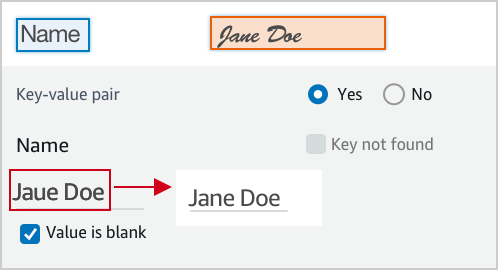
        <p>The text of the value is incorrect, correct it.</p>
        <p><img src="https://assets.crowd.aws/images/a2i-console/correct-value-text.png">
        </p><p><br></p>
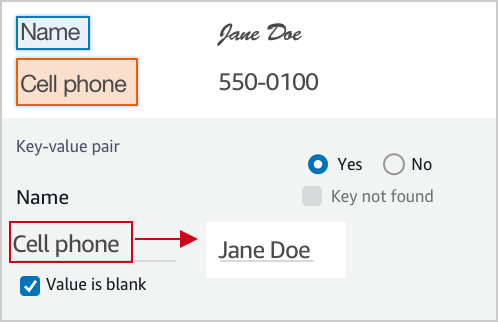
        <p>A wrong value is identified, correct it.</p>
        <p><img src="https://assets.crowd.aws/images/a2i-console/correct-value.png">
        </p><p><br></p>
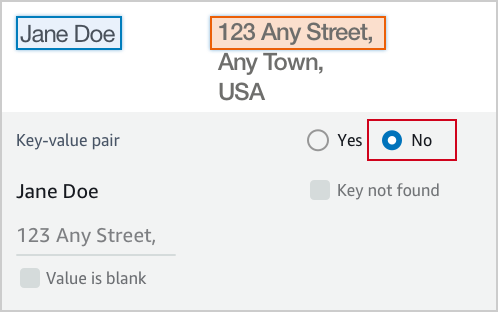
        <p>If it is not a valid key-value relationship, choose No.</p>
        <p><img src="https://assets.crowd.aws/images/a2i-console/not-a-key-value-pair.png">
        </p><p><br></p>
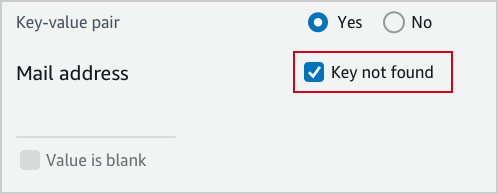
        <p>If you can’t find the key in the document, choose Key not found.</p>
        <p><img src="https://assets.crowd.aws/images/a2i-console/key-is-not-found.png">
        </p><p><br></p>
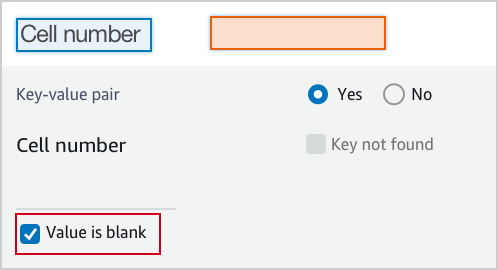
        <p>If the content of a field is empty, choose Value is blank.</p>
        <p><img src="https://assets.crowd.aws/images/a2i-console/value-is-blank.png">
        </p><p><br></p>
        <p><strong>Examples</strong></p>
        <p>Key and value are often displayed next or below to each other.
        </p><p><br></p>
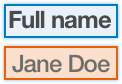
        <p>Key and value displayed in one line.</p>
        <p><img src="https://assets.crowd.aws/images/a2i-console/sample-key-value-pair-1.png">
        </p><p><br></p>
        <p>Key and value displayed in two lines.</p>
        <p><img src="https://assets.crowd.aws/images/a2i-console/sample-key-value-pair-2.png">
        </p><p><br></p>
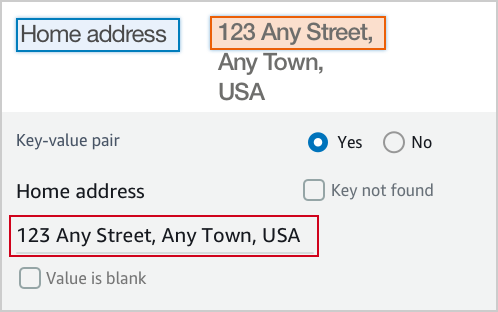
        <p>If the content of the value has multiple lines, enter all the text without line break. 
        Include all value text even if it extends beyond the highlight box.</p>
        <p><img src="https://assets.crowd.aws/images/a2i-console/multiple-lines.png"></p>
    </short-instructions>
    <full-instructions header="Instructions"></full-instructions>
  </crowd-textract-analyze-document>
</crowd-form>
"""
```

------
#### [ Amazon Rekognition – Image moderation ]

若要進一步了解此類範本，請參閱[Amazon Rekognition 的自訂範本範例](a2i-custom-templates.md#a2i-custom-templates-rekognition-sample)。

```
{{template}} = r"""
<script src="https://assets.crowd.aws/crowd-html-elements.js"></script>
{% capture s3_uri %}http://s3.amazonaws.com/{{ task.input.aiServiceRequest.image.s3Object.bucket }}/{{ task.input.aiServiceRequest.image.s3Object.name }}{% endcapture %}

<crowd-form>
  <crowd-rekognition-detect-moderation-labels
    categories='[
      {% for label in task.input.selectedAiServiceResponse.moderationLabels %}
        {
          name: "{{ label.name }}",
          parentName: "{{ label.parentName }}",
        },
      {% endfor %}
    ]'
    src="{{ s3_uri | grant_read_access }}"
    header="Review the image and choose all applicable categories."
  >
    <short-instructions header="Instructions">
      <style>
        .instructions {
          white-space: pre-wrap;
        }
      </style>
      <p class="instructions">Review the image and choose all applicable categories.
If no categories apply, choose None.

<b>Nudity</b>
Visuals depicting nude male or female person or persons

<b>Partial Nudity</b>
Visuals depicting covered up nudity, for example using hands or pose

<b>Revealing Clothes</b>
Visuals depicting revealing clothes and poses

<b>Physical Violence</b>
Visuals depicting violent physical assault, such as kicking or punching

<b>Weapon Violence</b>
Visuals depicting violence using weapons like firearms or blades, such as shooting

<b>Weapons</b>
Visuals depicting weapons like firearms and blades
    </short-instructions>

    <full-instructions header="Instructions"></full-instructions>
  </crowd-rekognition-detect-moderation-labels>
</crowd-form>"""
```

------
#### [ Custom Integration ]

以下是可用於自訂整合的範例範本。這個範本會用於此[筆記本](https://github.com/aws-samples/amazon-a2i-sample-jupyter-notebooks/blob/master/Amazon%20Augmented%20AI%20(A2I)%20and%20Comprehend%20DetectSentiment.ipynb)，展示了與 Amazon Comprehend 的自訂整合。

```
{{template}} = r"""
<script src="https://assets.crowd.aws/crowd-html-elements.js"></script>

<crowd-form>
    <crowd-classifier
      name="sentiment"
      categories='["Positive", "Negative", "Neutral", "Mixed"]'
      initial-value="{{ task.input.initialValue }}"
      header="What sentiment does this text convey?"
    >
      <classification-target>
        {{ task.input.taskObject }}
      </classification-target>
      
      <full-instructions header="Sentiment Analysis Instructions">
        <p><strong>Positive</strong> sentiment include: joy, excitement, delight</p>
        <p><strong>Negative</strong> sentiment include: anger, sarcasm, anxiety</p>
        <p><strong>Neutral</strong>: neither positive or negative, such as stating a fact</p>
        <p><strong>Mixed</strong>: when the sentiment is mixed</p>
      </full-instructions>

      <short-instructions>
       Choose the primary sentiment that is expressed by the text. 
      </short-instructions>
    </crowd-classifier>
</crowd-form>
"""
```

------

使用上述指定的範本，您可以使用 適用於 Python (Boto3) 的 AWS SDK `[create\_human\_task\_ui](https://boto3.amazonaws.com/v1/documentation/api/latest/reference/services/sagemaker.html#SageMaker.Client.create_human_task_ui)`函數建立範本。有關其他特定於語言的 SDK，請參閱`[CreateHumanTaskUi](https://docs.aws.amazon.com/sagemaker/latest/APIReference/API_CreateHumanTaskUi.html#API_CreateHumanTaskUi_SeeAlso)`。

```
    
    response = client.create_human_task_ui(
        HumanTaskUiName="{{human-task-ui-name}}",
        UiTemplate={
            "Content": {{template}}
        }
    )
```

此回應元素包含人工任務使用者介面 ARN。儲存此項目，如下所示：

```
    humanTaskUiArn = response["HumanTaskUiArn"]
```

### 建立 JSON 以指定啟動條件
<a name="a2i-get-started-api-activation-conditions"></a>

對於 Amazon Textract 和 Amazon Rekognition 內建整合，您可以將啟動條件儲存在 JSON 物件中，並在您的 `CreateFlowDefinition` 請求中使用此條件。

接下來，選擇一個標籤以查看可用於這些內建整合的範例啟動條件。有關啟動條件選項的其他資訊，請參閱[Amazon 增強版 AI 中，適用於 JSON 結構描述的人工循環啟動條件](a2i-human-fallback-conditions-json-schema.md)。

------
#### [ Amazon Textract – Key-value pair extraction ]

此範例指定文件中特定鍵值 (例如 `Mail address`) 的條件。如果 Amazon Textract 的可信度超出此處設定的閾值，則會將文件傳送給人員進行審核，並提示工作者啟動人工循環的特定鍵值。

```
      import json  

      humanLoopActivationConditions = json.dumps(
        {
            "Conditions": [
                {
                  "Or": [
                    
                    {
                        "ConditionType": "ImportantFormKeyConfidenceCheck",
                        "ConditionParameters": {
                            "ImportantFormKey": "Mail address",
                            "ImportantFormKeyAliases": ["Mail Address:","Mail address:", "Mailing Add:","Mailing Addresses"],
                            "KeyValueBlockConfidenceLessThan": 100,
                            "WordBlockConfidenceLessThan": 100
                        }
                    },
                    {
                        "ConditionType": "MissingImportantFormKey",
                        "ConditionParameters": {
                            "ImportantFormKey": "Mail address",
                            "ImportantFormKeyAliases": ["Mail Address:","Mail address:","Mailing Add:","Mailing Addresses"]
                        }
                    },
                    {
                        "ConditionType": "ImportantFormKeyConfidenceCheck",
                        "ConditionParameters": {
                            "ImportantFormKey": "Phone Number",
                            "ImportantFormKeyAliases": ["Phone number:", "Phone No.:", "Number:"],
                            "KeyValueBlockConfidenceLessThan": 100,
                            "WordBlockConfidenceLessThan": 100
                        }
                    },
                    {
                      "ConditionType": "ImportantFormKeyConfidenceCheck",
                      "ConditionParameters": {
                        "ImportantFormKey": "*",
                        "KeyValueBlockConfidenceLessThan": 100,
                        "WordBlockConfidenceLessThan": 100
                      }
                    },
                    {
                      "ConditionType": "ImportantFormKeyConfidenceCheck",
                      "ConditionParameters": {
                        "ImportantFormKey": "*",
                        "KeyValueBlockConfidenceGreaterThan": 0,
                        "WordBlockConfidenceGreaterThan": 0
                      }
                    }
            ]
        }
            ]
        }
    )
```

------
#### [ Amazon Rekognition – Image moderation ]

此處使用的人工循環啟動條件是針對 Amazon Rekognition 內容審核而量身打造的；它們是根據適用於 `Suggestive` 和 `Female Swimwear Or Underwear` 審核標籤的可信度閾值。

```
        import json  

        humanLoopActivationConditions = json.dumps(
        {
            "Conditions": [
                {
                  "Or": [
                    {
                        "ConditionType": "ModerationLabelConfidenceCheck",
                        "ConditionParameters": {
                            "ModerationLabelName": "Suggestive",
                            "ConfidenceLessThan": 98
                        }
                    },
                    {
                        "ConditionType": "ModerationLabelConfidenceCheck",
                        "ConditionParameters": {
                            "ModerationLabelName": "Female Swimwear Or Underwear",
                            "ConfidenceGreaterThan": 98
                        }
                    }
                  ]
               }
            ]
        }
    )
```

------

### 建立人工審核工作流程
<a name="a2i-get-started-api-flow-definition"></a>

本節提供使用先前區段中建立的資源的`CreateFlowDefinition` 適用於 Python (Boto3) 的 AWS SDK 請求範例。有關其他特定於語言的 SDK，請參閱[CreateFlowDefinition](https://docs.aws.amazon.com/sagemaker/latest/APIReference/API_CreateFlowDefinition.html#API_CreateFlowDefinition_SeeAlso)。使用下表中的索引標籤來查看為 Amazon Textract 和 Amazon Rekognition 內建整合建立人工審核工作流程的請求。

------
#### [ Amazon Textract – Key-value pair extraction ]

如果您使用與 Amazon Textract 的內建整合，您必須在 `HumanLoopRequestSource` 中指定 `"AWS/Textract/AnalyzeDocument/Forms/V1"` 供給 `"AwsManagedHumanLoopRequestSource"`。

```
    response = client.create_flow_definition(
        FlowDefinitionName="{{human-review-workflow-name}}",
        HumanLoopRequestSource={
            "AwsManagedHumanLoopRequestSource": "AWS/Textract/AnalyzeDocument/Forms/V1"
        }, 
        HumanLoopActivationConfig={
            "HumanLoopActivationConditionsConfig": {
                "HumanLoopActivationConditions": {{humanLoopActivationConditions}}
            }
        },
        HumanLoopConfig={
            "WorkteamArn": {{workteamArn}},
            "HumanTaskUiArn": {{humanTaskUiArn}},
            "TaskTitle": "{{Document entry review}}",
            "TaskDescription": "{{Review the document and instructions. Complete the task}}",
            "TaskCount": {{1}},
            "TaskAvailabilityLifetimeInSeconds": {{43200}},
            "TaskTimeLimitInSeconds": {{3600}},
            "TaskKeywords": [
                "{{document review}}",
            ],
        },
        OutputConfig={
            "S3OutputPath": "{{s3://amzn-s3-demo-bucket/prefix/}}",
        },
        RoleArn="{{arn:aws:iam::<account-number>:role/<role-name>}}",
        Tags=[
            {
                "Key": "{{string}}",
                "Value": "{{string}}"
            },
        ]
    )
```

------
#### [ Amazon Rekognition – Image moderation ]

如果您使用與 Amazon Rekognition 的內建整合，您必須在 `HumanLoopRequestSource` 中指定 `"AWS/Rekognition/DetectModerationLabels/Image/V3"` 供給 `"AwsManagedHumanLoopRequestSource"`。

```
    response = client.create_flow_definition(
        FlowDefinitionName="{{human-review-workflow-name}}",
        HumanLoopRequestSource={
            "AwsManagedHumanLoopRequestSource": "AWS/Rekognition/DetectModerationLabels/Image/V3"
        }, 
        HumanLoopActivationConfig={
            "HumanLoopActivationConditionsConfig": {
                "HumanLoopActivationConditions": {{humanLoopActivationConditions}}
            }
        },
        HumanLoopConfig={
            "WorkteamArn": {{workteamArn}},
            "HumanTaskUiArn": {{humanTaskUiArn}},
            "TaskTitle": "{{Image content moderation}}",
            "TaskDescription": "{{Review the image and instructions. Complete the task}}",
            "TaskCount": {{1}},
            "TaskAvailabilityLifetimeInSeconds": {{43200}},
            "TaskTimeLimitInSeconds": {{3600}},
            "TaskKeywords": [
                "{{content moderation}}",
            ],
        },
        OutputConfig={
            "S3OutputPath": "{{s3://amzn-s3-demo-bucket/prefix/}}",
        },
        RoleArn="{{arn:aws:iam::<account-number>:role/<role-name>}}",
        Tags=[
            {
                "Key": "{{string}}",
                "Value": "{{string}}"
            },
        ]
    )
```

------
#### [ Custom Integration ]

如果您使用自訂整合，請排除下列參數：`HumanLoopRequestSource`、`HumanLoopActivationConfig`。

```
    response = client.create_flow_definition(
        FlowDefinitionName="{{human-review-workflow-name}}",
        HumanLoopConfig={
            "WorkteamArn": {{workteamArn}},
            "HumanTaskUiArn": {{humanTaskUiArn}},
            "TaskTitle": "{{Image content moderation}}",
            "TaskDescription": "{{Review the image and instructions. Complete the task}}",
            "TaskCount": {{1}},
            "TaskAvailabilityLifetimeInSeconds": {{43200}},
            "TaskTimeLimitInSeconds": {{3600}},
            "TaskKeywords": [
                "{{content moderation}}",
            ],
        },
        OutputConfig={
            "S3OutputPath": "{{s3://amzn-s3-demo-bucket/prefix/}}",
        },
        RoleArn="{{arn:aws:iam::<account-number>:role/<role-name>}}",
        Tags=[
            {
                "Key": "{{string}}",
                "Value": "{{string}}"
            },
        ]
    )
```

------

建立人工審核工作流後，您可以從響應中檢索流定義 ARN：

```
    {{humanReviewWorkflowArn}} = response["FlowDefinitionArn"]    
```

## 建立人工循環
<a name="a2i-get-started-api-create-human-loop"></a>

您用來啟動人工循環的 API 作業取決於您使用的 Amazon A2I 整合。
+ 如果您使用 Amazon Textract 內建整合，請使用 [AnalyzeDocument](https://docs.aws.amazon.com/textract/latest/dg/API_AnalyzeDocument.html) 作業。
+ 如果您使用 Amazon Rekognition 內建整合，請使用 [DetectModerationLabels](https://docs.aws.amazon.com/rekognition/latest/dg/API_DetectModerationLabels.html) 作業。
+ 如果您使用自訂整合，請使用 [StartHumanLoop](https://docs.aws.amazon.com/augmented-ai/2019-11-07/APIReference/API_StartHumanLoop.html) 作業。

使用 適用於 Python (Boto3) 的 AWS SDK，在下表中選取您的任務類型，以查看 Amazon Textract 和 Amazon Rekognition 的範例請求。

------
#### [ Amazon Textract – Key-value pair extraction ]

下列範例使用 適用於 Python (Boto3) 的 AWS SDK 在 us-west-2 `analyze_document`中呼叫 。將紅色斜體文字取代為您的資源。如果您使用的是 Amazon Mechanical Turk 人力資源，請包括 [https://docs.aws.amazon.com/augmented-ai/2019-11-07/APIReference/API_HumanLoopDataAttributes.html](https://docs.aws.amazon.com/augmented-ai/2019-11-07/APIReference/API_HumanLoopDataAttributes.html) 參數。有關詳細資訊，請參閱[分析\_文件](https://boto3.amazonaws.com/v1/documentation/api/latest/reference/services/textract.html#Textract.Client.analyze_document)文件中的*適用於 Python (Boto) 的 AWS SDK API 參考*。

```
   response = client.analyze_document(
         Document={"S3Object": {"Bucket": "{{amzn-s3-demo-bucket}}", "Name": "{{document-name.pdf}}"},
         HumanLoopConfig={
            "FlowDefinitionArn":"{{arn:aws:sagemaker:us-west-2:111122223333:flow-definition/flow-definition-name}}",
            "HumanLoopName":"{{human-loop-name}}",
            "DataAttributes" : {ContentClassifiers:[{{"FreeOfPersonallyIdentifiableInformation"}}|{{"FreeOfAdultContent"}}]}
         }
         FeatureTypes=["FORMS"]
    )
```

只有在 Amazon Textract 對文件分析任務的可信度符合您在人工審核工作流程中指定的啟動條件時，才會建立人工循環。您可以檢查 `response` 元素以確定是否已建立人工循環。要查看此響應中包含的所有內容，請參閱[https://docs.aws.amazon.com/textract/latest/dg/API_HumanLoopActivationOutput.html](https://docs.aws.amazon.com/textract/latest/dg/API_HumanLoopActivationOutput.html)。

```
    if "HumanLoopArn" in analyzeDocumentResponse["HumanLoopActivationOutput"]:
        # A human loop has been started!
        print(f"A human loop has been started with ARN: {analyzeDocumentResponse["HumanLoopActivationOutput"]["HumanLoopArn"]}"
```

------
#### [ Amazon Rekognition – Image moderation ]

下列範例使用 適用於 Python (Boto3) 的 AWS SDK 在 us-west-2 `detect_moderation_labels`中呼叫 。將紅色斜體文字取代為您的資源。如果您使用的是 Amazon Mechanical Turk 人力資源，請包括 [https://docs.aws.amazon.com/augmented-ai/2019-11-07/APIReference/API_HumanLoopDataAttributes.html](https://docs.aws.amazon.com/augmented-ai/2019-11-07/APIReference/API_HumanLoopDataAttributes.html) 參數。有關詳細資訊，請參閱[檢測\_審核\_標籤](https://boto3.amazonaws.com/v1/documentation/api/latest/reference/services/rekognition.html#Rekognition.Client.detect_moderation_labels)文件中的*適用於 Python (Boto) 的 AWS SDK API 參考*。

```
   response = client.detect_moderation_labels(
            Image={"S3Object":{"Bucket": "{{amzn-s3-demo-bucket}}", "Name": "{{image-name.png}}"}},
            HumanLoopConfig={
               "FlowDefinitionArn":"{{arn:aws:sagemaker:us-west-2:111122223333:flow-definition/flow-definition-name}}",
               "HumanLoopName":"{{human-loop-name}}",
               "DataAttributes":{ContentClassifiers:[{{"FreeOfPersonallyIdentifiableInformation"}}|{{"FreeOfAdultContent"}}]}
             }
    )
```

只有在 Amazon Rekognition 對影像審核任務的可信度符合您在人工審核工作流程中指定的啟動條件時，才會建立人工循環。您可以檢查 `response` 元素以確定是否已建立人工循環。要查看此響應中包含的所有內容，請參閱[https://docs.aws.amazon.com/rekognition/latest/dg/API_HumanLoopActivationOutput.html](https://docs.aws.amazon.com/rekognition/latest/dg/API_HumanLoopActivationOutput.html)。

```
    if "HumanLoopArn" in response["HumanLoopActivationOutput"]:
        # A human loop has been started!
        print(f"A human loop has been started with ARN: {response["HumanLoopActivationOutput"]["HumanLoopArn"]}")
```

------
#### [ Custom Integration ]

下列範例使用 適用於 Python (Boto3) 的 AWS SDK 在 us-west-2 `start_human_loop`中呼叫 。將紅色斜體文字取代為您的資源。如果您使用的是 Amazon Mechanical Turk 人力資源，請包括 [https://docs.aws.amazon.com/augmented-ai/2019-11-07/APIReference/API_HumanLoopDataAttributes.html](https://docs.aws.amazon.com/augmented-ai/2019-11-07/APIReference/API_HumanLoopDataAttributes.html) 參數。有關詳細資訊，請參閱[啟動人工審查循環](https://boto3.amazonaws.com/v1/documentation/api/latest/reference/services/sagemaker-a2i-runtime.html#AugmentedAIRuntime.Client.start_human_loop)文件中的*適用於 Python (Boto) 的 AWS SDK API 參考*。

```
   response = client.start_human_loop(
        HumanLoopName= "{{human-loop-name}}",
        FlowDefinitionArn= "{{arn:aws:sagemaker:us-west-2:111122223333:flow-definition/flow-definition-name}}",
        HumanLoopInput={"InputContent": {{inputContentJson}}},
        DataAttributes={"ContentClassifiers":[{{"FreeOfPersonallyIdentifiableInformation"|"FreeOfAdultContent"}}]}
   )
```

此範例會將輸入內容儲存在變數 {{`inputContentJson`}} 中。假設輸入內容包含兩個元素：文字模糊和情緒 (例如 `Positive`、`Negative`、或 `Neutral`)，其格式如下：

```
    inputContent = {
        "initialValue": sentiment,
         "taskObject": blurb
     }
```

關鍵字 `initialValue` 和 `taskObject` 必須相對應工作者任務範本之液體元素中使用的關鍵字。請參閱[建立人工任務使用者介面](#a2i-get-started-api-worker-task-template)中的自訂範本查看範例。

執行下列步驟來建立 `{{inputContentJson}}`：

```
    import json
    
    inputContentJson = json.dumps(inputContent)
```

每次呼叫 `start_human_loop` 時會開始一個人工循環。要檢查人工審查循環的狀態，請使用[描述\_人工\_循環](https://boto3.amazonaws.com/v1/documentation/api/latest/reference/services/sagemaker-a2i-runtime.html#AugmentedAIRuntime.Client.describe_human_loop)：

```
    human_loop_info = a2i.describe_human_loop(HumanLoopName="{{human_loop_name}}")
    print(f"HumanLoop Status: {resp["HumanLoopStatus"]}")
    print(f"HumanLoop Output Destination: {resp["HumanLoopOutput"]}")
```

------