本文為英文版的機器翻譯版本,如內容有任何歧義或不一致之處,概以英文版為準。
將 Lake Formation 與 IAM Identity Center 連線
您必須先完成下列步驟,才能使用 IAM Identity Center 管理身分,以使用 Lake Formation 授予對 Data Catalog 資源的存取權。您可以使用 Lake Formation 主控台或 建立 IAM Identity Center 整合 AWS CLI。
- AWS 管理主控台
-
將 Lake Formation 與 IAM Identity Center 連線
登入 AWS 管理主控台,然後開啟 Lake Formation 主控台,網址為 https://https://console.aws.amazon.com/lakeformation/
。 在左側導覽窗格中,選取 IAM Identity Center 整合。
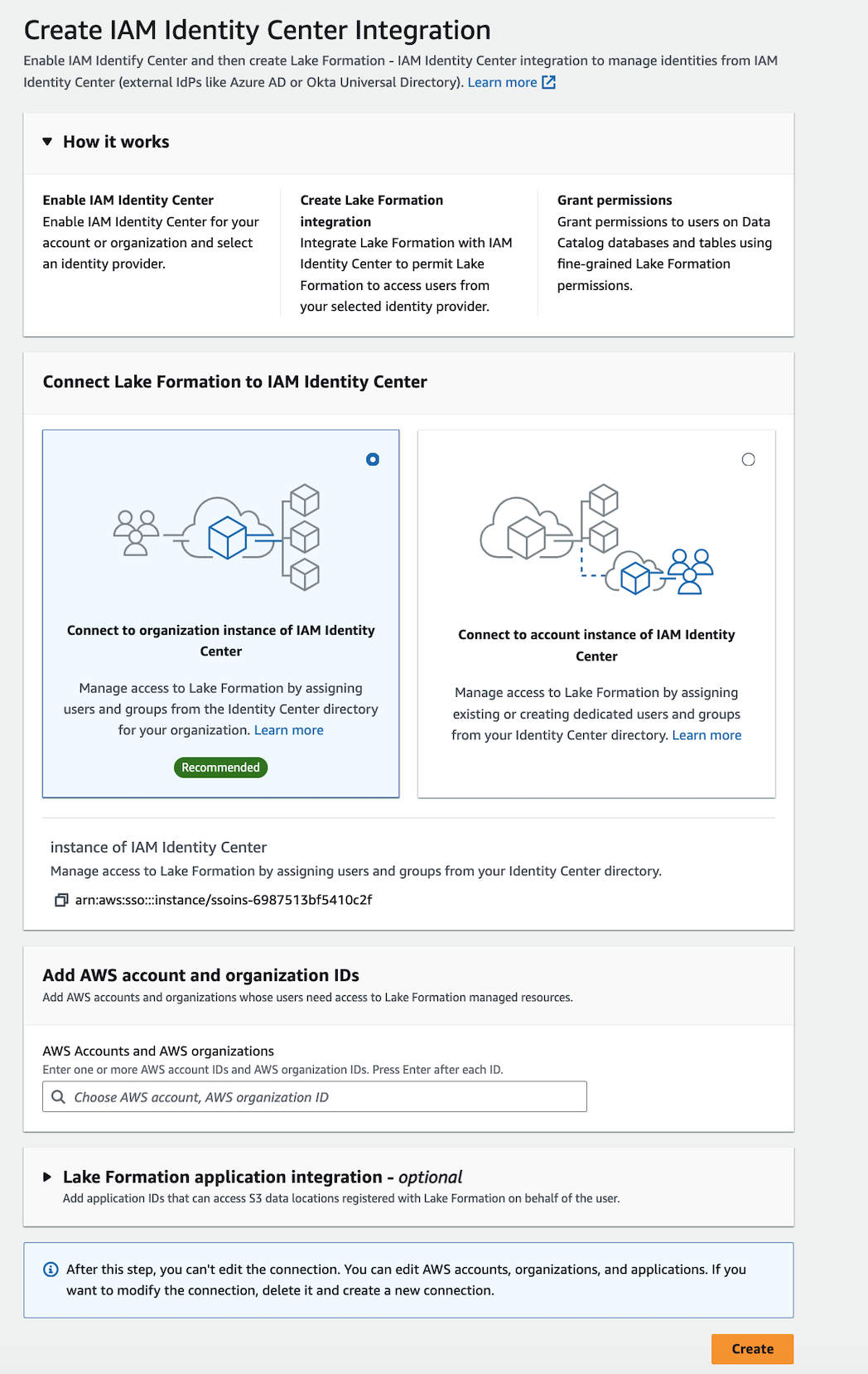
(選用) 輸入一或多個 AWS 帳戶 IDs、組織 IDs和/或組織單位 IDs,以允許外部帳戶存取 Data Catalog 資源。當 IAM Identity Center 使用者或群組嘗試存取 Lake Formation 受管 Data Catalog 資源時,Lake Formation 會擔任 IAM 角色來授權中繼資料存取。如果 IAM 角色屬於沒有 AWS Glue 資源政策和 AWS RAM 資源共用的外部帳戶,IAM Identity Center 使用者和群組將無法存取資源,即使他們具有 Lake Formation 許可。
Lake Formation 使用 AWS Resource Access Manager (AWS RAM) 服務與外部帳戶和組織共用資源。 AWS RAM 向承授者帳戶傳送邀請,以接受或拒絕資源共用。
如需詳細資訊,請參閱從 接受資源共享邀請 AWS RAM。
注意
Lake Formation 允許來自外部帳戶的 IAM 角色代表 IAM Identity Center 使用者和群組擔任電信業者角色,以存取 Data Catalog 資源,但只能在擁有帳戶中的 Data Catalog 資源上授予許可。如果您嘗試將許可授予外部帳戶中 Data Catalog 資源上的 IAM Identity Center 使用者和群組,Lake Formation 會擲出下列錯誤 -「委託人不支援跨帳戶授予。」
(選用) 在建立 Lake Formation 整合畫面上,指定可在向 Lake Formation 註冊的 Amazon S3 位置存取資料的第三方應用程式的 ARNs。Lake Formation 根據有效許可,以 AWS STS 字符的形式將範圍縮小的臨時憑證提供給已註冊的 Amazon S3 位置,以便授權的應用程式可以代表使用者存取資料。
-
(選用) 在建立 Lake Formation 整合畫面上,勾選信任身分傳播中的 Amazon Redshift Connect 核取方塊,以透過 IDC 啟用 Amazon Redshift 聯合許可探索。Lake Formation 會根據有效許可將身分傳播到下游,以便授權的應用程式可以代表使用者存取資料。
選取提交。
Lake Formation 管理員完成步驟並建立整合後,IAM Identity Center 屬性會出現在 Lake Formation 主控台中。完成這些任務可讓 Lake Formation 成為已啟用 IAM Identity Center 的應用程式。主控台內的屬性包括整合狀態。整合狀態會顯示
Success何時完成。此狀態指出 IAM Identity Center 組態是否已完成。
- AWS CLI
-
-
下列範例示範如何建立 Lake Formation 與 IAM Identity Center 的整合。您也可以指定應用程式的
Status(ENABLED、DISABLED)。aws lakeformation create-lake-formation-identity-center-configuration \ --catalog-id<123456789012>\ --instance-arn<arn:aws:sso:::instance/ssoins-112111f12ca1122p>\ --share-recipients '[{"DataLakePrincipalIdentifier": "<123456789012>"}, {"DataLakePrincipalIdentifier": "<555555555555>"}]' \ --external-filtering '{"AuthorizedTargets": ["<app arn1>", "<app arn2>"], "Status": "ENABLED"}' -
下列範例示範如何檢視 Lake Formation 與 IAM Identity Center 的整合。
aws lakeformation describe-lake-formation-identity-center-configuration --catalog-id<123456789012> -
下列範例顯示如何啟用
Redshift:Connect授權。授權可以啟用或停用。aws lakeformation create-lake-formation-identity-center-configuration \ --instance-arn <arn:aws:sso:::instance/ssoins-112111f12ca1122p> \ --service-integrations '[{ "Redshift": [{ "RedshiftConnect": { "Authorization": "ENABLED" } }] }]' -
使用
describe-lake-formation-identity-center-configuration命令來描述湖形成身分中心應用程式。Redshift:Connect服務整合對於跨服務和跨叢集 IdC 身分傳播至關重要:aws lakeformation describe-lake-formation-identity-center-configuration --catalog-id <123456789012>回應:
{
    "CatalogId": "CATALOG ID",
    "InstanceArn": "INSTANCE ARN",
    "ApplicationArn": "APPLICATION ARN",
    "ShareRecipients": [],
    "ServiceIntegrations": [
        {
            "Redshift": [
                {
                    "RedshiftConnect": {
                        "Authorization": "ENABLED"
                    }
                }
            ]
        }
    ]
}
-
跨多個 使用 IAM Identity Center AWS 區域
Lake Formation 在多個 中支援 IAM Identity Center AWS 區域。您可以將 IAM Identity Center 從主要區域擴展 AWS 區域 到其他區域,透過接近使用者和可靠性來改善效能。在 IAM Identity Center 中新增新區域時,您可以在新區域中建立 Lake Formation Identity Center 應用程式,而無需從主要區域複寫身分。如需在多個區域中開始使用 IAM Identity Center 的詳細資訊,請參閱《IAM Identity Center 使用者指南》中的多區域 IAM Identity Center。
