Amazon Forecast 不再提供給新客戶。Amazon Forecast 的現有客戶可以繼續正常使用服務。進一步了解」
本文為英文版的機器翻譯版本,如內容有任何歧義或不一致之處,概以英文版為準。
使用 自動化 CloudFormation
在本教學課程中,您會使用 AWS CloudFormation 自動化堆疊來啟動 Amazon Forecast 管道,並使用示範資料集產生預測。
AWS 預測 CloudFormation 堆疊:
-
使用Machine Learning解決方案範本部署改善預測準確性 CloudFormation 。
-
將 NYC Taxi 資料集
部署至預測資料 Amazon S3 儲存貯體。 -
在預測中自動啟動示範 NYC 計程車預測管道。
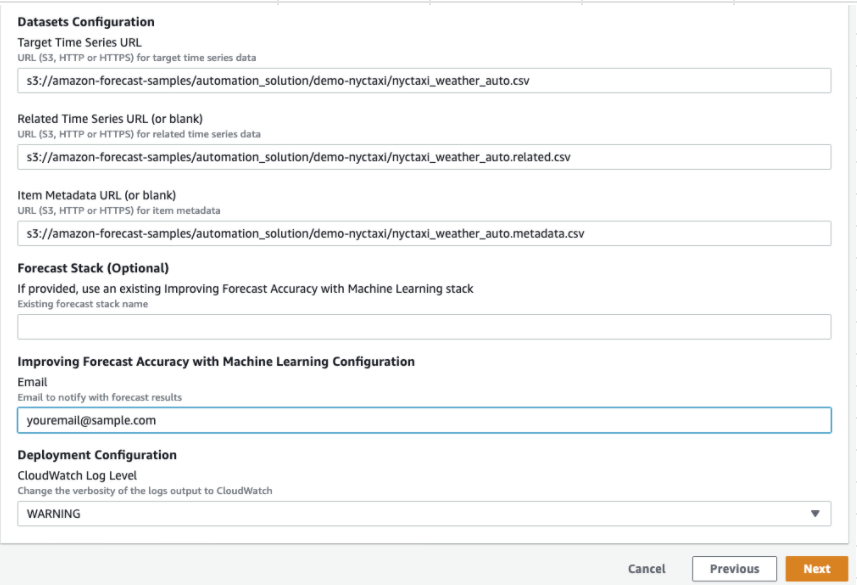
CloudFormation 範本會預先載入目標時間序列、相關時間序列和項目中繼資料示範資料集。主控台中的相關欄位會預先填入其各自的 S3 位置。
使用示範資料集完成本教學課程後,您可以使用相同的自動化堆疊,使用您自己的資料集產生預測。
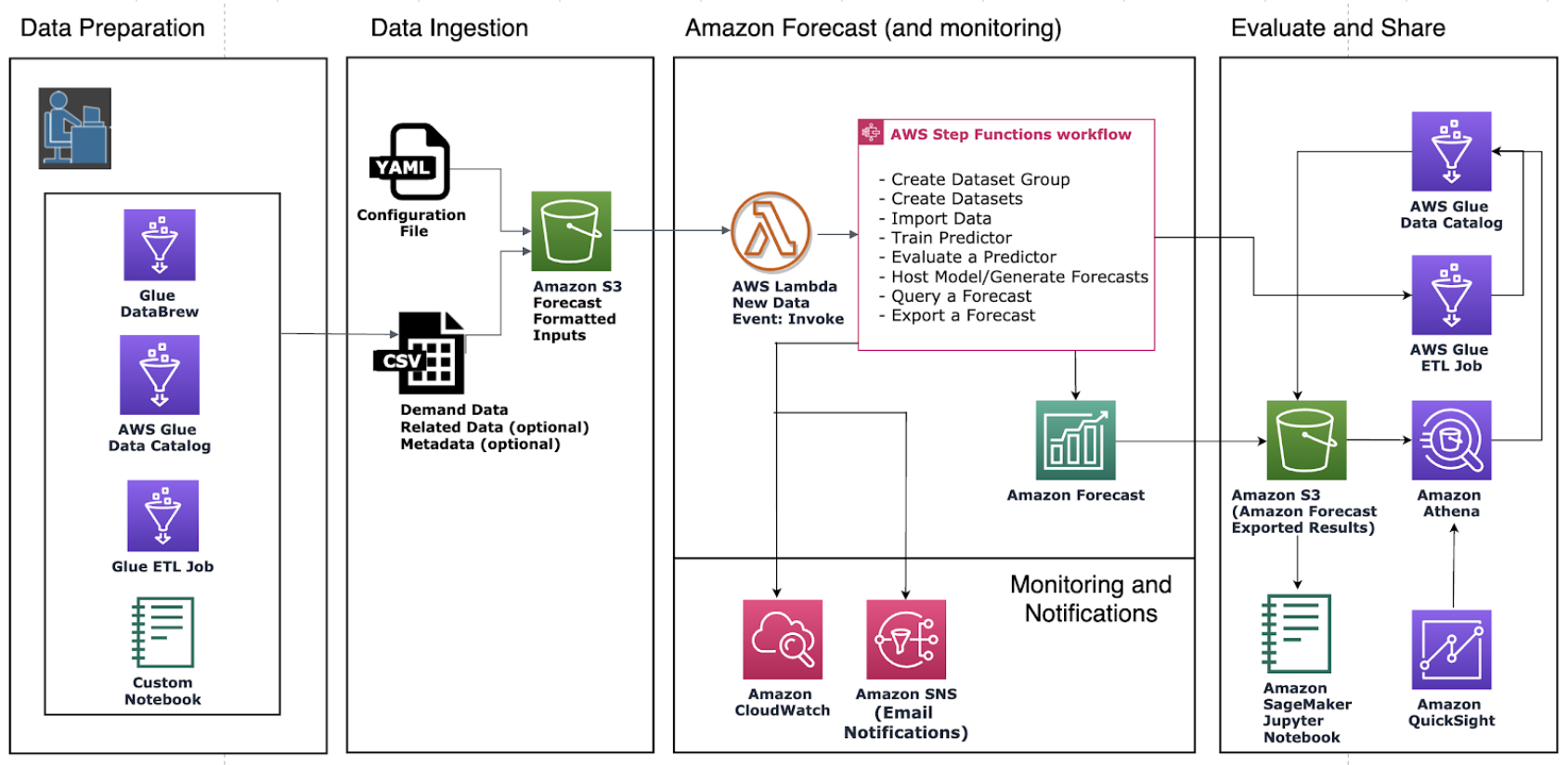
下圖顯示本教學課程中所使用的元件。
先決條件
開始教學課程之前,請確定您已登入 AWS 帳戶 並安裝 CloudFormation 範本:
-
登入您的 AWS 帳戶。如果您還沒有 ,請建立 AWS 帳戶
。 -
安裝 AWS CloudFormation 範本。選擇離您最近的區域:
-
孟買:ap-south-1
-
新加坡:ap-southeast-1
-
法蘭克福:eu-cental-1
-
愛爾蘭:eu-west-1
-
維吉尼亞北部:us-east-1
-
俄亥俄州:us-east-2
-
奧勒岡:us-west-2
這會使用 NYC Taxi 資料集
部署用於預測自動化的 CloudFormation 範本
使用 NYC Taxi 資料集部署 CloudFormation 範本
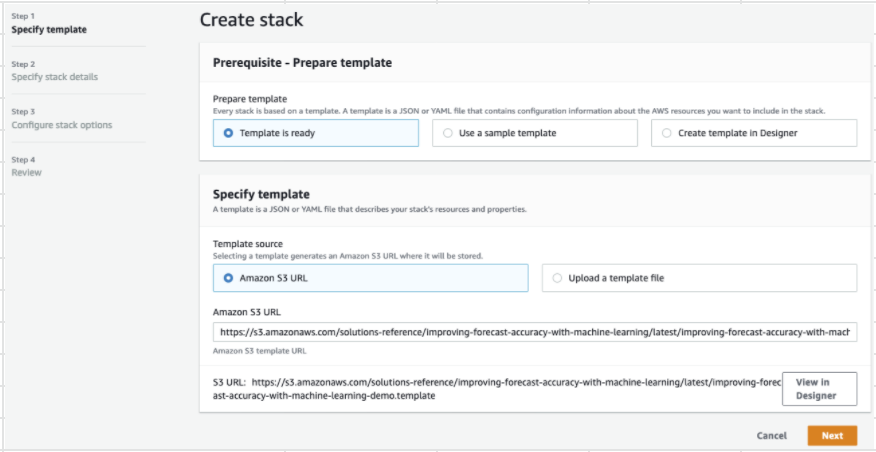
步驟 1:接受預設值,然後選擇下一步。
步驟 2:提供通知的電子郵件地址,然後選擇下一步。
步驟 3:接受預設值,然後選擇下一步。
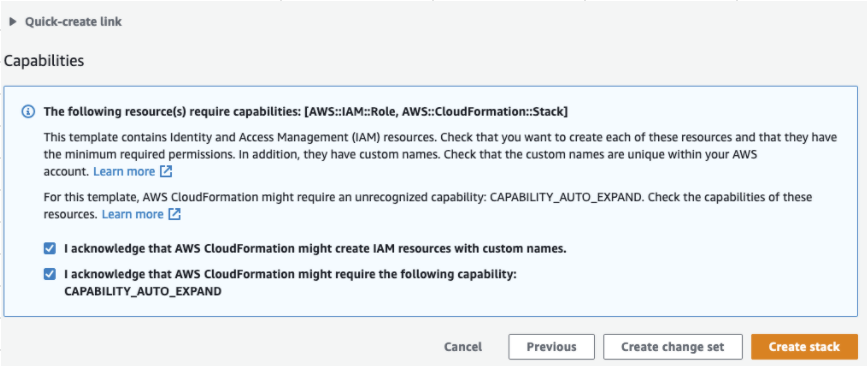
步驟 4:針對功能,選取兩個核取方塊以允許 CloudFormation 建立 AWS Identity and Access Management (IAM) 資源和巢狀堆疊。選擇建立堆疊。
您已在預測中部署 CloudFormation 範本。
清除
部署此 CloudFormation 範本之後,您可以清除新建立的資源、使用自己的資料集部署 CloudFormation 堆疊,以及探索其他部署選項。
-
清除:刪除示範堆疊會保留「使用Machine Learning提升預測準確性」堆疊。刪除「使用Machine Learning改善預測準確性」堆疊會保留所有 S3、Athena、QuickSight 和預測資料。
-
使用您自己的資料集:若要使用您自己的時間序列資料部署此 CloudFormation 範本,請在步驟 2 的資料集組態區段中輸入資料集的 S3 位置。
-
其他部署選項:如需更多部署選項,請參閱自動部署。如果資料已可用,您可以在沒有示範資料的情況下部署堆疊。
