本文為英文版的機器翻譯版本,如內容有任何歧義或不一致之處,概以英文版為準。
在其他區域中建立監視器
每個截止日期雲端監視器都會管理單一資源 AWS 區域。若要管理其他區域中的資源,您可以在每個區域中建立個別的監視器。
如果您的 IAM Identity Center 執行個體在您要建立監視器的區域中無法使用,您有下列選項:
-
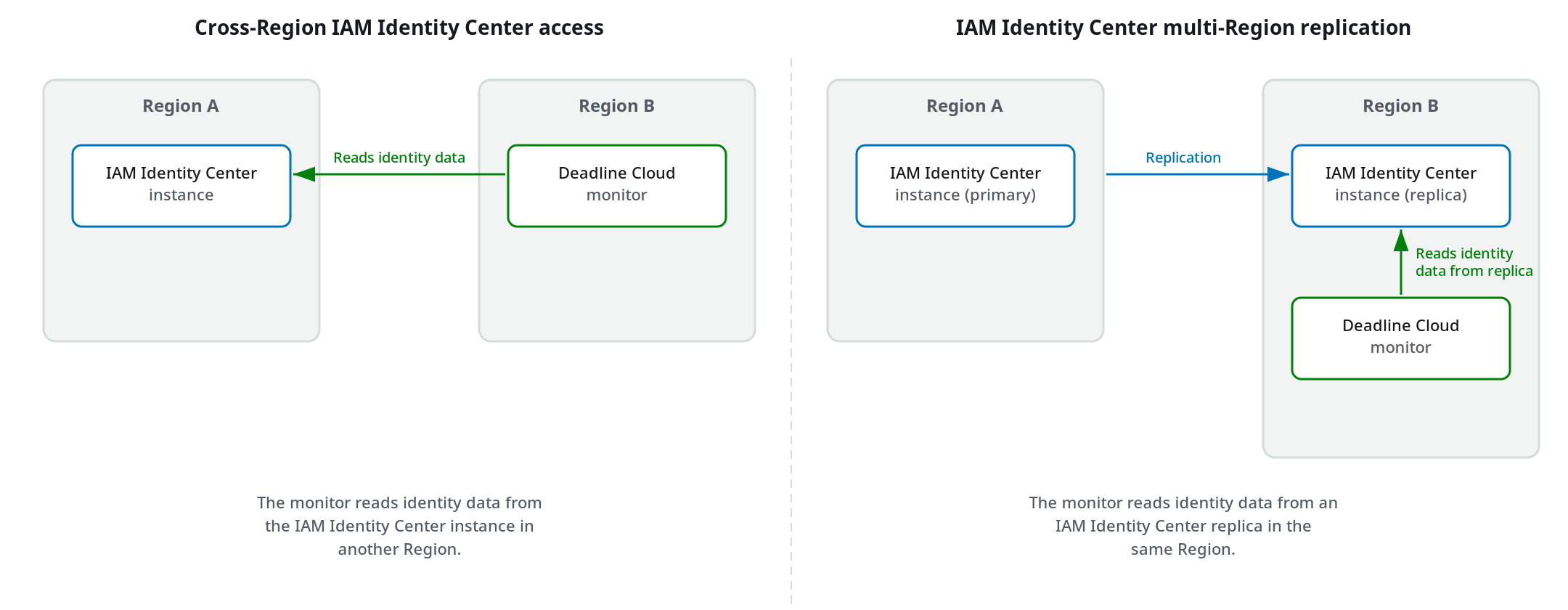
跨區域 IAM Identity Center 存取 – 在不同的區域中建立監視器,而截止日期雲端會從 IAM Identity Center 執行個體所在的區域讀取 IAM Identity Center 身分資料。此選項不需要變更 IAM Identity Center 組態。
-
IAM Identity Center 多區域複寫 – 將 IAM Identity Center 執行個體複寫至其他區域,讓這些區域中的監視器在相同區域中使用 IAM Identity Center 複本。此選項提供較低的延遲和區域可用性,但需要額外的 IAM Identity Center 組態。
下圖顯示每種方法的運作方式。
下表比較這兩種方法。
| 考量事項 | 跨區域 IAM Identity Center 存取 | IAM Identity Center 多區域複寫 |
|---|---|---|
| 設定要求 | 不需要額外的 IAM Identity Center 設定 | 需要設定 IAM Identity Center 複寫 |
| 身分資料位置 | 僅保留在 IAM Identity Center 區域中 | 複寫到每個設定的 區域 |
| 延遲 | 取決於與 IAM Identity Center 區域的距離 | 當 IAM Identity Center 複本位於相同區域時,降低延遲 |
| 區域可用性 | 取決於 IAM Identity Center 區域的可用性 | 如果 IAM Identity Center 主要區域無法使用,則繼續運作 |
跨區域 IAM Identity Center 存取
透過跨區域 IAM Identity Center 存取,您可以在與 IAM Identity Center 執行個體不同的區域中建立截止日期雲端監視器。Deadline Cloud 會從 IAM Identity Center 執行個體所在的區域讀取 IAM Identity Center 身分資料。
當您使用截止日期雲端主控台建立監視器時,主控台會自動偵測您的 IAM Identity Center 執行個體,並將監視器連接到該執行個體,即使執行個體位於不同的區域。當您使用 AWS SDK 建立監視器時,請指定 IAM Identity Center 執行個體所在的區域。
考量事項
-
跨區域 IAM Identity Center 存取需要您的 IAM Identity Center 執行個體位於商業中 AWS 區域。不支援選擇加入區域中的 IAM Identity Center 執行個體。
-
您無法在建立監視器後變更 IAM Identity Center 區域。
IAM Identity Center 多區域複寫
IAM Identity Center 多區域複寫會將您的 IAM Identity Center 身分存放區資料,包括使用者、群組和群組成員資格,同步至其他 AWS 區域。啟用複寫至區域後,您可以將該區域中的監視器連線至 IAM Identity Center 複本。
多區域複寫在下列案例中非常有用:
-
對於較接近複寫區域的使用者,您需要較低的延遲。
-
您需要可在 IAM Identity Center 主要區域無法使用時繼續運作的監視器。
若要啟用多區域複寫,請參閱《IAM Identity Center 使用者指南》中的跨多個 使用 AWS 區域 IAM Identity Center。為區域啟用複寫之後,您可以使用 主控台或 AWS SDK 在該區域建立截止日期雲端監控。
