本文為英文版的機器翻譯版本,如內容有任何歧義或不一致之處,概以英文版為準。
# 修改 Amazon Aurora 資料庫叢集
您可以變更資料庫叢集的設定,以達成各種任務,像是變更其備份保留期或資料庫連線埠。您也可以修改資料庫叢集中的資料庫執行個體,以達成各種任務,像是變更其資料庫執行個體類別或啟用 Performance Insights (效能洞見)。本主題將引導您修改 Aurora 資料庫叢集和其資料庫執行個體,並說明兩者的設定。
建議您先在測試資料庫叢集或資料庫執行個體上測試任何變更,然後再修改生產資料庫叢集或資料庫執行個體,以便充分了解每一項變更的影響。這在升級資料庫版本時特別重要。
**Topics**
+ [使用主控台、CLI 和 API 修改資料庫叢集](#Aurora.Modifying.Cluster)
+ [修改資料庫叢集中的資料庫執行個體](#Aurora.Modifying.Instance)
+ [變更資料庫主要使用者的密碼](#Aurora.Modifying.Password)
+ [Amazon Aurora的設定](#Aurora.Modifying.Settings)
+ [Amazon Aurora 資料庫叢集不適用的設定](#Aurora.Modifying.SettingsNotApplicableDBClusters)
+ [Amazon Aurora 資料庫執行個體不適用的設定](#Aurora.Modifying.SettingsNotApplicable)
## 使用主控台、CLI 和 API 修改資料庫叢集
您可以使用 AWS 管理主控台、 AWS CLI或 RDS API 修改資料庫叢集。
**注意**
大多數修改都可以立即套用,或下次維護時段時套用。部分修改 (例如開啟刪除保護) 會立即套用,無論您何時選擇套用這些修改。
在 中變更主密碼一律 AWS 管理主控台 會立即套用。
如果您使用 SSL 端點並變更資料庫叢集識別符,請停止並重新啟動資料庫叢集,以更新 SSL 端點。如需詳細資訊,請參閱[停用和啟動 Amazon Aurora 資料庫叢集](aurora-cluster-stop-start.md)。
### 主控台
**修改資料庫叢集**
1. 登入 AWS 管理主控台 並開啟位於 https://[https://console.aws.amazon.com/rds/](https://console.aws.amazon.com/rds/) 的 Amazon RDS 主控台。
1. 在導覽窗格中選擇 **Databases (資料庫)**,然後選取您要修改的資料庫叢集。
1. 選擇 **Modify (修改)**。**Modify DB cluster (修改資料庫叢集)** 頁面隨即出現。
1. 變更您要的任何設定。如需每項設定的相關資訊,請參閱 [Amazon Aurora的設定](#Aurora.Modifying.Settings)。
**注意**
在 中 AWS 管理主控台,某些執行個體層級變更僅適用於目前的資料庫執行個體,而其他則適用於整個資料庫叢集。至於設定會套用至資料庫執行個體或資料庫叢集,詳細資訊請參閱[Amazon Aurora的設定](#Aurora.Modifying.Settings) 中的設定範圍。若要變更在 中的執行個體層級修改整個資料庫叢集的設定 AWS 管理主控台,請遵循 中的指示[修改資料庫叢集中的資料庫執行個體](#Aurora.Modifying.Instance)。
1. 當所有變更都如您所願時,請選擇 **Continue (繼續)** 並查看修改摘要。
1. 若要立即套用變更,請選取 **Apply immediately (立即套用)**。
1. 在確認頁面上,檢閱您的變更。如果都正確,請選擇 **Modify cluster (修改叢集)** 以儲存您的變更。
或者,選擇 **Back (上一步)** 以編輯變更,或是選擇 **Cancel (取消)** 以取消變更。
### AWS CLI
若要使用 修改資料庫叢集 AWS CLI,請呼叫 [modify-db-cluster](https://docs.aws.amazon.com/cli/latest/reference/rds/modify-db-cluster.html) 命令。指定資料庫叢集識別符,以及您要修改設定的值。如需每項設定的相關資訊,請參閱 [Amazon Aurora的設定](#Aurora.Modifying.Settings)。
**注意**
部分設定僅會套用至資料庫執行個體。若要變更這些設定,請遵循[修改資料庫叢集中的資料庫執行個體](#Aurora.Modifying.Instance)中的說明。
**Example**
以下命令會修改 `mydbcluster`,將備份保留期設為 1 週 (7 天)。
對於 Linux、macOS 或 Unix:
```
aws rds modify-db-cluster \
--db-cluster-identifier {{mydbcluster}} \
--backup-retention-period {{7}}
```
在 Windows 中:
```
aws rds modify-db-cluster ^
--db-cluster-identifier {{mydbcluster}} ^
--backup-retention-period {{7}}
```
### RDS API
若要使用 Amazon RDS API 修改資料庫叢集,呼叫 [ModifyDBCluster](https://docs.aws.amazon.com/AmazonRDS/latest/APIReference/API_ModifyDBCluster.html) 操作。指定資料庫叢集識別符,以及您要修改設定的值。如需每項參數的相關資訊,請參閱 [Amazon Aurora的設定](#Aurora.Modifying.Settings)。
**注意**
部分設定僅會套用至資料庫執行個體。若要變更這些設定,請遵循[修改資料庫叢集中的資料庫執行個體](#Aurora.Modifying.Instance)中的說明。
## 修改資料庫叢集中的資料庫執行個體
您可以使用 AWS 管理主控台 AWS CLI、 或 RDS API 修改資料庫叢集中的資料庫執行個體。
修改資料庫執行個體時,您可以立即套用變更。若要立即套用變更,請在 中選取**立即套用**選項 AWS 管理主控台、在呼叫 時使用 `--apply-immediately` 參數 AWS CLI,或是在使用 Amazon RDS API `true`時將 `ApplyImmediately` 參數設定為 。
如果您不選擇立即套用變更,變更會延遲到下一個維護時段為止。在下一個維護時段期間,會套用任何這些延遲變更。如果您選擇立即套用變更,則會套用您的新變更以及先前延遲的變更。
若要查看下一個維護時段待定的修改,請使用 [describe-db-clusters](https://awscli.amazonaws.com/v2/documentation/api/latest/reference/rds/describe-db-clusters.html) AWS CLI 命令並檢查 `PendingModifiedValues` 欄位。
**重要**
如果有任何延遲的修改需要停機才能執行,則**Apply immediately** (立即套用) 選項可能會導致資料庫執行個體未預期的停機。資料庫叢集中的其他資料庫執行個體沒有任何停機時間。
`describe-pending-maintenance-actions` CLI 命令的輸出中不會列出您延遲的修改。維護動作只包括您為下一個維護時段排程的系統升級。
### 主控台
**修改資料庫叢集中的資料庫執行個體**
1. 登入 AWS 管理主控台 ,並在 https://[https://console.aws.amazon.com/rds/](https://console.aws.amazon.com/rds/) 開啟 Amazon RDS 主控台。
1. 在導覽窗格中選擇 **Databases (資料庫)**,然後選取您要修改的資料庫執行個體。
1. 在 **Actions (動作)** 中,選擇 **Modify (修改)**。**Modify DB instance (修改資料庫執行個體)** 頁面隨即出現。
1. 變更您要的任何設定。如需每項設定的相關資訊,請參閱 [Amazon Aurora的設定](#Aurora.Modifying.Settings)。
**注意**
有些設定會套用到整個資料庫叢集,且必須在叢集層級進行變更。若要變更這些設定,請遵循[使用主控台、CLI 和 API 修改資料庫叢集](#Aurora.Modifying.Cluster)中的說明。
在 中 AWS 管理主控台,某些執行個體層級變更僅適用於目前的資料庫執行個體,而其他則適用於整個資料庫叢集。至於設定會套用至資料庫執行個體或資料庫叢集,詳細資訊請參閱[Amazon Aurora的設定](#Aurora.Modifying.Settings) 中的設定範圍。
1. 當所有變更都如您所願時,請選擇 **Continue (繼續)** 並查看修改摘要。
1. 若要立即套用變更,請選取 **Apply immediately (立即套用)**。
1. 在確認頁面上,檢閱您的變更。如果都正確,請選擇 **Modify DB instance** (修改資料庫執行個體) 以儲存您的變更。
或者,選擇 **Back (上一步)** 以編輯變更,或是選擇 **Cancel (取消)** 以取消變更。
### AWS CLI
若要使用 修改資料庫叢集中的資料庫執行個體 AWS CLI,請呼叫 [modify-db-instance](https://docs.aws.amazon.com/cli/latest/reference/rds/modify-db-instance.html) 命令。指定資料庫執行個體識別符,以及您要修改設定的值。如需每項參數的相關資訊,請參閱 [Amazon Aurora的設定](#Aurora.Modifying.Settings)。
**注意**
部分設定會套用至整個資料庫叢集。若要變更這些設定,請遵循[使用主控台、CLI 和 API 修改資料庫叢集](#Aurora.Modifying.Cluster)中的說明。
**Example**
以下程式碼會將資料庫執行個體類別設定為 `mydbinstance`,藉此修改 `db.r4.xlarge`。使用 `--no-apply-immediately`,會在下一次維護時段期間由系統套用變更。使用 `--apply-immediately` 可立即套用變更。
對於 Linux、macOS 或 Unix:
```
aws rds modify-db-instance \
--db-instance-identifier {{mydbinstance}} \
--db-instance-class {{db.r4.xlarge}} \
{{--no-apply-immediately}}
```
在 Windows 中:
```
aws rds modify-db-instance ^
--db-instance-identifier {{mydbinstance}} ^
--db-instance-class {{db.r4.xlarge}} ^
{{--no-apply-immediately}}
```
### RDS API
若要使用 Amazon RDS API 來修改資料庫執行個體,請呼叫 [ModifyDBInstance](https://docs.aws.amazon.com/AmazonRDS/latest/APIReference/API_ModifyDBInstance.html) 操作。指定資料庫執行個體識別符,以及您要修改設定的值。如需每項參數的相關資訊,請參閱 [Amazon Aurora的設定](#Aurora.Modifying.Settings)。
**注意**
部分設定會套用至整個資料庫叢集。若要變更這些設定,請遵循[使用主控台、CLI 和 API 修改資料庫叢集](#Aurora.Modifying.Cluster)中的說明。
## 變更資料庫主要使用者的密碼
您可以使用 AWS 管理主控台 或 AWS CLI 來變更主要使用者密碼。
### 主控台
您可以使用 AWS 管理主控台修改寫入器資料庫執行個體,以變更主要使用者密碼。
**若要變更主要使用者的密碼**
1. 登入 AWS 管理主控台 ,並在 [https://console.aws.amazon.com/rds/](https://console.aws.amazon.com/rds/):// 開啟 Amazon RDS 主控台。
1. 在導覽窗格中選擇 **Databases (資料庫)**,然後選取您要修改的資料庫執行個體。
1. 在 **Actions (動作)** 中,選擇 **Modify (修改)**。
**Modify DB instance (修改資料庫執行個體)** 頁面隨即出現。
1. 輸入**新的主要密碼**。
1. 針對**確認主要密碼**,輸入相同的新密碼。
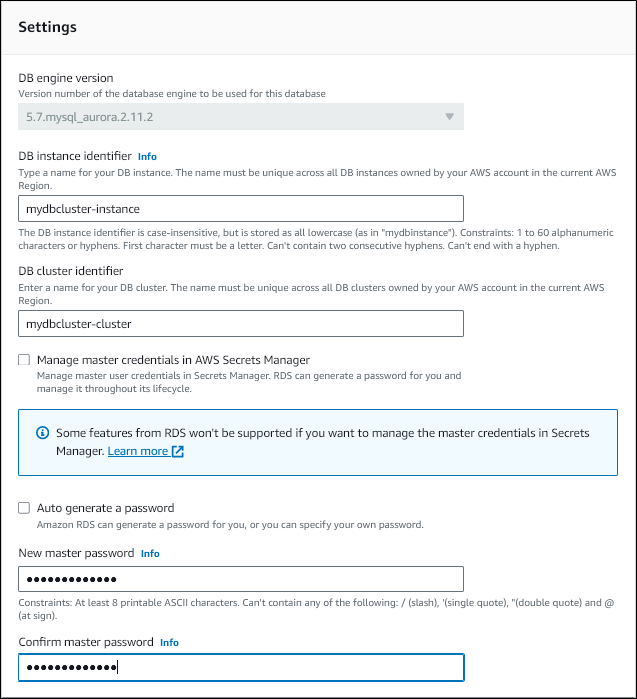
1. 選擇 **Continue (繼續)**,並檢查修改的摘要。
**注意**
密碼變更一律會立即套用。
1. 在確認頁面上,選擇 **Modify DB instance (修改資料庫執行個體)**。
### CLI
您可以使用 AWS CLI呼叫 [modify-db-cluster](https://docs.aws.amazon.com/cli/latest/reference/rds/modify-db-cluster.html) 命令來變更主要使用者密碼。指定資料庫叢集識別符和新密碼,如下列範例所示。
您不需要指定 `--apply-immediately|--no-apply-immediately`,因為密碼變更一律會立即套用。
對於 Linux、macOS 或 Unix:
```
aws rds modify-db-cluster \
--db-cluster-identifier {{mydbcluster}} \
--master-user-password {{mynewpassword}}
```
在 Windows 中:
```
aws rds modify-db-cluster ^
--db-cluster-identifier {{mydbcluster}} ^
--master-user-password {{mynewpassword}}
```
## Amazon Aurora的設定
下表所述的詳細資訊說明您可以修改的設定、修改設定的方法、設定的範圍。範圍決定了設定是否會套用至整個資料庫叢集,或是僅為特定資料庫執行個體而設定。
**注意**
如果您要修改Aurora serverless資料庫叢集,則可使用其他設定。如需這些設定的資訊,請參閱 [管理 Aurora serverless 資料庫叢集](aurora-serverless-v2-administration.md)。
由於其限制Aurora serverless,某些設定不適用於 。如需詳細資訊,請參閱[Aurora serverless 的要求與限制](aurora-serverless-v2.requirements.md)。
****
| 設定和說明 | 方法 | 範圍 | 停機時間備註 |
| --- | --- | --- | --- |
| **Auto minor version upgrade** (自動次要版本升級)
是否要讓資料庫執行個體自動接收可用的建議次要引擎版本升級。只會在排定的維護時段安裝升級。
如需引擎更新的詳細資訊,請參閱 [Amazon Aurora PostgreSQL 的資料庫引擎更新](AuroraPostgreSQL.Updates.md) 和 [Amazon Aurora MySQL 的資料庫引擎更新Amazon Aurora MySQL 的長期支援 (LTS) 和 Beta 版](AuroraMySQL.Updates.md)。如需有關 Aurora MySQL 的 **Auto minor version upgrade (自動次要版本升級)** 設定的詳細資訊,請參閱 [啟用次要 Aurora MySQL 版本之間的自動升級](AuroraMySQL.Updates.AMVU.md)。 | 此設定預設為啟用。針對每個新叢集,請根據此設定的重要性、預期壽命上限,以及每次升級之後所執行的驗證測試量,為其選擇適當的值。 變更此設定時,請對 Aurora 叢集中的每個資料庫執行個體執行此修改。如果叢集中的任何資料庫執行個體已關閉此設定,則叢集不會自動升級。
使用 AWS 管理主控台、[修改資料庫叢集中的資料庫執行個體](#Aurora.Modifying.Instance)。
使用 AWS CLI執行 [modify-db-instance](https://docs.aws.amazon.com/cli/latest/reference/rds/modify-db-instance.html) 並設定 `--auto-minor-version-upgrade\|--no-auto-minor-version-upgrade`選項。
使用 RDS API,呼叫 [ModifyDBInstance](https://docs.aws.amazon.com/AmazonRDS/latest/APIReference/API_ModifyDBInstance.html),並設定 `AutoMinorVersionUpgrade` 參數。 | 整個資料庫叢集 | 進行此變更時,不會發生停機。當 Aurora 套用自動升級時,將會在未來的維護期間發生中斷。 |
| **Backup retention period (備份保留期間)**
自動備份保留的天數。最小值為 `1`。
如需詳細資訊,請參閱[備份](Aurora.Managing.Backups.md#Aurora.Managing.Backups.Backup)。 | 使用 AWS 管理主控台、[使用主控台、CLI 和 API 修改資料庫叢集](#Aurora.Modifying.Cluster)。
使用 AWS CLI執行 [modify-db-cluster](https://docs.aws.amazon.com/cli/latest/reference/rds/modify-db-cluster.html) 並設定 `--backup-retention-period`選項。
使用 RDS API,呼叫 [ModifyDBCluster](https://docs.aws.amazon.com/AmazonRDS/latest/APIReference/API_ModifyDBCluster.html),並設定 `BackupRetentionPeriod` 參數。 | 整個資料庫叢集 | 進行此變更時,不會發生停機。 |
| **備份時段 (開始時間)**
進行自動資料庫備份的時間範圍。備份時段是國際標準時間 (UTC) 格式的開始時間和以小時為單位的持續時間。
Aurora 備份是持續且增量的,但是備份時段是用來建立在備份保留期間內保留的每日系統備份。您可以複製該檔案,在超出保留期間後仍然保留。
資料庫叢集的維護時段和備份時段不能重疊。
如需詳細資訊,請參閱[備份時段](Aurora.Managing.Backups.md#Aurora.Managing.Backups.BackupWindow)。 | 使用 AWS 管理主控台、[使用主控台、CLI 和 API 修改資料庫叢集](#Aurora.Modifying.Cluster)。
使用 AWS CLI執行 [modify-db-cluster](https://docs.aws.amazon.com/cli/latest/reference/rds/modify-db-cluster.html) 並設定 `--preferred-backup-window`選項。
使用 RDS API,呼叫 [ModifyDBCluster](https://docs.aws.amazon.com/AmazonRDS/latest/APIReference/API_ModifyDBCluster.html),並設定 `PreferredBackupWindow` 參數。 | 整個資料庫叢集。 | 進行此變更時,不會發生停機。 |
| **容量設定**
Aurora serverless 資料庫叢集的擴展屬性。您只能在 `serverless` 資料庫引擎模式下修改資料庫叢集的擴展屬性。 | 使用 AWS 管理主控台、[使用主控台、CLI 和 API 修改資料庫叢集](#Aurora.Modifying.Cluster)。
使用 AWS CLI執行 [modify-db-cluster](https://docs.aws.amazon.com/cli/latest/reference/rds/modify-db-cluster.html) 並設定 `--scaling-configuration`選項。
使用 RDS API,呼叫 [ModifyDBCluster](https://docs.aws.amazon.com/AmazonRDS/latest/APIReference/API_ModifyDBCluster.html),並設定 `ScalingConfiguration` 參數。 | 整個資料庫叢集 | 進行此變更時,不會發生停機。
系統會立即進行變更。此設定會忽略立即套用設定。 |
| **憑證授權單位**
資料庫執行個體所使用之伺服器憑證的憑證授權單位 (CA)。 | 使用 AWS 管理主控台、[修改資料庫叢集中的資料庫執行個體](#Aurora.Modifying.Instance)。
使用 AWS CLI執行 [modify-db-instance](https://docs.aws.amazon.com/cli/latest/reference/rds/modify-db-instance.html) 並設定 `--ca-certificate-identifier`選項。
使用 RDS API,呼叫 [ModifyDBInstance](https://docs.aws.amazon.com/AmazonRDS/latest/APIReference/API_ModifyDBInstance.html),並設定 `CACertificateIdentifier` 參數。 | 僅限指定的資料庫執行個體 | 只有在資料庫引擎不支援無需重新啟動即可輪換時,才會發生中斷。您可以使用 [ describe-db-engine-versions](https://docs.aws.amazon.com/cli/latest/reference/rds/describe-db-engine-versions.html) AWS CLI 命令來判斷資料庫引擎是否支援旋轉而不重新啟動。 |
| **叢集儲存組態**
資料庫叢集的儲存類型:**Aurora I/O-Optimized** 或 **Aurora Standard**。
如需詳細資訊,請參閱[Amazon Aurora 資料庫叢集的儲存組態](Aurora.Overview.StorageReliability.md#aurora-storage-type)。 | 使用 AWS 管理主控台、[使用主控台、CLI 和 API 修改資料庫叢集](#Aurora.Modifying.Cluster)。
使用 AWS CLI執行 [modify-db-cluster](https://docs.aws.amazon.com/cli/latest/reference/rds/modify-db-cluster.html) 並設定 `--storage-type`選項。
使用 RDS API,呼叫 [ModifyDBCluster](https://docs.aws.amazon.com/AmazonRDS/latest/APIReference/API_ModifyDBCluster.html),並設定 `StorageType` 參數。 | 整個資料庫叢集 | 使用 Optimized Reads 執行個體類別變更 Aurora PostgreSQL 資料庫叢集的儲存類型會導致中斷。變更具有其他執行個體類別類型的叢集儲存類型時,不會發生這種情況。如需資料庫執行個體類別類型的詳細資訊,請參閱 [資料庫執行個體類別的類型](Concepts.DBInstanceClass.Types.md)。 |
| Copy tags to snapshots (將標籤複製到快照)選取以指定讓針對此資料庫叢集定義的標籤,複製到從這個資料庫叢集建立的資料庫快照中。如需詳細資訊,請參閱[標記 Amazon Aurora 和 Amazon RDS 資源](USER_Tagging.md)。 | 使用 AWS 管理主控台、[使用主控台、CLI 和 API 修改資料庫叢集](#Aurora.Modifying.Cluster)。
使用 AWS CLI,執行[https://docs.aws.amazon.com/cli/latest/reference/rds/modify-db-cluster.html](https://docs.aws.amazon.com/cli/latest/reference/rds/modify-db-cluster.html)並設定 `--copy-tags-to-snapshot`或 `--no-copy-tags-to-snapshot`選項。
使用 RDS API,呼叫 [https://docs.aws.amazon.com/AmazonRDS/latest/APIReference/API_ModifyDBCluster.html](https://docs.aws.amazon.com/AmazonRDS/latest/APIReference/API_ModifyDBCluster.html),並設定 `CopyTagsToSnapshot` 參數。 | 整個資料庫叢集 | 進行此變更時,不會發生停機。 |
| Database authentication (資料庫身分驗證您想要使用的資料庫身分驗證。
適用於 MySQL:[See the AWS documentation website for more details](http://docs.aws.amazon.com/zh_tw/AmazonRDS/latest/AuroraUserGuide/Aurora.Modifying.html)
適用於 PostgreSQL:[See the AWS documentation website for more details](http://docs.aws.amazon.com/zh_tw/AmazonRDS/latest/AuroraUserGuide/Aurora.Modifying.html) | 使用 AWS 管理主控台、[使用主控台、CLI 和 API 修改資料庫叢集](#Aurora.Modifying.Cluster)。
使用 AWS CLI執行 [ modify-db-cluster](https://docs.aws.amazon.com/cli/latest/reference/rds/modify-db-cluster.html),並設定下列選項:[See the AWS documentation website for more details](http://docs.aws.amazon.com/zh_tw/AmazonRDS/latest/AuroraUserGuide/Aurora.Modifying.html)
使用 RDS API,呼叫 [ModifyDBCluster](https://docs.aws.amazon.com/AmazonRDS/latest/APIReference/API_ModifyDBCluster.html) 並設定下列參數:[See the AWS documentation website for more details](http://docs.aws.amazon.com/zh_tw/AmazonRDS/latest/AuroraUserGuide/Aurora.Modifying.html) | 整個資料庫叢集 | 進行此變更時,不會發生停機。 |
| **Database port** (資料庫連線埠)
您要用來存取資料庫叢集的連線埠。 | 使用 AWS 管理主控台、[使用主控台、CLI 和 API 修改資料庫叢集](#Aurora.Modifying.Cluster)。
使用 AWS CLI執行[https://docs.aws.amazon.com/cli/latest/reference/rds/modify-db-cluster.html](https://docs.aws.amazon.com/cli/latest/reference/rds/modify-db-cluster.html)並設定 `--port`選項。
使用 RDS API,呼叫 [https://docs.aws.amazon.com/AmazonRDS/latest/APIReference/API_ModifyDBCluster.html](https://docs.aws.amazon.com/AmazonRDS/latest/APIReference/API_ModifyDBCluster.html),並設定 `Port` 參數。 | 整個資料庫叢集 | 進行此變更時,會發生停機。資料庫叢集中的所有資料庫執行個體皆會立即重新開機。 |
| **DB cluster identifier** (資料庫叢集識別符)
資料庫叢集識別符 此值會以小寫字母字串的形式儲存。
當您變更資料庫叢集識別符時,資料庫叢集端點會變更。資料庫叢集中資料庫執行個體的端點不會變更。 | 使用 AWS 管理主控台、[使用主控台、CLI 和 API 修改資料庫叢集](#Aurora.Modifying.Cluster)。
使用 AWS CLI執行[https://docs.aws.amazon.com/cli/latest/reference/rds/modify-db-cluster.html](https://docs.aws.amazon.com/cli/latest/reference/rds/modify-db-cluster.html)並設定 `--new-db-cluster-identifier`選項。
使用 RDS API,呼叫 [https://docs.aws.amazon.com/AmazonRDS/latest/APIReference/API_ModifyDBCluster.html](https://docs.aws.amazon.com/AmazonRDS/latest/APIReference/API_ModifyDBCluster.html),並設定 `NewDBClusterIdentifier` 參數。 | 整個資料庫叢集 | 進行此變更時,不會發生停機。 |
| **DB cluster parameter group (資料庫叢集參數群組)**
要與資料庫叢集建立關聯的資料庫叢集參數群組。
如需詳細資訊,請參閱[Amazon Aurora 的參數群組](USER_WorkingWithParamGroups.md)。 | 使用 AWS 管理主控台、[使用主控台、CLI 和 API 修改資料庫叢集](#Aurora.Modifying.Cluster)。
使用 AWS CLI執行[https://docs.aws.amazon.com/cli/latest/reference/rds/modify-db-cluster.html](https://docs.aws.amazon.com/cli/latest/reference/rds/modify-db-cluster.html)並設定 `--db-cluster-parameter-group-name`選項。
使用 RDS API,呼叫 [https://docs.aws.amazon.com/AmazonRDS/latest/APIReference/API_ModifyDBCluster.html](https://docs.aws.amazon.com/AmazonRDS/latest/APIReference/API_ModifyDBCluster.html),並設定 `DBClusterParameterGroupName` 參數。 | 整個資料庫叢集 | 進行此變更時,不會發生停機。當您變更參數群組時,某些參數的變更會立即套用到資料庫叢集的資料庫執行個體,而不需要重新啟動。其他參數的變更只有在資料庫叢集的資料庫執行個體重新啟動之後才會套用。 |
| **DB instance class** (資料庫執行個體類別)
您要使用的資料庫執行個體類別。
如需詳細資訊,請參閱[Amazon Aurora 資料庫執行個體類別](Concepts.DBInstanceClass.md)。 | 使用 AWS 管理主控台、[修改資料庫叢集中的資料庫執行個體](#Aurora.Modifying.Instance)。
使用 AWS CLI執行[https://docs.aws.amazon.com/cli/latest/reference/rds/modify-db-instance.html](https://docs.aws.amazon.com/cli/latest/reference/rds/modify-db-instance.html)並設定 `--db-instance-class`選項。
使用 RDS API,呼叫 [https://docs.aws.amazon.com/AmazonRDS/latest/APIReference/API_ModifyDBInstance.html](https://docs.aws.amazon.com/AmazonRDS/latest/APIReference/API_ModifyDBInstance.html),並設定 `DBInstanceClass` 參數。 | 僅限指定的資料庫執行個體 | 進行此變更時,會發生停機。 |
| **DB instance identifier** (資料庫執行個體識別碼):
資料庫執行個體識別符。此值會以小寫字母字串的形式儲存。 | 使用 AWS 管理主控台、[修改資料庫叢集中的資料庫執行個體](#Aurora.Modifying.Instance)。
使用 AWS CLI執行[https://docs.aws.amazon.com/cli/latest/reference/rds/modify-db-instance.html](https://docs.aws.amazon.com/cli/latest/reference/rds/modify-db-instance.html)並設定 `--new-db-instance-identifier`選項。
使用 RDS API,呼叫 [https://docs.aws.amazon.com/AmazonRDS/latest/APIReference/API_ModifyDBInstance.html](https://docs.aws.amazon.com/AmazonRDS/latest/APIReference/API_ModifyDBInstance.html),並設定 `NewDBInstanceIdentifier` 參數。 | 僅限指定的資料庫執行個體 | 進行此變更時,會發生停機。
RDS 會重新啟動資料庫執行個體以更新下列項目:[See the AWS documentation website for more details](http://docs.aws.amazon.com/zh_tw/AmazonRDS/latest/AuroraUserGuide/Aurora.Modifying.html) |
| **DB parameter group** (資料庫參數群組)
要與資料庫執行個體建立關聯的資料庫參數群組。
如需詳細資訊,請參閱[Amazon Aurora 的參數群組](USER_WorkingWithParamGroups.md)。 | 使用 AWS 管理主控台、[修改資料庫叢集中的資料庫執行個體](#Aurora.Modifying.Instance)。
使用 AWS CLI執行[https://docs.aws.amazon.com/cli/latest/reference/rds/modify-db-instance.html](https://docs.aws.amazon.com/cli/latest/reference/rds/modify-db-instance.html)並設定 `--db-parameter-group-name`選項。
使用 RDS API,呼叫 [https://docs.aws.amazon.com/AmazonRDS/latest/APIReference/API_ModifyDBInstance.html](https://docs.aws.amazon.com/AmazonRDS/latest/APIReference/API_ModifyDBInstance.html),並設定 `DBParameterGroupName` 參數。 | 僅限指定的資料庫執行個體 | 進行此變更時,不會發生停機。
當您建立新資料庫參數群組與資料庫執行個體的關聯時,只有在資料庫執行個體重新開機之後,才會套用修改過的靜態參數和動態參數。不過,如果您在將資料庫參數群組與資料庫執行個體建立關聯之後修改該群組中的動態參數,則會立即套用這些變更,而不需重新開機。
如需詳細資訊,請參閱[Amazon Aurora 的參數群組](USER_WorkingWithParamGroups.md)及[重新啟動 Amazon Aurora 資料庫叢集或 Amazon Aurora 資料庫執行個體](USER_RebootCluster.md)。 |
| **刪除保護**
**啟用刪除保護**可避免您的資料庫叢集遭意外刪除。如需詳細資訊,請參閱[Aurora 叢集的刪除保護](USER_DeleteCluster.md#USER_DeletionProtection)。 | 使用 AWS 管理主控台、[使用主控台、CLI 和 API 修改資料庫叢集](#Aurora.Modifying.Cluster)。
使用 AWS CLI執行[https://docs.aws.amazon.com/cli/latest/reference/rds/modify-db-cluster.html](https://docs.aws.amazon.com/cli/latest/reference/rds/modify-db-cluster.html)並設定 `--deletion-protection\|--no-deletion-protection`選項。
使用 RDS API,呼叫 [https://docs.aws.amazon.com/AmazonRDS/latest/APIReference/API_ModifyDBCluster.html](https://docs.aws.amazon.com/AmazonRDS/latest/APIReference/API_ModifyDBCluster.html),並設定 `DeletionProtection` 參數。 | 整個資料庫叢集 | 進行此變更時,不會發生停機。 |
| **引擎版本**
您要使用的資料庫引擎的版本。升級生產資料庫叢集之前,建議您先在測試資料庫叢集上測試升級程序,以確認其持續時間及驗證您的應用程式。 | 使用 AWS 管理主控台、[使用主控台、CLI 和 API 修改資料庫叢集](#Aurora.Modifying.Cluster)。
使用 AWS CLI執行[https://docs.aws.amazon.com/cli/latest/reference/rds/modify-db-cluster.html](https://docs.aws.amazon.com/cli/latest/reference/rds/modify-db-cluster.html)並設定 `--engine-version`選項。
使用 RDS API,呼叫 [https://docs.aws.amazon.com/AmazonRDS/latest/APIReference/API_ModifyDBCluster.html](https://docs.aws.amazon.com/AmazonRDS/latest/APIReference/API_ModifyDBCluster.html),並設定 `EngineVersion` 參數。 | 整個資料庫叢集 | 進行此變更時,會發生停機。 |
| **Enhanced monitoring** (增強型監控)
**Enable enhanced monitoring (啟用增強型監控)**,以針對資料庫執行個體執行所在的作業系統即時收集指標。
如需詳細資訊,請參閱[使用增強型監控來監控作業系統指標](USER_Monitoring.OS.md)。 | 使用 AWS 管理主控台、[修改資料庫叢集中的資料庫執行個體](#Aurora.Modifying.Instance)。
使用 AWS CLI執行[https://docs.aws.amazon.com/cli/latest/reference/rds/modify-db-instance.html](https://docs.aws.amazon.com/cli/latest/reference/rds/modify-db-instance.html)並設定 `--monitoring-role-arn` 和 `--monitoring-interval`選項。
使用 RDS API,呼叫 [https://docs.aws.amazon.com/AmazonRDS/latest/APIReference/API_ModifyDBInstance.html](https://docs.aws.amazon.com/AmazonRDS/latest/APIReference/API_ModifyDBInstance.html),並設定 `MonitoringRoleArn` 和 `MonitoringInterval` 參數。 | 僅限指定的資料庫執行個體 | 進行此變更時,不會發生停機。 |
| **Log exports (日誌匯出)**
選取要發佈到 Amazon CloudWatch Logs 的日誌類型。
如需詳細資訊,請參閱[Aurora MySQL資料庫日誌檔案](USER_LogAccess.Concepts.MySQL.md)。 | 使用 AWS 管理主控台、[使用主控台、CLI 和 API 修改資料庫叢集](#Aurora.Modifying.Cluster)。
使用 AWS CLI執行[https://docs.aws.amazon.com/cli/latest/reference/rds/modify-db-cluster.html](https://docs.aws.amazon.com/cli/latest/reference/rds/modify-db-cluster.html)並設定 `--cloudwatch-logs-export-configuration`選項。
使用 RDS API,呼叫 [https://docs.aws.amazon.com/AmazonRDS/latest/APIReference/API_ModifyDBCluster.html](https://docs.aws.amazon.com/AmazonRDS/latest/APIReference/API_ModifyDBCluster.html),並設定 `CloudwatchLogsExportConfiguration` 參數。 | 整個資料庫叢集 | 進行此變更時,不會發生停機。 |
| **Maintenance window (維護時段)**
進行系統維護的時間範圍。系統維護包括升級 (如適用)。維護時段是國際標準時間 (UTC) 格式的開始時間和以小時為單位的持續時間。
如果您將時段設定為目前時間,則目前時間與結束時段之間必須至少間隔 30 分鐘,以確保能套用任何擱置的變更。
您可以為資料庫叢集和資料庫叢集中的每個資料庫執行個體分開設定維護時段。當修改的範圍是整個資料庫叢集時,修改會在資料庫叢集的維護時段期間進行。當修改的範圍是資料庫執行個體時,修改會在該資料庫執行個體的維護時段期間進行。
資料庫叢集的維護時段和備份時段不能重疊。
如需詳細資訊,請參閱[Amazon RDS 維護時段](USER_UpgradeDBInstance.Maintenance.md#Concepts.DBMaintenance)。 | 若要使用 變更資料庫叢集的維護時段 AWS 管理主控台,請[使用主控台、CLI 和 API 修改資料庫叢集](#Aurora.Modifying.Cluster)。
若要使用 變更資料庫執行個體的維護時段 AWS 管理主控台,請[修改資料庫叢集中的資料庫執行個體](#Aurora.Modifying.Instance)。
若要使用 變更資料庫叢集的維護時段 AWS CLI,請執行 [https://docs.aws.amazon.com/cli/latest/reference/rds/modify-db-cluster.html](https://docs.aws.amazon.com/cli/latest/reference/rds/modify-db-cluster.html) 並設定 `--preferred-maintenance-window`選項。
若要使用 變更資料庫執行個體的維護時段 AWS CLI,請執行 [https://docs.aws.amazon.com/cli/latest/reference/rds/modify-db-instance.html](https://docs.aws.amazon.com/cli/latest/reference/rds/modify-db-instance.html) 並設定 `--preferred-maintenance-window`選項。
若要使用 RDS API 變更資料庫叢集的維護時段,請呼叫 [https://docs.aws.amazon.com/AmazonRDS/latest/APIReference/API_ModifyDBCluster.html](https://docs.aws.amazon.com/AmazonRDS/latest/APIReference/API_ModifyDBCluster.html),並設定 `PreferredMaintenanceWindow` 參數。
若要使用 RDS API 變更資料庫執行個體的維護時段,請呼叫 [https://docs.aws.amazon.com/AmazonRDS/latest/APIReference/API_ModifyDBInstance.html](https://docs.aws.amazon.com/AmazonRDS/latest/APIReference/API_ModifyDBInstance.html),並設定 `PreferredMaintenanceWindow` 參數。 | 整個資料庫叢集或單一資料庫執行個體 | 如果您有一個或多個會導致停機的擱置動作,並將維護時段變更為涵蓋目前時間,則系統會立即套用這些擱置動作,最終導致停機。 |
| **在 中管理主登入資料 AWS Secrets Manager**
選取 **Manage master credentials in AWS Secrets Manager** (管理 AWS Secrets Manager中的主要憑證) 以秘密管理 Secrets Manager 中的主要使用者密碼。
選擇性地選擇要用來保護機密的 KMS 金鑰。從您帳戶中的 KMS 金鑰進行選擇,或輸入來自不同帳戶的金鑰。
如需詳細資訊,請參閱[使用 Amazon Aurora 和 進行密碼管理 AWS Secrets Manager](rds-secrets-manager.md)。
如果 Aurora 已在管理資料庫叢集的主要使用者密碼,您可以選擇 **Rotate secret immediately** (立即輪換秘密) 來輪換主要使用者密碼。
如需詳細資訊,請參閱[使用 Amazon Aurora 和 進行密碼管理 AWS Secrets Manager](rds-secrets-manager.md)。 | 使用 AWS 管理主控台、[修改資料庫叢集中的資料庫執行個體](#Aurora.Modifying.Instance)。
使用 AWS CLI執行[https://docs.aws.amazon.com/cli/latest/reference/rds/modify-db-cluster.html](https://docs.aws.amazon.com/cli/latest/reference/rds/modify-db-cluster.html)並設定 `--manage-master-user-password \| --no-manage-master-user-password` 和 `--master-user-secret-kms-key-id`選項。若要立即輪換主要使用者密碼,請設定 `--rotate-master-user-password` 選項。
使用 RDS API,呼叫 [https://docs.aws.amazon.com/AmazonRDS/latest/APIReference/API_ModifyDBCluster.html](https://docs.aws.amazon.com/AmazonRDS/latest/APIReference/API_ModifyDBCluster.html),並設定 `ManageMasterUserPassword` 和 `MasterUserSecretKmsKeyId` 參數。若要立即輪換主要使用者密碼,請將 `RotateMasterUserPassword` 參數設為 `true`。 | 整個資料庫叢集 | 進行此變更時,不會發生停機。 |
| **Network type (網路類型)**
資料庫叢集支援的 IP 定址通訊協定。
**IPv4** 指定資源只能透過網際網路通訊協定第 4 版 (IPv4) 定址通訊協定與資料庫叢集通訊。
**Dual-stack mode** (雙堆疊模式) 指定資源可透過 IPv4、IPv6 或兩者與資料庫叢集通訊。如果您有任何資源必須透過 IPv6 定址通訊協定與您的資料庫叢集通訊,請使用雙堆疊模式。若要使用雙堆疊模式,請確定至少有兩個跨越兩個可用區域的子網路,同時支援 IPv4 和 IPv6 網路通訊協定。此外,請確保將 IPv6 CIDR 區塊與您指定的資料庫子網路群組中的所有子網路相關聯。
如需詳細資訊,請參閱[Amazon Aurora IP 定址](USER_VPC.WorkingWithRDSInstanceinaVPC.md#USER_VPC.IP_addressing)。 | 使用 AWS 管理主控台、[使用主控台、CLI 和 API 修改資料庫叢集](#Aurora.Modifying.Cluster)。
使用 AWS CLI執行[https://docs.aws.amazon.com/cli/latest/reference/rds/modify-db-cluster.html](https://docs.aws.amazon.com/cli/latest/reference/rds/modify-db-cluster.html)並設定 `--network-type`選項。
使用 RDS API,呼叫 [https://docs.aws.amazon.com/AmazonRDS/latest/APIReference/API_ModifyDBCluster.html](https://docs.aws.amazon.com/AmazonRDS/latest/APIReference/API_ModifyDBCluster.html),並設定 `NetworkType` 參數。 | 整個資料庫叢集 | 進行此變更時,不會發生停機。 |
| **新主要使用者密碼**
主要使用者的密碼。[See the AWS documentation website for more details](http://docs.aws.amazon.com/zh_tw/AmazonRDS/latest/AuroraUserGuide/Aurora.Modifying.html) | 使用 AWS 管理主控台、[修改資料庫叢集中的資料庫執行個體](#Aurora.Modifying.Instance)。
使用 AWS CLI執行[https://docs.aws.amazon.com/cli/latest/reference/rds/modify-db-cluster.html](https://docs.aws.amazon.com/cli/latest/reference/rds/modify-db-cluster.html)並設定 `--master-user-password`選項。
使用 RDS API,呼叫 [https://docs.aws.amazon.com/AmazonRDS/latest/APIReference/API_ModifyDBCluster.html](https://docs.aws.amazon.com/AmazonRDS/latest/APIReference/API_ModifyDBCluster.html),並設定 `MasterUserPassword` 參數。 | 整個資料庫叢集 | 進行此變更時,不會發生停機。 |
| **Performance Insights** (績效詳情)
是否要啟用 Performance Insights,這個工具會監控您的資料庫執行個體負載,讓您可分析資料庫效能並對其進行故障排除。
如需詳細資訊,請參閱[在 Amazon Aurora 上使用績效詳情監控資料庫負載](USER_PerfInsights.md)。 | 使用 AWS 管理主控台、[修改資料庫叢集中的資料庫執行個體](#Aurora.Modifying.Instance)。
使用 AWS CLI執行[https://docs.aws.amazon.com/cli/latest/reference/rds/modify-db-instance.html](https://docs.aws.amazon.com/cli/latest/reference/rds/modify-db-instance.html)並設定 `--enable-performance-insights\|--no-enable-performance-insights`選項。
使用 RDS API,呼叫 [https://docs.aws.amazon.com/AmazonRDS/latest/APIReference/API_ModifyDBInstance.html](https://docs.aws.amazon.com/AmazonRDS/latest/APIReference/API_ModifyDBInstance.html),並設定 `EnablePerformanceInsights` 參數。 | 僅限指定的資料庫執行個體 | 進行此變更時,不會發生停機。 |
| **Performance Insights AWS KMS key** (績效詳情)
Performance Insights 資料的加密 AWS KMS key 識別符。KMS 金鑰識別碼是 KMS 金鑰的 Amazon 資源名稱 (ARN)、金鑰識別碼或金鑰別名。
如需詳細資訊,請參閱[開啟和關閉 Aurora 的 Performance Insights](USER_PerfInsights.Enabling.md)。 | 使用 AWS 管理主控台、[修改資料庫叢集中的資料庫執行個體](#Aurora.Modifying.Instance)。
使用 AWS CLI執行[https://docs.aws.amazon.com/cli/latest/reference/rds/modify-db-instance.html](https://docs.aws.amazon.com/cli/latest/reference/rds/modify-db-instance.html)並設定 `--performance-insights-kms-key-id`選項。
使用 RDS API,呼叫 [https://docs.aws.amazon.com/AmazonRDS/latest/APIReference/API_ModifyDBInstance.html](https://docs.aws.amazon.com/AmazonRDS/latest/APIReference/API_ModifyDBInstance.html),並設定 `PerformanceInsightsKMSKeyId` 參數。 | 僅限指定的資料庫執行個體 | 進行此變更時,不會發生停機。 |
| **Performance Insights 保留期間**
Performance Insights 資料的保留時間,單位為天。保留設定為**預設值 (7 天)**。若要更長時間保留績效資料,請指定 1 - 24 個月。如需保留期間的詳細資訊,請參閱 [Performance Insights 的定價和資料保留](USER_PerfInsights.Overview.cost.md)。
如需詳細資訊,請參閱[開啟和關閉 Aurora 的 Performance Insights](USER_PerfInsights.Enabling.md)。 | 使用 AWS 管理主控台、[修改資料庫叢集中的資料庫執行個體](#Aurora.Modifying.Instance)。
使用 AWS CLI執行[https://docs.aws.amazon.com/cli/latest/reference/rds/modify-db-instance.html](https://docs.aws.amazon.com/cli/latest/reference/rds/modify-db-instance.html)並設定 `--performance-insights-retention-period`選項。
使用 RDS API,呼叫 [https://docs.aws.amazon.com/AmazonRDS/latest/APIReference/API_ModifyDBInstance.html](https://docs.aws.amazon.com/AmazonRDS/latest/APIReference/API_ModifyDBInstance.html),並設定 `PerformanceInsightsRetentionPeriod` 參數。 | 僅限指定的資料庫執行個體 | 進行此變更時,不會發生停機。 |
| **提升層**
此值指定在現有主要執行個體失敗後,Aurora 複本提升為資料庫叢集主要執行個體的順序。
如需詳細資訊,請參閱[Aurora 資料庫叢集的容錯能力](Concepts.AuroraHighAvailability.md#Aurora.Managing.FaultTolerance)。 | 使用 AWS 管理主控台、[修改資料庫叢集中的資料庫執行個體](#Aurora.Modifying.Instance)。
使用 AWS CLI執行[https://docs.aws.amazon.com/cli/latest/reference/rds/modify-db-instance.html](https://docs.aws.amazon.com/cli/latest/reference/rds/modify-db-instance.html)並設定 `--promotion-tier`選項。
使用 RDS API,呼叫 [https://docs.aws.amazon.com/AmazonRDS/latest/APIReference/API_ModifyDBInstance.html](https://docs.aws.amazon.com/AmazonRDS/latest/APIReference/API_ModifyDBInstance.html),並設定 `PromotionTier` 參數。 | 僅限指定的資料庫執行個體 | 進行此變更時,不會發生停機。 |
| **公開存取**
**Publicly accessible (可公開存取)** 用來給予資料庫執行個體一個公有 IP 地址,這表示可在 VPC 外加以存取。資料庫執行個體也必須位於 VPC 的公有子網路中,才能公開存取。
**Not publicly accessible (不可公開存取)** 將使得資料庫執行個體只能從 VPC 內部存取。
如需詳細資訊,請參閱 [在 VPC 中的網際網路中隱藏資料庫叢集](USER_VPC.WorkingWithRDSInstanceinaVPC.md#USER_VPC.Hiding)。
若要從其 Amazon VPC 之外連線至資料庫執行個體,資料庫執行個體必須可公開存取、必須使用資料庫執行個體之安全群組的傳入規則授予存取權,且必須符合其他要求。如需詳細資訊,請參閱[無法連線至 Amazon RDS 資料庫執行個體](CHAP_Troubleshooting.md#CHAP_Troubleshooting.Connecting)。
如果您的資料庫執行個體無法公開存取,您也可以使用 AWS Site-to-Site連線或 Direct Connect 連線從私有網路存取。如需詳細資訊,請參閱[網際網路流量隱私權](inter-network-traffic-privacy.md)。 | 使用 AWS 管理主控台、[修改資料庫叢集中的資料庫執行個體](#Aurora.Modifying.Instance)。
使用 AWS CLI執行[https://docs.aws.amazon.com/cli/latest/reference/rds/modify-db-instance.html](https://docs.aws.amazon.com/cli/latest/reference/rds/modify-db-instance.html)並設定 `--publicly-accessible\|--no-publicly-accessible`選項。
使用 RDS API,呼叫 [https://docs.aws.amazon.com/AmazonRDS/latest/APIReference/API_ModifyDBInstance.html](https://docs.aws.amazon.com/AmazonRDS/latest/APIReference/API_ModifyDBInstance.html),並設定 `PubliclyAccessible` 參數。 | 僅限指定的資料庫執行個體 | 進行此變更時,不會發生停機。 |
| **Serverless v2 容量設定**
Aurora serverless 資料庫叢集的資料庫容量,以 Aurora 容量單位 (ACU) 為單位進行測量。
如需詳細資訊,請參閱[設定叢集的 Aurora serverless 容量範圍](aurora-serverless-v2-administration.md#aurora-serverless-v2-setting-acus)。 | 使用 AWS 管理主控台、[使用主控台、CLI 和 API 修改資料庫叢集](#Aurora.Modifying.Cluster)。
使用 AWS CLI執行[https://docs.aws.amazon.com/cli/latest/reference/rds/modify-db-cluster.html](https://docs.aws.amazon.com/cli/latest/reference/rds/modify-db-cluster.html)並設定 `--serverless-v2-scaling-configuration`選項。
使用 RDS API,呼叫 [https://docs.aws.amazon.com/AmazonRDS/latest/APIReference/API_ModifyDBCluster.html](https://docs.aws.amazon.com/AmazonRDS/latest/APIReference/API_ModifyDBCluster.html),並設定 `ServerlessV2ScalingConfiguration` 參數。 | 整個資料庫叢集 | 進行此變更時,不會發生停機。
系統會立即進行變更。此設定會忽略立即套用設定。 |
| **安全群組**
要與資料庫叢集建立關聯的安全群組。
如需詳細資訊,請參閱[使用安全群組控制存取](Overview.RDSSecurityGroups.md)。 | 使用 AWS 管理主控台、[使用主控台、CLI 和 API 修改資料庫叢集](#Aurora.Modifying.Cluster)。
使用 AWS CLI執行[https://docs.aws.amazon.com/cli/latest/reference/rds/modify-db-cluster.html](https://docs.aws.amazon.com/cli/latest/reference/rds/modify-db-cluster.html)並設定 `--vpc-security-group-ids`選項。
使用 RDS API,呼叫 [https://docs.aws.amazon.com/AmazonRDS/latest/APIReference/API_ModifyDBCluster.html](https://docs.aws.amazon.com/AmazonRDS/latest/APIReference/API_ModifyDBCluster.html),並設定 `VpcSecurityGroupIds` 參數。 | 整個資料庫叢集 | 進行此變更時,不會發生停機。 |
| **目標恢復時段**
您希望資料庫叢集能夠恢復的時間量,單位為秒。此設定僅適用於 Aurora MySQL,且僅能用於恢復功能啟用時所建立的資料庫叢集。 | 使用 AWS 管理主控台、[使用主控台、CLI 和 API 修改資料庫叢集](#Aurora.Modifying.Cluster)。
使用 AWS CLI執行[https://docs.aws.amazon.com/cli/latest/reference/rds/modify-db-cluster.html](https://docs.aws.amazon.com/cli/latest/reference/rds/modify-db-cluster.html)並設定 `--backtrack-window`選項。
使用 RDS API,呼叫 [https://docs.aws.amazon.com/AmazonRDS/latest/APIReference/API_ModifyDBCluster.html](https://docs.aws.amazon.com/AmazonRDS/latest/APIReference/API_ModifyDBCluster.html),並設定 `BacktrackWindow` 參數。 | 整個資料庫叢集 | 進行此變更時,不會發生停機。 |
## Amazon Aurora 資料庫叢集不適用的設定
AWS CLI 命令中的下列設定[https://docs.aws.amazon.com/cli/latest/reference/rds/modify-db-cluster.html](https://docs.aws.amazon.com/cli/latest/reference/rds/modify-db-cluster.html)和 RDS API 操作[https://docs.aws.amazon.com/AmazonRDS/latest/APIReference/API_ModifyDBCluster.html](https://docs.aws.amazon.com/AmazonRDS/latest/APIReference/API_ModifyDBCluster.html)不適用於 Amazon Aurora 資料庫叢集。
**注意**
您無法使用 AWS 管理主控台 修改 Aurora 資料庫叢集的這些設定。
****
| AWS CLI 設定 | RDS API 設定 |
| --- | --- |
| `--allocated-storage` | `AllocatedStorage` |
| `--auto-minor-version-upgrade \| --no-auto-minor-version-upgrade` | `AutoMinorVersionUpgrade` |
| `--db-cluster-instance-class` | `DBClusterInstanceClass` |
| `--enable-performance-insights \| --no-enable-performance-insights` | `EnablePerformanceInsights` |
| `--iops` | `Iops` |
| `--monitoring-interval` | `MonitoringInterval` |
| `--monitoring-role-arn` | `MonitoringRoleArn` |
| `--option-group-name` | `OptionGroupName` |
| `--performance-insights-kms-key-id` | `PerformanceInsightsKMSKeyId` |
| `--performance-insights-retention-period` | `PerformanceInsightsRetentionPeriod` |
## Amazon Aurora 資料庫執行個體不適用的設定
AWS CLI 命令[https://docs.aws.amazon.com/cli/latest/reference/rds/modify-db-instance.html](https://docs.aws.amazon.com/cli/latest/reference/rds/modify-db-instance.html)和 RDS API 操作中的下列設定[https://docs.aws.amazon.com/AmazonRDS/latest/APIReference/API_ModifyDBInstance.html](https://docs.aws.amazon.com/AmazonRDS/latest/APIReference/API_ModifyDBInstance.html)不適用於 Amazon Aurora 資料庫執行個體。
**注意**
您無法使用 AWS 管理主控台 修改 Aurora 資料庫執行個體的這些設定。
****
| AWS CLI 設定 | RDS API 設定 |
| --- | --- |
| `--allocated-storage` | `AllocatedStorage` |
| `--allow-major-version-upgrade\|--no-allow-major-version-upgrade` | `AllowMajorVersionUpgrade` |
| `--copy-tags-to-snapshot\|--no-copy-tags-to-snapshot` | `CopyTagsToSnapshot` |
| `--domain` | `Domain` |
| `--db-security-groups` | `DBSecurityGroups` |
| `--db-subnet-group-name` | `DBSubnetGroupName` |
| `--domain-iam-role-name` | `DomainIAMRoleName` |
| `--multi-az\|--no-multi-az` | `MultiAZ` |
| `--iops` | `Iops` |
| `--license-model` | `LicenseModel` |
| `--network-type` | `NetworkType` |
| `--option-group-name` | `OptionGroupName` |
| `--processor-features` | `ProcessorFeatures` |
| `--storage-type` | `StorageType` |
| `--tde-credential-arn` | `TdeCredentialArn` |
| `--tde-credential-password` | `TdeCredentialPassword` |
| `--use-default-processor-features\|--no-use-default-processor-features` | `UseDefaultProcessorFeatures` |