本文属于机器翻译版本。若本译文内容与英语原文存在差异,则一律以英文原文为准。
# 标注资源
标签是一种自定义元数据标签,您可以将其添加到资源中,以便更轻松地在搜索中识别、整理和查找。标签由两个独立部分组成:标签键和标签值。这被称为键值对。
标签键通常表示较大的类别,而标签值则表示该类别的子集。例如,您可能拥有*标签键=颜色*和*标签值=蓝色*,这样将生成键值对 `Color:Blue`。请注意,您可以将标签的值设为空的字符串,但是不能将其设为空值。省略标签值与使用空字符串效果相同。
**提示**
AWS 账单与成本管理 可以使用标签将账单分为动态类别。例如,如果您添加标签来代表公司内的不同部门,例如 `Department:Sales` 或 `Department:Legal`,则 AWS 可以为您提供每个部门的成本分配。
在中 Amazon Transcribe,您可以标记以下资源:
+ 转录作业
+ 医疗转录作业
+ 通话分析通话后转录作业
+ 自定义词汇表
+ 自定义医学词汇表
+ 自定义词汇表过滤器
+ 通话分析类别
+ 自定义语言模型
标签键的长度最多为 128 个字符,标签值的长度最多可为 256 个字符;两者都区分大小写。 Amazon Transcribe 每个资源最多支持 50 个标签。对于给定资源,每个标签键必须是唯一的,只有一个值。请注意,您的标签不能以开头,`aws:`因为系统生成的标签 AWS 保留了此前缀。您无法添加、修改或删除 `aws:*` 标签,而且它们不会计入每个资源的标签数的限制。
**特定于资源标记的 API 操作**
[https://docs.aws.amazon.com/transcribe/latest/APIReference/API_ListTagsForResource.html](https://docs.aws.amazon.com/transcribe/latest/APIReference/API_ListTagsForResource.html), [https://docs.aws.amazon.com/transcribe/latest/APIReference/API_TagResource.html](https://docs.aws.amazon.com/transcribe/latest/APIReference/API_TagResource.html), [https://docs.aws.amazon.com/transcribe/latest/APIReference/API_UntagResource.html](https://docs.aws.amazon.com/transcribe/latest/APIReference/API_UntagResource.html)
要使用标签 API,您必须在请求中包含 Amazon 资源名称 (ARN)。ARN 的格式为 `arn:partition:service:region:account-id:resource-type/resource-id`。例如,与转录作业关联的 ARN 可能如下所示:`arn:{{aws}}:transcribe:{{us-west-2}}:{{111122223333}}:transcription-job/{{my-transcription-job-name}}`
要了解有关标签的更多信息,包括最佳实践,请参阅[标记资源 AWS](https://docs.aws.amazon.com/general/latest/gr/aws_tagging.html)。
## Tag-based 访问控制
您可以使用标签来控制内部的访问权限 AWS 账户。对于基于标签的访问控制,您可以在 IAM 策略的条件元素中提供标签信息。然后,您可以使用标签及其关联的标签条件键控制对以下内容的访问:
+ **资源:**根据您为这些 Amazon Transcribe 资源分配的标签来控制对这些资源的访问权限。
+ 请使用 `aws:ResourceTag/{{key-name}}` 条件键指定必须将哪个标签键值对附加到资源。
+ **请求:**控制哪些标签可以传入请求。
+ 使用`aws:RequestTag/{{key-name}}`条件键指定可以向 IAM 用户或角色添加、修改或删除哪些标签。
+ **授权流程:**控制授权过程任何部分的基于标签的访问权限。
+ 使用 `aws:TagKeys/` 条件键控制是否可以在资源或请求中或者由主体使用特定标签键。在这种情况下,键值无关紧要。
有关基于标签的访问控制策略的示例,请参阅[基于标签查看转录作业](security_iam_id-based-policy-examples.md#tagging-transcription-policy)。
有关基于标签的访问控制的更多详细信息,请参阅[使用标签控制对 AWS 资源的访问](https://docs.aws.amazon.com/IAM/latest/UserGuide/access_tags.html)。
## 将标签添加到你的 Amazon Transcribe 资源
您可以在运行 Amazon Transcribe 任务之前或之后添加标签。使用现有的 **Create\*** 和 **Start\*** API,您可以在转录请求中添加标签。
您可以使用 **AWS 管理控制台**、**AWS CLI** 或 **AWS SDK** 添加、修改或删除标签;有关示例,请参阅以下内容:
### AWS 管理控制台
1. 登录到 [AWS 管理控制台](https://console.aws.amazon.com/transcribe/)。
1. 在导航窗格中,选择**转录作业**,然后选择**创建作业**(右上角)。这将打开**指定作业详细信息**页面。
1. 滚动到**指定作业详细信息**页面底部,找到**标签 - *可选***框,然后选择**添加新标签**。
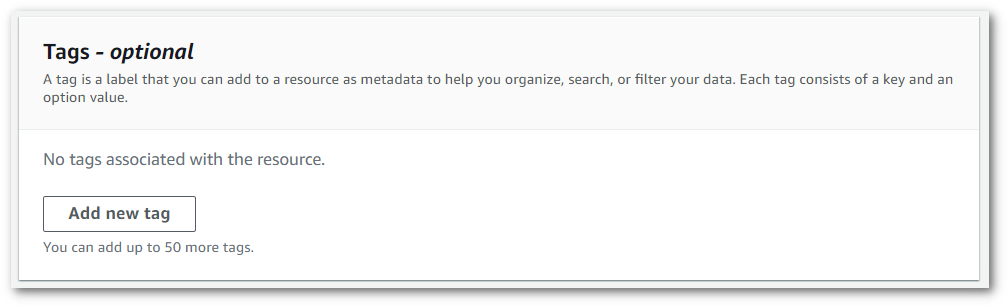
1. 在**键**字段和(可选)**值**字段中输入信息。

1. 在**指定作业详细信息**页面上填写要包含的任何其它字段,然后选择**下一步**。此时您将会看到**配置作业 - *可选***页面。
选择**创建作业**以运行您的转录作业。
1. 您可以通过导航到**转录作业**页面,选择转录作业,然后滚动到该作业信息页面的底部,来查看与转录作业相关的标签。如果要编辑标签,可以选择**管理标签**。

### AWS CLI
此示例使用 [start-transcription-job](https://awscli.amazonaws.com/v2/documentation/api/latest/reference/transcribe/start-transcription-job.html) 命令和 `Tags` 参数。有关更多信息,请参阅[https://docs.aws.amazon.com/transcribe/latest/APIReference/API_StartTranscriptionJob.html](https://docs.aws.amazon.com/transcribe/latest/APIReference/API_StartTranscriptionJob.html)和[https://docs.aws.amazon.com/transcribe/latest/APIReference/API_Tag.html](https://docs.aws.amazon.com/transcribe/latest/APIReference/API_Tag.html)。
```
aws transcribe start-transcription-job \
--region {{us-west-2}} \
--transcription-job-name {{my-first-transcription-job}} \
--media MediaFileUri=s3://{{amzn-s3-demo-bucket}}/{{my-input-files}}/{{my-media-file}}.{{flac}} \
--output-bucket-name {{amzn-s3-demo-bucket}} \
--output-key {{my-output-files}}/ \
--language-code {{en-US}} \
--tags Key={{color}},Value={{blue}} Key={{shape}},Value={{square}}
```
以下是另一个使用 [start-transcription-job](https://awscli.amazonaws.com/v2/documentation/api/latest/reference/transcribe/start-transcription-job.html) 命令的示例,以及一个将标签添加到该作业的请求正文。
```
aws transcribe start-transcription-job \
--region {{us-west-2}} \
--cli-input-json file://{{filepath}}/{{my-first-tagging-job.json}}
```
*my-first-tagging-job.json* 文件包含以下请求正文。
```
{
"TranscriptionJobName": "{{my-first-transcription-job}}",
"Media": {
"MediaFileUri": "s3://{{amzn-s3-demo-bucket}}/{{my-input-files}}/{{my-media-file}}.{{flac}}"
},
"OutputBucketName": "{{amzn-s3-demo-bucket}}",
"OutputKey": "{{my-output-files}}/",
"LanguageCode": "{{en-US}}",
"Tags": [
{
"Key": "{{color}}",
"Value": "{{blue}}"
},
{
"Key": "{{shape}}",
"Value": "{{square}}"
}
]
}
```
### 适用于 Python (Boto3) 的 AWS SDK
以下示例使用使用 [start\_transcription\_](https://boto3.amazonaws.com/v1/documentation/api/latest/reference/services/transcribe.html#TranscribeService.Client.start_transcription_job) job 方法的`Tags`参数来添加标签。 适用于 Python (Boto3) 的 AWS SDK 有关更多信息,请参阅[https://docs.aws.amazon.com/transcribe/latest/APIReference/API_StartTranscriptionJob.html](https://docs.aws.amazon.com/transcribe/latest/APIReference/API_StartTranscriptionJob.html)和[https://docs.aws.amazon.com/transcribe/latest/APIReference/API_Tag.html](https://docs.aws.amazon.com/transcribe/latest/APIReference/API_Tag.html)。
有关使用 AWS 软件开发工具包的其他示例,包括特定功能、场景和跨服务示例,请参阅本章。[使用 Amazon Transcribe 的代码示例 AWS 软件开发工具包](service_code_examples.md)
```
from __future__ import print_function
import time
import boto3
transcribe = boto3.client('transcribe', '{{us-west-2}}')
job_name = "{{my-first-transcription-job}}"
job_uri = "s3://{{amzn-s3-demo-bucket}}/{{my-input-files}}/{{my-media-file}}.{{flac}}"
transcribe.start_transcription_job(
TranscriptionJobName = job_name,
Media = {
'MediaFileUri': job_uri
},
OutputBucketName = '{{amzn-s3-demo-bucket}}',
OutputKey = '{{my-output-files}}/',
LanguageCode = '{{en-US}}',
Tags = [
{
'Key':'{{color}}',
'Value':'{{blue}}'
}
]
)
while True:
status = transcribe.get_transcription_job(TranscriptionJobName = job_name)
if status['TranscriptionJob']['TranscriptionJobStatus'] in ['COMPLETED', 'FAILED']:
break
print("Not ready yet...")
time.sleep(5)
print(status)
```