本文属于机器翻译版本。若本译文内容与英语原文存在差异,则一律以英文原文为准。
# 使用本地微软 Active Direct AWS Managed Microsoft AD ory 集中解析 DNS
*Brian Westmoreland,Amazon Web Services*
## Summary
此模式为同时使用 AWS Directory Service for Microsoft Active Directory (AWS Managed Microsoft AD) 和 Amazon Route 53 在 AWS 多账户环境中集中 DNS 解析提供了指导。在这种模式中, AWS DNS 命名空间是本地 DNS 命名空间的子域。此模式还提供了有关如何将本地 DNS 服务器配置为在本地 DNS 解决方案使用 Microsoft Active Directory AWS 时将查询转发到的指导。
## 先决条件和限制
**先决条件**
+ 使用 AWS Organizations设置的 AWS 多账户环境。
+ 之间已建立网络连接 AWS 账户。
+ 在 AWS 和本地环境之间建立网络连接(通过使用 AWS Direct Connect 或任何类型的 VPN 连接)。
+ AWS Command Line Interface (AWS CLI) 在本地工作站上配置。
+ AWS Resource Access Manager (AWS RAM) 用于在账户之间共享 Route 53 规则。因此,必须在 AWS Organizations 环境中启用共享,如长[篇故事](#centralize-dns-resolution-by-using-aws-managed-microsoft-ad-and-on-premises-microsoft-active-directory-epics)部分所述。
**限制**
+ AWS Managed Microsoft AD 标准版的股票上限为 5 股。
+ AWS Managed Microsoft AD 企业版的股票上限为 125 股。
+ 这种模式下的解决方案仅限于通过 AWS 区域 该支持共享 AWS RAM。
**产品版本**
+ 在 Windows Server 2008、2012、2012 R2 或 2016 上运行的 Microsoft Active Directory。
## 架构
**目标架构**
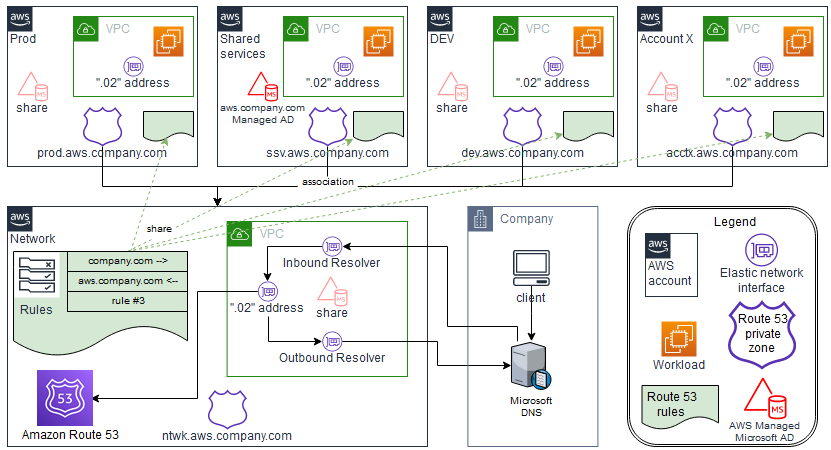
在此设计中 AWS Managed Microsoft AD ,安装在共享服务中 AWS 账户。尽管这不是必需的,但该模式假定了这种配置。如果您以不同的 AWS Managed Microsoft AD 方式进行配置 AWS 账户,则可能需要相应地修改 [Epics](#centralize-dns-resolution-by-using-aws-managed-microsoft-ad-and-on-premises-microsoft-active-directory-epics) 部分中的步骤。
此设计使用 Route 53 解析器,通过使用 Route 53 规则来支持名称解析。如果本地 DNS 解决方案使用 Microsoft DNS,则为 AWS 命名空间 (`aws.company.com`)(公司 DNS 命名空间 (`company.com`) 的子域)创建条件转发规则并不简单。如果您尝试创建传统的条件转发器,将会导致错误。这是因为 Microsoft Active Directory 已经被认为对的任何 `company.com` 子域具有权威性。要解决此错误,必须首先为创建一个 `aws.company.com` 委托,委托该命名空间的权限。然后,您可创建条件转发器。
每个分支账户的虚拟私有云 (VPC) 可以根据根命名空间拥有自己的唯一 DNS AWS 命名空间。在此设计中,每个分支账户将账户名称的缩写附加到基本 AWS 命名空间。在分支账户中创建私有托管区域后,这些区域将与分支账户中的本地 VPC 以及中央 AWS 网络账户中的 VPC 相关联。这样,中央 AWS 网络账户就可以回答与分支账户相关的 DNS 查询。这样,Route 53 和 Route 就可以 AWS Managed Microsoft AD 共同承担管理 AWS 命名空间 (`aws.company.com`) 的责任。
**自动化和扩展**
此设计使用 Route 53 解析器端点在本地环境 AWS 之间扩展 DNS 查询。每个 Route 53 Resolver 端点包含多个弹性网络接口(分布在多个可用区),每个网络接口每秒最多可处理 10,000 个查询。Route 53 解析器支持每个端点最多 6 个 IP 地址,因此该设计总共支持每秒多达 60,000 个 DNS 查询,分布在多个可用区中,以实现高可用性。
此外,这种模式自动考虑了 AWS未来增长。无需修改本地配置的 DNS 转发规则,即可支持新增的私有托管区域 VPCs 及其关联的私有托管区域 AWS。
## 工具
**AWS 服务**
+ [AWS Directory Service for Microsoft Active Directory](https://docs.aws.amazon.com/directoryservice/latest/admin-guide/directory_microsoft_ad.html)允许你的目录感知工作负载和 AWS 资源使用中的 Microsoft Active Directory。 AWS Cloud
+ [AWS Organizations](https://docs.aws.amazon.com/organizations/latest/userguide/orgs_introduction.html)是一项账户管理服务,可帮助您将多个账户整合 AWS 账户 到一个由您创建和集中管理的组织中。
+ [AWS Resource Access Manager (AWS RAM)](https://docs.aws.amazon.com/ram/latest/userguide/what-is.html) 可帮助您安全地共享资源, AWS 账户 从而减少运营开销并提供可见性和可审计性。
+ [Amazon Route 53](https://docs.aws.amazon.com/Route53/latest/DeveloperGuide/Welcome.html) 是一种可用性高、可扩展性强的 DNS Web 服务。
**工具**
+ [AWS Command Line Interface (AWS CLI)](https://docs.aws.amazon.com/cli/latest/userguide/cli-chap-welcome.html) 是一个开源工具,可帮助您 AWS 服务 通过命令行外壳中的命令进行交互。在此模式中, AWS CLI 用于配置 Route 53 授权。
## 操作说明
### 创建和共享 AWS Managed Microsoft AD 目录
| Task | 说明 | 所需技能 |
| --- | --- | --- |
| 部署 AWS Managed Microsoft AD。 | [See the AWS documentation website for more details](http://docs.aws.amazon.com/zh_cn/prescriptive-guidance/latest/patterns/centralize-dns-resolution-by-using-aws-managed-microsoft-ad-and-on-premises-microsoft-active-directory.html) | AWS 管理员 |
| 共享您的目录。 | 建立目录后,与 AWS 组织 AWS 账户 中的其他人共享。有关说明,请参阅 *AWS Directory Service 管理指南*中的[共享目录](https://docs.aws.amazon.com/directoryservice/latest/admin-guide/step2_share_directory.html)。 AWS Managed Microsoft AD 标准版的股票上限为 5 股。 企业版的股票上限为 125 股。 | AWS 管理员 |
### 配置 Route 53
| Task | 说明 | 所需技能 |
| --- | --- | --- |
| 创建 Route 53 解析器。 | Route 53 解析器简化了本地数据中心 AWS 之间的 DNS 查询解析。 [See the AWS documentation website for more details](http://docs.aws.amazon.com/zh_cn/prescriptive-guidance/latest/patterns/centralize-dns-resolution-by-using-aws-managed-microsoft-ad-and-on-premises-microsoft-active-directory.html)尽管不需要使用中央 AWS 网络账户 VPC,但其余步骤假设此配置。 | AWS 管理员 |
| 创建 Route 53 规则。 | 您的特定使用案例可能需要大量 Route 53 规则,但您需要配置以下规则作为基准:[See the AWS documentation website for more details](http://docs.aws.amazon.com/zh_cn/prescriptive-guidance/latest/patterns/centralize-dns-resolution-by-using-aws-managed-microsoft-ad-and-on-premises-microsoft-active-directory.html)
有关更多信息,请参阅 *Route 53 开发人员指南*中的[托管转发规则](https://docs.aws.amazon.com/Route53/latest/DeveloperGuide/resolver-rules-managing.html)。 | AWS 管理员 |
| 配置 Route 53 配置文件。 | Route 53 配置文件用于与分支账户共享规则。[See the AWS documentation website for more details](http://docs.aws.amazon.com/zh_cn/prescriptive-guidance/latest/patterns/centralize-dns-resolution-by-using-aws-managed-microsoft-ad-and-on-premises-microsoft-active-directory.html) | AWS 管理员 |
### 配置本地 Active Directory DNS
| Task | 说明 | 所需技能 |
| --- | --- | --- |
| 创建委托。 | 使用 Microsoft DNS 管理单元 (`dnsmgmt.msc`) 在 Active Directory 中为 `company.com` 命名空间创建新的委托。委托域的名称应为 `aws`。这使得 `aws.company.com` 委托的完全限定域名 (FQDN) 成为可能。使用 AWS Managed Microsoft AD 域控制器的 IP 地址作为名称服务器 IP 值,并使用`server.aws.company.com`作为名称。(此委托仅用于冗余,因为将为此命名空间创建一个优先于委托的条件转发器。) | Active Directory |
| 创建条件转发器。 | 使用 Microsoft DNS 管理单元 (`dnsmgmt.msc`) 为 `aws.company.com` 创建新条件转发器。 使用中央 DNS 中 AWS 入站 Route 53 解析器的 IP 地址 AWS 账户 作为条件转发器的目标。 | Active Directory |
### 为辐条创建 Route 53 私有托管区域 AWS 账户
| Task | 说明 | 所需技能 |
| --- | --- | --- |
| 创建 Route 53 私有托管区: | 在每个分支账户中创建 Route 53 私有托管区域。将此私有托管区域与分支账户 VPC 相关联。有关详细步骤,请参阅 *Route 53 开发人员指南*中的[创建私有托管区](https://docs.aws.amazon.com/Route53/latest/DeveloperGuide/hosted-zone-private-creating.html)。 | AWS 管理员 |
| 创建授权。 | 使用 AWS CLI 为中央 AWS 网络账户 VPC 创建授权。在每个分支 AWS 账户的上下文运行以下命令:aws route53 create-vpc-association-authorization --hosted-zone-id \
--vpc VPCRegion=,VPCId=
其中:[See the AWS documentation website for more details](http://docs.aws.amazon.com/zh_cn/prescriptive-guidance/latest/patterns/centralize-dns-resolution-by-using-aws-managed-microsoft-ad-and-on-premises-microsoft-active-directory.html) | AWS 管理员 |
| 创建关联。 | 使用为中央 AWS 网络账户 VPC 创建 Route 53 私有托管区域关联 AWS CLI。在中央 AWS 网络帐户的上下文中运行以下命令:aws route53 associate-vpc-with-hosted-zone --hosted-zone-id \
--vpc VPCRegion=,VPCId=
其中:[See the AWS documentation website for more details](http://docs.aws.amazon.com/zh_cn/prescriptive-guidance/latest/patterns/centralize-dns-resolution-by-using-aws-managed-microsoft-ad-and-on-premises-microsoft-active-directory.html) | AWS 管理员 |
## 相关资源
+ [使用 Route 53 解析器简化多账户环境中的 DNS 管理](https://aws.amazon.com/blogs/security/simplify-dns-management-in-a-multiaccount-environment-with-route-53-resolver/)(AWS 博客文章)
+ [创建你的 AWS Managed Microsoft AD](https://docs.aws.amazon.com/directoryservice/latest/admin-guide/ms_ad_getting_started_create_directory.html)(AWS Directory Service 文档)
+ [共享 AWS Managed Microsoft AD 目录](https://docs.aws.amazon.com/directoryservice/latest/admin-guide/step2_share_directory.html)(AWS Directory Service 文档)
+ [什么是 Amazon Route 53 Resolver?](https://docs.aws.amazon.com/Route53/latest/DeveloperGuide/resolver.html) (Amazon Route 53 文档)
+ [创建私有托管区](https://docs.aws.amazon.com/Route53/latest/DeveloperGuide/hosted-zone-private-creating.html)(Amazon Route 53 文档)
+ [Amazon Route 53 Profiles 是什么?](https://docs.aws.amazon.com/Route53/latest/DeveloperGuide/profiles.html) (Amazon Route 53 文档)