本文属于机器翻译版本。若本译文内容与英语原文存在差异,则一律以英文原文为准。
将 Lake Formation 与 IAM Identity Center 连接
您必须先完成以下步骤,然后才能使用 IAM Identity Center 管理身份以使用 Lake Formation 授予对数据目录资源的访问权限。您可以使用 Lake Formation 控制台或 AWS CLI创建 IAM Identity Center 集成。
- AWS 管理控制台
-
将 Lake Formation 与 IAM Identity Center 连接
登录并打开 Lake AWS 管理控制台 Formation 控制台,网址为https://console.aws.amazon.com/lakeformation/
。 在左侧导航窗格中,选择 IAM Identity Center 集成。
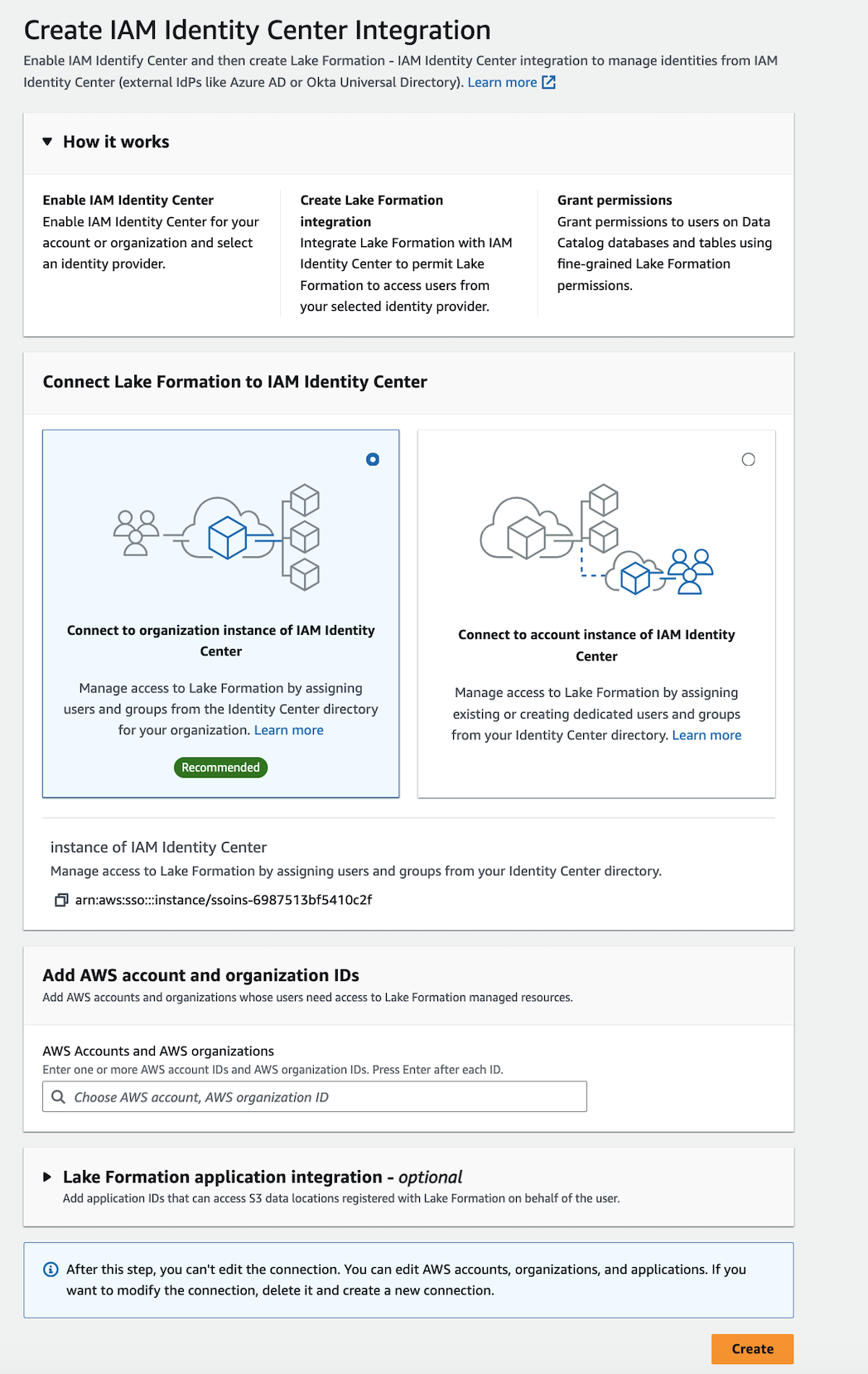
(可选)输入一个或多个有效的组织 AWS 账户 IDs IDs、 and/or 组织单位, IDs 以允许外部帐户访问数据目录资源。当 IAM Identity Center 用户或组尝试访问 Lake Formation 托管式数据目录资源时,Lake Formation 会代入 IAM 角色来授权访问元数据。如果 IAM 角色属于没有 AWS Glue 资源策略和 AWS RAM 资源共享的外部账户,那么 IAM Identity Center 用户和群组即使拥有 Lake Formation 权限,也无法访问该资源。
Lake Formation 使用 AWS Resource Access Manager (AWS RAM) 服务与外部账户和组织共享资源。 AWS RAM 向被授权者账户发送接受或拒绝资源共享的邀请。
有关更多信息,请参阅 接受来自的资源共享邀请 AWS RAM。
注意
Lake Formation 允许外部账户中的 IAM 角色代表 IAM Identity Center 用户和组作为访问数据目录资源的载体角色,但只能在所有者账户内授予对数据目录资源的权限。如果您尝试在外部账户中向 IAM Identity Center 用户和组授予对数据目录资源的权限,那么 Lake Formation 会引发以下错误:“Cross-account grants are not supported for the principal.”
(可选)在创建 Lake Formation 集成屏幕上,指定哪些第三方应用程序可以访问注册到 Lake Formation 的 Amazon S3 位置中的数据。 ARNs Lake Formation 根据有效权限以 AWS STS 令牌的形式向已注册的 Amazon S3 地点出售限定范围的临时证书,以便授权的应用程序可以代表用户访问数据。
-
(可选)在创建 Lake Formation 集成屏幕上,选中 “可信身份传播” 中的 Amazon Redshift Connect 复选框,启用通过 IDC 发现亚马逊 Redshift 联合权限。Lake Formation 根据有效的权限向下游传播身份,这样获得授权的应用程序就能够代表用户访问数据。
选择提交。
Lake Formation 管理员完成这些步骤并创建集成后,IAM Identity Center 属性将显示在 Lake Formation 控制台中。完成这些任务后,Lake Formation 将成为启用了 IAM Identity Center 的应用程序。控制台中的属性包括集成状态。集成完成后,状态显示为
Success。此状态指示 IAM Identity Center 配置是否已完成。
- AWS CLI
-
-
以下示例演示如何创建 Lake Formation 与 IAM Identity Center 的集成。您还可以指定该应用程序的
Status(ENABLED、DISABLED)。aws lakeformation create-lake-formation-identity-center-configuration \ --catalog-id<123456789012>\ --instance-arn<arn:aws:sso:::instance/ssoins-112111f12ca1122p>\ --share-recipients '[{"DataLakePrincipalIdentifier": "<123456789012>"}, {"DataLakePrincipalIdentifier": "<555555555555>"}]' \ --external-filtering '{"AuthorizedTargets": ["<app arn1>", "<app arn2>"], "Status": "ENABLED"}' -
以下示例演示如何查看 Lake Formation 与 IAM Identity Center 的集成。
aws lakeformation describe-lake-formation-identity-center-configuration --catalog-id<123456789012> -
以下示例说明如何启用
Redshift:Connect授权。可以启用或禁用授权。aws lakeformation create-lake-formation-identity-center-configuration \ --instance-arn <arn:aws:sso:::instance/ssoins-112111f12ca1122p> \ --service-integrations '[{ "Redshift": [{ "RedshiftConnect": { "Authorization": "ENABLED" } }] }]' -
使用
describe-lake-formation-identity-center-configuration命令描述湖泊形成身份中心应用程序。Redshift:Connect服务集成对于跨服务和跨集群 IdC 身份传播至关重要:aws lakeformation describe-lake-formation-identity-center-configuration --catalog-id <123456789012>响应:
{
    "CatalogId": "CATALOG ID",
    "InstanceArn": "INSTANCE ARN",
    "ApplicationArn": "APPLICATION ARN",
    "ShareRecipients": [],
    "ServiceIntegrations": [
        {
            "Redshift": [
                {
                    "RedshiftConnect": {
                        "Authorization": "ENABLED"
                    }
                }
            ]
        }
    ]
}
-
跨多个 IAM 身份中心使用 AWS 区域
Lake Formation 以多种方式支持 IAM 身份中心 AWS 区域。您可以将 IAM Identity Center 从您的主区域扩展 AWS 区域 到其他区域,从而通过靠近用户和提高可靠性来提高性能。在 IAM Identity Center 中添加新区域后,您可以在新区域中创建 Lake Formation Identity Center 应用程序,而无需从主区域复制身份。有关开始在多个区域使用 IAM 身份中心的更多详细信息,请参阅 IAM 身份中心用户指南中的多区域 IAM 身份中心。
