本文属于机器翻译版本。若本译文内容与英语原文存在差异,则一律以英文原文为准。
使用 Amazon EventBridge 事件来跟踪屏幕录制状态
借助 Amazon EventBridge,您可以近乎实时地查看代理屏幕录像的状态。每个代理屏幕录制的事件包括 success/failure 状态、带有描述的故障代码、录制位置、录制文件大小、已安装的客户端版本以及屏幕录制的开始和结束时间。
您可以与其他 AWS 服务集成,以获得代理屏幕录像的分析或监控见解:
-
使用 A mazon CloudWatch 日志见解进行查询
-
在 Amazon Quick
控制面板中获取近乎实时的提醒 -
在 Amazon Connect 之外创建汇总报告
-
将您的其他自定义数据管道解决方案与 Amazon 连接起来 EventBridge
Amazon EventBridge 事件负载格式
带有屏幕录制状态的事件-已启动
当代理接受联系人时(可能是在录制开始之前),对于启用代理屏幕录制的每一次接触,都会触发此事件。
{
  "version": "0",
  "id": "the_event_id_from_eventbridge",
  "detail-type": "Screen Recording Status Changed",
  "source": "aws.connect",
  "account": "your_aws_account_id",
  "time": "2026-01-01T00:00:00Z",
  "region": "us-west-2",
  "resources": [
    "arn:aws:connect:us-west-2:your_aws_account_id:instance/your_instance_id/contact/your_contact_id",
    "arn:aws:connect:us-west-2:your_aws_account_id:instance/your_instance_id"
  ],
  "detail": {
    "version": "1.0",
    "recordingStatus": "INITIATED",
    "eventDeduplicationId": "unique_uuid",
    "instanceArn": "arn:aws:connect:us-west-2:your_aws_account_id:instance/your_instance_id",
    "contactArn": "arn:aws:connect:us-west-2:your_aws_account_id:instance/your_instance_id/contact/your_contact_id",
    "agentArn": "arn:aws:connect:us-west-2:your_aws_account_id:instance/your_instance_id/agent/your_agent_id",
    "clientInfo": {
      "appVersion": "2.0.3.0",
    }
  }
}
显示屏幕录制状态的事件-已完成
当屏幕录制在代理桌面上结束时,会触发此事件。这并不意味着屏幕录像已成功上传到您的 Amazon S3 存储桶。
{
  "version": "0",
  "id": "the_event_id_from_eventbridge",
  "detail-type": "Screen Recording Status Changed",
  "source": "aws.connect",
  "account": "your_aws_account_id",
  "time": "2026-01-01T00:00:00Z",
  "region": "us-west-2",
  "resources": [
    "arn:aws:connect:us-west-2:your_aws_account_id:instance/your_instance_id/contact/your_contact_id",
    "arn:aws:connect:us-west-2:your_aws_account_id:instance/your_instance_id"
  ],
  "detail": {
    "version": "1.0",
    "recordingStatus": "COMPLETED",
    "eventDeduplicationId": "aaaaaaaa-bbbb-cccc-dddd-eeeeeeee",
    "instanceArn": "arn:aws:connect:us-west-2:your_aws_account_id:instance/your_instance_id",
    "contactArn": "arn:aws:connect:us-west-2:your_aws_account_id:instance/your_instance_id/contact/your_contact_id",
    "agentArn": "arn:aws:connect:us-west-2:your_aws_account_id:instance/your_instance_id/agent/your_agent_id",
    "clientInfo": {
      "appVersion": "2.0.3.0",
    },
    "recordingInfo": {
      "startTime": "2026-01-01T00:00:00.000Z",
      "endTime": "2026-01-01T00:00:00.000Z",
    }
  }
}
带有屏幕录制状态的事件-已发布
当屏幕录像成功上传到您的 Amazon S3 存储桶时,就会触发此事件。详细信息包括 Amazon S3 存储桶的位置、录制大小和录制时长。
{
  "version": "0",
  "id": "the_event_id_from_eventbridge",
  "detail-type": "Screen Recording Status Changed",
  "source": "aws.connect",
  "account": "your_aws_account_id",
  "time": "2026-01-01T00:00:00Z",
  "region": "us-west-2",
  "resources": [
    "contactArn",
    "instanceArn"
  ],
  "detail": {
    "version": "1.0",
    "recordingStatus": "PUBLISHED",
    "eventDeduplicationId": "aaaaaaaa-bbbb-cccc-dddd-eeeeeeee",
    "instanceArn": "arn:aws:connect:us-west-2:your_aws_account_id:instance/your_instance_id",
    "contactArn": "arn:aws:connect:us-west-2:your_aws_account_id:instance/your_instance_id/contact/your_contact_id",
    "agentArn": "arn:aws:connect:us-west-2:your_aws_account_id:instance/your_instance_id/agent/your_agent_id",
    "clientInfo": {
      "appVersion": "2.0.3.0",
    },
    "recordingInfo": {
      "startTime": "2026-01-01T00:00:00.000Z",
      "endTime": "2026-01-01T00:00:00.000Z",
      "publishTime": "2026-01-01T00:00:00.000Z",
      "location": "s3://your-bucket-name/object-prefix/object-key",
      "durationInMillis": 100000,
      "sizeInBytes": 1000000
    }
  }
}
显示屏幕录制状态的事件-失败
如果屏幕录制失败,则会发出此事件。有关故障信息的详细信息是为了尽最大努力估计我们能够检测到的可能的故障原因。
{
  "version": "0",
  "id": "the_event_id_from_eventbridge",
  "detail-type": "Screen Recording Status Changed",
  "source": "aws.connect",
  "account": "your_aws_account_id",
  "time": "2026-01-01T00:00:00Z",
  "region": "us-west-2",
  "resources": [
    "arn:aws:connect:us-west-2:your_aws_account_id:instance/your_instance_id/contact/cccccccc-cccc-cccc-cccc-ccccccccccccc",
    "arn:aws:connect:us-west-2:your_aws_account_id:instance/your_instance_id"
  ],
  "detail": {
    "version": "1.0",
    "recordingStatus": "FAILED",
    "eventDeduplicationId": "aaaaaaaa-bbbb-cccc-dddd-eeeeeeee",
    "instanceArn": "arn:aws:connect:us-west-2:your_aws_account_id:instance/your_instance_id",
    "contactArn": "arn:aws:connect:us-west-2:your_aws_account_id:instance/your_instance_id/contact/cccccccc-cccc-cccc-cccc-ccccccccccccc",
    "agentArn": "arn:aws:connect:us-west-2:your_aws_account_id:instance/your_instance_id/agent/your_agent_id",
    "clientInfo": {
      "appVersion": "2.0.3.0",
    },
    "failureInfo": {
      "code": "UNKNOWN",
      "message": "UNKNOWN",
      "source": "Unknown failure"
    },
    "recordingInfo": {
      "startTime": "2026-01-01T00:00:00.000Z"
    }
  }
}
创建规则以匹配 Amazon EventBridge 事件
要订阅 Amazon EventBridge 事件以获取屏幕录制状态,您需要创建一个与定义的事件源和事件详细信息类型相匹配的 Amazon EventBridge 规则。这可以通过 AWS 控制台或 AWS CDK 库来实现。
使用 AWS 控制台创建规则
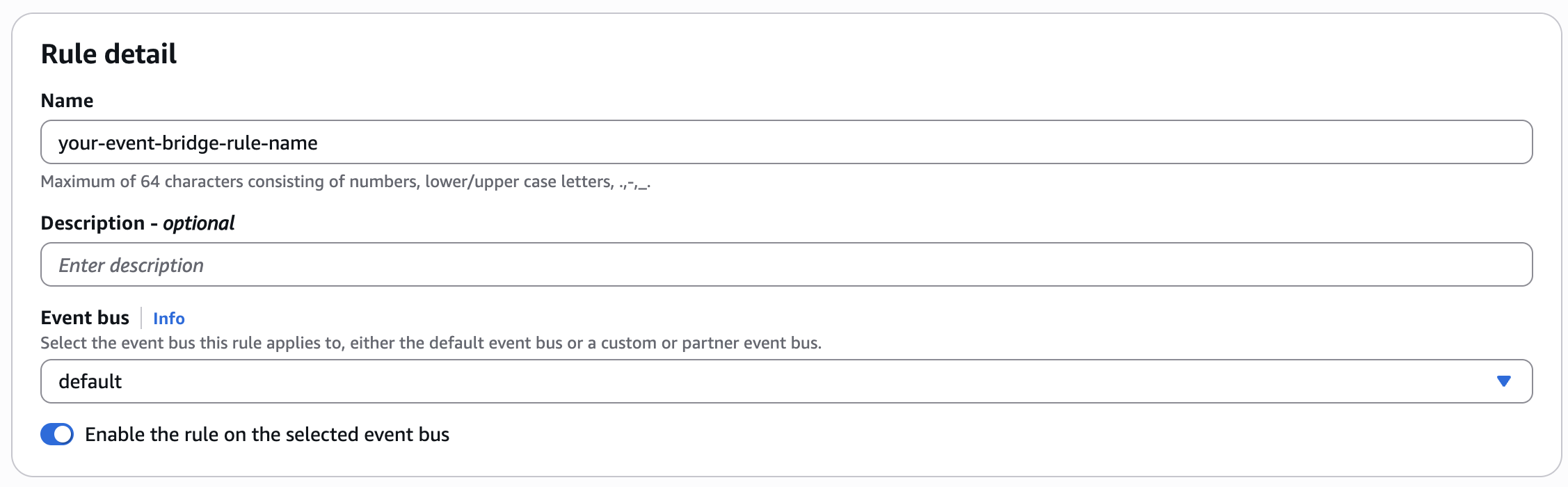
在 AWS 控制台中,在 Amazon EventBridge → 总线 → 规则中创建新规则。
使用默认事件总线
使用模板事件模式
从下拉列表中选择已定义的事件模式。
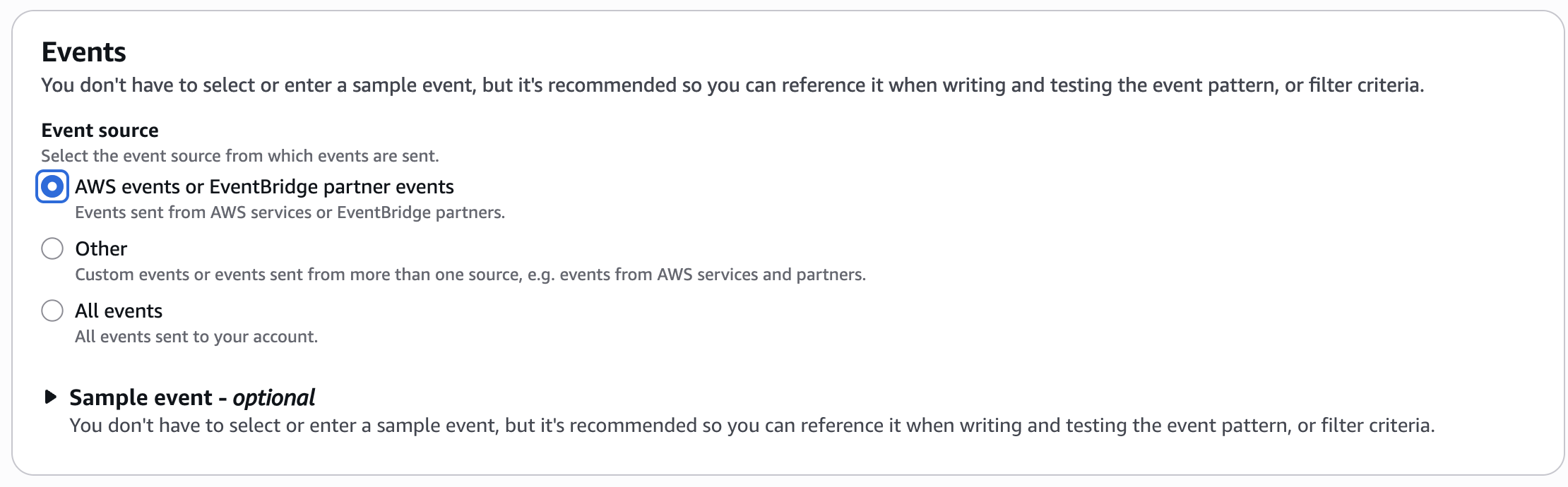
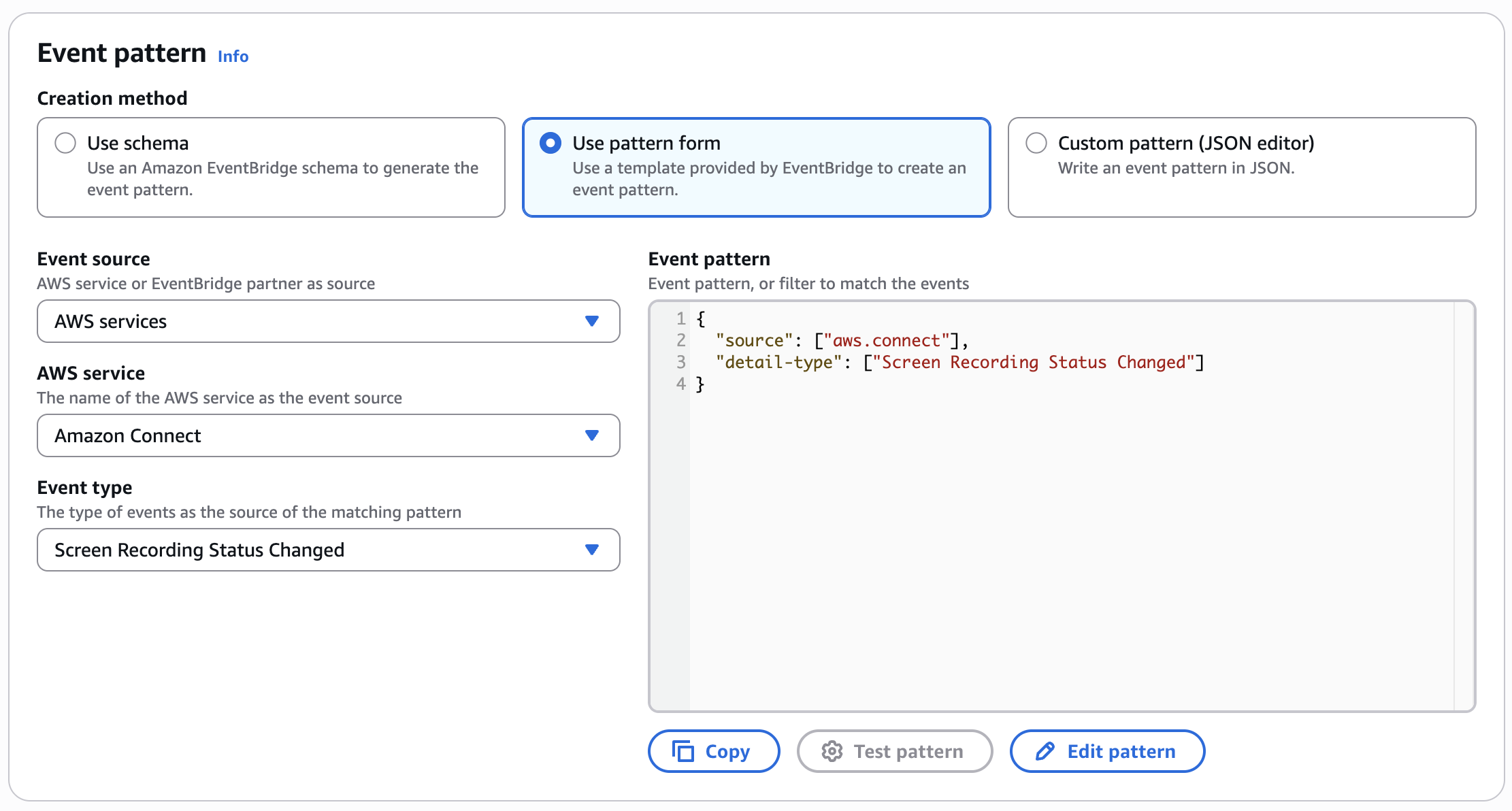
如果事件类型未显示在下拉列表中,则也可以使用自定义模式(JSON 编辑器)创建相同的模式:
{
  "source": [ "aws.connect" ],
  "detailType": [ "Screen Recording Status Changed" ]
}
使用创建规则 AWS CDK
或者,如果您使用管理 AWS 资源 AWS CDK,则以下是构建 Amazon EventBridge 规则的示例 TypeScript 代码片段:
import { Rule } from 'aws-cdk-lib/aws-events';

const eventBridgeRule = new Rule(this, 'YourEventBridgeRuleLogicalName', {
    ruleName: 'your-event-bridge-rule-name',
    description: 'your rule description',
    eventPattern: {
        source: [ "aws.connect" ],
        detailType: [ "Screen Recording Status Changed" ]
    }
});
配置已创建的 Amazon EventBridge 规则的目标
Amazon EventBridge 支持将多项 AWS 服务作为目标。根据您的需求,您可以灵活地使用其他 AWS 服务构建自己的事件处理管道。您最多可以为每条规则定义五个目标。有关更多信息,请参阅《亚马逊 EventBridge 用户指南》中的亚马逊 EventBridge 目标。
CloudWatch 以 Amazon 日志组为示例目标
以下示例使用 A mazon CloudWatch 日志组作为目标。
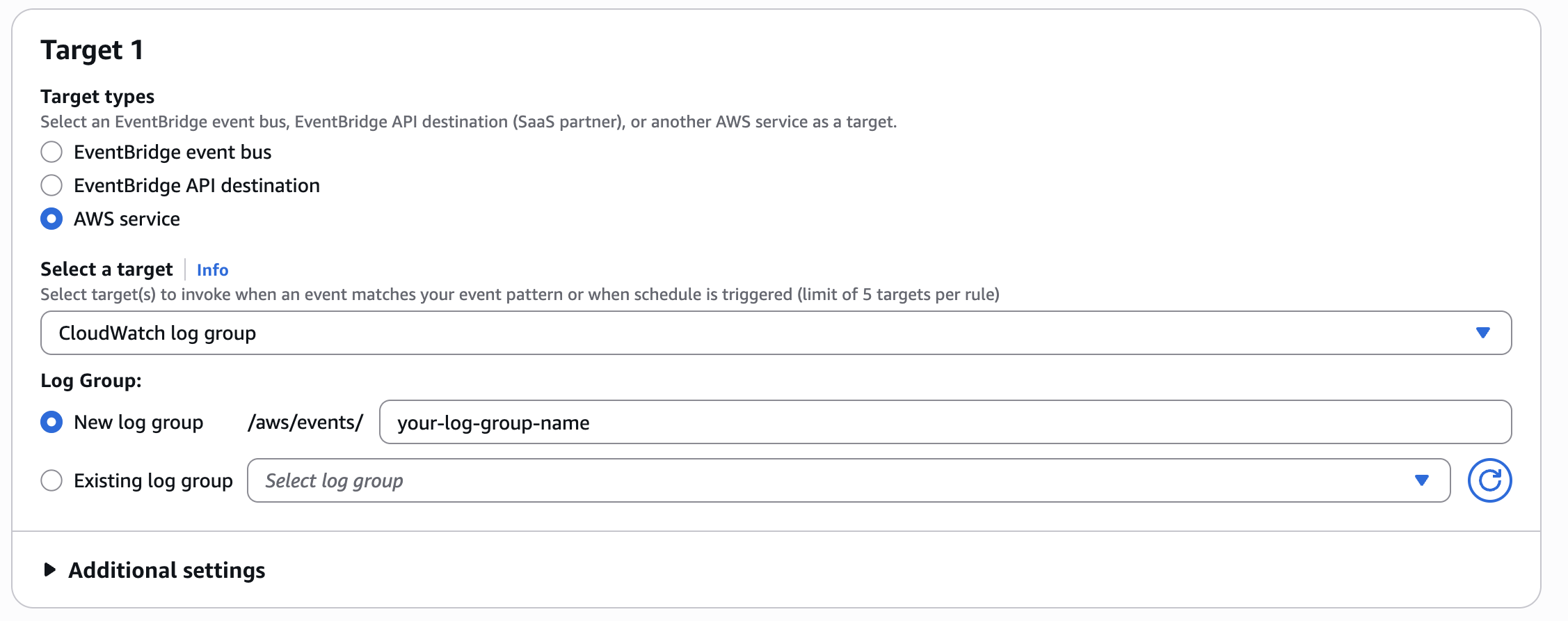
在 AWS CDK 代码中,创建资源并将其添加到 Amazon EventBridge 规则中:
import { LogGroup, RetentionDays } from "aws-cdk-lib/aws-logs";
import { CloudWatchLogGroup } from 'aws-cdk-lib/aws-events-targets';

const logGroup = new LogGroup(this, 'YourLogGroupLogicalName', {
    logGroupName: '"/aws/events/your-log-group-name',
    retention: RetentionDays.ONE_YEAR
});

eventBridgeRule.addTarget(new CloudWatchLogGroup((logGroup)));
Amazon CloudWatch 日志见解查询示例
以下是一些使用 Amazon CloudWatch Insights 查询语言的查询示例:
-
成功率查询示例
fields @timestamp, @message, detail | stats sum(detail.recordingStatus= "PUBLISHED") as Count_Success, sum(detail.recordingStatus= "INITIATED") as Count_Total, Count_Success / Count_Total as Success_Ratio -
获取每个录制状态计数的示例查询
fields @timestamp, @message, detail | stats count(*) as Count group by detail.recordingStatus as recordingStatus -
带有最常见故障代码的失败联系人查询示例
fields @timestamp, @message, detail | filter detail.recordingStatus = "FAILED" | stats count(*) as Count group by detail.failureInfo.code as FailureCode | sort by Count desc -
联系失败次数最多的代理的查询示例
fields @timestamp, @message, detail
| filter detail.recordingStatus = "FAILED"
| stats count(*) as Count group by detail.agentArn as AgentArn
| sort by Count desc
