End of support notice: On March 31, 2027, AWS will end support for Amazon WorkSpaces Thin Client. After March 31, 2027, you will no longer be able to access the WorkSpaces Thin Client console or WorkSpaces Thin Client resources. For more information, see Amazon WorkSpaces Thin Client end of support.
Connect your WorkSpaces Thin Client device
To use your WorkSpaces Thin Client device, you must have a keyboard, mouse, and monitor.

| Number | Device | Instruction |
|---|---|---|
| 1 | 
|
Connect your mouse to a USB-A port on your hub. |
| 2 | 
|
Connect your keyboard to a USB-A port on your hub. |
| 3 | 
|
Connect your hub power adapter to the power port on your hub. |
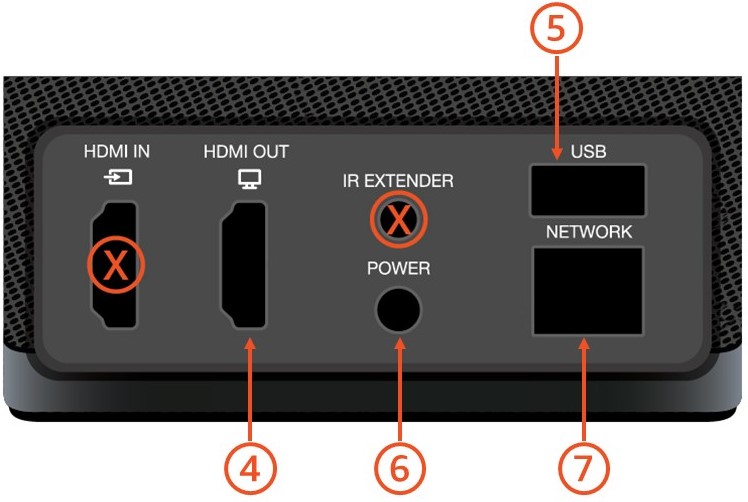
| 4 |

|
Connect the HDMI port on your monitor to the HDMI-Out port on your WorkSpaces Thin Client with an HDMI cable (not included). |
| 5 | 
|
Connect your hub’s USB-A plug to the USB port on your WorkSpaces Thin Client. |
| 6 |
|
Connect your WorkSpaces Thin Client power adapter to the power port on your WorkSpaces Thin Client. |
| 7 |

|
(Optional) Connect an Ethernet cable.
NoteA network connection is required. If you prefer a wired Ethernet connection instead of Wi-Fi, connect the Ethernet cable (not included) to the network port. |
