Use Amazon CloudWatch to monitor your workload and get insights into performance so that your application runs and responds effectively. Complement this with Step Functions to orchestrate your serverless workflow, handle errors automatically, and maintain consistency in processing. These services give you the observability and control you need to proactively identify and resolve issues.
Overview
This Guidance demonstrates how to conduct a semantic video search powered by generative artificial intelligence (AI). It streamlines the process of finding and extracting relevant video segments from vast amounts of video data. With natural language queries, it can quickly search for specific scenes, actions, concepts, people, objects, and more without the need to watch the full length of original videos. Designed to drive cost efficiency and scalability in media supply chain management, this Guidance is built for those who want to efficiently generate content such as trailers, sports highlights, captions, and descriptions from their existing video assets through automation.
How it works
These technical details feature an architecture diagram to illustrate how to effectively use this solution. The architecture diagram shows the key components and their interactions, providing an overview of the architecture's structure and functionality step-by-step.
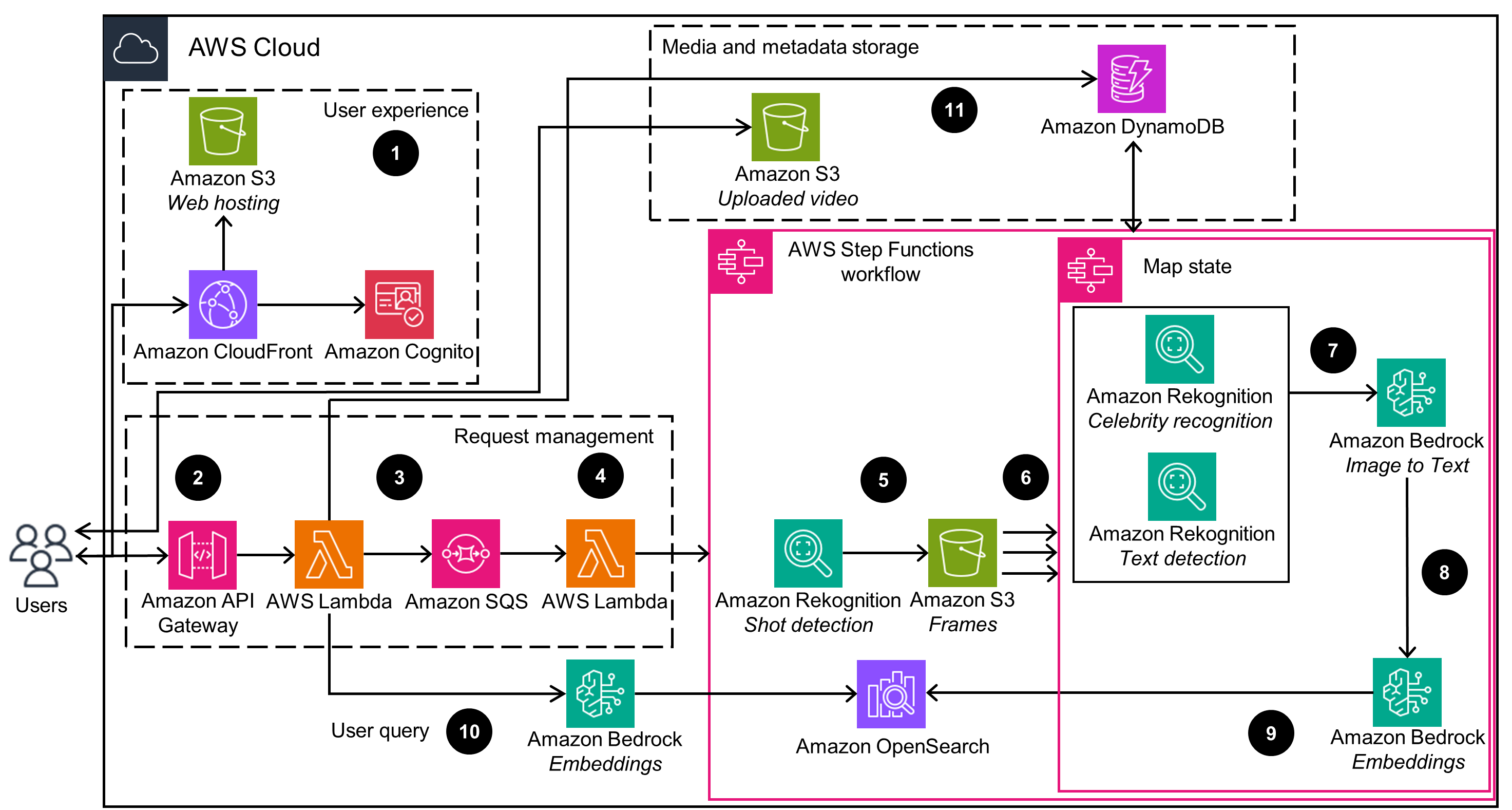 Step 1
Amazon Simple Storage Service (Amazon S3) hosts a static website for the semantic video search, served by an Amazon CloudFront distribution. Amazon Cognito provides customer identity and access management for the web application.
Step 2
Upload videos to Amazon S3 with Amazon S3 pre-signed URLs.
Step 3
After a video is uploaded successfully, an API call to Amazon API Gateway invokes AWS Lambda to queue new indexing-video requests in Amazon Simple Queue Service (Amazon SQS).
Step 4
Lambda processes new messages in the Amazon SQS queue, initiating an AWS Step Functions workflow.
Step 5
Amazon Rekognition detects multiple video shots from the original video, containing the start, end, and duration of each shot. Shot metadata is used to generate a sequence of frames, which are grouped by individual video shots and stored in Amazon S3.
Step 6
Step Functions uses the Map state to run a set of workflows for each frame stored in Amazon S3 in parallel.
Step 7
Amazon Rekognition detects celebrities and text in the frames.
Step 8
A foundation model (FM) in Amazon Bedrock generates image descriptions from the frames data and detected text or celebrities in the frames. The FM creates a description of the video shot based on a sequence of descriptions of its associated frames.
Step 9
An embedding model in Amazon Bedrock generates the embeddings of a video's descriptions. Amazon OpenSearch Service stores the embeddings and other related information in a vector database.
Step 10
An embedding model in Amazon Bedrock generates the embedding of the users' query, which is then used to perform semantic search for the videos from the OpenSearch Service vector database.
Step 11
Amazon DynamoDB tables store profiling and video indexing job metadata to keep track of the jobs' status and other relevant information.
Well-Architected Pillars
The architecture diagram above is an example of a Solution created with Well-Architected best practices in mind. To be fully Well-Architected, you should follow as many Well-Architected best practices as possible.
Operational Excellence
Security
Utilize Cognito to authenticate users and authorize access to your resources. Pair this with CloudFront to securely deliver your content globally, with built-in distributed denial-of-service (DDoS) protection from AWS Shield Standard. These services ensure only valid users can access your application while safeguarding your data.
Reliability
Amazon S3 stores your videos, images, and other media objects with high availability and durability, minimizing the risk of data loss or downtime. It also supports features like versioning, cross-Region replication, and lifecycle policies, contributing to the integrity and availability of your data. Use this with CloudWatch to monitor your application and automatically respond to incidents when thresholds are breached. Finally, use Step Functions to orchestrate your serverless workflows, with built-in error handling and retry mechanisms that support consistent processing and fault tolerance.
Performance Efficiency
Optimize your application's performance by taking advantage of serverless computing with Lambda. You can use this in tandem with Amazon Bedrock for high-performing machine learning inference, and benefit from the global reach of CloudFront to deliver content with low latency. These services work together to scale your application efficiently and deliver a responsive user experience.
Cost Optimization
Optimize costs by using Amazon S3 Intelligent-Tiering and Amazon S3 Lifecycle configuration to automatically store your media in the most cost-effective manner. Amazon S3 Lifecycle transitions files to cheaper storage tiers or deletes them based on rules, keeping your costs low. Lambda and Amazon Bedrock also help, as you only pay for the resources you use without provisioning servers. Lambda scales on demand, charging only for compute time used, and Amazon Bedrock is invoked as needed, avoiding idle infrastructure costs.
Sustainability
Lambda scales dynamically based on demand, improving efficiency and eliminating constant server provisioning. It also supports event filtering for Amazon SQS to reduce traffic to your Lambda functions. Complement this with Amazon S3 Intelligent-Tiering and Amazon S3 Lifecycle, which automatically shift data to the most suitable storage tiers based on usage. This minimizes expensive storage and unnecessary data. Finally, CloudFront caches content closer to users, lowering network traffic and energy consumption for data transfers.