Let's make it happen
Dive deep into the implementation guide for additional customization options and service configurations to tailor to your specific needs.
These technical details feature an architecture diagram to illustrate how to effectively use this solution. The architecture diagram shows the key components and their interactions, providing an overview of the architecture's structure and functionality step-by-step.
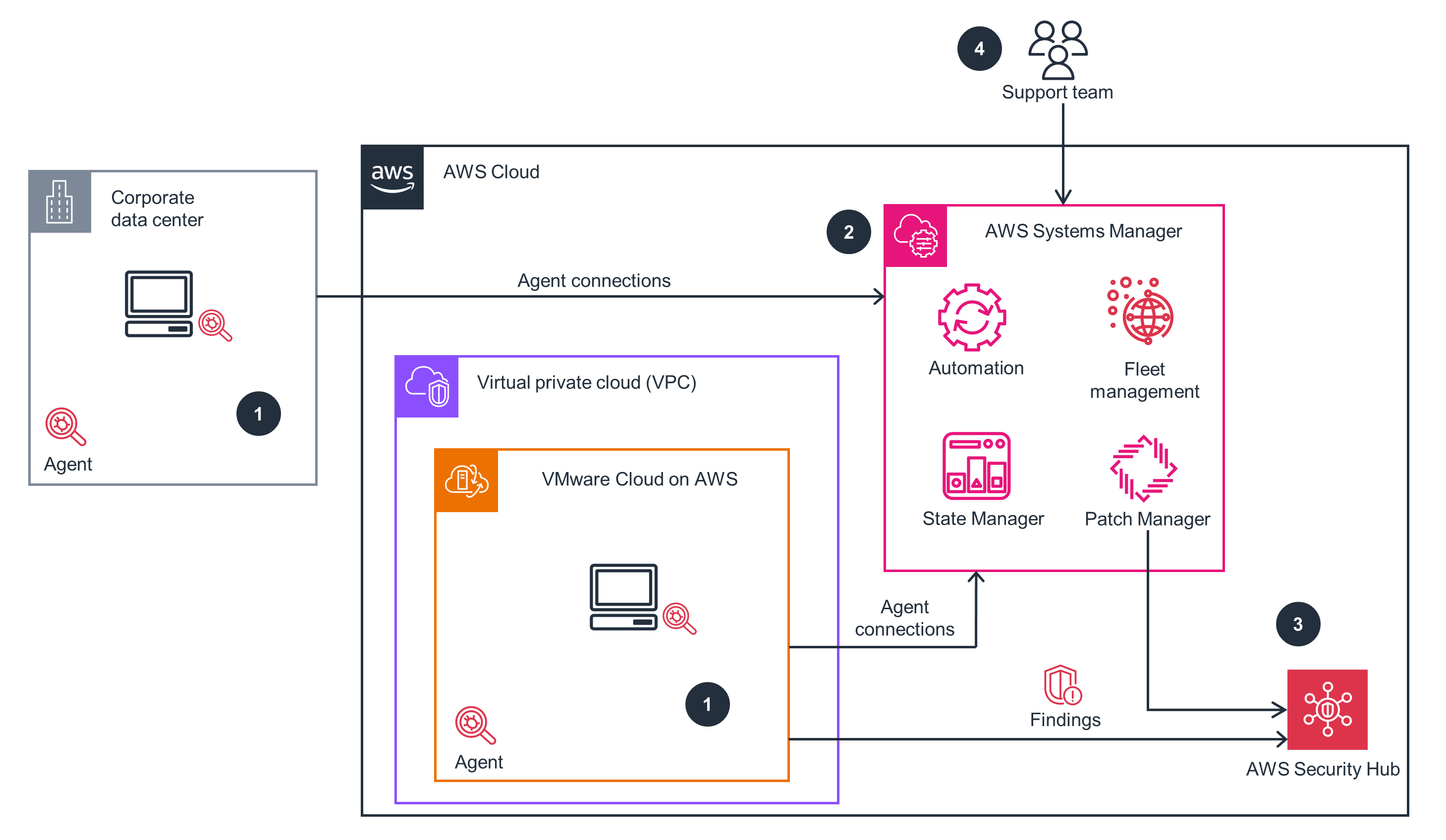 Step 1
Everything you need to launch this Guidance in your account is right here.
Dive deep into the implementation guide for additional customization options and service configurations to tailor to your specific needs.
The architecture diagram above is an example of a Solution created with Well-Architected best practices in mind. To be fully Well-Architected, you should follow as many Well-Architected best practices as possible.
Patch Manager, a capability of Systems Manager, allows you to deploy software patches automatically across on-premises or cloud instances. You can set a patch baseline with rules that state which patches should automatically be installed, or you can choose to have Patch Manager show you a report of all missing patches.
Security Hub offers a centralized view of your security findings. Once established, other services will automatically send security findings to Security Hub so you can easily check whether or not your services are in compliance. Security Hub acts on security findings by either alerting you, raising the finding on a dashboard, or kicking off an automation to resolve the finding. This helps you to discover vulnerabilities as soon as they occur and remediate them once discovered.
VMware Cloud on AWS is the preferred service for AWS for all vSphere-based workloads. VMware Cloud on AWS includes vSphere High Availability (HA) which restarts VMs automatically in the event of a failed ESXi host. Distributed Resource Scheduler (DRS) is also enabled, which can be used along with vMotion to live migrate running VMs off of hosts before maintenance is performed. VMware Cloud on AWS helps you avoid or minimize downtime for VMware workloads running on AWS.
VMware Cloud on AWS allows you to provision ESXi hosts dynamically using a feature called Elastic Distributed Resource Scheduler (eDRS). eDRS will grow or shrink the VMware Cloud on AWS clusters based on the workloads running on top of those clusters. eDRS accomplishes this by responding to the total CPU and memory load within the VMware Cloud on AWS cluster.
The Guidance doesn’t require additional servers or OS licensing, minimizing overall costs. With the exclusion of the servers being patched, this Guidance is fully serverless and uses managed services. Patching is automated, which can reduce operational costs compared to manual patching.
The main service costs to consider are:
VMware Cloud on AWS with eDRS can shut down extra capacity, which saves on resource consumption, such as power and cooling. eDRS also allows you to design for the smallest possible footprint and dynamically scale to meet your workload demands.
Additionally, Security Hub and Systems Manager are managed and operated by AWS. As such, you do not need to deploy additional servers and infrastructure to accomplish your compliance and patching requirements.