Optimize your application performance by simulating real-world traffic from multiple AWS Regions to assess how your application behaves under diverse geographic loads.
Overview
Simulate hundreds to millions of concurrent users against any endpoint, in any AWS Region, without provisioning a single server. Distributed Load Testing on AWS is an open-source solution that automates performance testing at scale, demonstrating how systems behave under different load conditions and helping identify potential performance issues throughout their lifecycle. The solution automatically launches and manages distributed test runners within and across AWS Regions, providing insights into the scalability and reliability of your Amazon EC2 instances, Amazon ECS or Amazon EKS clusters, AWS Lambda functions, Amazon RDS databases, and Amazon CloudFront distributions.
This solution supports JMeter, k6, and Locust testing frameworks, single HTTP endpoint tests, and provides comprehensive analytics capabilities. Set test baselines to compare results throughout your application lifecycle and deploy the optional MCP server to build AI-powered analytics. Streamline test execution, analyze regression over time, and gain deeper visibility into system behavior.
Benefits
Distribute load across regions
Quickly analyze test results
Easily access test run and results data through the dashboard that supports downloadable, tabular views as well as access to raw performance metrics, error summaries, and latency data for better analysis and reporting.
Automate insights with agentic AI
Deploy the optional MCP server to connect DLT with agentic AI workflows. Automate performance analysis, compare test results against observability metrics and application changes, and accelerate root cause identification without manual investigation.
Deploy behind any network boundary
Choose from three console hosting options: Amazon CloudFront with Amazon Simple Storage Service for public delivery, Application Load Balancer with Amazon Elastic Container Service on AWS Fargate for restricted networks, or a headless backend-only deployment for self-hosting behind your corporate network.
Optimize resource costs
Right-size your infrastructure by gaining accurate insights into how your applications perform under varying load conditions, resulting in cost-effective resource allocation.
How it works
Choose from three web console hosting options to match your network and compliance requirements. The default uses Amazon CloudFront with Amazon Simple Storage Service for fast public delivery. For environments that restrict public Amazon CloudFront distributions, deploy with Application Load Balancer and Amazon Elastic Container Service on AWS Fargate. For complete network isolation, use the headless option that deploys the backend only and lets you host the console on your own web server. All options share the same backend and Amazon Cognito authentication.
You can automatically deploy this architecture using the implementation guide and the accompanying AWS CloudFormation template.
View implementation guide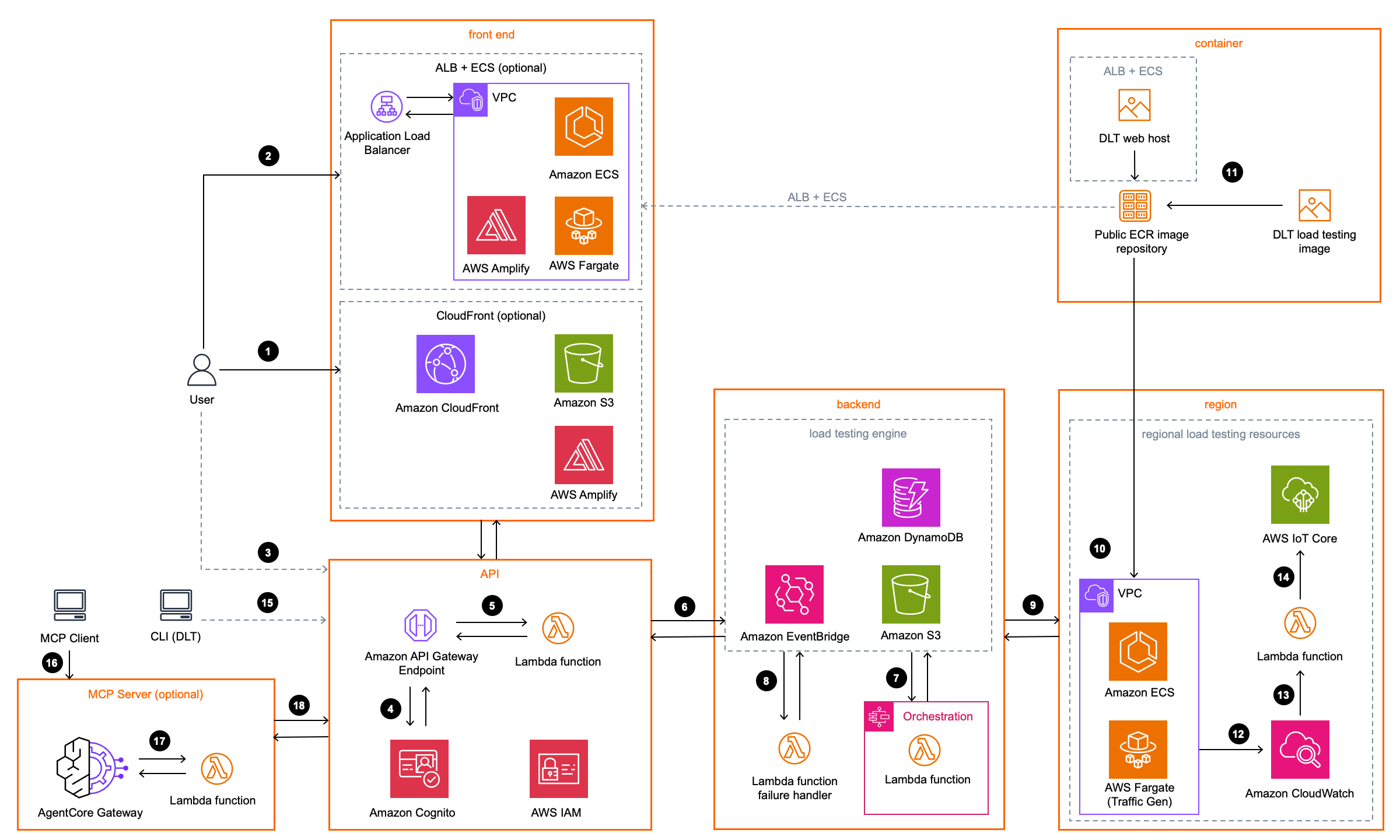 Step 1
(CloudFront + S3 hosting deployment option) The Console User accesses the web console through Amazon CloudFront, which serves the AWS Amplify application hosted in an Amazon Simple Storage Service (Amazon S3) bucket.
(ALB + ECS Fargate hosting deployment option) The Console User accesses the web console through an Application Load Balancer, which routes traffic to the AWS Amplify application running on Amazon Elastic Container Service (Amazon ECS) on AWS Fargate inside an Amazon Virtual Private Cloud (Amazon VPC).
(Headless deployment option) No public front end is deployed. The solution provides the web console as a downloadable ZIP in a private Amazon S3 bucket. The Console User can access the console from a self-hosted web server.
During initial configuration, the solution creates a default administrator user in the Amazon Cognito user pool and sends an account creation email to the email address you provide. The Cognito user pool manages user access to the web console, the REST API, the CLI, and the MCP Server.
Amazon API Gateway invokes AWS Lambda microservices that provide the business logic to manage test data and run the tests.
The microservices interact with Amazon S3, Amazon DynamoDB, and Amazon EventBridge to store test scenario details and manage test schedules. When you schedule a test to run at a future time or on a recurring interval, the microservices create an EventBridge Scheduler schedule that invokes the microservice at the scheduled time.
To run a test, the microservices invoke AWS Step Functions, which orchestrates the test execution.
Amazon EventBridge rules route Amazon ECS task and Step Functions failure events to a failure handler Lambda function.
Step Functions launches Amazon Elastic Container Service (Amazon ECS) tasks on AWS Fargate in each AWS Region you selected.
Each task runs within an Amazon Virtual Private Cloud (Amazon VPC) in the selected Region.
The load testing container uses an Amazon Linux 2023 base image with the Taurus
Each Fargate task writes its per-Region test results to Amazon S3 and emits logs to Amazon CloudWatch. When all Regions complete, the microservices aggregate the results in DynamoDB.
If you enable the live data option, a Lambda function receives CloudWatch logs from Fargate tasks during the test.
The Lambda function publishes the logs to a topic in AWS IoT Core in the Region where the main stack is deployed. The web console subscribes to the topic to display real-time metrics while the test runs.
(Optional CLI access) Users can install the DLT command-line interface (CLI) locally to interact with the solution from their terminal. The CLI authenticates through Cognito and calls the REST API directly, enabling scripted automation and CI/CD integration.
The following steps describe the optional MCP Server integration for AI-assisted load testing analysis. This component is only deployed if you select the MCP Server option during solution deployment.
An MCP client (AI development tool) connects to the Amazon Bedrock AgentCore Gateway endpoint to access the Distributed Load Testing solution's data through the Model Context Protocol. AgentCore Gateway validates the user's Cognito authentication token to ensure authorized access to the MCP Server.
Upon successful authentication, AgentCore Gateway forwards the MCP tool request to the DLT MCP Server Lambda function.
The Lambda function processes the request and queries the appropriate AWS resources (DynamoDB tables, S3 buckets, or CloudWatch logs) to retrieve the requested load testing data. It then returns the structured data to AgentCore Gateway, which sends it back to the MCP client for AI-assisted analysis and insights.
Deploy with confidence
Everything you need to launch this AWS Solution in your account is right here.
We'll walk you through it
Get started fast. Read the implementation guide for deployment steps, architecture details, cost information, and customization options.
Let's make it happen
Ready to deploy? AWS Launch Wizard walks you through setup in the AWS Console, where you can choose from three hosting templates to match your network requirements. You'll be prompted to access your AWS account if you haven't yet logged in.
Prepare for high-traffic events with confidence
AWS Countdown Premium Short Term Engagements for Distributed Load Testing helps you identify bottlenecks, scalability limitations, and infrastructure constraints before they impact your business.
Deployment tools
Follow these links for direct access to the artifacts for this AWS Solution.
CloudFormation templates
Download the CloudFormation template for your preferred hosting option.
Launch the stack
Launch a CloudFormation template directly in your AWS account.
Source code
The source code for this AWS Solution is available in GitHub.
Implementation guide
Follow the implementation guide for step-by-step actions to deploy this AWS Solution.
Related content
Solving with AWS Solutions
This video demonstrates how Distributed Load Testing on AWS enables automated application testing at scale to identify and fix performance bottlenecks before production release.
Ensure Optimal Application Performance with Distributed Load Testing on AWS
This blog discusses Distributed Load Testing on AWS for app scalability, automation, and bottleneck resolution before release.
Sony Music Solutions Inc.
Learn how Sony Music Solutions Inc. reduced costs and improved performance testing speed using Distributed Load Testing on AWS.
Imagine Learning
Education company Imagine Learning automated performance testing by implementing Distributed Load Testing on AWS in hours.
Customer stories
Calabrio
"At Calabrio, our mission is to help contact centers work smarter, faster and better. We needed to design a new, high-performing feature for a major customer -- fast. We used Distributed Load Testing on AWS to test our system’s performance at scale, without the need for costly enterprise testing licenses or writing custom orchestration code for open-source tools. With this AWS Solution, we designed and executed tests at six times the expected traffic volume and launched the new feature successfully and ahead of schedule."
Daryl Robbins, Senior Director, Engineering
MadeiraMadeira
"At MadeiraMadeira, ensuring the performance and scalability of our applications is essential, especially during high-traffic periods like Black Friday. With Distributed Load Testing on AWS, we are able to simulate complex large-scale scenarios and accelerate our non-functional validations. This AWS Solution removed technical barriers and helped us build greater confidence in our releases while keeping customer experience a top priority."
Michel Augusto, Quality Assurance Specialist
Arthurite Integrated
"Our team at Arthurite Integrated deployed an AI-powered chatbot and needed to ensure it could handle high-traffic volumes from millions of users, especially during peak periods. Traditional manual testing couldn't simulate the real-world usage patterns we expected, so we used Distributed Load Testing on AWS to validate the system's scalability, latency and fault tolerance under realistic workloads. With this AWS Solution we identified latency bottlenecks, leading to optimizations that improved our response time by 60%. Our error rates dropped by 45% and the system's throughput scaled 5x times higher under load. Auto-scaling also became 3x more responsive, ensuring a seamless user experience even during usage spikes."
Somtochukwu Ezepue, Founder/CEO