This Guidance uses AWS CodeCommit, AWS CodeBuild, and AWS CodePipeline to create version control and automate the build and deployment of your bioinformatics workflow’s source code. Additionally, DynamoDB lets you track HealthOmics output files and run metadata. Because this Guidance uses DevOps best practices to manage your workflow code and give you visibility into workflow run metadata, you can make incremental changes to achieve accurate results. By tracking workflow run metadata, you can easily find relevant workflow run status and output files to perform downstream reporting or scientific analysis.
Overview
IMPORTANT: This Guidance requires the use of AWS CodeCommit , which is no longer available to new customers. Existing customers of AWS CodeCommit can continue using and deploying this Guidance as normal.
This Guidance shows how you can build and run production-grade bioinformatics workflows at scale. Using AWS services for automation, workflow analysis, storage, and operational and cost observability, you can follow DevOps best practices to manage the lifecycle of your bioinformatics workflows. You can use this architecture as the foundation for your own infrastructure and update certain aspects as needed to integrate it with your environment and meet your needs.
How it works
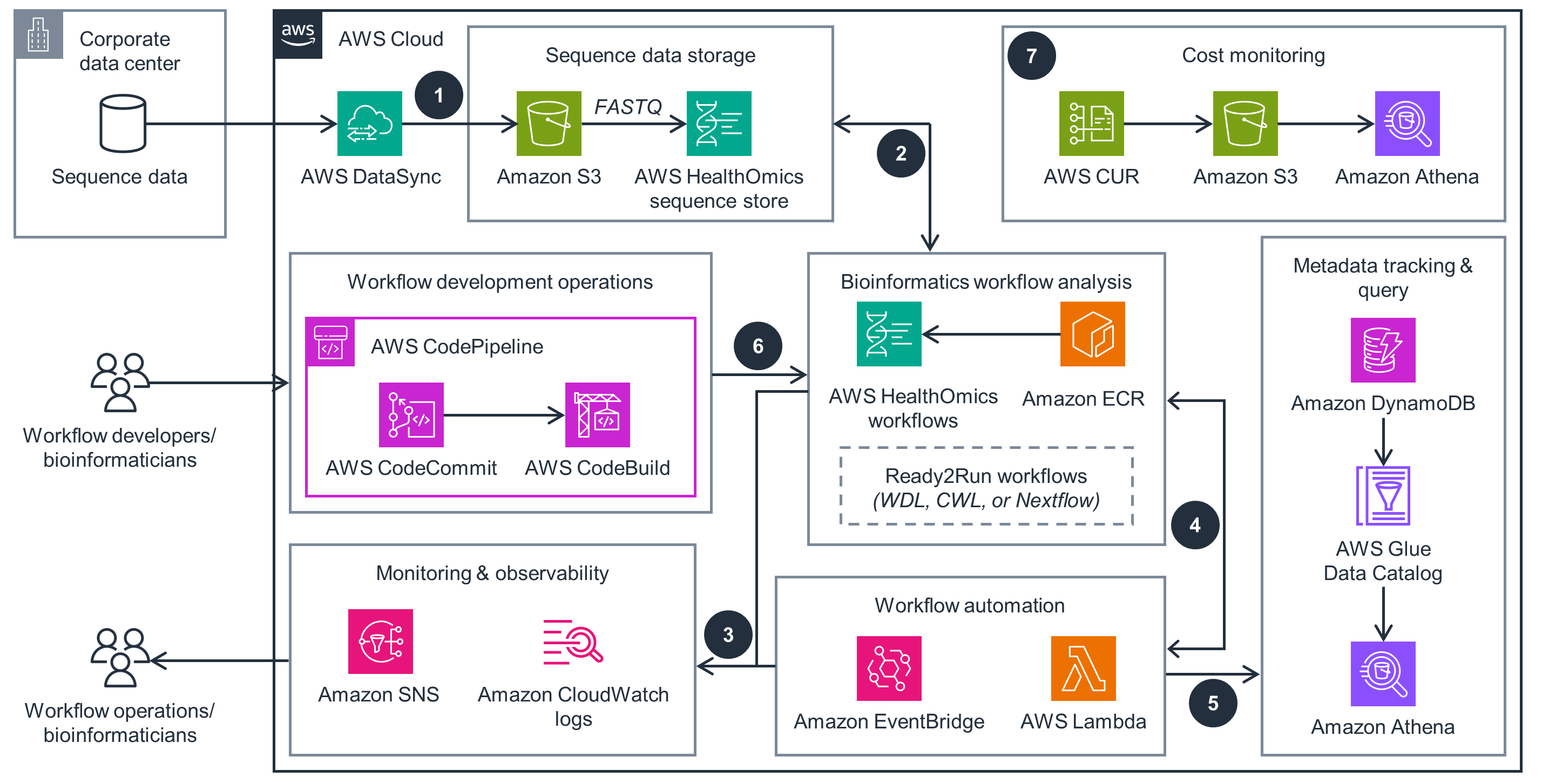
This architecture diagram highlights key considerations and best practices for implementing bioinformatics workflows at scale.
 Step 1
Transfer sequence data to Amazon Simple Storage Service (Amazon S3) using AWS DataSync. If data is in FASTQ format, it can be imported into a sequence store in AWS HealthOmics (successor to Amazon Omics) for cost savings.
Step 2
HealthOmics runs bioinformatics workflows in languages like Workflow Description Language (WDL), Nextflow, or Common Workflow Language (CWL) to analyze raw data. These workflows can be built as private or Ready2Run (hosted by HealthOmics). Tools running within the workflows are stored as Docker images within Amazon Elastic Container Registry (Amazon ECR). Workflow outputs are uploaded to Amazon S3.
Step 3
HealthOmics publishes workflow engine logs, task logs, and workflow run logs to Amazon CloudWatch for troubleshooting and monitoring.
Step 4
HealthOmics publishes events using Amazon EventBridge, which can automate downstream actions, such as using AWS Lambda functions to launch more bioinformatics workflows or notifying users or groups about workflow failures using Amazon Simple Notification Service (Amazon SNS).
Step 5
Useful metadata from HealthOmics workflows—such as workflow run ID, tags, sample ID, workflow output file locations—can be tracked in Amazon DynamoDB tables. An AWS Glue crawler ingests this data into the AWS Glue Data Catalog, which can be queried using Amazon Athena.
Step 6
Workflow developers and bioinformaticians can iterate on new and existing workflows and maintain version control using continuous integration and continuous delivery with AWS CodeCommit. AWS CodePipeline can be used to invoke an AWS CodeBuild job to automate the creation of new workflows in HealthOmics.
Step 7
AWS Cost and Usage Reports (AWS CUR) facilitates cost monitoring. This service can be configured to create reports and upload them to an Amazon S3 bucket. An AWS Glue crawler is configured to ingest this data to AWS Glue Data Catalog, which can be queried using Amazon Athena to derive cost-related insights.
Well-Architected Pillars
The architecture diagram above is an example of a Solution created with Well-Architected best practices in mind. To be fully Well-Architected, you should follow as many Well-Architected best practices as possible.
Operational Excellence
Security
This Guidance provides encryption at rest using AWS Key Management Service (AWS KMS) and encryption in transit for all network traffic using DataSync. Additionally, AWS Identity and Access Management(IAM) provides fine-grained access control over potentially sensitive data so that only authorized users can perform specific actions to process and analyze it.
Reliability
This Guidance lets you orchestrate computationally intensive bioinformatics workflows at scale by using HealthOmics. This service has certain service quotas, such as number of virtual CPUs, to prevent accidental overprovisioning. Additionally, Amazon S3 and DynamoDB provide high availability with built-in backup. This Guidance also uses EventBridge to capture events, such as failures, and Amazon SNS can provide real-time notifications in response so that you can take appropriate action. You can quickly investigate events using Amazon CloudWatch, which provides detailed logs to give you visibility into your HealthOmics workflows and underlying tools.
Performance Efficiency
This Guidance lets you run concurrent workflows with different CPU and memory configurations for specific tasks. You can request resources by specifying the CPUs, memory, and storage you need, and HealthOmics provisions the appropriate infrastructure. This helps you scale based on your business needs with the right resources.
Cost Optimization
This Guidance uses an HealthOmics sequence store, which lets you store and share petabyte-scale genomics data files efficiently and at a low cost per gigabase, providing additional cost savings over Amazon S3. Additionally, you can use AWS CUR to access the most detailed information about your AWS costs and usage, identify areas for optimization, and understand your business’s trends based on attributes such as projects, departments, or users.
Sustainability
This Guidance uses managed and serverless services that help you avoid provisioning and managing your own infrastructure, helping you minimize the environmental impact of your projects. HealthOmics provisions resources only when you request a workflow run and tears down the resources when completed. Similarly, Lambda lets you run smaller tasks as functions without provisioning your own servers.
Related content
Designing an event-driven architecture for Bioinformatics workflows using AWS HealthOmics and Amazon EventBridge
This blog post demonstrates how to automate running multiple bioinformatics workflows and receive event-based notifications using an event-driven architecture.
Guidance for a Laboratory Data Mesh on AWS
This Guidance demonstrates how to build a scientific data management system that integrates both laboratory instrument data and software with cloud data governance, data discovery, and bioinformatics pipelines, capturing key metadata events along the way.