This Guidance is designed to provide you with the information you need to understand the internal state of your workloads. Specifically, observability is built into the architecture, with every service publishing metrics to Amazon CloudWatch where dashboards and alarms can be configured. You can then iterate to develop the telemetry necessary for your workloads.
Overview
This Guidance demonstrates various ways to upload audience and segments data to external platforms using AWS services. One way you can deploy this Guidance is through AWS managed services that use existing, pre-built integrations in AWS services to activate the audience and segments data. A second way is through a multi-step API workflow that uses a set of rules, provided by the external platform, to activate the audience and segments data. A third way to deploy this Guidance is through a simple rest API-based integration to activate the audience and segments data. This allows you to maximize the value of the data available in AWS, and helps you tailor your customer's experience to the specific needs of each segment.
How it works
Overview
This architecture diagram shows integration patterns for uploading audience segments built or stored in AWS services to advertising and marketing platforms.
Download the architecture diagram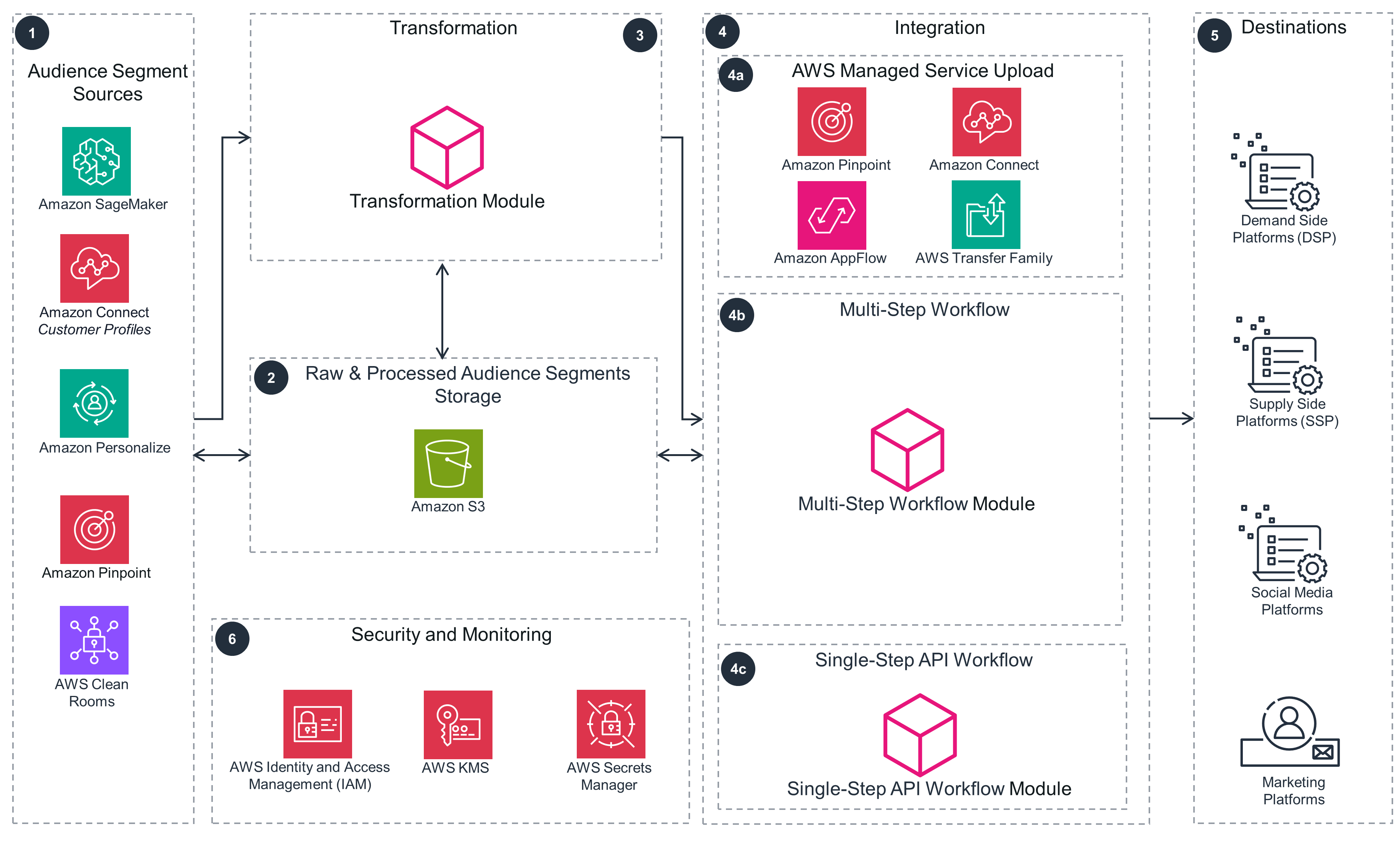 Step 1
You can generate audience segments using the below services on AWS: Amazon SageMaker and Amazon Personalize generate marketing segmentation, such as Recency, Frequency and Monetary (RFM), churn, and product segmentation. Amazon Pinpoint provides first-party audience engagement and customer journey segmentation. AWS Clean Rooms provides enriched segmentation through multi-party data collaborations. Amazon Connect Customer Customer Profiles provides customer interactions-based segments.
Step 2
The raw audience or segmentation output is stored in an Amazon Simple Storage Service (Amazon S3) bucket.
Step 3
The transformation module workflow coordinates the advertising platform-specific data transformation, normalization, and anonymization of personally identifiable information (PII) using hashing techniques, like SHA256. Follow Steps 4-6 on the next slide for the integration patterns and destinations.
Step 4
The prepared audience data is then uploaded to advertising and marketing activation platforms following one of the three integration patterns as displayed in Steps 4a, 4b, and 4c.
Step 4a
The AWS Managed Service Upload pattern uses ready-to-deploy integrations to activate the audience data: In Amazon Pinpoint, use custom channel features to upload data to advertising platforms. In Amazon Connect Customer, use the same integration flows for ingestion and single customer view to upload data to advertising platforms. Use Amazon AppFlow software-as-a-service (SaaS) application integrations to upload audiences to advertising platforms. In an enterprise setting with numerous file-based integrations, use AWS Transfer Family managed workflows to centralize and automate the secure-file transfer protocol (SFTP) file integrations and upload data to advertising platforms.
Step 4b
The Multi-Step Workflow pattern uses third-party integration requirements.
Step 4c
The Single-Step API Workflow pattern is best suited for non-batch, transactional, and streaming activations.
Step 5
The patterns are applicable to audience segment uploads to demand side platforms (DSP), supply side platforms (SSP), or social media platforms. These patterns are also applicable to audience segment uploads to customer relationship management (CRM) applications, marketing platforms, and other SaaS products used for improving the customer experience.
Step 6
Use AWS Identity and Access Management (IAM) to securely manage identities and access to AWS services and resources. Use AWS Secrets Manager to store advertiser ID and access tokens. Configuring the uploader integration module accesses this service at run time. Use AWS Key Management Service (AWS KMS) to store customer managed encryption keys. Use these keys to encrypt data at rest and in transit.
Multi-Step Workflow
The Multi-Step Workflow pattern is shown here in more detail.
Download the architecture diagram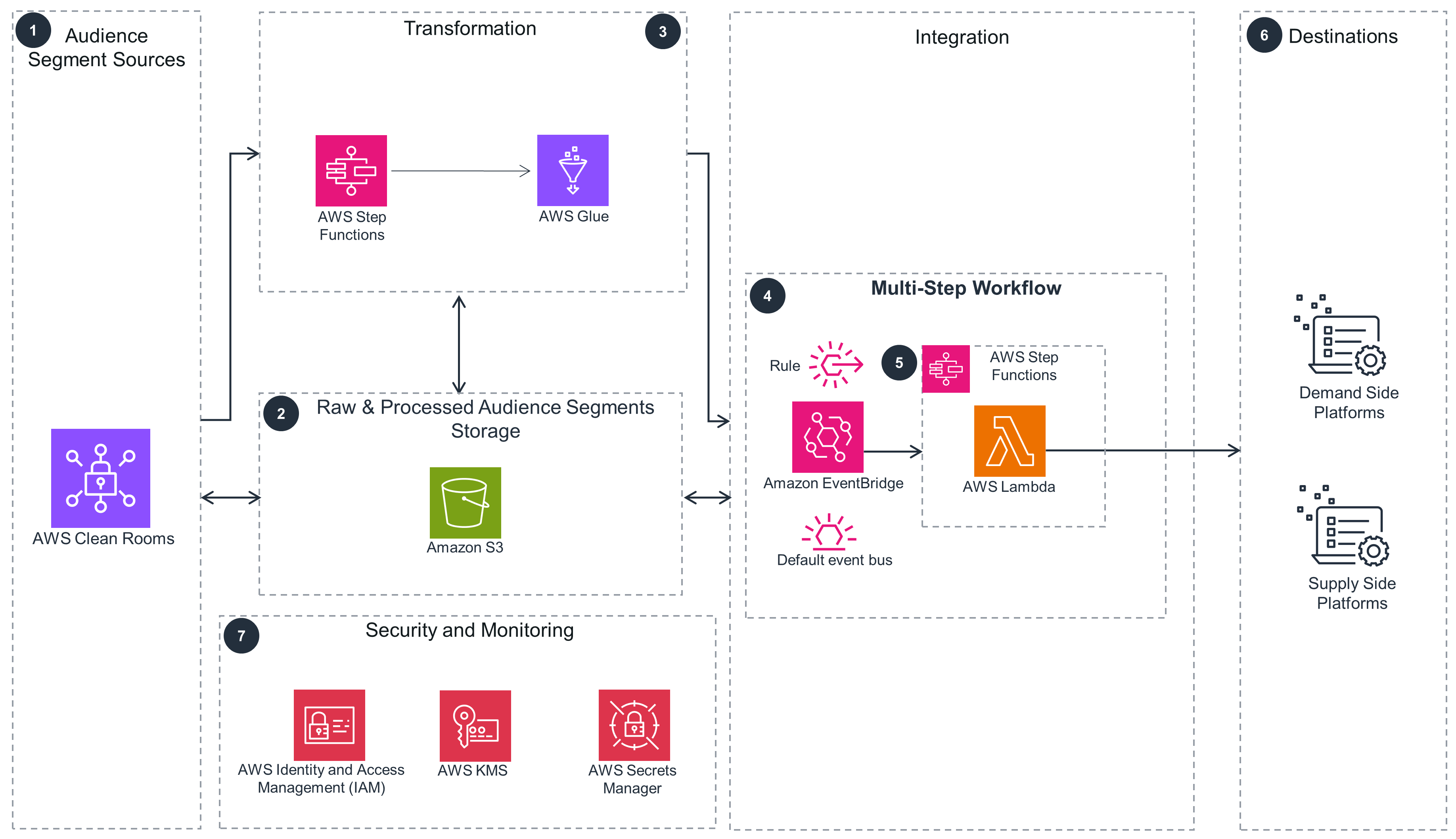 Step 1
An AWS Clean Rooms query is used to generate a data export of audiences for activation.
Step 2
The audience or segmentation output from the segmentation source is stored in an Amazon S3 bucket.
Step 3
An AWS Step Functions workflow coordinates the AWS Glue job for advertising platform-specific data transformation, normalization, and anonymization of personally identifiable information (PII) using hashing techniques, like SHA256.
Step 4
The Multi-Step Workflow pattern uses an Amazon EventBridge rule, created on the AWS account default event bus, to respond to the object creation event in Amazon S3. A Step Functions state machine is invoked by the EventBridge rule and orchestrates a workflow of AWS Lambda functions. This workflow is built using third-party integration requirements.
Step 5
Step Functions orchestrates a sequence of Lambda functions that make API calls to the advertising activation platform. This workflow is built using requirements specific to the advertising platforms. An example for a third-party CRM API is as follows: a) First, a Lambda function creates a segment using an API endpoint b) Then a second Lambda function creates a segment drop URL using another API endpoint. c) Finally, the third Lambda function reads the files from the Amazon S3 bucket and publishes the segment data using another API endpoint with the drop URL as input.
Step 6
This pattern is applicable to paid media ad platforms for online media targeting.
Step 7
Use IAM to securely manage identities and access to AWS services and resources. Use Secrets Manager to store advertiser ID and access tokens. Configuring the uploader integration module accesses this service at run time. Use AWS KMS to store customer managed encryption keys. Use these keys to encrypt data at rest and in transit.
Single-Step API Upload
The Single-Step API Upload pattern is shown here in more detail.
Download the architecture diagram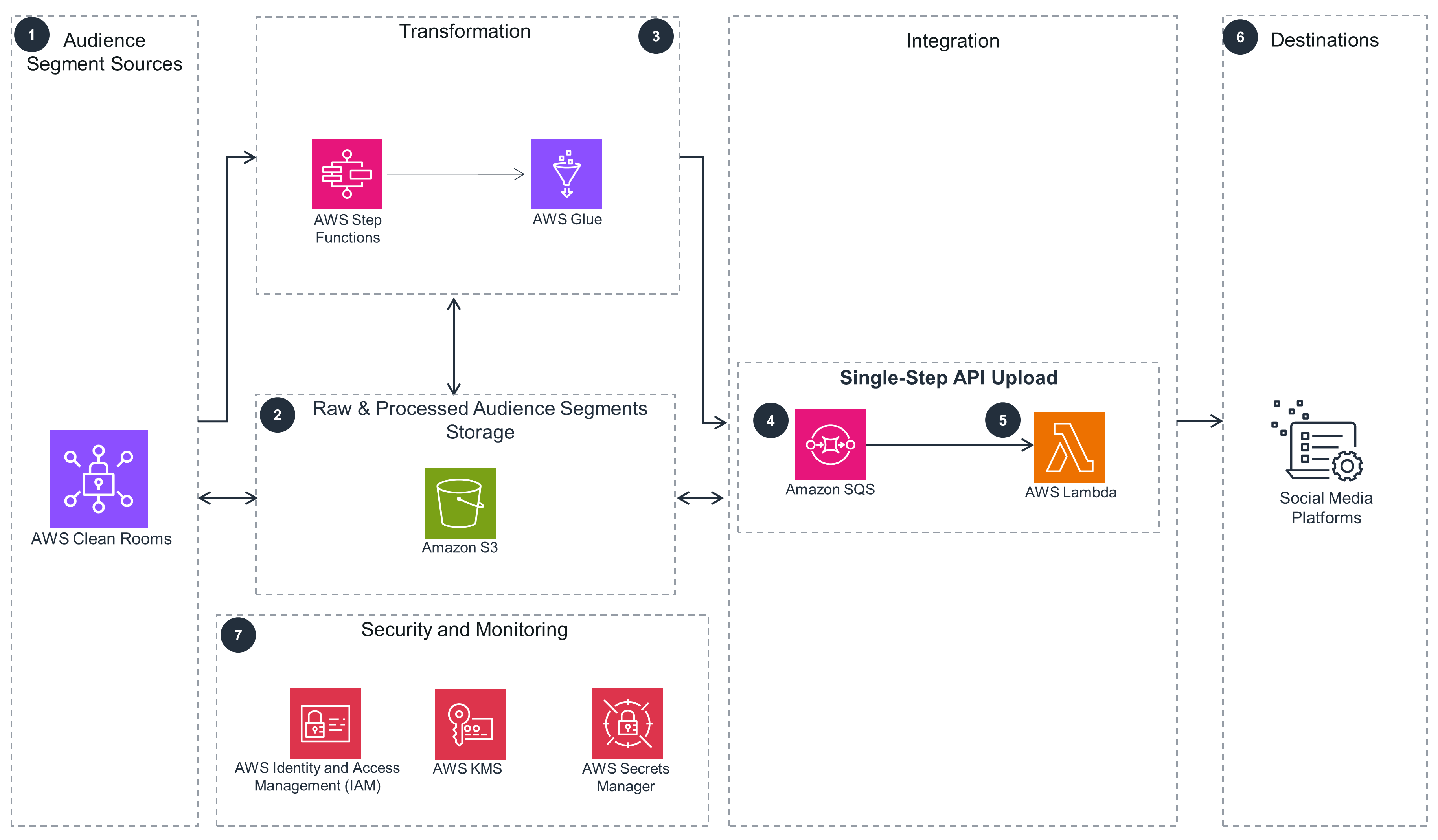 Step 1
An AWS Clean Rooms query is used to generate a data export of audiences for activation.
Step 2
The audience or segmentation output from the segmentation source is stored in an Amazon S3 bucket.
Step 3
A Step Functions workflow coordinates the AWS Glue job for advertising platform-specific data transformation, normalization, and anonymization of personally identifiable information (PII) using hashing techniques, like SHA256. The AWS Glue job writes processed audience segmentation to an Amazon S3 bucket.
Step 4
The Single-Step API Upload pattern uses a Lambda function to read the events from Amazon Simple Queue Service (Amazon SQS) and data from storage to publish segment data to the advertising platform marketing API. Using this pattern is best suited for non-batch, transactional, and streaming activations.
Step 5
A Lambda function reads the file upload events from Amazon SQS and reads the audience data from Amazon S3 storage to publish segment data to the advertising platform API.
Step 6
This pattern is applicable to ad platforms for online media targeting.
Step 7
Use IAM to securely manage identities and access to AWS services and resources. Use Secrets Manager to store advertiser ID and access tokens. Configuring the uploader integration module accesses this service at run time. Use AWS KMS to store customer managed encryption keys. Use these keys to encrypt data at rest and in transit.
Well-Architected Pillars
The architecture diagram above is an example of a Solution created with Well-Architected best practices in mind. To be fully Well-Architected, you should follow as many Well-Architected best practices as possible.
Operational Excellence
Security
A number of decisions were factored into the design of this Guidance to help you secure your workloads. One, IAM policies are created using the least-privilege access, such that every policy is restricted to the specific resource and operation. Two, secrets and configuration items are centrally managed in Secrets Manager and secured using IAM. Three, the data at rest in the Amazon S3 bucket is encrypted using AWS KMS. And four, the data in transit into the external API is encrypted and transferred over HTTPS, and the sensitive data in the payload is SHA-256 encrypted at the attribution level.
Reliability
To help you implement a highly available network topology, every service and technology within each architecture layer was used because they are serverless and fully managed by AWS, making the overall architecture elastic, highly available, and fault-tolerant. Also, this Guidance is designed using a multi-tier architecture, where every tier is independently scalable, deployable, and testable.
To further support the reliability of your workloads, implementing a data backup and recovery plan is simple, thanks to the Amazon S3 bucket that is used as persistent storage. Consider using the Amazon S3 Intelligent-Tiering storage class to back up your data and meet your requirements for recovery time objectives (RTO) and recovery point objectives (RPO). Amazon S3 offers industry-leading durability, availability, performance, security, and virtually unlimited scalability at very low costs.
Performance Efficiency
Using serverless technologies, you only provision the exact resources you use. Serverless technology reduces the amount of underlying infrastructure you need to manage, allowing you to focus on solving your business needs. You can use automated deployments to deploy the components of this Guidance into any Region quickly - providing data residence and reduced latency. In addition, all components are colocated in a single Region and use a serverless stack, which avoids the need for you to make infrastructure location decisions apart from the Region choice.
Cost Optimization
This Guidance helps you use the appropriate services, resources, and configurations, all key to cost savings. For one, by using serverless technologies, you only pay for the resources you consume. Second, as the data ingestion velocity increases and decreases, the costs will align with usage, so you can plan for data transfer charges. Third, when AWS Glue is performing data transformations, you only pay for the infrastructure while the processing is occurring. Fourth, through a tenant isolation model and resource tagging, you can automate cost usage alerts and measure costs specific to each tenant, application module, and service.
Sustainability
This Guidance scales to continually match the load while ensuring that only the minimum resources are required through the extensive use of serverless services, where compute is only used as needed. The efficient use of serverless resources reduces the overall energy required to operate the workload. For example, AWS Glue, Lambda, and Amazon S3 automatically optimize resource utilization in response to demand.
You can extend this Guidance by using Amazon S3 Lifecycle configuration to define policies and move objects to different storage classes based on access patterns. Finally, all of the services used in this Guidance are managed services that allocate hardware according to workload demand. Using the provisioned capacity option in the service configurations, where it is available and when the workload is predictable, is recommended.