Amazon Bedrock MAP Tagging using the AWS CLI
This guide explains how to tag Amazon Bedrock and Amazon Bedrock AgentCore workloads to report MAP spend and generate any appropriate incentives using the AWS CLI.
There are two methods to tag your Bedrock workloads for MAP:
-
IAM principal tagging (recommended) — Tag the IAM role used to invoke Bedrock APIs with
map-migrated. This is the simplest approach and requires no changes to your application code or additional Bedrock resources. This method is only available effective June 8, 2026. -
Resource tagging (application inference profiles) — Create an application inference profile, tag it with
map-migrated, and invoke models through the profile. This method provides per-model and per-region cost granularity but requires creating and managing additional Bedrock resources.
Important
If both a resource tag and an IAM principal tag are present, the resource tag takes precedence for MAP spend. Therefore, select only one method to tag Amazon Bedrock and Amazon Bedrock AgentCore workloads.
IAM principal tagging (recommended)
Tag the IAM role used for Amazon Bedrock or Amazon Bedrock AgentCore API calls with the
map-migrated tag. This approach uses IAM principal cost allocation tags,
which allows MAP spend tracking without requiring you to create and manage
application inference profiles or change your application code.
Prerequisites
-
Must have AWS Migration Program Engagement number (MPE ID number), also known as your project number, in your Migration Plan.
-
Enable IAM principal cost allocation tags in your AWS Billing and Cost Management console. For more information, see IAM principal cost allocation tags in the AWS Billing User Guide.
-
Activate the
map-migratedtag as a cost allocation tag (CAT) in the Billing console under Cost allocation tags. Cost allocation tags are available for both resource tags and IAM principal tags. -
Your role must have permission to tag IAM roles. If your role has the IAMFullAccess AWS-managed policy attached, you can skip this step. Otherwise, ensure your role has the
iam:TagRoleandiam:ListRoleTagspermissions.
Tagging your IAM role
Tag the IAM role that is used to invoke Amazon Bedrock or AgentCore APIs with the
map-migrated tag and your MPE ID.
-
Identify the IAM role used for your Bedrock API calls. This is the role assumed by your application or service when invoking Bedrock models.
-
Use the AWS CLI to apply the
map-migratedtag to the role:$ aws iam tag-role --role-nameMyBedrockRole--tags "Key=map-migrated,Value=migYOUR_MPE_ID"Replace
MyBedrockRolewith the name of your IAM role andYOUR_MPE_IDwith your MPE ID. -
Verify the tag was applied correctly:
$ aws iam list-role-tags --role-nameMyBedrockRoleThe output should show the
map-migratedtag:{ "Tags": [ { "Key": "map-migrated", "Value": "mig123456789" } ] }
Once the IAM role is tagged, all Amazon Bedrock and AgentCore API calls made using
that role will be tracked for MAP spend. The
iamPrincipal/map-migrated tag will appear in your Cost and Usage Report
(CUR) data for eligible billing lines.
Important considerations
-
Supported services: IAM principal tagging for MAP is only recognized for Amazon Bedrock and Amazon Bedrock AgentCore billing lines. Other AWS services are not eligible for MAP credit via IAM principal tags.
-
Tag precedence: If both a resource-level
map-migratedtag (for example, on an application inference profile) and an IAM principalmap-migratedtag are present, the resource tag takes precedence for MAP spend reporting. -
Resource exclusion: If the IAM role was in use before start of your MAP migration, the associated spend will be excluded from MAP spend.
-
Tag value format: Use the same tag value format as resource tags:
migfollowed by your MPE ID (for example,mig12345ormigABCDE12345).
Resource tagging (application inference profiles)
If you need per-model or per-region cost granularity, you can create application inference
profiles and tag them with map-migrated. This approach requires creating
Bedrock resources and updating your application to invoke models through the tagged profile.
Introducing inference profiles
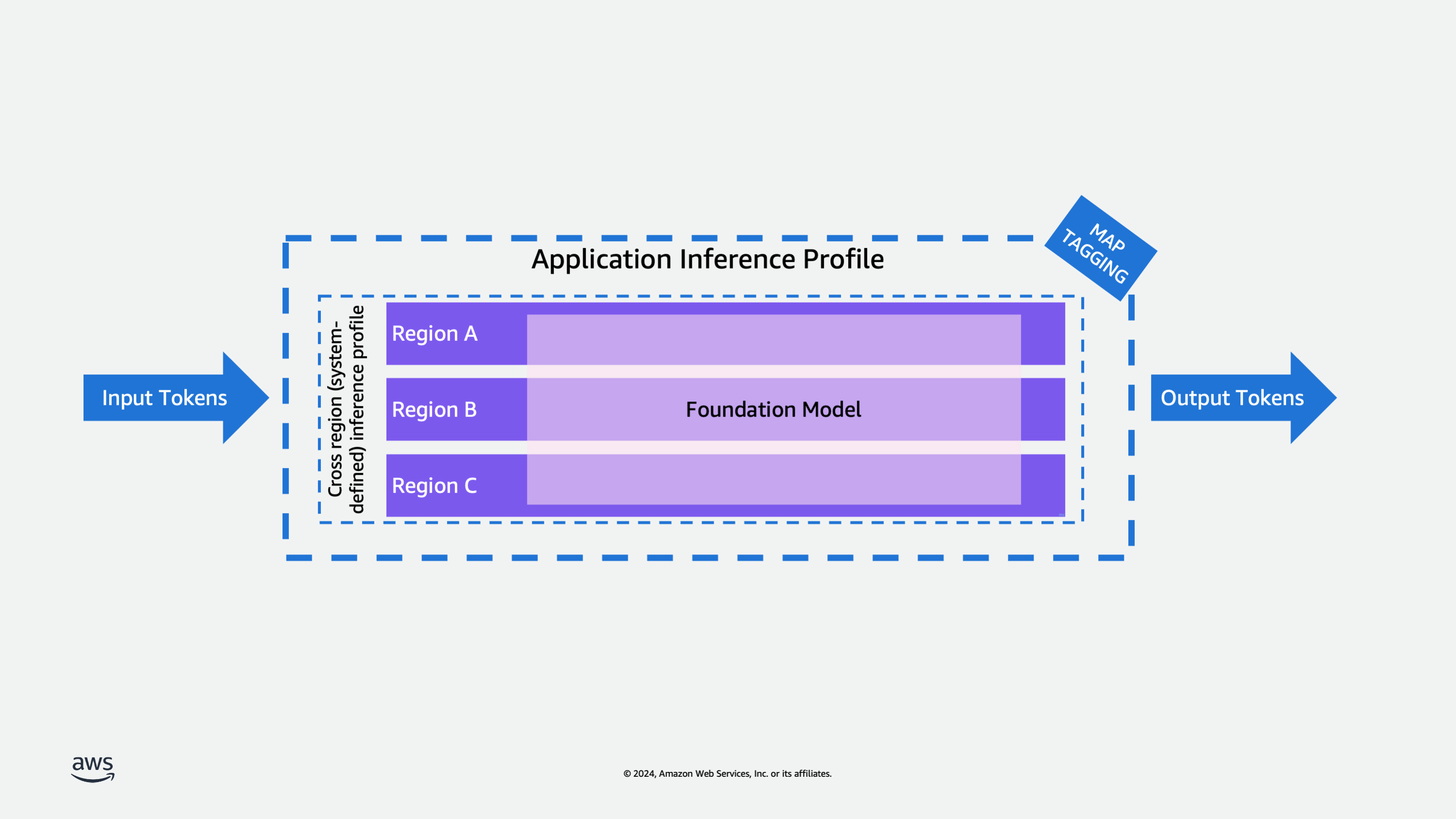
Inference profiles are a resource of Amazon Bedrock that enable model invocation and cost management.
An inference profile serves as a configuration container that specifies both a foundation model and its associated AWS regions for model invocation. Using inference profiles organizations can effectively manage their model invocations across multiple regions, helping to distribute workload and prevent performance bottlenecks. They play a crucial role in cost management and resource tracking, as they can be tagged with cost allocation tags to monitor usage and expenses across different regions.
Amazon Bedrock offers the following types of inference profiles:
Cross-region (system-defined) inference profiles: Inference profiles that are predefined in Amazon Bedrock and include multiple Regions to which requests for a model can be routed.
Application inference profiles: Inference profiles that a user creates to track costs and model usage. You can create an inference profile that routes model invocation requests to one Region or to multiple Regions.
Currently you can only create an inference profile using the Amazon Bedrock API.
A key feature of inference profiles is their integration with cost allocation tags - organizations can apply cost allocation tags to application inference profiles to track and manage expenses. When invoking models through Bedrock, users must specify a profile which contains the region and model specifications. This profile-based approach represents an evolution from the previous direct model ARN invocation method, providing better resource management and cost tracking capabilities. Specifically, application inference profiles support MAP tagging functionality, enabling organizations to track migration progress and resource utilization within the MAP program framework.
Amazon Bedrock offers significant cost advantages for customers with predictable foundation model inference patterns. When used appropriately, provisioned throughput can deliver substantial cost savings compared to on-demand pricing, making it an economical choice for consistent workload volumes. This pricing model is particularly beneficial for customers who can forecast their model inference needs and maintain steady utilization levels. For example, enterprises running regular batch processing jobs, customer service applications with predictable chat volumes, or content generation workflows with consistent throughput requirements can optimize their costs by choosing provisioned capacity. While on-demand mode provides flexibility for variable workloads, provisioned capacity in Bedrock enables customers to optimize their AI/ML spending by committing to a specific throughput level. This approach not only helps reduce operational costs but also ensures reliable performance for applications that require consistent model access, though customers need to carefully plan their capacity requirements to maximize the cost benefits.
Prerequisites
To implement MAP tagging with Bedrock inference profiles, you'll need to follow a structured process that involves creating and tagging application inference profiles. Here's how it works:
-
Must have AWS Migration Program Engagement number (MPE ID number), also known as your project number, in your Migration Plan.
-
Customers must gain access to supported foundation models only by using the Amazon Bedrock Console or API.
-
If using volume-based discounts (such as Provisioned Throughput for supported foundation models), these must be purchased only using the Amazon Bedrock Console or API.
-
Your role must have access to the inference profile API actions. If your role has the AmazonBedrockFullAccess AWS-managed policy attached, you can skip this step. Otherwise, follow the steps at Creating IAM policies and create the following policy, which allows a role to do inference profile-related actions and run model inference using all foundation models and inference profiles.
{
  "Version": "2012-10-17",
  "Statement": [
    {
      "Effect": "Allow",
      "Action": [
        "bedrock:InvokeModel*",
        "bedrock:CreateInferenceProfile"
      ],
      "Resource": [
        "arn:aws:bedrock:*::foundation-model/*",
        "arn:aws:bedrock:*:*:inference-profile/*",
        "arn:aws:bedrock:*:*:application-inference-profile/*"
      ]
    },
    {
      "Effect": "Allow",
      "Action": [
        "bedrock:GetInferenceProfile",
        "bedrock:ListInferenceProfiles",
        "bedrock:DeleteInferenceProfile",
        "bedrock:TagResource",
        "bedrock:UntagResource",
        "bedrock:ListTagsForResource"
      ],
      "Resource": [
        "arn:aws:bedrock:*:*:inference-profile/*",
        "arn:aws:bedrock:*:*:application-inference-profile/*"
      ]
    }
  ]
}
Using the CLI
Now create an application inference profile using the AWS CLI. This profile will serve as the foundation for your model invocations and cost tracking. The process typically involves the following steps:
-
Download and install the latest version of the AWS CLI.
-
Create the application inference profile with specific parameters.
-
Create an application inference profile: Open a new terminal on a machine that has the AWS CLI installed and configured and run the following CLI command:
$ aws bedrock create-inference-profile \
  --inference-profile-name "myappinferenceprofile" \
  --model-source "copyFrom=arn:aws:bedrock:us-east-1:123456789123:inference-profile/us.amazon.nova-pro-v1:0"
Enter a new name for the application inference profile and define a model source. The profile is created using a copy of the system inference profile using the "copyFrom" parameter. In this case I am using the Amazon Nova Pro system inference profile using its ARN. The model source is composed using the format:
arn:aws:bedrock:region:accountID:inference-profile/inferenceProfileIdReplace the placeholders for your selected region where the new application inference profile will be created in and add your account ID. Select your preferred system inference profile ID from the list of available system inference profiles. The CLI output shows the created inference profile ARN and status as active.
{
"inferenceProfileArn": "arn:aws:bedrock:us-east-1:123456789123:application-inference-profile/k1c3lwu20lem",
"status": "ACTIVE"
}
The inferenceProfileArn that can be used in other inference profile-related actions and that can be used with model invocation and Amazon Bedrock resources.
-
Once the profile is created, obtain its ARN and use it to apply the "map-migrated" tag to it. This is done using the AWS tagging API.
-
Use the bedrock tag-resource CLI command to tag the created inference profile with the map-migrated tag and the value of your MAP ID following the tagging guidelines.
$ aws bedrock tag-resource --resource-arn "arn:aws:bedrock:us-east-1:123456789123:application-inference-profile/k1c3lwu20lem" --tags "key=map-migrated,value=mig123456789"For the –resource-arn, Use the generated ARN from previous step. Add the -–tags parameter using the key value pair as shown above replace the value to your corresponding MAP ID with the prefix of "mig".
-
You can list and update inference profiles and their review their tags. To confirm that the application inference profile is correctly tagged, you can list application profiles using the following CLI command:
$ aws bedrock list-inference-profiles --type-equals "APPLICATION"This will list all application inference profiles showing the ARN, profile name and ID for each.
{
  "inferenceProfileSummaries": [
    {
      "inferenceProfileName": "myappinferenceprofile",
      "createdAt": "2025-01-14T21:21:54.414544+00:00",
      "updatedAt": "2025-01-14T21:21:54.414544+00:00",
      "inferenceProfileArn": "arn:aws:bedrock:us-east-1:123456789123:application-inference-profile/k1c3lwu20lem",
      "models": [
        {
          "modelArn": "arn:aws:bedrock:us-east-1::foundation-model/amazon.nova-pro-v1:0"
        },
        {
          "modelArn": "arn:aws:bedrock:us-west-2::foundation-model/amazon.nova-pro-v1:0"
        },
        {
          "modelArn": "arn:aws:bedrock:us-east-2::foundation-model/amazon.nova-pro-v1:0"
        }
      ],
      "inferenceProfileId": "k1c3lwu20lem",
      "status": "ACTIVE",
      "type": "APPLICATION"
    }
  ]
}
If you know the inference Profile ID you can get the specific profile details using the CLI command:
$ aws bedrock get-inference-profile --inference-profile-identifier "k1c3lwu20lem"{ "inferenceProfileName": "myappinferenceprofile", "createdAt": "2025-01-14T21:21:54.414544+00:00", "updatedAt": "2025-01-14T21:21:54.414544+00:00", "inferenceProfileArn": "arn:aws:bedrock:us-east-1:123456789123:application-inference-profile/k1c3lwu20lem", "models": [ { "modelArn": "arn:aws:bedrock:us-east-1::foundation-model/amazon.nova-pro-v1:0" }, { "modelArn": "arn:aws:bedrock:us-west-2::foundation-model/amazon.nova-pro-v1:0" }, { "modelArn": "arn:aws:bedrock:us-east-2::foundation-model/amazon.nova-pro-v1:0" } ], "inferenceProfileId": "k1c3lwu20lem", "status": "ACTIVE", "type": "APPLICATION" }Using the ARN of the corresponding profile, use the following CLI command to list the resource tags:
$ aws bedrock list-tags-for-resource \
  --resource-arn "arn:aws:bedrock:us-east-1:123456789123:application-inference-profile/k1c3lwu20lem"
The output will list tags associated with the profile.
{
  "tags": [
    {
      "key": "map-migrated",
      "value": "mig123456789"
    }
  ]
}
This tagging structure enables several important capabilities including proper cost allocation tracking for MAP program requirements, clear identification of migrated workloads, and simplified resource management and monitoring.
The "map-migrated" tag serves as an identifier that helps track your migration progress and ensures proper attribution of resource usage within the MAP program framework. All subsequent model invocations using this tagged profile will be properly tracked and accounted for in your MAP metrics.
To create an application inference profile for one Region, specify a foundation model. Usage and costs for requests made to that Region with that model will be tracked.
To create an application inference profile for multiple Regions, specify a cross region (system-defined) inference profile. The inference profile will route requests to the Regions defined in the cross region (system-defined) inference profile that you choose. Usage and costs for requests made to the Regions in the inference profile will be tracked.
