Montar sistemas de arquivos do S3 no Amazon EKS
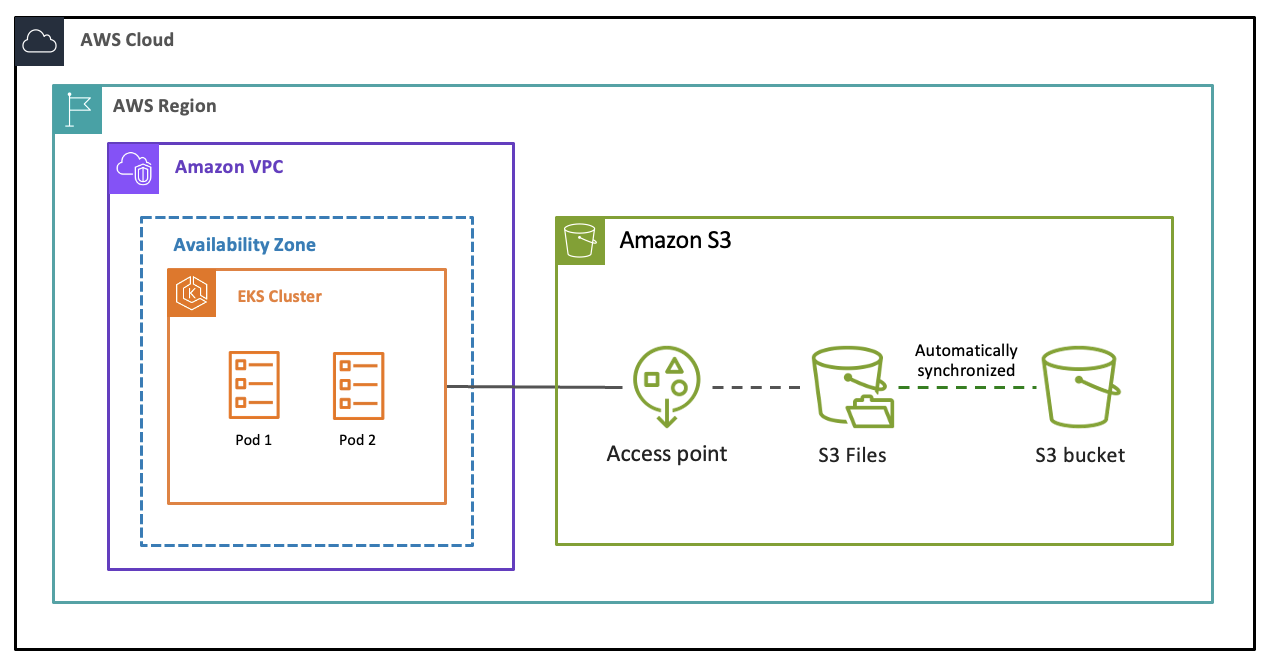
É possível anexar um sistema de arquivos do S3 a um cluster do Amazon EKS usando o driver de interface de armazenamento de contêiner (CSI) do Amazon EFS, que permite tanto o provisionamento dinâmico quanto o provisionamento estático. Isso requer a instalação do efs-csi-driver, que é o driver de CSI para o Amazon EFS e o S3 Files.
Pré-requisitos
Antes de montar um sistema de arquivos do S3 em um cluster do EKS, observe o seguinte:
Você precisa ter um sistema de arquivos do S3 com pelo menos um destino de montagem disponível.
Os Grupos de segurança necessários devem ter sido configurados.
O cluster do EKS deve estar na mesma VPC que o destino de montagem.
O driver de CSI do Amazon EFS precisa de permissões do AWS Identity and Access Management (IAM) para se conectar e interagir com os sistemas de arquivos do S3. Para obter detalhes, consulte Perfil do IAM para anexar o sistema de arquivos a recursos de computação da AWS.
AWSA sugere o uso de Identidades de Pod do EKS. Para ter mais informações, consulte Visão geral da configuração do EKS Pod Identities.
Para ter informações sobre os perfis do IAM para contas de serviço e a configuração de um provedor OpenID Connect (OIDC) do IAM para o cluster, consulte Criar um provedor de identidade OIDC do IAM para o cluster.
A ferramenta da linha de comando
kubectlestá instalada no seu dispositivo ou no AWS CloudShell. A versão pode ser a mesma ou até uma versão secundária anterior ou posterior à versão do Kubernetes do seu cluster. Por exemplo, se a versão do cluster for 1.29, você poderá usar a versão 1.28, 1.29 ou 1.30 dokubectlcom ela. Para instalar ou atualizar okubectl, consulte Configurar o kubectl e o eksctl.
Como montar um sistema de arquivos do S3 em um cluster do EKS
O driver da CSI do Amazon EFS exige permissões do IAM para interagir com seu sistema de arquivos. Crie um perfil do IAM e anexe a política gerenciada AmazonS3FilesCSIDriverPolicy a ele. Adicione o driver de CSI do EFS ao cluster do EKS e especifique o perfil do IAM para permitir que o driver de CSI acesse as APIs da AWS e o sistema de arquivos. Você pode usar o Console de Gerenciamento da AWS ou a API da AWS. Para ver detalhes, consulte Usar o armazenamento do sistema de arquivos do S3 com o Amazon EKS.
Também é possível usar sistemas de arquivos do S3 com o AWS Batch no Amazon EKS. Para anexar o volume do sistema de arquivos do S3 a um trabalho do AWS Batch no Amazon EKS, você pode usar pods do Amazon EKS com solicitação de volume persistente. Para ver mais detalhes, consulte a seção persistentVolumeClaim das páginas RegisterJobDefinition e EksPersistentVolumeClaim no Guia de referência de API do AWS Batch.
É possível monitorar o armazenamento, o desempenho, as conexões de cliente e os erros de sincronização do sistema de arquivos usando o Amazon CloudWatch.
