Transform Easytrieve to modern languages by using AWS Transform custom
Shubham Roy, Subramanyam Malisetty, and Harshitha Shashidhar, Amazon Web Services
Summary
This pattern provides prescriptive guidance for faster and lower-risk transformation of mainframe Broadcom Easytrieve Report Generator
This pattern provides a ready-to-use custom transformation definition for EZT transformation. The definition uses multiple transformation inputs:
EZT business rules extracted using AWS Transform custom
EZT programming reference documentation
EZT source code
Mainframe input and output datasets
AWS Transform custom uses these inputs to generate functionally equivalent applications in modern target languages, such as Java or Python.
The transformation process uses intelligent test execution, automated debugging, and iterative fix capabilities to validate functional equivalence against expected outputs. It also supports continual learning, enabling the custom transformation definition to improve accuracy and consistency across successive transformations. Using this pattern, organizations can reduce migration effort and risk, address niche mainframe technical debt, and modernize EZT workloads on AWS to improve agility, reliability, security, and innovation.
Prerequisites and limitations
Prerequisites
An active AWS account
A mainframe EZT workload with input and output data
Limitations
Scope limitations
Language support - Only EZT-to-Java transformation is supported for this specific transformation pattern. This APG pattern is tested on in-line EZT code in JCL/Proc.
Out of scope - For transformation of other mainframe programming languages use AWS Transform for mainframe. Learn more in Supported file types for transformation of mainframe applications in the AWS Transform user guide.
Process limitations
Validation dependency – Without baseline output data the transformation cannot be validated.
Proprietary logic – Highly specific, custom-developed utilities require additional user documentation and reference materials in order to be correctly interpreted by the AI agent.
Technical limitations
Service limits – For AWS Transform custom service limits and quotas see AWS Transform User Guide - Quotas and the AWS General Reference - Transform Quotas.
Product versions
AWS Transform CLI – Latest version
Node.js – version 20 or later
Git – Latest version
Target environment
Java – version 17 or later
Spring Boot – version 3.x is the primary target for refactored applications
Maven – version 3.6 or later
Architecture
Source technology stack
Operating system – IBM z/OS
Programming language – Easytrieve, Job control language (JCL)
Database – IBM DB2 for z/OS, Virtual Storage Access Method (VSAM), Mainframe flat files
Target technology stack
Operating system – Amazon Linux
Compute – Amazon Elastic Compute Cloud (Amazon EC2)
Programming language – Java
Database Amazon Relational Database Service (Amazon RDS)
Target architecture
Workflow
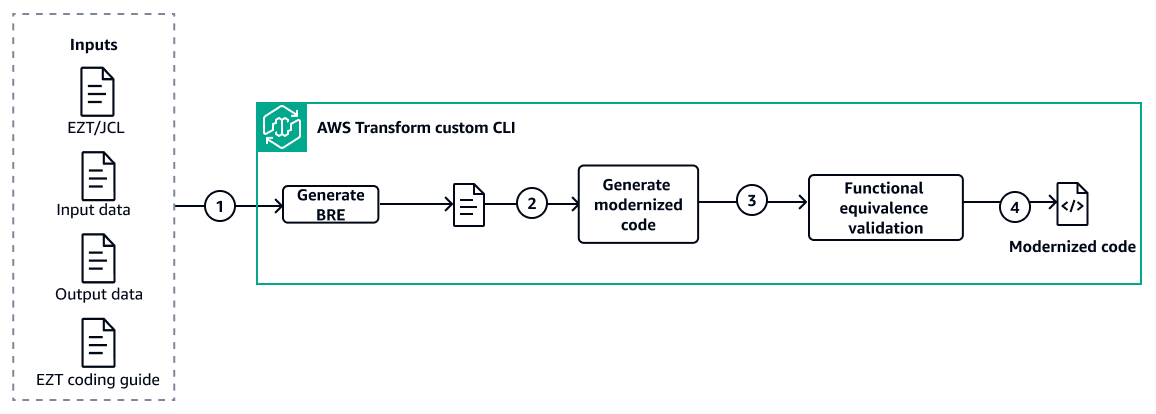
This solution uses AWS Transform custom with pre-built transformation definitions to modernize mainframe Easytrieve (EZT) applications to Java through a three-step automated workflow. AWS Transform custom handles the entire process — business rule extraction (BRE), code transformation and functional equivalence validation — driven by transformation definitions provided as part of this solution. Human validation is required to validate the BRE generated and validation of functional equivalence report.
Step 1 – Prepare the inputs folder
source-code/ – EZT source code (.ezt files), JCL job streams (.jcl/.JCL files), COBOL programs, copybooks, and control cards
bre-doc/ - Generated Business rule extract document
input-data/ – Baseline mainframe input datasets for validation
output-data/ – Baseline mainframe output datasets for validation
document_references/ – Transformation definitions and reference documentation provided by:
-
bre_transformation_definition.md– Defines the 5-phase business rule extraction process-
transformation_definition.md– Defines how Easytrieve constructs map to Java-
summaries.md– Transformation rules and patterns-
ca-easytrieve-report-generator-11-6.txt– Easytrieve reference manual
Step 2 – Extract business rules using AWS Transform Custom
1. Interact with the AWS Transform CLI using natural language to review available transformation definitions (TDs) and customize the BRE TD to match your specific criteria and rules
2. Use the finalized TD to generate the BRE document — AWS Transform custom analyzes the mainframe source artifacts (Easytrieve, JCL, COBOL, copybooks, control cards) and produces a structured BRE with business rule catalog, file layouts, data lineage, and data type mappings
3. Move the generated BRE document to the bre-doc/ folder for use in Step 3
Step 3 – Generate functional equivalent modernized code
Interact with the AWS Transform CLI using natural language to review available base transformation definitions (TDs)
and customize the base TD to match your specific criteria and rules. Then, invoke the AWS Transform CLI with the project source code. AWS Transform custom creates transformation plans, converts EZT to Java upon approval, generates supporting files, builds the executable JAR, and validates exit criteria.
Use the validation agent to test the functional equivalence against mainframe output. The Self-Debugger Agent autonomously fixes issues. Final deliverables include validated Java code and HTML validation reports.
Automation and scale
Agentic AI multi-mode execution architecture – AWS Transform custom leverages agentic AI with 3 execution modes - conversational, interactive, and full automation - to automate complex transformation tasks including code analysis, refactoring, transformation planning and testing.
Adaptive learning feedback system – The platform implements continuous learning mechanisms through code sample analysis, documentation parsing, and developer feedback integration with versioned transformation definitions.
Concurrent application processing architecture – The system enables distributed parallel execution of multiple application transformation operations simultaneously across scalable infrastructure.
Tools
AWS services
AWS Transform custom is an agentic AI service is used to transform legacy EZT applications into modern programming languages.
Amazon Simple Storage Service (Amazon S3) is a cloud-based object storage service that helps you store, protect, and retrieve any amount of data. Amazon S3 serves as the primary storage service for AWS Transform custom for storing transformation definitions, code repositories, and processing results.
AWS Identity and Access Management (IAM) helps you securely manage access to your AWS resources by controlling who is authenticated and authorized to use them. IAM provides the security framework for AWS Transform custom, managing permissions and access control for transformation operations.
Other tools
AWS Transform CLI is the command-line interface for AWS Transform custom, enabling developers to define, execute, and manage custom code transformations through natural language conversations and automated execution modes. AWS Transform custom supports both interactive sessions (atx custom def exec) and autonomous transformations for scalable modernization of codebases.
Git
version control system used for branch protection, change tracking, and rollback capabilities during automated fix application. Java
is the programming language and development environment used in this pattern.
Code repository
The code for this pattern is available in Easytrieve to Modern Languages Transformation with AWS Transform Custom
Best practices
Establish standardized project structure – Create a four-folder structure (source-code, bre-doc, input-data, output-data), validate completeness, and document contents before transformation.
Use baseline files for validation – Use production baseline input files, perform byte-by-byte comparison with baseline output, accept zero tolerance for deviations.
Use all available reference documents – To increase accuracy of transformation provide all available reference documents such as business requirements and coding checklists.
Provide input for quality improvement – AWS Transform custom automatically extracts learnings from transformation executions (developer feedback, code issues) and creates knowledge items for them. after each successful transformation review knowledge items and approve the one that you would like to be used in future executions. This improves the quality of future transformations.
Epics
| Task | Description | Skills required |
|---|---|---|
Provision the infrastructure for AWS Transform custom. | Deploy the production-ready infrastructure required to host a secure transformation environment. This includes a private Amazon EC2 instance configured with the necessary tools, IAM permissions, and network settings for converting Easytrieve code. To provision the environment using infrastructure as code (IaC), follow the deployment instructions in the Easytrieve to Modern Languages Transformation with AWS Transform Custom | App developer, AWS administrator |
Prepare input materials for transformation. |
| App developer |
| Task | Description | Skills required |
|---|---|---|
Create BRE transformation definition | Follow these steps to create the custom transformation definition for BRE (Business Rule Extraction) from Easytrieve source code. 1. Go the code repo for this pattern and copy bre_transformation_definition.md from the documents folder along with the document_references folder with the EZT coding guide. 2. Upload that content in the AWS Transform CLI upload to a location of your choice and note the path location to use in the next steps. 3. Invoke AWS Transform from the CLI with the atx command. 4. Provide this prompt in the CLI: Create a custom transformation using my transformation definition file available at path <path to content from step#2> AWS Transform creates a new custom transformation definition for BRE generation. 5. Review the transformation definition and make changes if needed. | App developer |
Publish BRE transformation definition | After review and validation of the BRE transformation definition you can publish it to the AWS Transform custom registry with a natural language prompt, providing a definition name such as Easytrieve-Business-Rule-Extract. | App developer |
Create transformation definition. | Follow these steps to create the custom transformation definition for EZT to Java transformation with functional validation.
| App developer |
Publish transformation definition. | After review and validation of the transformation definition you can publish it to the AWS Transform custom registry with a natural language prompt, providing a definition name such as Easytrieve-to-Java-Migration. | App developer |
| Task | Description | Skills required |
|---|---|---|
Run the BRE generation job. | Execute the AWS Transform CLI command, choosing the non-interactive or the interactive option: Non-interactive execution (fully autonomous):
Interactive execution (with human oversight):
Resume interrupted execution:
OR
Move the generated BRE document to the bre-doc/ folder to be used as input during the Easytrieve-to-Java transformation step. | App developer |
| Task | Description | Skills required |
|---|---|---|
Review the transformation validation summary. | Before executing the AWS Transform custom transformation, validate that the
| App developer |
Run the custom transformation job. | Execute the AWS Transform CLI command, choosing the non-interactive or the interactive option:
AWS Transform automatically validates through build/test commands during transformation execution. | App developer |
| Task | Description | Skills required |
|---|---|---|
Review the transformation validation summary. |
| App developer |
Access validation reports. | Enter these commands to review the detailed validation artifacts:
| App developer |
Enable knowledge items for continuous learning. | Improve future transformation accuracy by promoting suggested knowledge items to your persistent configuration. After a transformation, the agent stores identified patterns and mapping rules in your local session directory. To review and apply these learned items, run these commands on your Amazon EC2 instance:
| App developer |
Troubleshooting
| Issue | Solution |
|---|---|
Input and output path configuration Input files are not being read, or output files are not being written correctly. | Specify the complete directory path where input files are stored and clearly indicate the location where output should be written. Ensure proper access permissions are configured for these directories. Best practices include using absolute paths rather than relative paths to avoid ambiguity and verifying that all specified paths exist with appropriate read/write permissions. |
Resuming interrupted executions Execution was interrupted or needs to be continued from where stopped | You can resume execution from where you left off by providing the conversation ID in the CLI command. Find the conversation ID in the logs of your previous execution attempt. |
Resolving memory constraints Out of memory error occurs during execution. | You can ask AWS Transform to share the current in-memory JVM size and then increase the memory allocation based on this information. This adjustment helps accommodate larger processing requirements. Consider breaking large jobs into smaller batches if memory constraints persist after adjustments. |
Addressing output file discrepancies Output files don't match expectations, and AWS Transform indicates no further changes are possible. | Provide specific feedback and technical reasons explaining why the current output is incorrect. Include additional technical or business documentation to support your requirements. This detailed context helps AWS Transform correct the code to generate the proper output files.
|
Related resources
