Choosing between Amazon EC2 and Amazon RDS
Amazon EC2 and Amazon RDS offer unique benefits that may be beneficial for your specific use case. You have the flexibility to use one or both services for your SQL Server database, depending on your needs. This section provides detailed information to help with your choice.
Decision matrix
The following table provides a side-by-side comparison of SQL Server features supported on Amazon RDS, Amazon RDS Custom for SQL Server, and Amazon EC2. Use this information to understand their differences and to choose the best approach for your use case.
For the most current information for Amazon RDS, see Microsoft SQL Server on Amazon RDS in the AWS documentation.
Development
Development feature | Amazon RDS | Amazon RDS Custom | Amazon EC2 | Notes |
|---|---|---|---|---|
Buffer pool extensions | No | Yes | Yes | If this feature is critical to your workload, consider choosing Amazon RDS Custom or Amazon EC2. |
| Yes | Yes | Yes | See Integrating an Amazon RDS for SQL Server DB instance with Amazon S3 in the Amazon RDS documentation. |
Change data capture (CDC) | Yes (Enterprise Edition: all versions; Standard Edition: 2016 SP1 and later) | Yes | Yes | See Using change data capture in the Amazon RDS documentation. |
Change tracking | Yes | Yes | Yes | |
Columnstore indexes | Yes (Enterprise Edition: 2014 and later) | Yes (Enterprise Edition: 2019) | Yes (Enterprise Edition: 2014 and later) | |
Data Quality Services | No | Yes | Yes | If this feature is critical to your workload, consider choosing Amazon RDS Custom or Amazon EC2. |
Database Mail | Yes | Yes | Yes | See the blog post Using Database Mail on Amazon RDS for SQL Server We encourage you to use the Amazon Simple Email Service (Amazon SES) |
Database Engine Tuning Advisor | Yes | Yes | Yes | |
DB event notifications | Yes | Yes | No (manually track and manage DB events) | See Using Amazon RDS event notification in the Amazon RDS documentation. |
DDL event notifications | No | Yes | Yes | If this feature is critical to your workload, consider choosing Amazon RDS Custom or Amazon EC2. |
Delayed transaction durability (lazy commit) | Yes (SQL Server 2014 and later) | Yes (SQL Server 2019) | Yes (SQL Server 2014 and later) | |
Distributed queries | Yes (SQL Server targets) | Yes (SQL Server targets) | Yes (SQL Server targets) | See the Implementing linked servers with Amazon RDS for SQL Server |
Extended events | Yes | Yes | Yes | |
Extended stored procedures, including | No | Yes | Yes | If this feature is critical to your workload, consider choosing Amazon RDS Custom or Amazon EC2. |
File tables | No | Yes | Yes | If this feature is critical to your workload, consider choosing Amazon RDS Custom or Amazon EC2. |
| No | Yes | Yes |
|
Full-text search | Yes (except semantic search) | Yes | Yes | |
In-memory database | Yes (SQL Server 2014 and later) | Yes (SQL Server 2019) | Yes (SQL Server 2014 and later) | |
Linked servers | Yes (SQL Server and Oracle targets) | Yes | Yes | See the Implementing linked servers with Amazon RDS for SQL Server |
Machine Learning Services (with R scripts) | No | Yes | Yes | Machine Learning Services must be installed separately on a Windows or Linux machine. It's supported on an Always On Failover Cluster Instance (FCI) Although R isn't supported on Amazon RDS, you can use it on AWS (see the blog post Getting started with R on AWS |
Maintenance plans | No | Yes | Yes | Amazon RDS provides a separate set of features to facilitate backup and recovery of databases. For backup, you can configure automated backup. |
Master Data Services | No | Yes | Yes | If this feature is critical to your workload, consider choosing Amazon RDS Custom or Amazon EC2. |
Microsoft Distributed Transaction Coordinator (MSDTC) | Yes | Yes | Yes | See the blog post Enabling distributed transaction support for domain-joined Amazon RDS for SQL Server instances |
| Yes | Yes | Yes | |
Partially contained databases | Yes (SQL Server 2014 and later) | Yes (SQL Server 2019) | Yes (SQL Server 2014 and later) | |
Performance Data Collector | No | Yes | Yes | On Amazon RDS, you can use Amazon CloudWatch, AWS CloudTrail, and Performance Insights to monitor your SQL Server performance (see Overview of monitoring Amazon RDS in the Amazon RDS documentation). |
Policy-Based Management | No | Yes | Yes | If this feature is critical to your workload, consider choosing Amazon RDS Custom or Amazon EC2. |
PolyBase | No | Yes | Yes | If this feature is critical to your workload, consider choosing Amazon RDS Custom or Amazon EC2. |
Preconfigured parameters | Yes | No | No | |
Resource Governor | No | Yes | Yes | If this feature is critical to your workload, consider choosing Amazon RDS Custom or Amazon EC2. |
Safe CLR | Yes (SQL Server 2014 and 2016) | Yes | Yes | |
Sequences | Yes (SQL Server 2014 and later) | Yes (SQL Server 2019) | Yes (SQL Server 2014 and later) | |
Server-level triggers | No | Yes | Yes | If this feature is critical to your workload, consider choosing Amazon RDS Custom or Amazon EC2. |
Service Broker | Yes (except endpoints) | Yes | Yes | |
Spatial and location features | Yes | Yes | Yes | |
SQL Server Agent | Yes | Yes | Yes | |
SQL Server Analysis Services (SSAS) | Yes (SQL Server 2016 and later) | Yes | Yes | See Support for SSAS in Amazon RDS for SQL Server in the Amazon RDS documentation. |
SQL Server Integration Services (SSIS) | Yes (SQL Server 2016 and later) | Yes | Yes | See Support for SSIS in Amazon RDS for SQL Server in the Amazon RDS documentation. |
SQL Server Management Studio (SSMS) | Yes | Yes | Yes | |
SQL Server Migration Assistant (SSMA) | Yes | Yes | Yes | |
SQL Server Profiler | Yes (server-side and client-side traces) | Yes | Yes | |
SQL Server Reporting Services (SSRS) | Yes (SQL Server 2016 and later) | Yes | Yes | See Support for SSRS in Amazon RDS for SQL Server in the Amazon RDS documentation. |
| Yes | Yes | Yes | |
Stretch Database | No | Yes | Yes | If this feature is critical to your workload, consider choosing Amazon RDS Custom or Amazon EC2. |
| Yes (SQL Server 2014 and later) | Yes (SQL Server 2019) | Yes (SQL Server 2014 and later) | |
Transact-SQL endpoints | No | Yes | Yes | All operations that use |
UTF-16 support | Yes (SQL Server 2014 and later) | Yes | Yes (SQL Server 2014 and later) | |
WCF Data Service | No | Yes | Yes | If this feature is critical to your workload, consider choosing Amazon RDS Custom or Amazon EC2. |
HA/DR
Development feature | Amazon RDS | Amazon RDS Custom | Amazon EC2 | Notes |
|---|---|---|---|---|
Always On availability groups | Yes | Yes (both synchronous and asynchronous) | Yes | If you need a self-managed Always On availability group, we recommend that you use AWS Launch Wizard to simplify SQL Server HA deployment on an Amazon EC2instance. See AWS Launch Wizard for SQL Server in the AWS documentation. |
Always On Failover Cluster Instances (FCIs) | No | Yes | Yes | You can use AWS Launch Wizard to simplify your SQL Server FCI deployment on Amazon EC2. See AWS Launch Wizard for SQL Server in the AWS documentation. |
Backing up to Amazon S3 | Yes | Yes | Yes | Amazon RDS supports native backup and restore for SQL Server databases by using full backup files (.bak files) and Amazon S3 as a repository. See Importing and Exporting SQL Server databases in the Amazon RDS documentation. |
| No | Yes | Yes | See How do I perform native backups of an Amazon RDS DB instance that's running SQL Server? |
Database mirroring | Yes (Multi-AZ) | Yes | Yes | |
Database replication | No (limited push subscription) | Yes | Yes | If you want to replicate a single table on Amazon RDS, you can also use AWS DMS |
Distributed availability groups | No | Yes | Yes | If this feature is critical to your workload, consider choosing Amazon RDS Custom or Amazon EC2. |
Log shipping | No | Yes | Yes | For disaster recovery purposes, you can use read replicas or AWS DMS |
Managed automated backups | Yes | Yes | No (requires configuring and managing maintenance plans, or using third-party solutions) | See Working with backups in the Amazon RDS documentation. |
Multi-AZ with automated failover | Yes | Yes (with manual configuration of Always On availability groups) | Yes (Enterprise Edition only, with manual configuration of Always On availability groups) | See Multi-AZ deployments for Amazon RDS for SQL Server in the Amazon RDS documentation. |
Read replicas | Yes (SQL Server 2016 and later) | Yes (with manual configuration of Always On availability groups) | Yes (with manual configuration of Always On availability groups) | |
| Yes | Yes | Yes | See AWS Knowledge Center |
Scalability
Development feature | Amazon RDS | Amazon RDS Custom | Amazon EC2 | Notes |
|---|---|---|---|---|
Built-in instance and database monitoring and metrics | Yes | No | No (export your own metrics to CloudWatch or use a third-party solution) | See the blog post Monitor your SQL Server database by using custom metrics with Amazon CloudWatch and AWS Systems Manager |
Configurable storage size | Yes | No | Yes | |
Maximum number of databases per instance | Depends on the instance size and Multi-AZ configuration | SQL Server maximum (5000) | No limitation | See Maximum capacity specifications for SQL Server |
Maximum storage size of a DB instance | 16 TiB | 16 TiB | No limitation | Amazon RDS also supports tempdb databases on local disks by using Non-Volatile Memory Express (NVMe) instance storage. See Instance store support for the tempdb database on Amazon RDS for SQL Server in the Amazon RDS documentation. |
Minimum storage size of a DB instance | 20 GiB (Enterprise, Standard, Web, and Express Editions) | 20 GiB (Enterprise, Standard, Web, and Express Editions) | No limitation | |
New Query Optimizer | Yes (SQL Server 2014 and later) | Yes (SQL Server 2014 and later) | Yes (SQL Server 2014 and later) | |
Read replicas | Yes (SQL Server 2016 and later) | Yes (with manual configuration of Always On availability groups) | Yes (with manual configuration of Always On availability groups) |
Security
Development feature | Amazon RDS | Amazon RDS Custom | Amazon EC2 | Notes |
|---|---|---|---|---|
Automatic software patching | Yes | No | No | |
Encrypted storage using AWS KMS | Yes (all SQL Server editions except Express) | Yes | Yes | See the blog post Securing data in Amazon RDS using AWS KMS encryption |
Flexible server roles | Yes (SQL Server 2014 and later) | Yes (SQL Server 2019) | Yes (SQL Server 2014 and later) | |
SQL authentication | Yes | Yes | Yes | |
SQL Server audit | Yes | Yes | Yes | |
SSL (encryption in transit) | Yes | Yes | Yes | See Using SSL with a Microsoft SQL Server DB instance in the Amazon RDS documentation. |
sysadmin role | No | Yes | Yes | For unsupported server-level roles, see Microsoft SQL Server security in the Amazon RDS documentation. When you create a new Amazon RDS DB instance, the default master user that you use gets certain privileges for that DB instance (see Account privileges in the Amazon RDS documentation). |
TDE (encryption at rest) | Yes (Enterprise Edition: 2014-2019; Standard Edition: 2019) | Yes (SQL Server 2019 Enterprise, Standard, Web, and Developer Editions) | Yes (Enterprise Edition: 2014-2019; Standard Edition: 2019) | See information about TDE support in the Amazon RDS and Amazon RDS Custom documentation. |
Windows Authentication | Yes | Yes | Yes |
Other features
Development feature | Amazon RDS | Amazon RDS Custom | Amazon EC2 | Notes |
|---|---|---|---|---|
Ability to install a third-party agent | No | Yes | Yes | |
Ability to rename existing databases | Yes (Single-AZ only) | Yes (not available for databases in availability groups or enabled for mirroring) | Yes (not available for databases in availability groups or enabled for mirroring) | For Multi-AZ deployments on Amazon RDS, see Renaming a Microsoft SQL Server database in a Multi-AZ deployment in the Amazon RDS documentation. |
Control over DB instance and operating system | No | Yes | Yes | If this feature is critical to your workload, consider choosing Amazon RDS Custom or Amazon EC2. |
Custom set time zones | Yes | No | Yes | |
Distributed Replay | No | Yes | Yes | The SQL Server Distributed Replay client service requires sysadmin permissions |
Import data into the msdb database | No | Yes | Yes | If this feature is critical to your workload, consider choosing Amazon RDS Custom or Amazon EC2. |
Installation methods | N/A | N/A | Amazon Machine Image (AMI) or manual installation | |
SQL Server editions | Enterprise, Standard, Web, Express | Enterprise, Standard, Developer | Enterprise, Standard, Web, Developer, Express | |
SQL Server versions | 2014, 2016, 2017, 2019, 2022 | 2022, 2019 | 2014, 2016, 2017, 2019, 2022 |
For detailed information about these features, see the following:
Active Directory Reference Architecture: Implementing Active Directory Domain Services on AWS
Remote Desktop Gateway on AWS
(AWS Quick Start) SQL Server with Always On replication on AWS
(AWS Quick Start) AWSEC2-SQLServerDBRestore (AWS Systems Manager Automation runbook that restores SQL Server database backups stored in Amazon S3 to SQL Server 2017 running on an Amazon EC2 Linux instance)
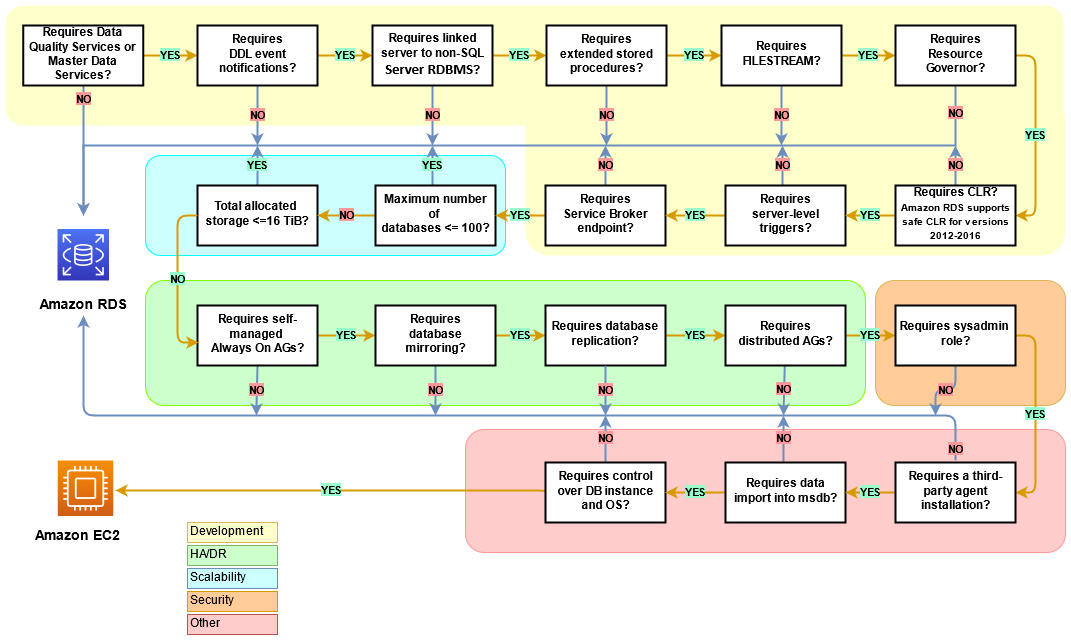
The following diagram helps visualize the information in the previous table, to assist in your decision-making process.
Shared responsibility
The following diagram shows the division of responsibilities between AWS and the user in the management of SQL Server features and operations.
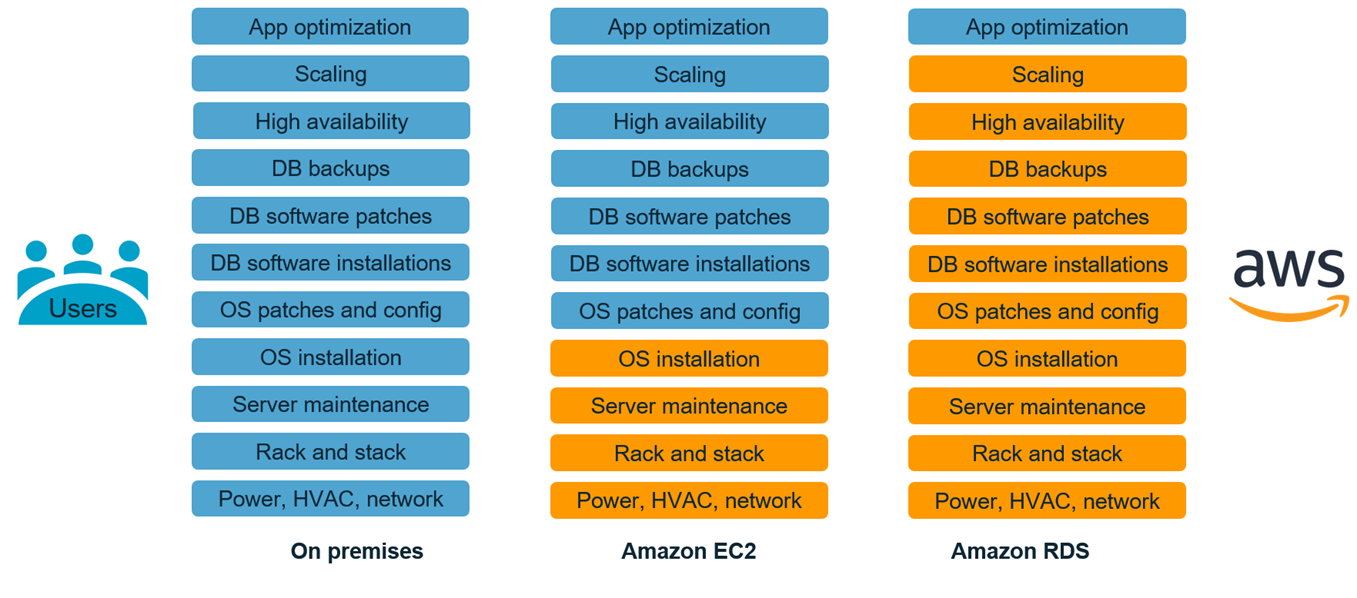
With AWS services, you don't have to worry about administration tasks such as server provisioning, patching, setup, configuration, backups, or recovery. AWS continuously monitors your clusters to keep your workloads up and running with self-healing storage and automated scaling. You focus on high-value application development tasks such as schema design, query construction, and optimization, while AWS takes care of operational tasks on your behalf.
You never have to over-provision or under-provision infrastructure to accommodate application growth, intermittent spikes, and performance requirements, or incur fixed capital costs, including software licensing and support, hardware refresh, and resources to maintain hardware. AWS manages these, so you can spend time innovating and building new applications, not managing infrastructure.
For more information, see Shared Responsibility Model
