Contact AWS Support
If you have AWS Business Support+
Create case
-
Sign in to Support Center
. -
Choose Create case.
Describe your issue
AWS Support now uses an AI-powered assistant to help route and resolve your case.
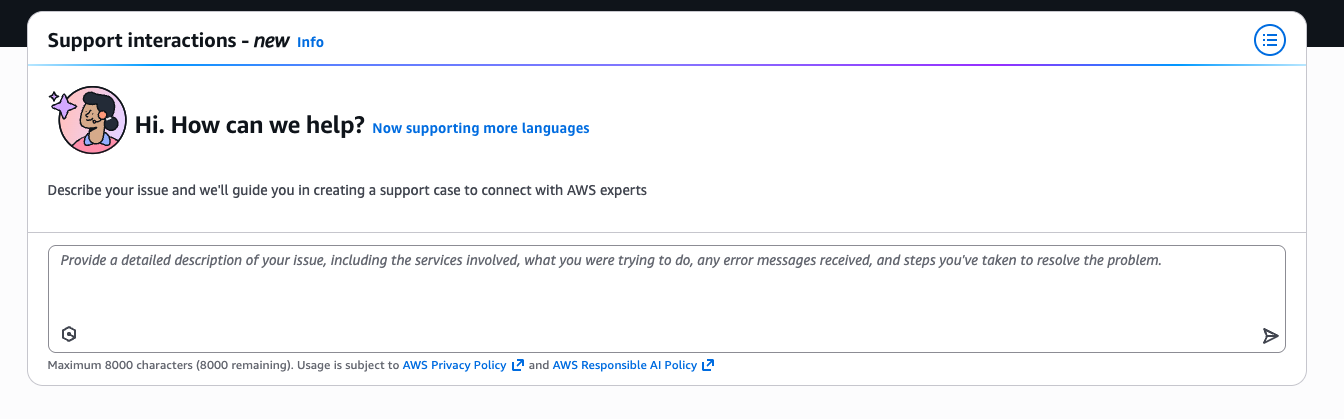
Describe your issue in natural language, including relevant details such as:
-
The solution name (Landing Zone Accelerator on AWS)
-
The AWS services involved
-
Error messages or unexpected behavior
-
Steps you have already taken to troubleshoot
The AI assistant will guide you through the resolution process or connect you with a support engineer.
Use the classic experience
If you prefer the form-based case creation workflow, choose Use the old experience.
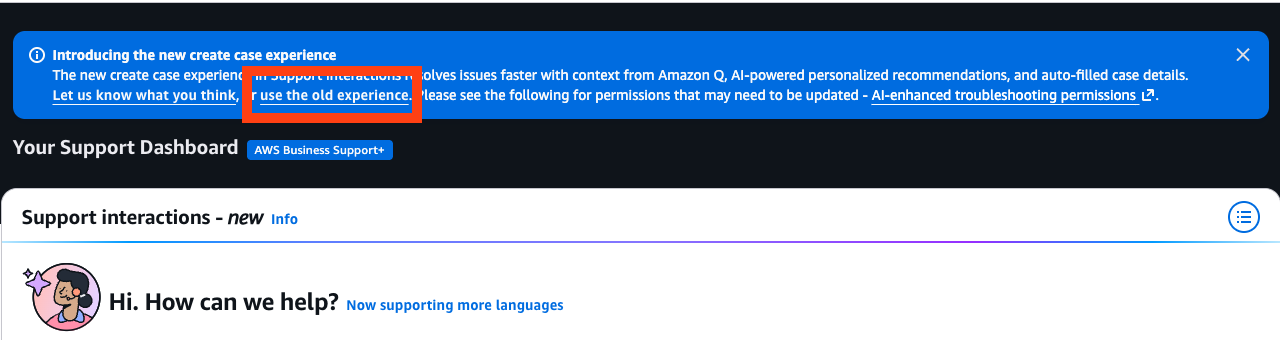
Then provide the following information:
-
For Type, choose Technical.
-
For Service, select Control Tower.
-
For Category, select Landing Zone Accelerator.
-
For Severity, select the option that best matches your use case.
-
For Subject, enter text summarizing your question or issue.
-
For Description, describe the issue in detail, including the name of this product and the version you are using, such as: Landing Zone Accelerator on AWS vX.Y.Z.
-
Choose Attach files to provide any supporting information that AWS Support needs to process the request.
-
Choose Submit.
Additional information
-
For Subject, enter text summarizing your question or issue.
-
For Description, describe the issue in detail.
-
Choose Attach files.
-
Attach a
–0—zipfile containing the following:-
Your Landing Zone Accelerator on AWS configuration files, noting modifications if applicable
-
Sanitized code build logs from the Failed stage which were obtained after setting the
LOG_LEVELto debug in the CodeBuild environment -
Failed CloudFormation template ARN
-
