기계 번역으로 제공되는 번역입니다. 제공된 번역과 원본 영어의 내용이 상충하는 경우에는 영어 버전이 우선합니다.
# AWS CloudFormation 템플릿을 사용하여 AWS Glue에서 암호화 적용 자동화
*Diogo Guedes, Amazon Web Services*
## 요약
이 패턴은 AWS CloudFormation 템플릿을 사용하여 AWS Glue에서 암호화 적용을 설정하고 자동화하는 방법을 보여줍니다. 템플릿은 암호화를 적용하는 데 필요한 모든 구성과 리소스를 생성합니다. 이러한 리소스에는 초기 구성, Amazon EventBridge 규칙에 의해 생성된 예방 제어, AWS Lambda 함수가 포함됩니다.
## 사전 조건 및 제한 사항
**사전 조건 **
+ 활성 상태의 AWS 계정
+ CloudFormation 템플릿과 해당 리소스를 배포할 수 있는 권한
**제한 사항 **
이 보안 제어는 리전별로 적용됩니다. AWS Glue에서 암호화 적용을 설정하려는 각 AWS 리전에 보안 제어를 배포해야 합니다.
## 아키텍처
**대상 기술 스택 **
+ Amazon CloudWatch Logs(AWS Lambda에서)
+ Amazon EventBridge 규칙
+ AWS CloudFormation 스택
+ AWS CloudTrail
+ AWS Identity and Access Management(IAM) 관리형 역할 및 정책
+ AWS Key Management Service (AWS KMS)
+ AWS KMS 별칭
+ AWS Lambda 함수
+ AWS Systems Manager Parameter Store
**대상 아키텍처**
다음 다이어그램은 AWS Glue에서 암호화 적용을 자동화하는 방법을 보여줍니다.
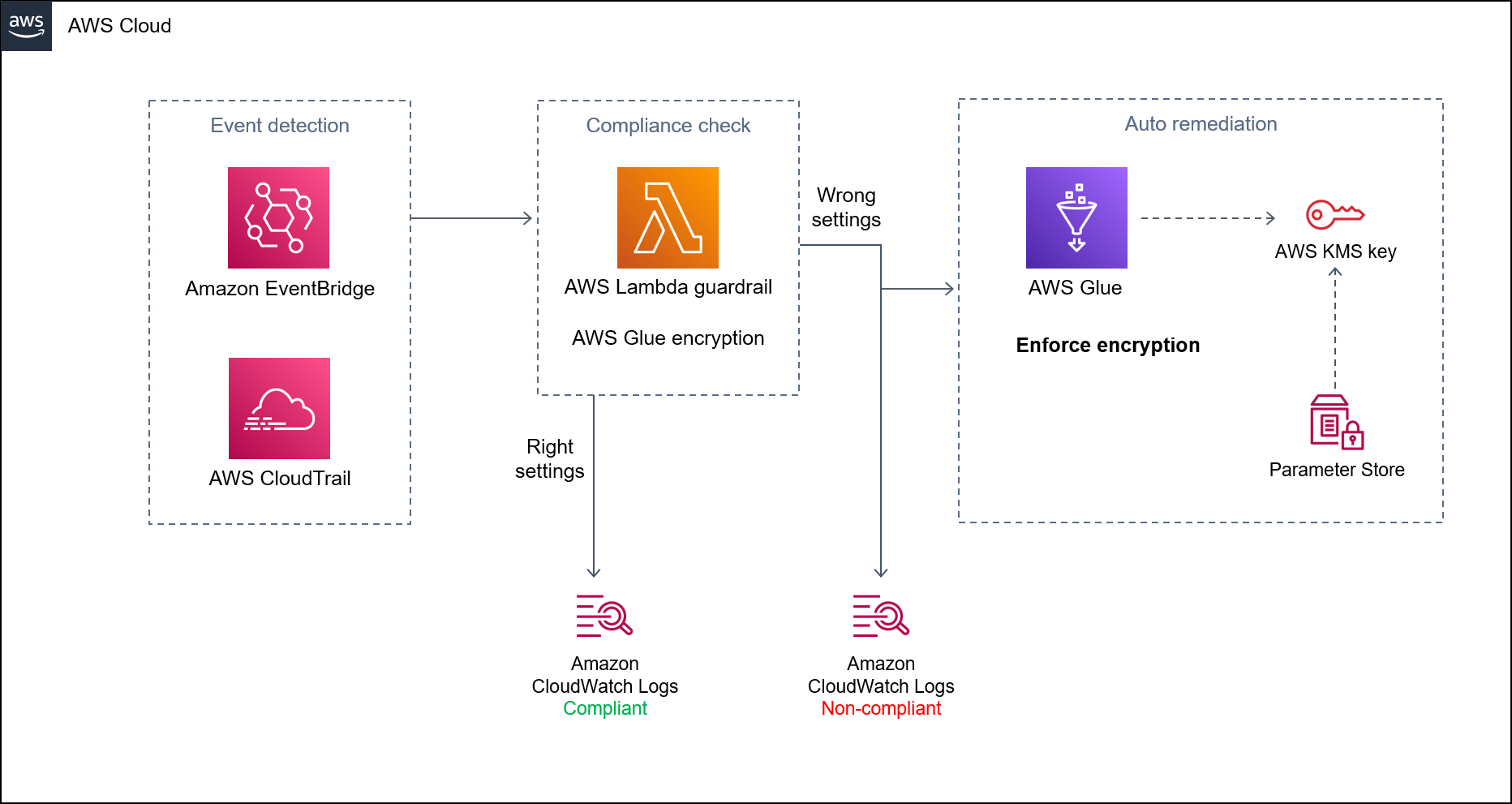
이 다이어그램은 다음 워크플로를 보여줍니다.
1. [CloudFormation 템플릿](https://github.com/aws-samples/aws-custom-guardrail-event-driven/blob/main/CloudFormation/aws-custom-guardrail-event-driven.yaml)은 AWS Glue에서의 암호화 시행을 위한 초기 구성 및 탐지 제어를 비롯한 모든 리소스를 생성합니다.
1. EventBridge 규칙은 암호화 구성의 상태 변경을 감지합니다.
1. Lambda 함수는 CloudWatch Logs를 통한 평가 및 로깅을 위해 호출됩니다. 규정 미준수 탐지의 경우, Parameter Store는 AWS KMS 키의 Amazon 리소스 이름(ARN)으로 복구됩니다. 서비스는 암호화가 활성화된 상태에서 규정 준수 상태로 개선됩니다.
**자동화 및 규모 조정**
[AWS Organizations](https://aws.amazon.com/organizations/)를 사용하는 경우, [AWS CloudFormation StackSets](https://docs.aws.amazon.com/AWSCloudFormation/latest/UserGuide/what-is-cfnstacksets.html)를 사용하여 AWS Glue에서 암호화를 적용하려는 여러 계정에 이 템플릿을 배포할 수 있습니다.
## 도구
+ [Amazon CloudWatch](https://docs.aws.amazon.com/AmazonCloudWatch/latest/monitoring/WhatIsCloudWatch.html)는 AWS 리소스와 AWS에서 실시간으로 실행되는 애플리케이션의 지표를 모니터링하는 데 도움이 됩니다.
+ [Amazon EventBridge](https://docs.aws.amazon.com/eventbridge/latest/userguide/eb-what-is.html)는 애플리케이션을 다양한 소스의 실시간 데이터와 연결할 수 있는 서버리스 이벤트 버스 서비스입니다. Lambda 함수, API 대상을 사용하는 HTTP 간접 호출 엔드포인트 또는 다른 AWS 계정의 이벤트 버스를 예로 들 수 있습니다.
+ [AWS CloudFormation](https://docs.aws.amazon.com/AWSCloudFormation/latest/UserGuide/Welcome.html)을 사용하면 AWS 리소스를 설정하고, 빠르고 일관되게 프로비저닝하고, 전체 AWS 계정 및 리전에서 수명 주기 전반에 걸쳐 관리할 수 있습니다.
+ [AWS CloudTrail](https://docs.aws.amazon.com/awscloudtrail/latest/userguide/cloudtrail-user-guide.html)은 운영 및 위험 감사, 거버넌스 및 AWS 계정의 규정 준수를 활성화하는 데 도움이 됩니다.
+ [AWS Glue](https://docs.aws.amazon.com/glue/latest/dg/what-is-glue.html)는 완전 관리형 추출, 전환, 적재(ETL) 서비스입니다. 이를 통해 데이터 스토어와 데이터 스트림 간에 데이터를 안정적으로 분류, 정리, 보강하고 이동할 수 있습니다.
+ [AWS Key Management Service(AWS KMS)](https://docs.aws.amazon.com/kms/latest/developerguide/overview.html)를 사용하면 암호화 키를 생성하고 제어하여 데이터를 보호할 수 있습니다.
+ [AWS Lambda](https://docs.aws.amazon.com/lambda/latest/dg/welcome.html)는 서버를 프로비저닝하거나 관리할 필요 없이 코드를 실행하는 데 도움이 되는 컴퓨팅 서비스입니다. 필요할 때만 코드를 실행하며 자동으로 확장이 가능하므로 사용한 컴퓨팅 시간만큼만 비용을 지불합니다.
+ [AWS Systems Manager](https://docs.aws.amazon.com/systems-manager/latest/userguide/what-is-systems-manager.html)는 AWS 클라우드에서 실행되는 애플리케이션과 인프라를 관리하는 데 도움이 됩니다. 애플리케이션 및 리소스 관리를 간소화하고, 운영 문제의 감지 및 해결 시간을 단축하며, AWS 리소스를 규모에 따라 안전하게 관리하는 데 도움이 됩니다.
**코드 **
이 패턴의 코드는 GitHub [aws-custom-guardrail-event-driven](https://github.com/aws-samples/aws-custom-guardrail-event-driven/blob/main/CloudFormation/aws-custom-guardrail-event-driven.yaml) 리포지토리에서 사용할 수 있습니다.
## 모범 사례
AWS Glue는 [AWS Glue에 작업 작성](https://docs.aws.amazon.com/glue/latest/dg/author-job-glue.html) 및 [개발 엔드포인트를 사용하여 스크립트 개발](https://docs.aws.amazon.com/glue/latest/dg/dev-endpoint.html)에 대한 저장된 데이터 암호화를 지원합니다.
다음 모범 사례를 고려하세요.
+ AWS KMS 키를 사용하여 암호화된 저장 데이터를 기록하도록 ETL 작업 및 개발 엔드포인트를 구성합니다.
+ AWS KMS를 통해 관리하는 키를 사용하여 [AWS Glue 데이터 카탈로그](https://docs.aws.amazon.com/glue/latest/dg/components-overview.html#data-catalog-intro)에 저장된 메타데이터를 암호화합니다.
+ AWS KMS 키를 사용하여 [크롤러](https://docs.aws.amazon.com/glue/latest/dg/add-crawler.html) 및 ETL 작업에서 생성된 작업 북마크와 로그를 암호화합니다.
## 에픽
### CloudFormation 템플릿 시작
| 작업 | 설명 | 필요한 기술 |
| --- | --- | --- |
| CloudFormation 템플릿을 배포합니다. | GitHub [리포지토리](https://github.com/aws-samples/aws-custom-guardrail-event-driven/blob/main/CloudFormation/aws-custom-guardrail-event-driven.yaml)에서 `aws-custom-guardrail-event-driven.yaml` 템플릿을 다운로드한 다음 템플릿을 [배포](https://awscli.amazonaws.com/v2/documentation/api/latest/reference/cloudformation/deploy/index.html)합니다. `CREATE_COMPLETE` 상태는 템플릿이 성공적으로 배포되었음을 나타냅니다.템플릿에는 입력 파라미터가 필요하지 않습니다. | 클라우드 아키텍트 |
### AWS Glue의 암호화 설정 확인
| 작업 | 설명 | 필요한 기술 |
| --- | --- | --- |
| AWS KMS 키 구성을 확인합니다. | [See the AWS documentation website for more details](http://docs.aws.amazon.com/ko_kr/prescriptive-guidance/latest/patterns/automate-encryption-enforcement-in-aws-glue-using-an-aws-cloudformation-template.html) | 클라우드 아키텍트 |
### 암호화 적용 테스트
| 작업 | 설명 | 필요한 기술 |
| --- | --- | --- |
| CloudFormation의 암호화 설정을 식별합니다. | [See the AWS documentation website for more details](http://docs.aws.amazon.com/ko_kr/prescriptive-guidance/latest/patterns/automate-encryption-enforcement-in-aws-glue-using-an-aws-cloudformation-template.html) | 클라우드 아키텍트 |
| 프로비저닝된 인프라를 미준수 상태로 전환합니다. | [See the AWS documentation website for more details](http://docs.aws.amazon.com/ko_kr/prescriptive-guidance/latest/patterns/automate-encryption-enforcement-in-aws-glue-using-an-aws-cloudformation-template.html)가드레일은 확인란의 선택을 취소한 후 AWS Glue에서 규정 미준수 상태를 탐지한 다음 잘못된 암호화 구성을 자동으로 수정하여 규정 준수를 적용합니다. 이에 따라, 페이지를 새로 고친 후 암호화 확인란을 다시 선택해야 합니다. | 클라우드 아키텍트 |
## 관련 리소스
+ [AWS CloudFormation 콘솔에서 스택 생성](https://docs.aws.amazon.com/AWSCloudFormation/latest/UserGuide/cfn-console-create-stack.html)(AWS CloudFormation 설명서)
+ [AWS CloudTrail을 사용하여 AWS API 호출에서 트리거되는 CloudWatch Events 규칙 생성](https://docs.aws.amazon.com/AmazonCloudWatch/latest/events/Create-CloudWatch-Events-CloudTrail-Rule.html)(Amazon CloudWatch 설명서)
+ [AWS Glue에서 암호화 설정](https://docs.aws.amazon.com/glue/latest/dg/set-up-encryption.html)(AWS Glue 설명서)