View a markdown version of this page

Examples of policy summaries - AWS Identity and Access Management

Examples of policy summaries

The following examples include JSON policies with their associated policy summaries, the service summaries, and the action summaries to help you understand the permissions given through a policy.

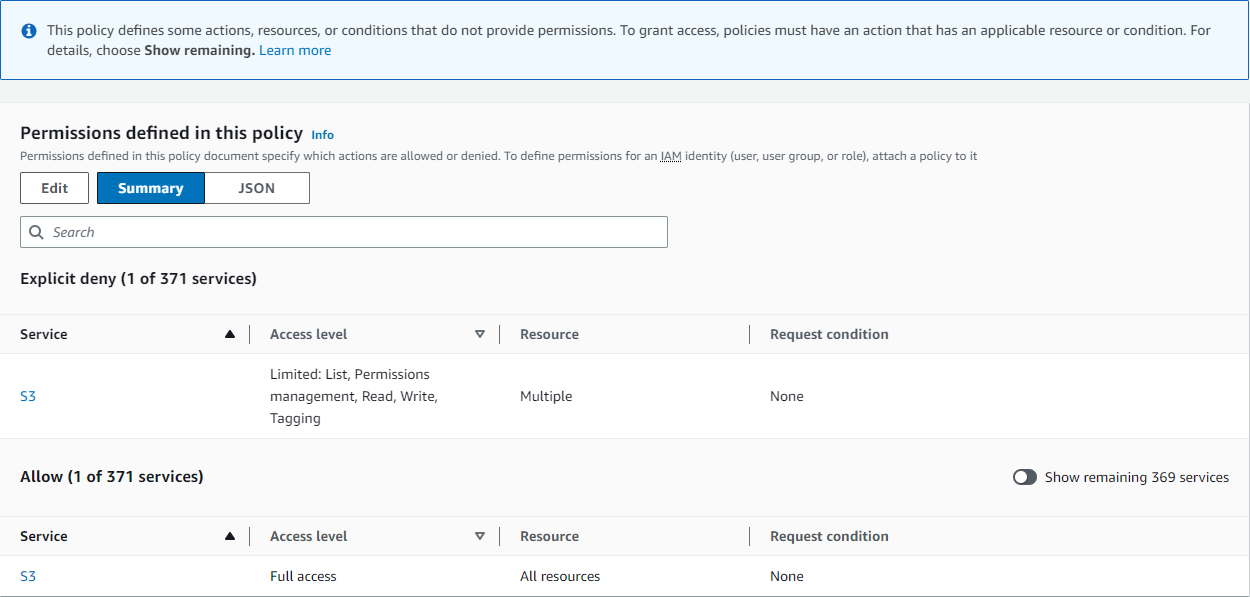
Policy 1: DenyCustomerBucket

This policy demonstrates an allow and a deny for the same service.

JSON
{ "Version":"2012-10-17", "Statement": [ { "Sid": "FullAccess", "Effect": "Allow", "Action": ["s3:*"], "Resource": ["*"] }, { "Sid": "DenyCustomerBucket", "Action": ["s3:*"], "Effect": "Deny", "Resource": ["arn:aws:s3:::customer", "arn:aws:s3:::customer/*" ] } ] }

DenyCustomerBucket Policy Summary:

Policy summary dialog image.

DenyCustomerBucket S3 (Explicit deny) Service Summary:

Service summary dialog image.

GetObject (Read) Action Summary:

Action summary dialog image.

Policy 2: DynamoDbRowCognitoID

This policy provides row-level access to Amazon DynamoDB based on the user's Amazon Cognito ID.

JSON
{ "Version":"2012-10-17", "Statement": [ { "Effect": "Allow", "Action": [ "dynamodb:DeleteItem", "dynamodb:GetItem", "dynamodb:PutItem", "dynamodb:UpdateItem" ], "Resource": [ "arn:aws:dynamodb:us-west-1:123456789012:table/myDynamoTable" ], "Condition": { "ForAllValues:StringEquals": { "dynamodb:LeadingKeys": [ "${cognito-identity.amazonaws.com:sub}" ] } } } ] }

DynamoDbRowCognitoID Policy Summary:

Policy summary dialog image.

DynamoDbRowCognitoID DynamoDB (Allow) Service Summary:

Service summary dialog image.

GetItem (List) Action Summary:

Action summary dialog image.

Policy 3: MultipleResourceCondition

This policy includes multiple resources and conditions.

JSON
{ "Version":"2012-10-17", "Statement": [ { "Effect": "Allow", "Action": [ "s3:PutObject", "s3:PutObjectAcl" ], "Resource": ["arn:aws:s3:::Apple_bucket/*"], "Condition": {"StringEquals": {"s3:x-amz-acl": ["public-read"]}} }, { "Effect": "Allow", "Action": [ "s3:PutObject", "s3:PutObjectAcl" ], "Resource": ["arn:aws:s3:::Orange_bucket/*"], "Condition": {"StringEquals": { "s3:x-amz-acl": ["custom"], "s3:x-amz-grant-full-control": ["1234"] }} } ] }

MultipleResourceCondition Policy Summary:

Policy summary dialog image.

MultipleResourceCondition S3 (Allow) Service Summary:

Service summary dialog image.

PutObject (Write) Action Summary:

Action summary dialog image.

Policy 4: EC2_troubleshoot

The following policy allows users to get a screenshot of a running Amazon EC2 instance, which can help with EC2 troubleshooting. This policy also permits viewing information about the items in the Amazon S3 developer bucket.

JSON
{ "Version":"2012-10-17", "Statement": [ { "Effect": "Allow", "Action": [ "ec2:GetConsoleScreenshot" ], "Resource": [ "*" ] }, { "Effect": "Allow", "Action": [ "s3:ListBucket" ], "Resource": [ "arn:aws:s3:::developer" ] } ] }

EC2_Troubleshoot Policy Summary:

Policy summary dialog image.

EC2_Troubleshoot S3 (Allow) Service Summary:

Service summary dialog image.

ListBucket (List) Action Summary:

Action summary dialog image.

Policy 5: CodeBuild_CodeCommit_CodeDeploy

This policy provides access to specific CodeBuild, CodeCommit, and CodeDeploy resources. Because these resources are specific to each service, they appear only with the matching service. If you include a resource that does not match any services in the Action element, then the resource appears in all action summaries.

JSON
{ "Version":"2012-10-17", "Statement": [ { "Sid": "Stmt1487980617000", "Effect": "Allow", "Action": [ "codebuild:*", "codecommit:*", "codedeploy:*" ], "Resource": [ "arn:aws:codebuild:us-east-2:123456789012:project/my-demo-project", "arn:aws:codecommit:us-east-2:123456789012:MyDemoRepo", "arn:aws:codedeploy:us-east-2:123456789012:application:WordPress_App", "arn:aws:codedeploy:us-east-2:123456789012:instance/AssetTag*" ] } ] }

CodeBuild_CodeCommit_CodeDeploy Policy Summary:

Policy summary dialog image.

CodeBuild_CodeCommit_CodeDeploy CodeBuild (Allow) Service Summary:
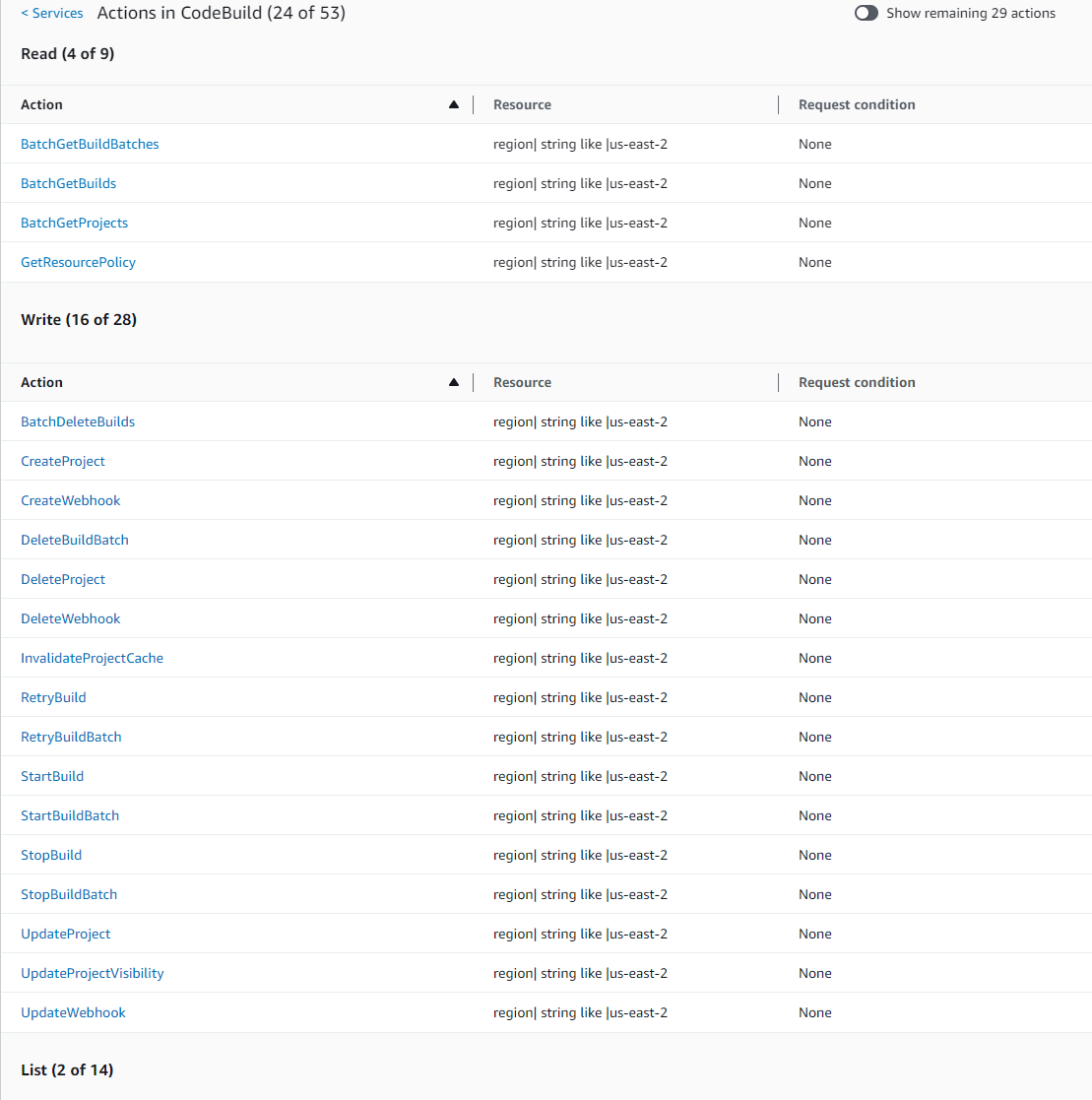
Service summary dialog image.

CodeBuild_CodeCommit_CodeDeploy StartBuild (Write) Action Summary:

Action summary dialog image.