翻訳は機械翻訳により提供されています。提供された翻訳内容と英語版の間で齟齬、不一致または矛盾がある場合、英語版が優先します。
# 通話後の文字起こしカテゴリの作成
通話後分析ではカスタムカテゴリの作成がサポートされているため、特定のビジネスニーズに合わせてトランスクリプト分析を調整できます。
さまざまなシナリオをカバーするカテゴリをいくつでも作成できます。作成するカテゴリごとに、1 から 20 のルールを作成する必要があります。各ルールは、中断、キーワード、非通話時間、感情という 4 つの基準のいずれかに基づいています。[https://docs.aws.amazon.com/transcribe/latest/APIReference/API_CreateCallAnalyticsCategory.html](https://docs.aws.amazon.com/transcribe/latest/APIReference/API_CreateCallAnalyticsCategory.html) オペレーションでこれらの基準を使用する詳細については、「[通話後分析カテゴリのルールの条件](#tca-rules-batch) セクション」を参照してください。
メディア内のコンテンツが、指定したカテゴリのすべてのルールに一致する場合、 Amazon Transcribe は出力にそのカテゴリのラベル付けを行います。JSON 出力のカテゴリマッチの例については、「[通話の分類出力](tca-output-batch.md#tca-output-categorization-batch)」を参照してください。
カスタムカテゴリを使用してできるその他の例を紹介します。
+ ネガティブなカスタマー感情で終わった通話など、特定の特徴を持つ通話を分離します。
+ 特定のキーワードセットにフラグを付けて追跡することで、お客様の問題の傾向を特定します。
+ エージェントが通話の最初の数秒間に特定のフレーズを話す (または省略する) などのコンプライアンスをモニタリングします。
+ エージェントによる中断やお客様からのネガティブな感情が多い通話にフラグを立てることで、カスタマーエクスペリエンスに関するインサイトを得られます。
+ 複数のカテゴリを比較して相関関係を測定します。たとえば、ウェルカムフレーズを使用するエージェントがお客様のポジティブな感情と相関関係があるかどうかの分析などです。
**通話後カテゴリとリアルタイムカテゴリ**
新しいカテゴリを作成する場合、通話後分析カテゴリ (`POST_CALL`) として作成するか、リアルタイム通話分析カテゴリ (`REAL_TIME`) として作成するかを指定できます。オプションを指定しない場合、カテゴリはデフォルトで通話後カテゴリとして作成されます。通話後分析カテゴリマッチは、通話後分析の文字起こしが完了すると、出力に表示されます。
通話後分析用の新しいカテゴリを作成するには、**AWS マネジメントコンソール**、**AWS CLI**、または **AWS SDK** を使用できます。例については以下を参照してください。
## AWS マネジメントコンソール
1. ナビゲーションペインで、**Amazon Transcribe 分析の呼び出し** Amazon Transcribeを選択します。
1. [**コール分析カテゴリ**] を選択すると、[**コール分析カテゴリ**] ページに移動します。[**カテゴリの作成**] を選択します。

1. [**カテゴリの作成ページ**] が表示されます。カテゴリの名前を入力し、**カテゴリタイプ**のドロップダウンメニューで [バッチコール分析] を選択します。
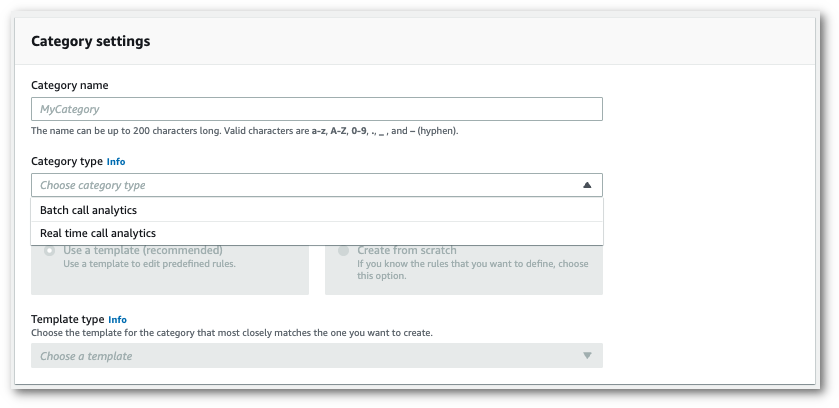
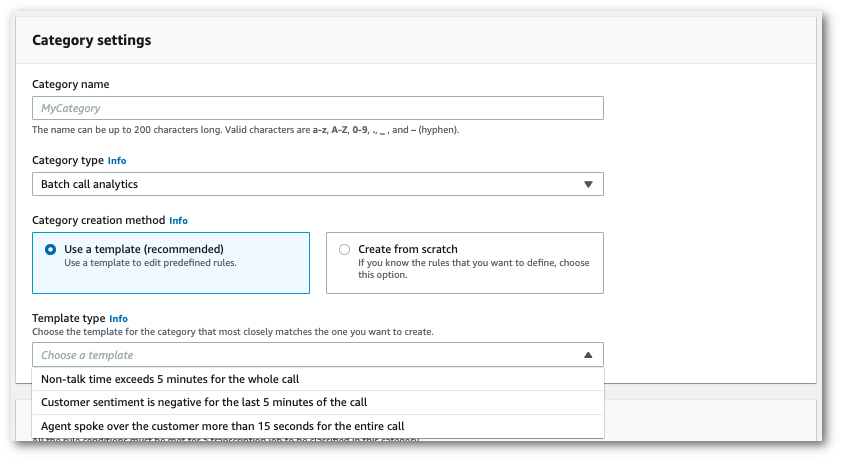
1. テンプレートを選択してカテゴリを作成することも、一から作成することもできます。
テンプレートを使用する場合: [**テンプレートを使用する (推奨)**] を選択し、必要なテンプレートを選択してから [**カテゴリの作成**] を選択します。
1. カスタムカテゴリを作成する場合: [**最初から作成**] を選択します。
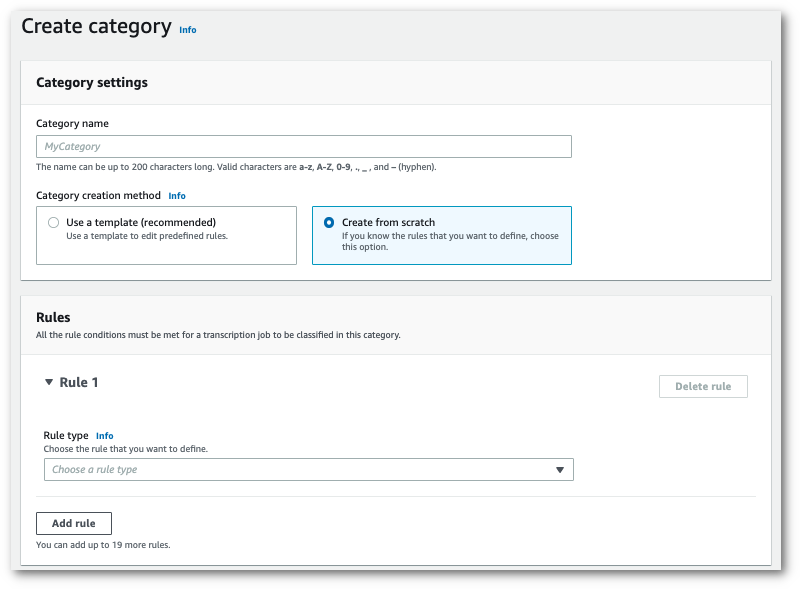
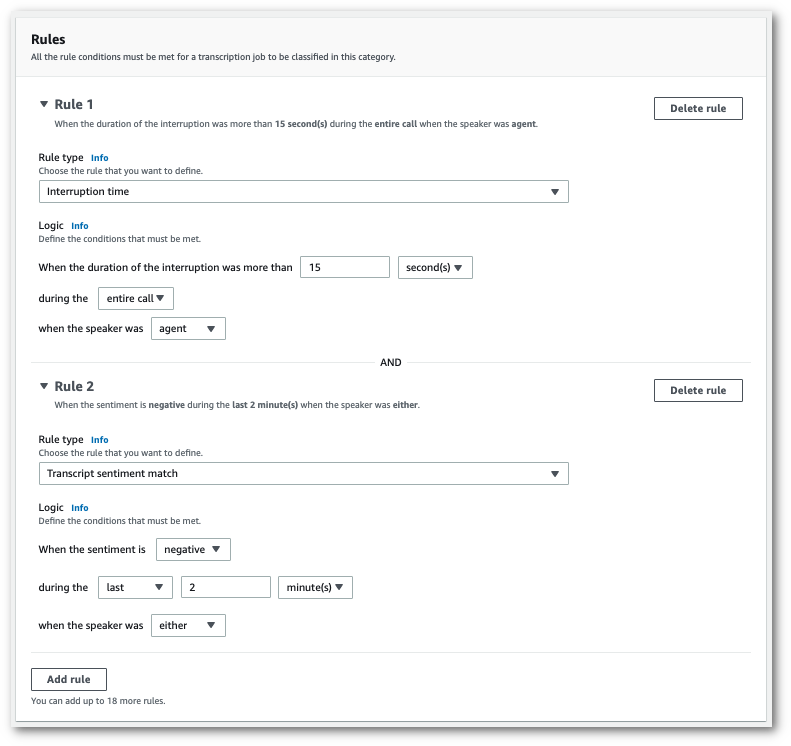
1. ドロップダウンメニューを使用して、カテゴリにルールを追加します。1 つのカテゴリには最大 20 ルールまで追加できます。
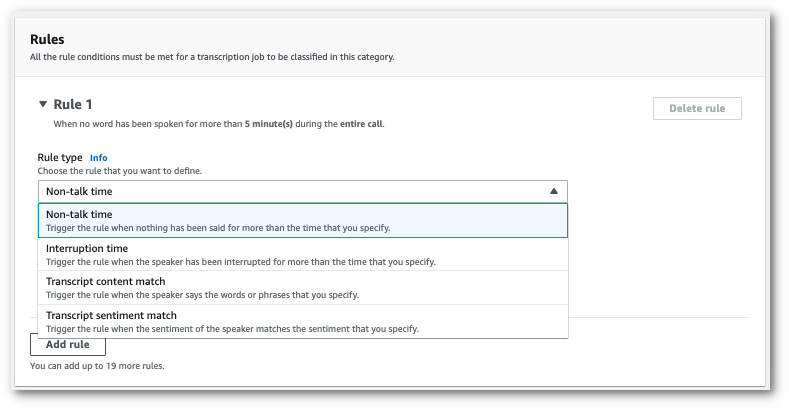
1. これは、2 つのルールがあるカテゴリの例です。1 つは、通話中に 15 秒以上お客様の話を中断したエージェントと、もう 1 つは通話の最後の 2 分間にお客様またはエージェントが感じたネガティブな感情です。
1. カテゴリにルールを追加し終えたら、[**カテゴリの作成**] を選択します。
## AWS CLI
この例では、[create-call-analytics-category](https://awscli.amazonaws.com/v2/documentation/api/latest/reference/transcribe/create-call-analytics-category.html) コマンドを使用します。詳細については、「[https://docs.aws.amazon.com/transcribe/latest/APIReference/API_CreateCallAnalyticsCategory.html](https://docs.aws.amazon.com/transcribe/latest/APIReference/API_CreateCallAnalyticsCategory.html)」、「[https://docs.aws.amazon.com/transcribe/latest/APIReference/API_CategoryProperties.html](https://docs.aws.amazon.com/transcribe/latest/APIReference/API_CategoryProperties.html)」、および「[https://docs.aws.amazon.com/transcribe/latest/APIReference/API_Rule.html](https://docs.aws.amazon.com/transcribe/latest/APIReference/API_Rule.html)」を参照してください。
以下の例では、ルールを含むカテゴリを作成します。
+ カスタマーは最初の 60 秒間で中断されました。これらの中断時間は少なくとも 10 秒続きました。
+ 通話の 10% から 80% の間では少なくとも20 秒の無音が続きました。
+ エージェントは、通話中のある時点でネガティブな感情を抱いていました。
+ 通話の最初の 10 秒の間に、「ようこそ」や「こんにちは」という単語は使われていません。
この例は、[create-call-analytics-category](https://awscli.amazonaws.com/v2/documentation/api/latest/reference/transcribe/create-call-analytics-category.html) コマンドと、カテゴリに複数のルールを追加するリクエストボディを使用しました。
```
aws transcribe create-call-analytics-category \
--cli-input-json file://{{filepath}}/{{my-first-analytics-category}}.json
```
ファイル *my-first-analytics-category.json* には、次のリクエストボディが含まれています。
```
{
"CategoryName": "{{my-new-category}}",
"InputType": "{{POST_CALL}}",
"Rules": [
{
"InterruptionFilter": {
"AbsoluteTimeRange": {
"First": {{60000}}
},
"Negate": {{false}},
"ParticipantRole": "{{CUSTOMER}}",
"Threshold": {{10000}}
}
},
{
"NonTalkTimeFilter": {
"Negate": {{false}},
"RelativeTimeRange": {
"EndPercentage": {{80}},
"StartPercentage": {{10}}
},
"Threshold": {{20000}}
}
},
{
"SentimentFilter": {
"ParticipantRole": "{{AGENT}}",
"Sentiments": [
"{{NEGATIVE}}"
]
}
},
{
"TranscriptFilter": {
"Negate": {{true}},
"AbsoluteTimeRange": {
"First": {{10000}}
},
"Targets": [
"{{welcome}}",
"{{hello}}"
],
"TranscriptFilterType": "{{EXACT}}"
}
}
]
}
```
## AWS SDK for Python (Boto3)
この例では AWS SDK for Python (Boto3) 、 を使用して、[create\_call\_analytics\_category ](https://boto3.amazonaws.com/v1/documentation/api/latest/reference/services/transcribe.html#TranscribeService.Client.create_call_analytics_category)メソッドの 引数`CategoryName`と `Rules`引数を使用してカテゴリを作成します。詳細については、[https://docs.aws.amazon.com/transcribe/latest/APIReference/API_CreateCallAnalyticsCategory.html](https://docs.aws.amazon.com/transcribe/latest/APIReference/API_CreateCallAnalyticsCategory.html)、[https://docs.aws.amazon.com/transcribe/latest/APIReference/API_CategoryProperties.html](https://docs.aws.amazon.com/transcribe/latest/APIReference/API_CategoryProperties.html)、および [https://docs.aws.amazon.com/transcribe/latest/APIReference/API_Rule.html](https://docs.aws.amazon.com/transcribe/latest/APIReference/API_Rule.html) を参照してください。
機能固有の例、シナリオ例、クロスサービス例など、 AWS SDKs[SDK を使用した Amazon Transcribe のコード例 AWS SDKs](service_code_examples.md)「」の章を参照してください。
以下の例では、ルールを含むカテゴリを作成します。
+ カスタマーは最初の 60 秒間で中断されました。これらの中断時間は少なくとも 10 秒続きました。
+ 通話の 10% から 80% の間では少なくとも20 秒の無音が続きました。
+ エージェントは、通話中のある時点でネガティブな感情を抱いていました。
+ 通話の最初の 10 秒の間に、「ようこそ」や「こんにちは」という単語は使われていません。
```
from __future__ import print_function
import time
import boto3
transcribe = boto3.client('transcribe', '{{us-west-2}}')
category_name = "{{my-new-category}}"
transcribe.create_call_analytics_category(
CategoryName = category_name,
InputType = {{POST_CALL}},
Rules = [
{
'InterruptionFilter': {
'AbsoluteTimeRange': {
'First': {{60000}}
},
'Negate': {{False}},
'ParticipantRole': '{{CUSTOMER}}',
'Threshold': {{10000}}
}
},
{
'NonTalkTimeFilter': {
'Negate': {{False}},
'RelativeTimeRange': {
'EndPercentage': {{80}},
'StartPercentage': {{10}}
},
'Threshold': {{20000}}
}
},
{
'SentimentFilter': {
'ParticipantRole': '{{AGENT}}',
'Sentiments': [
'{{NEGATIVE}}'
]
}
},
{
'TranscriptFilter': {
'Negate': {{True}},
'AbsoluteTimeRange': {
'First': {{10000}}
},
'Targets': [
'{{welcome}}',
'{{hello}}'
],
'TranscriptFilterType': '{{EXACT}}'
}
}
]
)
result = transcribe.get_call_analytics_category(CategoryName = category_name)
print(result)
```
## 通話後分析カテゴリのルールの条件
このセクションでは、[https://docs.aws.amazon.com/transcribe/latest/APIReference/API_CreateCallAnalyticsCategory.html](https://docs.aws.amazon.com/transcribe/latest/APIReference/API_CreateCallAnalyticsCategory.html) API オペレーションを使用して作成できるカスタム `POST_CALL` ルールのタイプについて説明します。
### 中断マッチ
中断 ([https://docs.aws.amazon.com/transcribe/latest/APIReference/API_InterruptionFilter.html](https://docs.aws.amazon.com/transcribe/latest/APIReference/API_InterruptionFilter.html) データタイプ) を使用するルールは、以下と一致するように設計されています。
+ エージェントがお客様を中断させるインスタンス
+ お客様がエージェントを中断させるインスタンス
+ いずれかの参加者が他の参加者を中断させる
+ 中断がないこと
[https://docs.aws.amazon.com/transcribe/latest/APIReference/API_InterruptionFilter.html](https://docs.aws.amazon.com/transcribe/latest/APIReference/API_InterruptionFilter.html) で使用できるパラメータの例を以下に示します。
```
"InterruptionFilter": {
"AbsoluteTimeRange": {
{{Specify the time frame, in milliseconds, when the match should occur}}
},
"RelativeTimeRange": {
{{Specify the time frame, in percentage, when the match should occur}}
},
"Negate": {{Specify if you want to match the presence or absence of interruptions}},
"ParticipantRole": {{Specify if you want to match speech from the agent, the customer, or both}},
"Threshold": {{Specify a threshold for the amount of time, in seconds, interruptions occurred during the call}}
},
```
これらのパラメータとそれぞれに関連する有効な値の詳細については、「[https://docs.aws.amazon.com/transcribe/latest/APIReference/API_CreateCallAnalyticsCategory.html](https://docs.aws.amazon.com/transcribe/latest/APIReference/API_CreateCallAnalyticsCategory.html)」および「[https://docs.aws.amazon.com/transcribe/latest/APIReference/API_InterruptionFilter.html](https://docs.aws.amazon.com/transcribe/latest/APIReference/API_InterruptionFilter.html)」を参照してください。
### キーワードマッチ
キーワード ([https://docs.aws.amazon.com/transcribe/latest/APIReference/API_TranscriptFilter.html](https://docs.aws.amazon.com/transcribe/latest/APIReference/API_TranscriptFilter.html) データタイプ) を使用するルールは、以下と一致するように設計されています。
+ エージェント、お客様、あるいはその両方が話すカスタム単語またはフレーズ
+ エージェント、お客様、あるいはその両方が口にし**ない**カスタム単語またはフレーズ
+ 特定の期間に出現するカスタム単語またはフレーズ
[https://docs.aws.amazon.com/transcribe/latest/APIReference/API_TranscriptFilter.html](https://docs.aws.amazon.com/transcribe/latest/APIReference/API_TranscriptFilter.html) で使用できるパラメータの例を以下に示します。
```
"TranscriptFilter": {
"AbsoluteTimeRange": {
{{Specify the time frame, in milliseconds, when the match should occur}}
},
"RelativeTimeRange": {
{{Specify the time frame, in percentage, when the match should occur}}
},
"Negate": {{Specify if you want to match the presence or absence of your custom keywords}},
"ParticipantRole": {{Specify if you want to match speech from the agent, the customer, or both}},
"Targets": [ {{The custom words and phrases you want to match}} ],
"TranscriptFilterType": {{Use this parameter to specify an exact match for the specified targets}}
}
```
これらのパラメータとそれぞれに関連する有効な値の詳細については、「[https://docs.aws.amazon.com/transcribe/latest/APIReference/API_CreateCallAnalyticsCategory.html](https://docs.aws.amazon.com/transcribe/latest/APIReference/API_CreateCallAnalyticsCategory.html)」および「[https://docs.aws.amazon.com/transcribe/latest/APIReference/API_TranscriptFilter.html](https://docs.aws.amazon.com/transcribe/latest/APIReference/API_TranscriptFilter.html)」を参照してください。
### 非通話時間マッチ
非通話時間 ([https://docs.aws.amazon.com/transcribe/latest/APIReference/API_NonTalkTimeFilter.html](https://docs.aws.amazon.com/transcribe/latest/APIReference/API_NonTalkTimeFilter.html) データタイプ) を使用するルールは、以下と一致するように設計されています。
+ 通話中、指定された時間帯に無音状態が続いていること
+ 通話中、指定された時間帯に発話状態が続いていること
[https://docs.aws.amazon.com/transcribe/latest/APIReference/API_NonTalkTimeFilter.html](https://docs.aws.amazon.com/transcribe/latest/APIReference/API_NonTalkTimeFilter.html) で使用できるパラメータの例を以下に示します。
```
"NonTalkTimeFilter": {
"AbsoluteTimeRange": {
{{Specify the time frame, in milliseconds, when the match should occur}}
},
"RelativeTimeRange": {
{{Specify the time frame, in percentage, when the match should occur}}
},
"Negate": {{Specify if you want to match the presence or absence of speech}},
"Threshold": {{Specify a threshold for the amount of time, in seconds, silence (or speech) occurred during the call}}
},
```
これらのパラメータとそれぞれに関連する有効な値の詳細については、「[https://docs.aws.amazon.com/transcribe/latest/APIReference/API_CreateCallAnalyticsCategory.html](https://docs.aws.amazon.com/transcribe/latest/APIReference/API_CreateCallAnalyticsCategory.html)」および「[https://docs.aws.amazon.com/transcribe/latest/APIReference/API_NonTalkTimeFilter.html](https://docs.aws.amazon.com/transcribe/latest/APIReference/API_NonTalkTimeFilter.html)」を参照してください。
### 感情マッチ
感情 ([https://docs.aws.amazon.com/transcribe/latest/APIReference/API_SentimentFilter.html](https://docs.aws.amazon.com/transcribe/latest/APIReference/API_SentimentFilter.html) データタイプ) を使用するルールは、以下と一致するように設計されています。
+ 通話中の特定の時点で、お客様、エージェント、あるいはその両方が表現したポジティブな感情の有無
+ 通話中の特定の時点で、お客様、エージェント、あるいはその両方が表明したネガティブな感情の有無
+ 通話中の特定の時点で、お客様、エージェント、あるいはその両方が表明した中立的な感情の有無
+ 通話中の特定の時点で、お客様、エージェント、あるいはその両方が表明したさまざまな感情の有無
[https://docs.aws.amazon.com/transcribe/latest/APIReference/API_SentimentFilter.html](https://docs.aws.amazon.com/transcribe/latest/APIReference/API_SentimentFilter.html) で使用できるパラメータの例を以下に示します。
```
"SentimentFilter": {
"AbsoluteTimeRange": {
{{Specify the time frame, in milliseconds, when the match should occur}}
},
"RelativeTimeRange": {
{{Specify the time frame, in percentage, when the match should occur}}
},
"Negate": {{Specify if you want to match the presence or absence of your chosen sentiment}},
"ParticipantRole": {{Specify if you want to match speech from the agent, the customer, or both}},
"Sentiments": [ {{The sentiments you want to match}} ]
},
```
これらのパラメータとそれぞれに関連する有効な値の詳細については、「[https://docs.aws.amazon.com/transcribe/latest/APIReference/API_CreateCallAnalyticsCategory.html](https://docs.aws.amazon.com/transcribe/latest/APIReference/API_CreateCallAnalyticsCategory.html)」および「[https://docs.aws.amazon.com/transcribe/latest/APIReference/API_SentimentFilter.html](https://docs.aws.amazon.com/transcribe/latest/APIReference/API_SentimentFilter.html)」を参照してください。