翻訳は機械翻訳により提供されています。提供された翻訳内容と英語版の間で齟齬、不一致または矛盾がある場合、英語版が優先します。
Amazon EventBridge イベントを使用して画面録画ステータスを追跡する
Amazon EventBridge を使用すると、エージェント画面録画のステータスをほぼリアルタイムで表示できます。各エージェントの画面録画のイベントには、成功/失敗ステータス、説明を含む失敗コード、録画場所、録画サイズ、インストールされたクライアントバージョン、画面録画の開始時刻と終了時刻が含まれます。
を他の AWS サービスと統合して、エージェントの画面録画の分析またはモニタリングに関するインサイトを取得できます。
-
Amazon CloudWatch Log Insights を使用したクエリ
-
Amazon Quick
ダッシュボードでほぼリアルタイムのアラートを取得する -
Connect Customer の外部で集計レポートを作成する
-
他のカスタマイズされたデータパイプラインソリューションを Amazon EventBridge に接続する
内容
Amazon EventBridge イベントペイロード形式
画面録画ステータスのイベント - INITIATED
このイベントは、エージェントが問い合わせを承諾したときに出力されます。これは、エージェントの画面録画が有効になっているすべての問い合わせについて、記録が開始される前である可能性があります。
{
  "version": "0",
  "id": "the_event_id_from_eventbridge",
  "detail-type": "Screen Recording Status Changed",
  "source": "aws.connect",
  "account": "your_aws_account_id",
  "time": "2026-01-01T00:00:00Z",
  "region": "us-west-2",
  "resources": [
    "arn:aws:connect:us-west-2:your_aws_account_id:instance/your_instance_id/contact/your_contact_id",
    "arn:aws:connect:us-west-2:your_aws_account_id:instance/your_instance_id"
  ],
  "detail": {
    "version": "1.0",
    "recordingStatus": "INITIATED",
    "eventDeduplicationId": "unique_uuid",
    "instanceArn": "arn:aws:connect:us-west-2:your_aws_account_id:instance/your_instance_id",
    "contactArn": "arn:aws:connect:us-west-2:your_aws_account_id:instance/your_instance_id/contact/your_contact_id",
    "agentArn": "arn:aws:connect:us-west-2:your_aws_account_id:instance/your_instance_id/agent/your_agent_id",
    "clientInfo": {
      "appVersion": "2.0.3.0",
    }
  }
}
画面録画ステータスのイベント - 完了
このイベントは、エージェントのデスクトップで画面録画が終了すると出力されます。これは、画面録画が Amazon S3 バケットに正常にアップロードされたことを意味するものではありません。
{
  "version": "0",
  "id": "the_event_id_from_eventbridge",
  "detail-type": "Screen Recording Status Changed",
  "source": "aws.connect",
  "account": "your_aws_account_id",
  "time": "2026-01-01T00:00:00Z",
  "region": "us-west-2",
  "resources": [
    "arn:aws:connect:us-west-2:your_aws_account_id:instance/your_instance_id/contact/your_contact_id",
    "arn:aws:connect:us-west-2:your_aws_account_id:instance/your_instance_id"
  ],
  "detail": {
    "version": "1.0",
    "recordingStatus": "COMPLETED",
    "eventDeduplicationId": "aaaaaaaa-bbbb-cccc-dddd-eeeeeeee",
    "instanceArn": "arn:aws:connect:us-west-2:your_aws_account_id:instance/your_instance_id",
    "contactArn": "arn:aws:connect:us-west-2:your_aws_account_id:instance/your_instance_id/contact/your_contact_id",
    "agentArn": "arn:aws:connect:us-west-2:your_aws_account_id:instance/your_instance_id/agent/your_agent_id",
    "clientInfo": {
      "appVersion": "2.0.3.0",
    },
    "recordingInfo": {
      "startTime": "2026-01-01T00:00:00.000Z",
      "endTime": "2026-01-01T00:00:00.000Z",
    }
  }
}
画面録画ステータスのイベント - 公開済み
このイベントは、画面録画が Amazon S3 バケットに正常にアップロードされたときに出力されます。詳細には、Amazon S3 バケットの場所、記録サイズ、記録期間が含まれます。
{
  "version": "0",
  "id": "the_event_id_from_eventbridge",
  "detail-type": "Screen Recording Status Changed",
  "source": "aws.connect",
  "account": "your_aws_account_id",
  "time": "2026-01-01T00:00:00Z",
  "region": "us-west-2",
  "resources": [
    "contactArn",
    "instanceArn"
  ],
  "detail": {
    "version": "1.0",
    "recordingStatus": "PUBLISHED",
    "eventDeduplicationId": "aaaaaaaa-bbbb-cccc-dddd-eeeeeeee",
    "instanceArn": "arn:aws:connect:us-west-2:your_aws_account_id:instance/your_instance_id",
    "contactArn": "arn:aws:connect:us-west-2:your_aws_account_id:instance/your_instance_id/contact/your_contact_id",
    "agentArn": "arn:aws:connect:us-west-2:your_aws_account_id:instance/your_instance_id/agent/your_agent_id",
    "clientInfo": {
      "appVersion": "2.0.3.0",
    },
    "recordingInfo": {
      "startTime": "2026-01-01T00:00:00.000Z",
      "endTime": "2026-01-01T00:00:00.000Z",
      "publishTime": "2026-01-01T00:00:00.000Z",
      "location": "s3://your-bucket-name/object-prefix/object-key",
      "durationInMillis": 100000,
      "sizeInBytes": 1000000
    }
  }
}
画面録画ステータスのイベント - 失敗
このイベントは、画面録画が失敗した場合に出力されます。障害情報の詳細は、検出可能な障害理由のベストエフォート推定として提供されます。
{
  "version": "0",
  "id": "the_event_id_from_eventbridge",
  "detail-type": "Screen Recording Status Changed",
  "source": "aws.connect",
  "account": "your_aws_account_id",
  "time": "2026-01-01T00:00:00Z",
  "region": "us-west-2",
  "resources": [
    "arn:aws:connect:us-west-2:your_aws_account_id:instance/your_instance_id/contact/cccccccc-cccc-cccc-cccc-ccccccccccccc",
    "arn:aws:connect:us-west-2:your_aws_account_id:instance/your_instance_id"
  ],
  "detail": {
    "version": "1.0",
    "recordingStatus": "FAILED",
    "eventDeduplicationId": "aaaaaaaa-bbbb-cccc-dddd-eeeeeeee",
    "instanceArn": "arn:aws:connect:us-west-2:your_aws_account_id:instance/your_instance_id",
    "contactArn": "arn:aws:connect:us-west-2:your_aws_account_id:instance/your_instance_id/contact/cccccccc-cccc-cccc-cccc-ccccccccccccc",
    "agentArn": "arn:aws:connect:us-west-2:your_aws_account_id:instance/your_instance_id/agent/your_agent_id",
    "clientInfo": {
      "appVersion": "2.0.3.0",
    },
    "failureInfo": {
      "code": "UNKNOWN",
      "message": "UNKNOWN",
      "source": "Unknown failure"
    },
    "recordingInfo": {
      "startTime": "2026-01-01T00:00:00.000Z"
    }
  }
}
Amazon EventBridge イベントに一致するルールを作成する
画面録画ステータスの Amazon EventBridge イベントをサブスクライブするには、定義されたイベントソースとイベント詳細タイプに一致する Amazon EventBridge ルールを作成する必要があります。これは、 AWS コンソールまたは AWS CDK ライブラリを使用して実現できます。
AWS コンソールを使用してルールを作成する
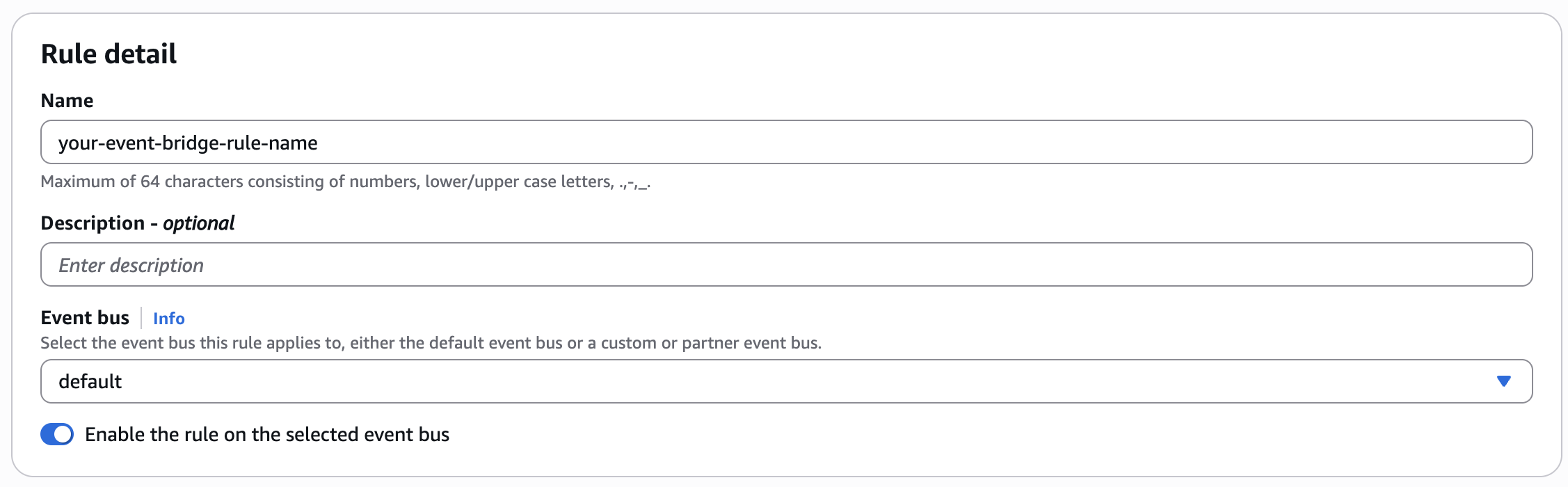
AWS コンソールで、Amazon EventBridge → Buses → Rules で新しいルールを作成します。
デフォルトのイベントバスを使用する
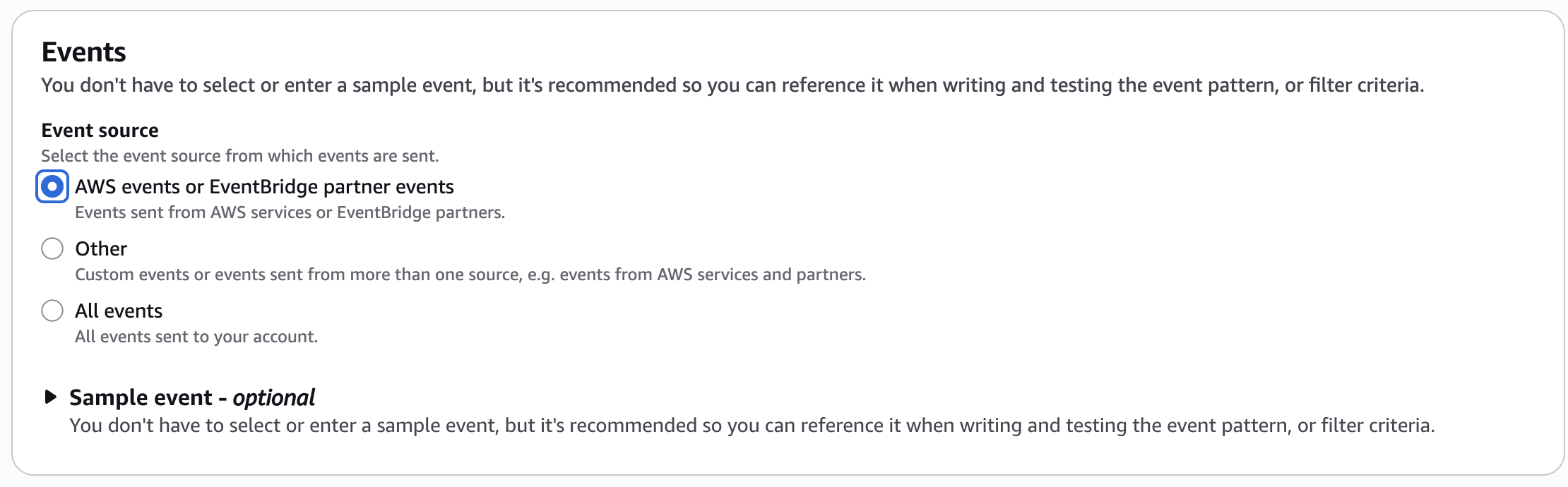
テンプレートイベントパターンを使用する
ドロップダウンリストから定義されたイベントパターンを選択します。
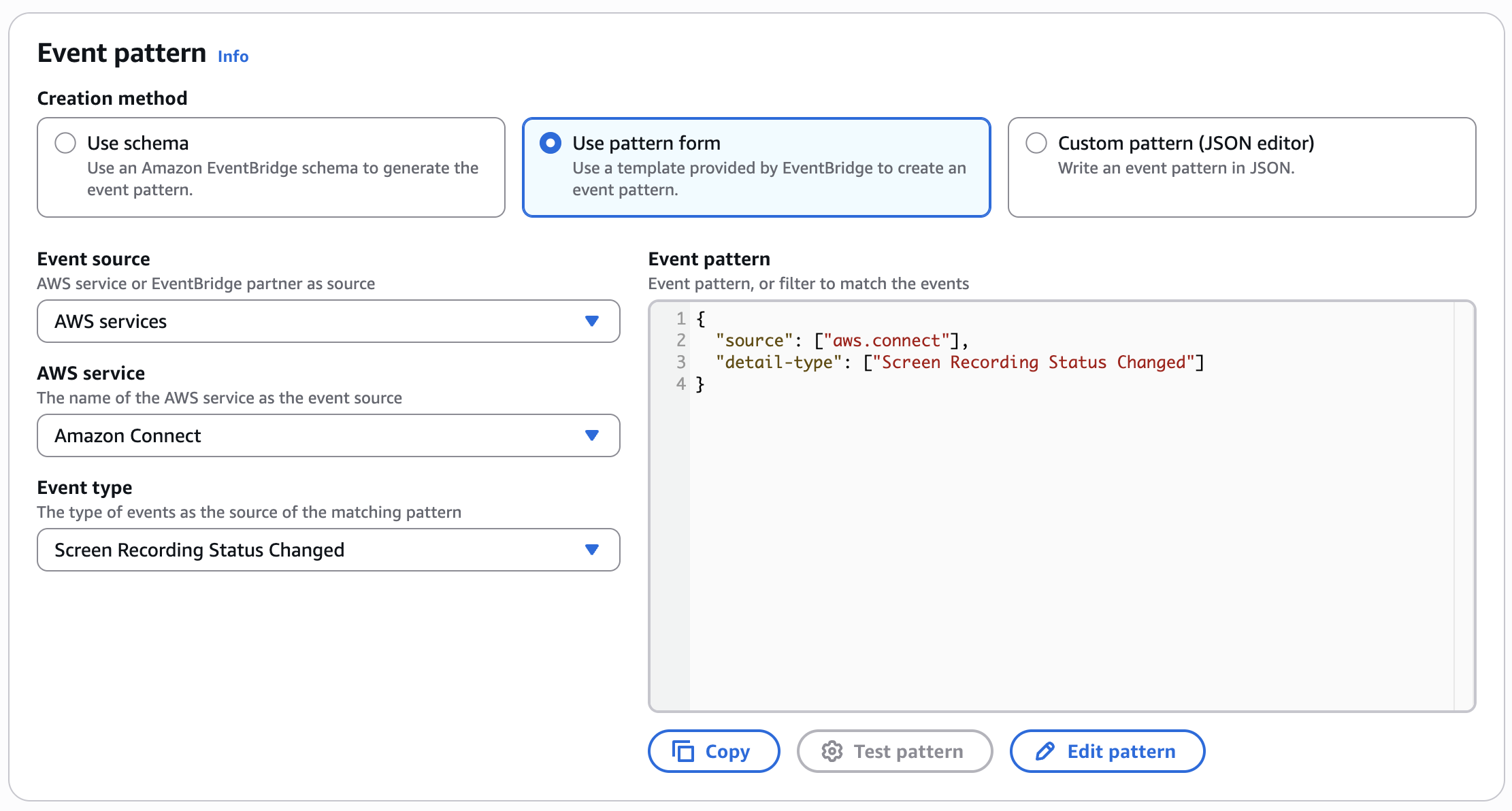
イベントタイプがドロップダウンリストに表示されない場合は、カスタムパターン (JSON エディタ) を使用して同じパターンを次のように作成することもできます。
{
  "source": [ "aws.connect" ],
  "detailType": [ "Screen Recording Status Changed" ]
}
を使用してルールを作成する AWS CDK
または、 で AWS リソースを管理する場合 AWS CDK、Amazon EventBridge ルールを構築するための TypeScript コードスニペットの例を次に示します。
import { Rule } from 'aws-cdk-lib/aws-events';

const eventBridgeRule = new Rule(this, 'YourEventBridgeRuleLogicalName', {
    ruleName: 'your-event-bridge-rule-name',
    description: 'your rule description',
    eventPattern: {
        source: [ "aws.connect" ],
        detailType: [ "Screen Recording Status Changed" ]
    }
});
作成した Amazon EventBridge ルールのターゲットを設定する
Amazon EventBridge は、ターゲットとして多くの AWS サービスをサポートしています。必要に応じて、他の AWS サービスを使用して独自のイベント処理パイプラインを柔軟に構築できます。ルールごとに最大 5 つのターゲットを定義できます。詳細については、「Amazon EventBridge ユーザーガイド」の「Amazon EventBridge ターゲット」を参照してください。
ターゲット例としての Amazon CloudWatch ロググループ
次の例では、Amazon CloudWatch ロググループをターゲットとして使用します。
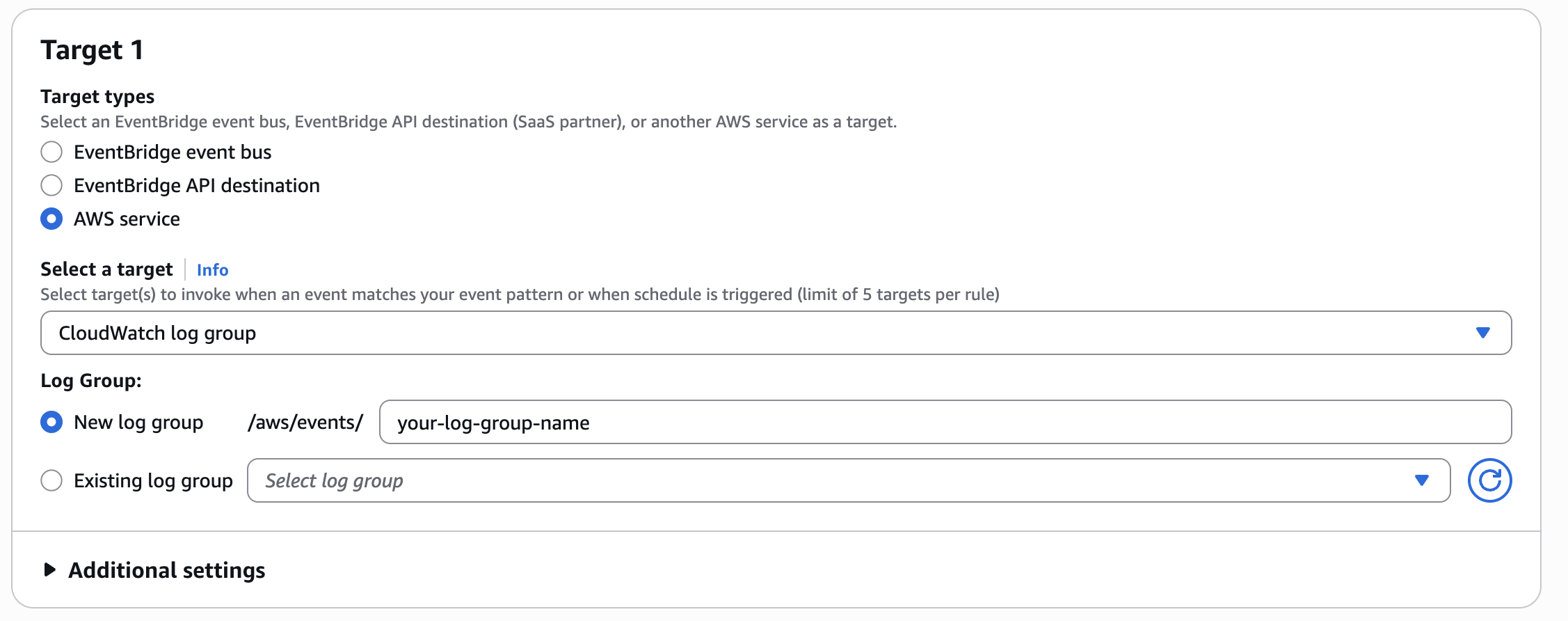
AWS CDK コードで、リソースを作成し、Amazon EventBridge ルールに追加します。
import { LogGroup, RetentionDays } from "aws-cdk-lib/aws-logs";
import { CloudWatchLogGroup } from 'aws-cdk-lib/aws-events-targets';

const logGroup = new LogGroup(this, 'YourLogGroupLogicalName', {
    logGroupName: '"/aws/events/your-log-group-name',
    retention: RetentionDays.ONE_YEAR
});

eventBridgeRule.addTarget(new CloudWatchLogGroup((logGroup)));
Amazon CloudWatch Log Insights クエリの例
Amazon CloudWatch Insights クエリ言語を使用して、クエリの例をいくつか示します。
-
成功率のサンプルクエリ
fields @timestamp, @message, detail | stats sum(detail.recordingStatus= "PUBLISHED") as Count_Success, sum(detail.recordingStatus= "INITIATED") as Count_Total, Count_Success / Count_Total as Success_Ratio -
各記録ステータスの数を取得するためのサンプルクエリ
fields @timestamp, @message, detail | stats count(*) as Count group by detail.recordingStatus as recordingStatus -
最も一般的な障害コードを持つ失敗した問い合わせに対するサンプルクエリ
fields @timestamp, @message, detail | filter detail.recordingStatus = "FAILED" | stats count(*) as Count group by detail.failureInfo.code as FailureCode | sort by Count desc -
問い合わせが最も失敗したエージェントに対するサンプルクエリ
fields @timestamp, @message, detail
| filter detail.recordingStatus = "FAILED"
| stats count(*) as Count group by detail.agentArn as AgentArn
| sort by Count desc
