Tagging key combinations
To better help you find your tagging values, consider the following questions:
-
What AWS service will be the destination for your migration?
-
What is in the license agreement of your databases?
-
Where is the source of your migration (on-prem or already in AWS as Amazon EC2A)?
-
Are your workloads in the specialized workload list such as SAP or Oracle workloads?
Use the tagging decision tree shown in the following diagram to help you assign the tag value for your migrated workloads. For a complete list of services that are included in MAP 2.0, see the MAP 2.0 Included Services list: https://s3-us-west-2.amazonaws.com/map-2.0-customer-documentation/included-services/MAP_Included_Services_List.pdf.
The following diagram shows the decision tree for selecting the appropriate tag value:
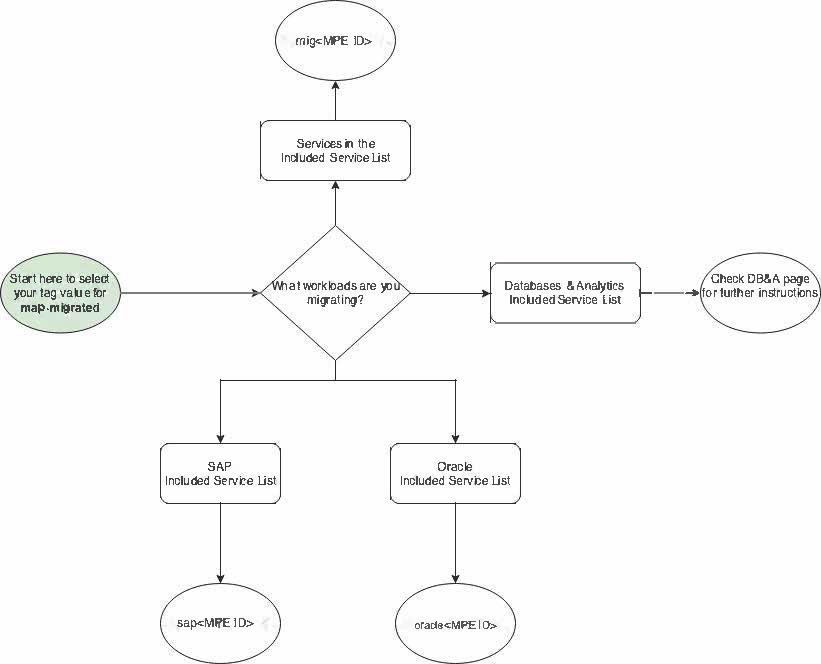
To get started
-
Where are you migrating to?
-
Services included in the Service list
-
SAP included in the Service list
-
Oracle included in the Service list
-
DB&A included Service list: For more information, see Database and analytic tags.
-
Note
Use lowercase letters for the mig, sap, and oracle
prefixes and uppercase letters for the alphanumeric MPE IDs (long MPE IDs). For more information
about your MPE ID, see MPE ID length.
mig5-digit MPE ID
Example: mig12345
mig10 alphanumeric MPE ID characters
Example: migABCDE12345
sap5-digit MPE ID
Example: sap12345
sap10 alphanumeric MPE ID characters
Example: sapABCDE12345
oracle5-digit MPE ID
Example: oracle12345
oracle10 alphanumeric MPE ID characters
Example: oracleABCDE12345
