Las traducciones son generadas a través de traducción automática. En caso de conflicto entre la traducción y la version original de inglés, prevalecerá la version en inglés.
Transforma Easytrieve a lenguajes modernos usando AWS Transform personalizado
Shubham Roy, Subramanyam Malisetty y Harshitha Shashidhar, de Amazon Web Services
Resumen
Este patrón proporciona una guía prescriptiva para una transformación más rápida y con menor riesgo de las cargas de trabajo del generador de informes Broadcom Easytrieve (EZT) de mainframe mediante una transformación personalizada de idioma a idioma.AWS Transform
Este patrón proporciona una definición de transformación personalizada y lista para usar para la transformación EZT. La definición utiliza varias entradas de transformación:
Reglas de negocio de EZT extraídas mediante métodos personalizados AWS Transform
Documentación de referencia sobre la programación de EZT
Código fuente de EZT
Conjuntos de datos de entrada y salida de mainframe
AWS Transform custom utiliza estas entradas para generar aplicaciones funcionalmente equivalentes en los lenguajes de destino modernos, como Java o Python.
El proceso de transformación utiliza funciones inteligentes de ejecución de pruebas, depuración automática y corrección iterativa para validar la equivalencia funcional con los resultados esperados. También es compatible con el aprendizaje continuo, lo que permite la definición de transformación personalizada para mejorar la precisión y la coherencia en las transformaciones sucesivas. Con este patrón, las organizaciones pueden reducir el esfuerzo y el riesgo de migración, hacer frente a la deuda técnica especializada en mainframes y modernizar las cargas de trabajo de EZT AWS para mejorar la agilidad, la fiabilidad, la seguridad y la innovación.
Requisitos previos y limitaciones
Requisitos previos
Una cuenta activa AWS
Una carga de trabajo EZT para mainframe con datos de entrada y salida
Limitaciones
Limitaciones de alcance
Compatibilidad con el idioma: solo se admite la EZT-to-Java transformación para este patrón de transformación específico. Este patrón APG se prueba en código EZT en línea en. JCL/Proc
Fuera de alcance: para la transformación de otros lenguajes de programación de mainframe y uso para mainframe. AWS Transform Obtenga más información en la guía del usuario sobre los tipos de archivos compatibles para la transformación de aplicaciones de mainframe. AWS Transform
Limitaciones del proceso
Dependencia de la validación: sin los datos de salida de referencia, la transformación no se puede validar.
Lógica patentada: las utilidades altamente específicas y desarrolladas a medida requieren documentación de usuario adicional y materiales de referencia para que el agente de IA las interprete correctamente.
Limitaciones técnicas
Límites de servicio: para ver los límites y las cuotas de servicio AWS Transform personalizados, consulte la Guía AWS Transform del usuario (Cuotas) y la referencia AWS general (Transformar cuotas).
Versiones de producto
AWS Transform CLI — Última versión
Node.js — versión 2.0 o posterior
Git — Última versión
Entorno de destino
Java: versión 17 o posterior
Spring Boot: la versión 3.x es el objetivo principal de las aplicaciones refactorizadas
Maven: versión 3.6 o posterior
Arquitectura
Pila de tecnología de origen
Sistema operativo: IBM z/OS
Lenguaje de programación — Easytrieve, lenguaje de control de tareas (JCL)
Base de datos: IBM DB2 para archivos planos de z/OS mainframe, método de acceso al almacenamiento virtual (VSAM)
Pila de tecnología de destino
Sistema operativo — Amazon Linux
Computación: Amazon Elastic Compute Cloud (Amazon EC2)
Lenguaje de programación: Java
Base de datos Amazon Relational Database Service (Amazon RDS)
Arquitectura de destino
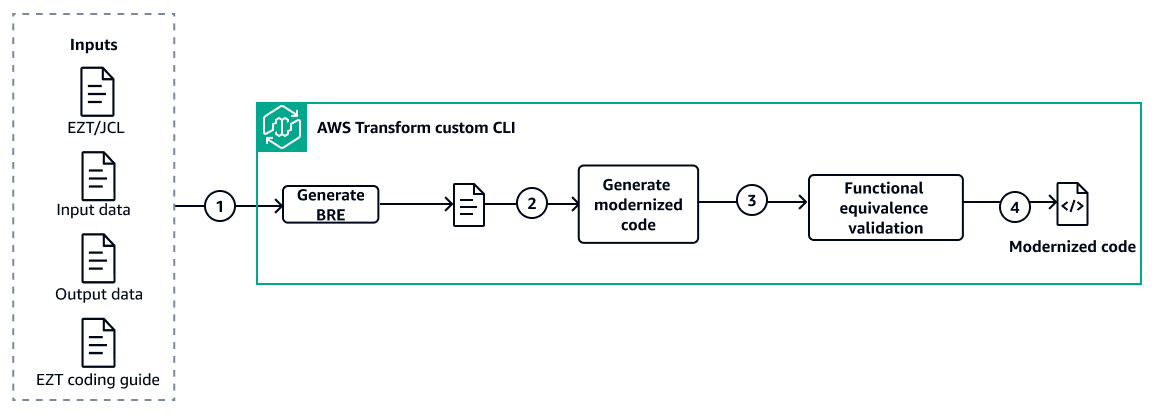
Flujo de trabajo
Esta solución utiliza definiciones de transformación AWS Transform personalizadas y predefinidas para modernizar las aplicaciones Easytrieve (EZT) de mainframe a Java mediante un flujo de trabajo automatizado de tres pasos. AWS Transform custom gestiona todo el proceso (la extracción de reglas empresariales (BRE), la transformación del código y la validación de la equivalencia funcional, basándose en las definiciones de transformación que se proporcionan como parte de esta solución. Se requiere la validación humana para validar el BRE generado y el informe de validación de la equivalencia funcional.
Paso 1: Preparar la carpeta de entradas
código fuente/: código fuente EZT (archivos.ezt), flujos de trabajos JCL (archivos.jcl/.jcl), programas COBOL, cuadernos y tarjetas de control
bre-doc/: documento de extracción de reglas de negocio generado
input-data/: conjuntos de datos de entrada de referencia del ordenador central para su validación
output-data/: conjuntos de datos de salida de la computadora central de referencia para su validación
document_references/ — Definiciones de transformación y documentación de referencia proporcionada por:
-
bre_transformation_definition.md— Define el proceso de extracción de reglas de negocio en 5 fases-
transformation_definition.md— Define cómo Easytrieve construye un mapa para Java-
summaries.md— Reglas y patrones de transformación-
ca-easytrieve-report-generator-11-6.txt— Manual de referencia de Easytrieve
Paso 2: Extraiga reglas empresariales con AWS Transform Custom
1. Interactúe con la AWS Transform CLI mediante un lenguaje natural para revisar las definiciones de transformación (TD) disponibles y personalizar la TD de BRE para que se ajuste a sus criterios y reglas específicos
2. Utilice el TD finalizado para generar el documento BRE: analiza de forma AWS Transform personalizada los artefactos fuente del mainframe (Easytrieve, JCL, COBOL, cuadernos, tarjetas de control) y crea un BRE estructurado con un catálogo de reglas empresariales, diseños de archivos, linaje de datos y mapeos de tipos de datos
3. Mueva el documento BRE generado a la carpeta para usarlo en el paso 3 bre-doc/
Paso 3: Generar código modernizado funcional equivalente
Interactúe con la AWS Transform CLI mediante un lenguaje natural para revisar las definiciones de transformación base (TD)
disponibles y personalizar la TD base para que se ajuste a sus criterios y reglas específicos. A continuación, invoque la AWS Transform CLI con el código fuente del proyecto. AWS Transform custom crea planes de transformación, convierte EZT a Java tras su aprobación, genera archivos auxiliares, crea el JAR ejecutable y valida los criterios de salida.
Utilice el agente de validación para probar la equivalencia funcional con la salida del mainframe. El Self-Debugger agente corrige los problemas de forma autónoma. Los resultados finales incluyen informes de validación de código Java y HTML validados.
Automatización y escala
La arquitectura de ejecución multimodo de Agentic AI ( AWS Transform personalizada) aprovecha la IA de Agentic con 3 modos de ejecución (conversacional, interactivo y totalmente automatizado) para automatizar tareas de transformación complejas, como el análisis de código, la refactorización, la planificación de la transformación y las pruebas.
Sistema de comentarios sobre el aprendizaje adaptativo: la plataforma implementa mecanismos de aprendizaje continuo mediante el análisis de muestras de código, el análisis de la documentación y la integración de los comentarios de los desarrolladores con las definiciones de transformación versionadas.
Arquitectura de procesamiento simultáneo de aplicaciones: el sistema permite la ejecución paralela distribuida de múltiples operaciones de transformación de aplicaciones simultáneamente en una infraestructura escalable.
Tools (Herramientas)
Servicios de AWS
AWS Transform custom es un servicio de IA de agencia que se utiliza para transformar las aplicaciones EZT heredadas en lenguajes de programación modernos.
Amazon Simple Storage Service (Amazon S3) es un servicio de almacenamiento de objetos basado en la nube que lo ayuda a almacenar, proteger y recuperar cualquier cantidad de datos. Amazon S3 sirve como el servicio de almacenamiento principal de AWS Transform Custom para almacenar definiciones de transformaciones, repositorios de código y resultados de procesamiento.
AWS Identity and Access Management (IAM) le ayuda a administrar de forma segura el acceso a sus AWS recursos al controlar quién está autenticado y autorizado a usarlos. La IAM proporciona un marco de seguridad AWS Transform personalizado, gestionando los permisos y el control de acceso para las operaciones de transformación.
Otras herramientas
AWS Transform CLI es la interfaz de línea de comandos AWS Transform personalizada, que permite a los desarrolladores definir, ejecutar y administrar transformaciones de código personalizadas a través de conversaciones en lenguaje natural y modos de ejecución automatizados. AWS Transform custom admite sesiones interactivas (atx custom def exec) y transformaciones autónomas para una modernización escalable de las bases de código.
El sistema de control de versiones de Git
se utiliza para la protección de sucursales, el seguimiento de cambios y las capacidades de reversión durante la aplicación de correcciones automatizadas. Java
es el lenguaje de programación y el entorno de desarrollo utilizados en este patrón.
Repositorio de código
El código de este patrón está disponible en Easytrieve to Modern Languages Transformation with AWS Transform
Prácticas recomendadas
Establezca una estructura de proyecto estandarizada: cree una estructura de cuatro carpetas (código fuente, bre-doc, datos de entrada y datos de salida), valide la integridad y documente el contenido antes de la transformación.
Utilice archivos de referencia para la validación: utilice archivos de entrada de referencia de producción, realice una comparación byte a byte con la salida de referencia y acepte la tolerancia cero ante las desviaciones.
Utilice todos los documentos de referencia disponibles: para aumentar la precisión de la transformación, proporcione todos los documentos de referencia disponibles, como los requisitos empresariales y las listas de verificación de codificación.
Proporcione información para mejorar la calidad: AWS Transform Custom extrae automáticamente lo aprendido de las ejecuciones de transformación (comentarios de los desarrolladores, problemas de código) y crea elementos de conocimiento para ellos. Después de cada transformación exitosa, revise los elementos de conocimiento y apruebe el que le gustaría utilizar en futuras ejecuciones. Esto mejora la calidad de las futuras transformaciones.
Epics
| Tarea | Descripción | Habilidades requeridas |
|---|---|---|
Aprovisione la infraestructura de AWS Transform forma personalizada. | Implemente la infraestructura lista para la producción necesaria para alojar un entorno de transformación seguro. Esto incluye una instancia privada de Amazon EC2 configurada con las herramientas, los permisos de IAM y la configuración de red necesarios para convertir el código de Easytrieve. Para aprovisionar el entorno mediante la infraestructura como código (IaC), siga las instrucciones de implementación que se encuentran en el repositorio Personalizado con Transformación a Lenguajes Modernos de Easytrieve | Desarrollador de aplicaciones, administrador de AWS |
Prepare los materiales de entrada para la transformación. |
| Desarrollador de aplicaciones |
| Tarea | Descripción | Habilidades requeridas |
|---|---|---|
Cree una definición de transformación BRE | Siga estos pasos para crear la definición de transformación personalizada para BRE (Business Rule Extraction) a partir del código fuente de Easytrieve. 1. Ve al repositorio de códigos de este patrón y copia bre_transformation_definition.md de la carpeta de documentos junto con la carpeta document_references de la guía de codificación de EZT. 2. Cargue ese contenido en la carga de la AWS Transform CLI en la ubicación que elija y anote la ubicación de la ruta que se utilizará en los siguientes pasos. 3. Invoque AWS Transform desde la CLI con el comando atx. 4. Proporcione este mensaje en la CLI: Cree una transformación personalizada utilizando mi archivo de definición de transformación disponible en la ruta <path to content from step #2 > AWS Transform crea una nueva definición de transformación personalizada para la generación de BRE. 5. Revise la definición de transformación y realice los cambios necesarios. | Desarrollador de aplicaciones |
Publique la definición de transformación de BRE | Tras revisar y validar la definición de transformación de BRE, puede publicarla en el registro AWS Transform personalizado con un mensaje en lenguaje natural, proporcionando un nombre de definición, por ejemplo Easytrieve-Business-Rule-Extract. | Desarrollador de aplicaciones |
Cree una definición de transformación. | Siga estos pasos para crear la definición de transformación personalizada para la transformación de EZT a Java con validación funcional.
| Desarrollador de aplicaciones |
Publique la definición de transformación. | Tras revisar y validar la definición de transformación, puede publicarla en el registro AWS Transform personalizado con un mensaje en lenguaje natural, proporcionando un nombre de definición, por ejemplo Easytrieve-to-Java-Migration. | Desarrollador de aplicaciones |
| Tarea | Descripción | Habilidades requeridas |
|---|---|---|
Ejecute el trabajo de generación de BRE. | Ejecute el comando AWS Transform CLI y elija la opción interactiva o no interactiva: Non-interactive ejecución (totalmente autónoma):
Ejecución interactiva (con supervisión humana):
Reanudar la ejecución interrumpida:
OR
Mueva el documento BRE generado a la carpeta bre-doc/ para usarlo como entrada durante el Easytrieve-to-Java paso de transformación. | Desarrollador de aplicaciones |
| Tarea | Descripción | Habilidades requeridas |
|---|---|---|
Revise el resumen de validación de la transformación. | Antes de ejecutar la transformación AWS Transform personalizada, compruebe que la
| Desarrollador de aplicaciones |
Ejecute el trabajo de transformación personalizado. | Ejecute el comando AWS Transform CLI y elija la opción interactiva o no interactiva:
AWS Transform se valida automáticamente mediante build/test comandos durante la ejecución de la transformación. | Desarrollador de aplicaciones |
| Tarea | Descripción | Habilidades requeridas |
|---|---|---|
Revise el resumen de validación de la transformación. |
| Desarrollador de aplicaciones |
Acceda a los informes de validación. | Introduzca estos comandos para revisar los artefactos de validación detallados:
| Desarrollador de aplicaciones |
Habilite los elementos de conocimiento para un aprendizaje continuo. | Mejore la precisión de la transformación futura al incluir los elementos de conocimiento sugeridos en su configuración persistente. Tras una transformación, el agente almacena los patrones identificados y las reglas de mapeo en el directorio de sesión local. Para revisar y aplicar estos elementos aprendidos, ejecute estos comandos en su instancia de Amazon EC2:
| Desarrollador de aplicaciones |
Resolución de problemas
| Problema | Solución |
|---|---|
Configuración de las rutas de entrada y salida Los archivos de entrada no se leen o los archivos de salida no se escriben correctamente. | Especifique la ruta completa del directorio donde se almacenan los archivos de entrada e indique claramente la ubicación en la que debe escribirse la salida. Asegúrese de que los permisos de acceso adecuados estén configurados para estos directorios. Las mejores prácticas incluyen el uso de rutas absolutas en lugar de rutas relativas para evitar la ambigüedad y la verificación de que todas las rutas especificadas existan con los permisos adecuados read/write . |
Reanudar las ejecuciones interrumpidas La ejecución se interrumpió o debe continuar desde donde se detuvo | Puede reanudar la ejecución desde donde la dejó proporcionando el ID de conversación en el comando CLI. Busque el ID de la conversación en los registros del intento de ejecución anterior. |
Resolver las restricciones de memoria Se produce un error de memoria insuficiente durante la ejecución. | Puede solicitar AWS Transform compartir el tamaño actual de la JVM en memoria y, a continuación, aumentar la asignación de memoria en función de esta información. Este ajuste ayuda a adaptarse a mayores requisitos de procesamiento. Considere la posibilidad de dividir los trabajos grandes en lotes más pequeños si persisten las limitaciones de memoria después de los ajustes. |
Abordar las discrepancias en los archivos de salida Los archivos de salida no coinciden con las expectativas e AWS Transform indican que no es posible realizar más cambios. | Proporcione comentarios específicos y razones técnicas que expliquen por qué la salida actual es incorrecta. Incluya documentación técnica o empresarial adicional para respaldar sus requisitos. Este contexto detallado ayuda a AWS Transform corregir el código para generar los archivos de salida adecuados.
|
Recursos relacionados
