Security and access controls
The harness gives you the same security primitives as the rest of AgentCore, wired in by configuration.
-
Isolated execution. Every session runs in its own Firecracker microVM in AgentCore Runtime. No shared state, no shared filesystem.
-
IAM execution role. The harness assumes an IAM role you own, configurable to include Bedrock, ECR, CloudWatch, and the AgentCore primitives it touches. See sample execution role policy below.
-
IAM permissions model. Harness APIs require permissions on both the harness resource and the underlying AgentCore Runtime resource. For example, calling
InvokeHarnessrequires bothbedrock-agentcore:InvokeHarnessandbedrock-agentcore:InvokeAgentRuntimepermissions on the harness ARN. The same pattern applies to control plane operations:UpdateHarnessrequiresbedrock-agentcore:UpdateAgentRuntime,DeleteHarnessrequiresbedrock-agentcore:DeleteAgentRuntime, and so on. See execution role policy for the full list. -
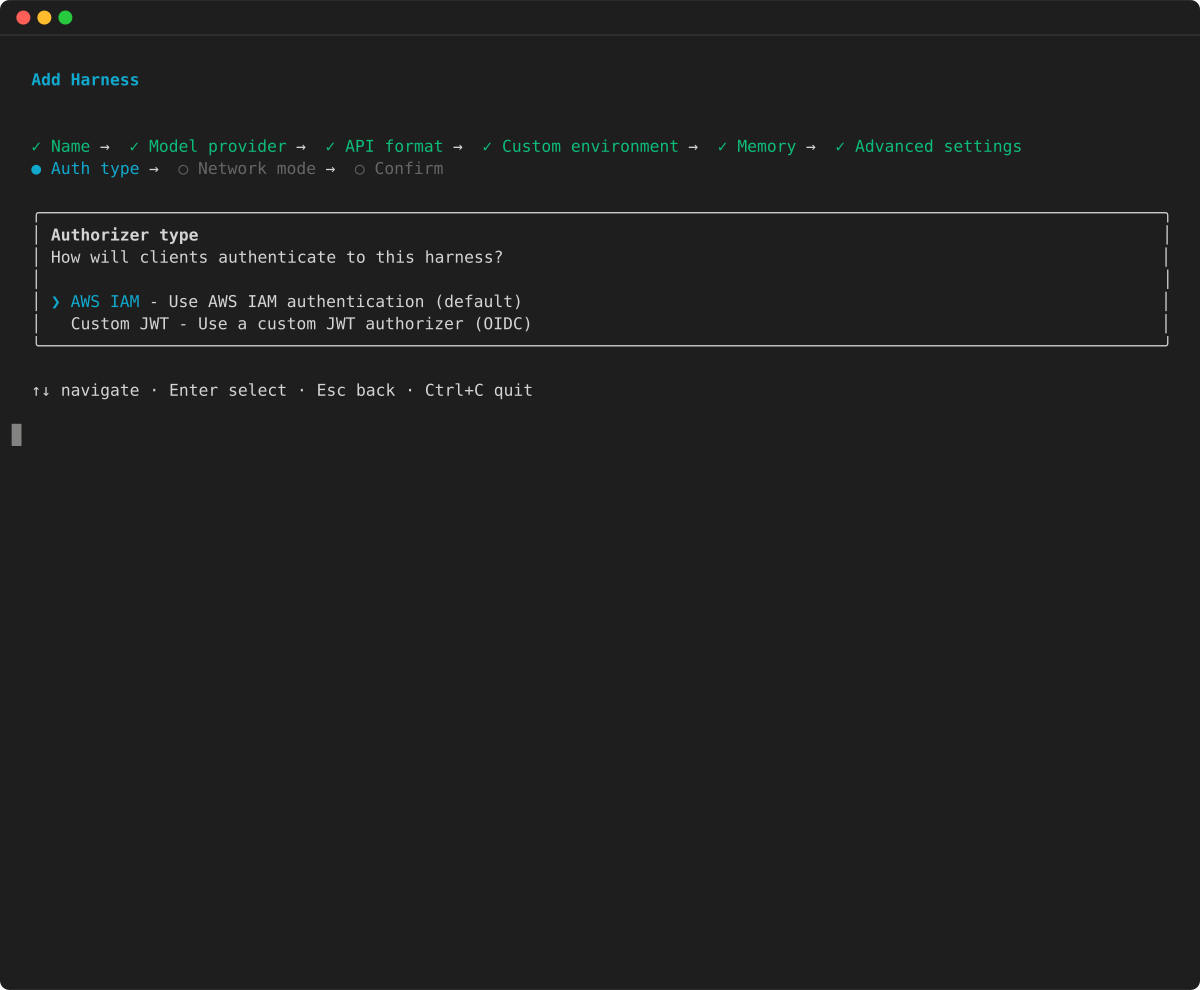
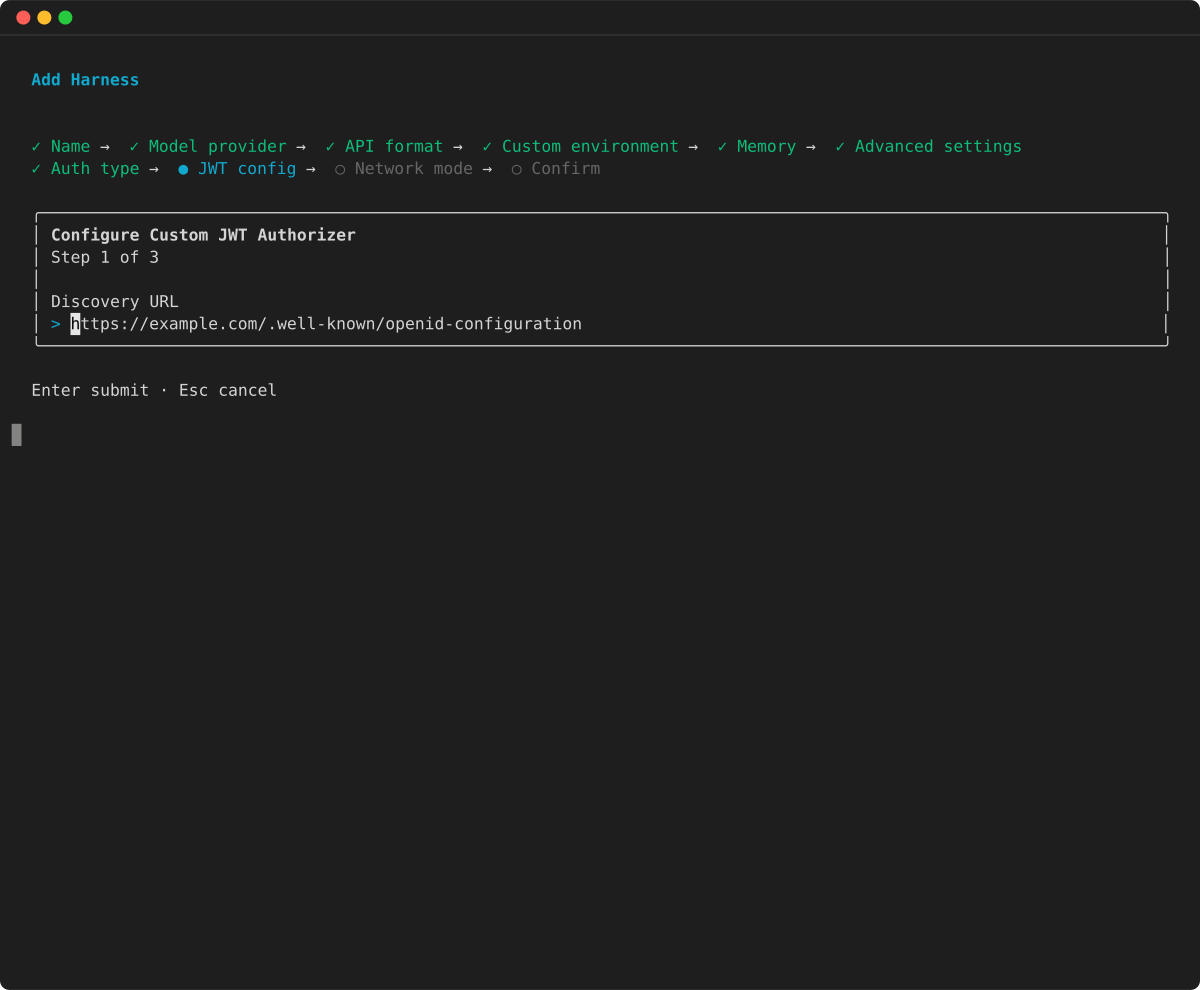
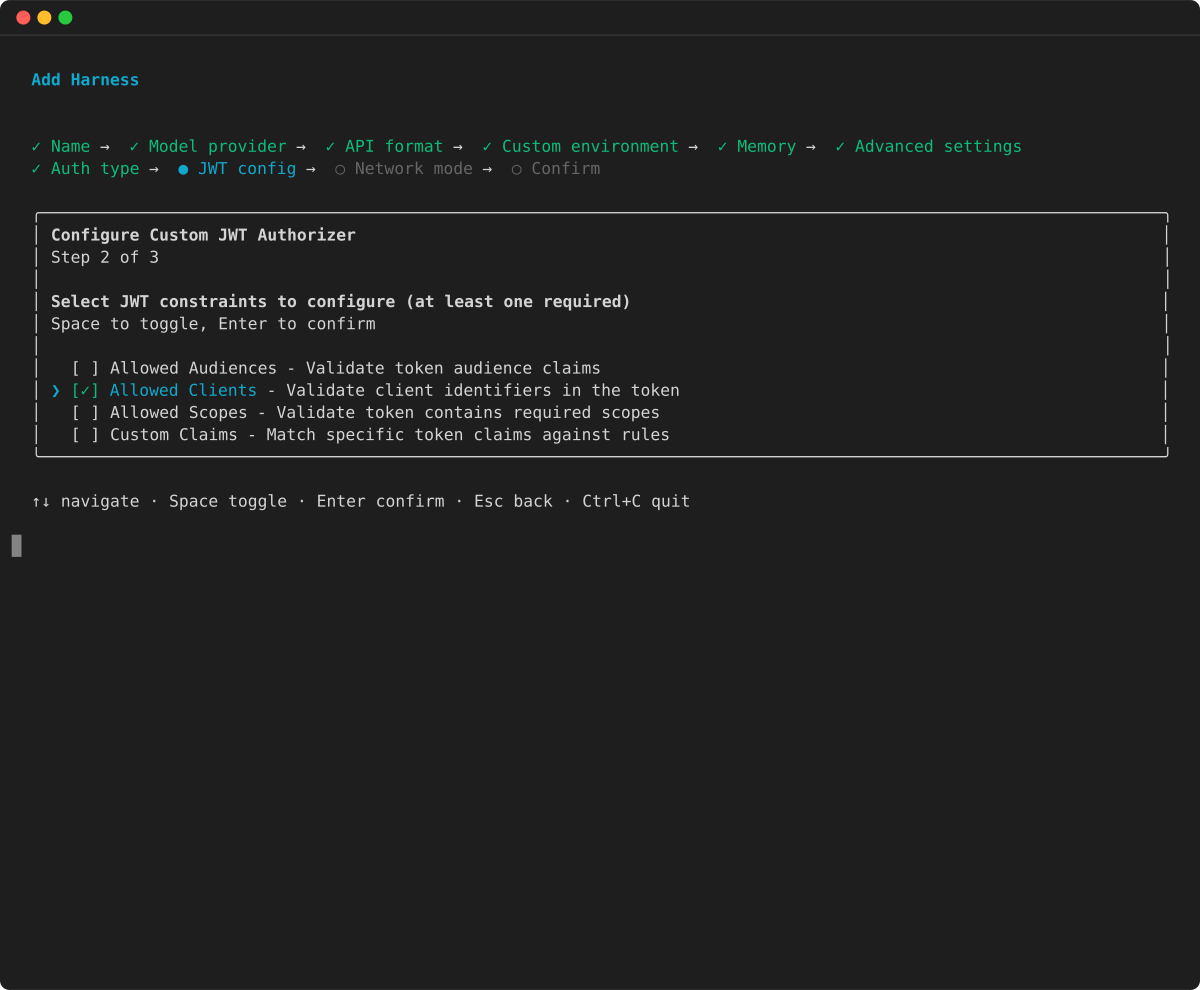
Inbound OAuth Support. JWT configured Harness resources require callers to present a valid JWT issued by a configured identity provider before they can invoke the harness. AgentCore Identity threads the end-user identity through the agent, so downstream tools can call APIs with scoped user credentials instead of a shared service account.
-
VPC. Connect harness sessions to your VPC for private access to internal resources.
-
Policies on Gateway. When tools are served through AgentCore Gateway, Cedar-based policies can be configured to gate every call: who can call which tool, under which conditions, with which arguments.
Note
SigV4 and per-user identity. When callers authenticate with SigV4 (AWS IAM), the harness does not propagate per-user identity into downstream tool calls. This means per-user credential scoping features in AgentCore Identity Token Vault - such as user-scoped OAuth token storage and on-behalf-of token exchange - are only available when callers authenticate with a Bearer JWT via the OAuth inbound path. If your use case requires per-user credential scoping for downstream tools, configure inbound OAuth on the harness. SigV4 support for per-user identity is planned for a future release.
Shared responsibility model
The harness is built on AgentCore Runtime. The security boundary is the same: IAM or JWT authentication combined with microVM isolation. The harness does not add a security layer between the caller and the microVM.
AWS responsibilities:
-
Secure infrastructure and microVM isolation at the hardware level
-
OS kernel patching
-
Language runtime patching for direct code deployments
-
Network infrastructure security
-
Service availability and resilience
Your responsibilities:
-
Agent code security and dependency management
-
IAM access controls and resource policies
-
Security of commands executed in runtime sessions
-
Session-to-user mapping enforcement
-
Input validation and prompt injection prevention - including validating all
InvokeHarnessinput (see Trust boundary and input validation) -
Model configuration validation - such as
additionalParams,apiBase, andmodelIdfields (see Model configuration parameters) -
Skill and instruction sources - ensuring that S3 buckets, Git repositories, and URLs used for skills contain trusted content (see Skills and instructions)
-
Container image updates (for container deployments) - rebuild with the latest secure base image regularly
-
Network configuration (security groups, VPC endpoints, route tables)
For the full AgentCore Runtime shared responsibility model, see Security best practices for AgentCore Runtime.
Trust boundary and input validation
All InvokeHarness and InvokeAgentRuntimeCommand input is trusted. Any principal that passes the IAM or JWT authentication and authorization gate has access to the full microVM session, including the tools and capabilities configured on the harness. The harness does not sanitize input, filter content blocks, or enforce behavioral constraints.
If you expose the harness to end users you do not fully trust (employees, external consumers, or third-party integrations), validate and sanitize messages in your application layer before passing them to InvokeHarness. This includes stripping content-block types or model configuration fields you do not want dispatched. This is the same pattern as any service that accepts payloads from authorized callers, such as Lambda, Amazon API Gateway, and Amazon SQS.
Model configuration parameters
The model field in InvokeHarness accepts additionalParams for Bedrock, OpenAI, and LiteLLM configurations. These parameters are passed through to the underlying model provider unchanged. The harness does not validate, filter, or restrict these parameters.
Callers who can set additionalParams can:
-
Redirect requests to arbitrary endpoints - LiteLLM’s
aws_bedrock_runtime_endpointparameter overrides the Bedrock endpoint URL. A caller can route the signed request - including the SigV4 signature and session credentials - to an endpoint that is specified in the trust model configuration. -
Override HTTP headers - OpenAI’s
extra_headersparameter injects or overrides HTTP headers on the outbound request to the model provider, including theAuthorizationheader. -
Attempt IAM role assumption - LiteLLM’s
aws_role_nameparameter instructs the runtime to assume a different IAM role before calling the model provider. The attempt succeeds or fails based on the execution role’ssts:AssumeRolepermissions. -
Change the target model or region - The
modelIdandapiBasefields can redirect inference to a different model, region, or provider entirely.
If your application exposes InvokeHarness capabilities to callers you do not fully trust, consider implementing input validation in your application layer. Examples include:
-
Stripping or allowlisting the
modelfield before forwarding requests -
Validating or removing
additionalParams,apiBase, andmodelId -
Denying
sts:AssumeRoleon the execution role if role switching is not required -
Scoping the harness network access using VPC security groups
Skills and instructions
Skills are bundles of markdown and scripts that the harness fetches from Amazon S3 or Git at invocation time and injects into the agent’s context. The harness treats all skill content as trusted input. It does not validate, sanitize, or inspect the content or source of skills before providing them to the agent.
You are responsible for:
-
Ensuring that skill sources (S3 buckets, Git repositories, URLs) are trusted and access-controlled
-
Reviewing skill content - including markdown instructions and any embedded scripts - before configuring them on the harness
-
Controlling which principals can override the
skillsfield per invocation, since callers can point the harness at arbitrary S3 or Git sources
Skills can be overridden per InvokeHarness call. If your application forwards caller-supplied input to InvokeHarness, a caller can supply their own skill sources containing arbitrary instructions or scripts. Examples of mitigations include:
-
Stripping or ignoring the
skillsfield from caller-supplied requests -
Allowlisting permitted S3 prefixes or Git repositories
Observability and trace correlation
The harness automatically propagates correlation identifiers to downstream AgentCore primitives (Gateway, Memory, Code Interpreter, Browser) to enable unified trace views in CloudWatch. These identifiers are used for observability only - they are never used for authorization or data access decisions.
Network configuration
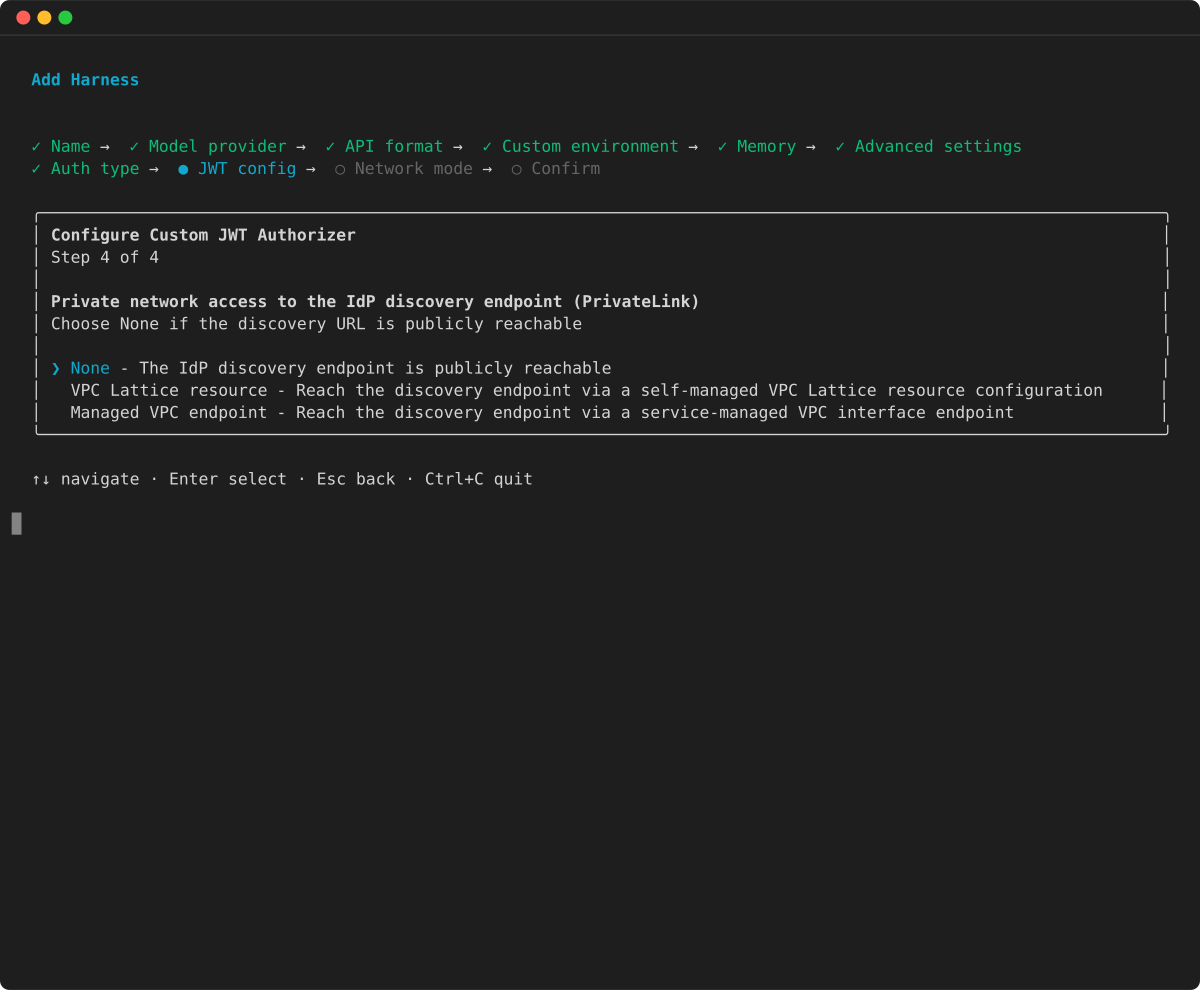
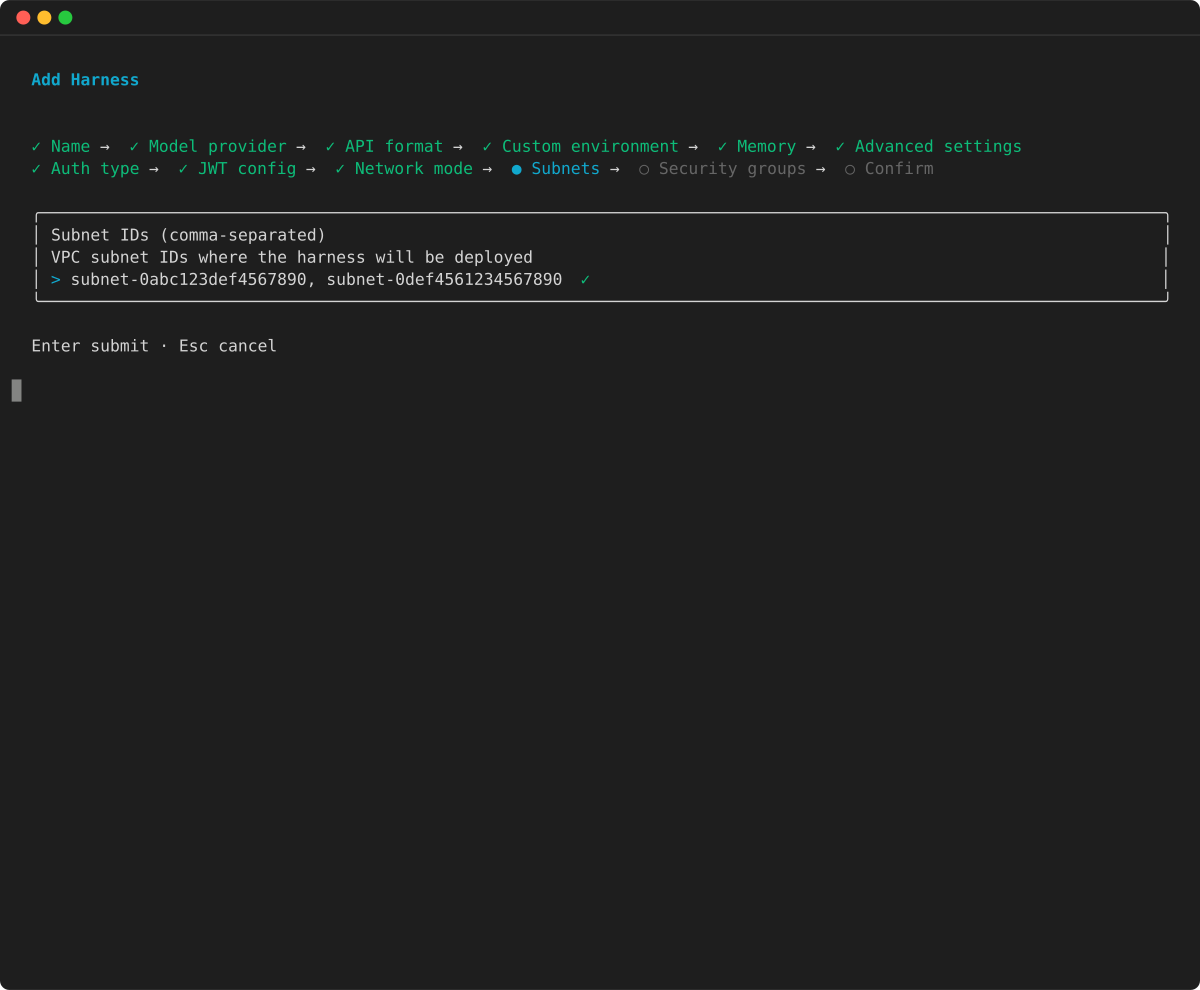
By default, harness sessions run on the public network. To access private resources (databases, internal APIs, private subnets), deploy the harness in your VPC.
Example
Important
The harness pulls its application container from Amazon ECR Public at the start of each session. When running in VPC mode, your VPC must allow outbound access to public.ecr.aws. Amazon ECR Public does not support VPC endpoints, so your VPC must have a NAT gateway with a route to an internet gateway. If this connectivity is not available, sessions will fail to start due to image pull timeouts.
For additional network configuration guidance, see Configure AgentCore Runtime and built-in tools VPC configuration. For inbound API connectivity via PrivateLink, see VPC interface endpoints.
Inbound OAuth
Require callers to present a valid JWT issued by a configured identity provider before they can invoke the harness. AgentCore Identity threads the end-user identity through the agent, so downstream tools can call APIs with scoped user credentials instead of a shared service account.
Example
Learn more: AgentCore Identity · inbound JWT authorizer · outbound credentials
Gateway policies
When tools are served through AgentCore Gateway, Cedar-based policies gate every call: who can call which tool, under which conditions, with which arguments.
Learn more: AgentCore Policy · common patterns
Execution role policy
The harness assumes an IAM execution role you provide. The role’s trust policy must allow the AgentCore service principal to assume it:
{
  "Version": "2012-10-17",
  "Statement": [{
    "Effect": "Allow",
    "Principal": {"Service": "bedrock-agentcore.amazonaws.com"},
    "Action": "sts:AssumeRole"
  }]
}
Required IAM permissions for callers
Harness APIs require permissions on both the harness resource and the underlying AgentCore Runtime and optional AgentCore Memory resources. The following table lists the required actions for each API:
| API | Required IAM actions |
|---|---|
|
|
|
|
|
|
|
|
|
|
|
|
|
|
|
|
|
|
|
|
|
|
|
|
|
|
|
|
|
|
|
|
|
|
|
|
|
|
|
Most actions use the harness ARN as the resource scope: arn:aws:bedrock-agentcore:<region>:<accountId>:harness/<id>. Endpoint actions also use the harness endpoint ARN: arn:aws:bedrock-agentcore:<region>:<accountId>:harness/<id>/harness-endpoint/<endpointName>.
The GetHarnessEndpoint, UpdateHarnessEndpoint, and DeleteHarnessEndpoint actions require both the harness ARN and the endpoint ARN. CreateHarnessEndpoint requires only the harness ARN. The endpoint doesn’t exist yet, so no endpoint ARN is needed. When you invoke a custom endpoint, InvokeHarness and InvokeAgentRuntimeCommand require both the harness ARN and the endpoint ARN.
Sample execution role policy
{
  "Version": "2012-10-17",
  "Statement": [
    {
      "Sid": "BedrockModelInvocation",
      "Effect": "Allow",
      "Action": [
        "bedrock:InvokeModel",
        "bedrock:InvokeModelWithResponseStream"
      ],
      "Resource": [
        "arn:aws:bedrock:*::foundation-model/*",
        "arn:aws:bedrock:<region>:<accountId>:*"
      ]
    },
    {
      "Sid": "EcrPublicTokenAccess",
      "Effect": "Allow",
      "Action": [
        "ecr-public:GetAuthorizationToken"
      ],
      "Resource": "*"
    },
    {
      "Sid": "StsForEcrPublicPull",
      "Effect": "Allow",
      "Action": [
        "sts:GetServiceBearerToken"
      ],
      "Resource": "*"
    },
    {
      "Sid": "XRayTracingAccess",
      "Effect": "Allow",
      "Action": [
        "xray:PutTraceSegments",
        "xray:PutTelemetryRecords",
        "xray:GetSamplingRules",
        "xray:GetSamplingTargets"
      ],
      "Resource": "*"
    },
    {
      "Sid": "CloudWatchLogsGroup",
      "Effect": "Allow",
      "Action": [
        "logs:CreateLogGroup",
        "logs:DescribeLogStreams"
      ],
      "Resource": "arn:aws:logs:<region>:<accountId>:log-group:/aws/bedrock-agentcore/runtimes/*"
    },
    {
      "Sid": "CloudWatchLogsDescribeGroups",
      "Effect": "Allow",
      "Action": [
        "logs:DescribeLogGroups"
      ],
      "Resource": "arn:aws:logs:<region>:<accountId>:log-group:*"
    },
    {
      "Sid": "CloudWatchLogsStream",
      "Effect": "Allow",
      "Action": [
        "logs:CreateLogStream",
        "logs:PutLogEvents"
      ],
      "Resource": "arn:aws:logs:<region>:<accountId>:log-group:/aws/bedrock-agentcore/runtimes/*:log-stream:*"
    },
    {
      "Sid": "CloudWatchMetricsPublish",
      "Effect": "Allow",
      "Resource": "*",
      "Action": "cloudwatch:PutMetricData",
      "Condition": {
        "StringEquals": {
          "cloudwatch:namespace": "bedrock-agentcore"
        }
      }
    },
    {
      "Sid": "AgentCoreWorkloadIdentity",
      "Effect": "Allow",
      "Action": [
        "bedrock-agentcore:GetWorkloadAccessToken",
        "bedrock-agentcore:GetWorkloadAccessTokenForJWT"
      ],
      "Resource": [
        "arn:aws:bedrock-agentcore:<region>:<accountId>:workload-identity-directory/default",
        "arn:aws:bedrock-agentcore:<region>:<accountId>:workload-identity-directory/default/workload-identity/harness_<agentName>-*"
      ]
    },
    {
      "Sid": "AgentCoreBrowserDefault",
      "Effect": "Allow",
      "Action": [
        "bedrock-agentcore:StartBrowserSession",
        "bedrock-agentcore:StopBrowserSession",
        "bedrock-agentcore:GetBrowserSession",
        "bedrock-agentcore:ListBrowserSessions",
        "bedrock-agentcore:UpdateBrowserStream",
        "bedrock-agentcore:ConnectBrowserAutomationStream",
        "bedrock-agentcore:ConnectBrowserLiveViewStream"
      ],
      "Resource": "arn:aws:bedrock-agentcore:<region>:aws:browser/*"
    },
    {
      "Sid": "AgentCoreCodeInterpreterDefault",
      "Effect": "Allow",
      "Action": [
        "bedrock-agentcore:StartCodeInterpreterSession",
        "bedrock-agentcore:StopCodeInterpreterSession",
        "bedrock-agentcore:GetCodeInterpreterSession",
        "bedrock-agentcore:ListCodeInterpreterSessions",
        "bedrock-agentcore:InvokeCodeInterpreter"
      ],
      "Resource": "arn:aws:bedrock-agentcore:<region>:aws:code-interpreter/*"
    }
  ]
}
The AgentCore CLI creates a role with these permissions automatically when you scaffold a harness project. The policy above is for cases where you create the role yourself.
Note
The BedrockModelInvocation sample statement above allows invocation of all foundation models across all regions and all Bedrock resources in your account. To scope this down, replace the resource ARNs with specific inference profiles, which let you route requests across models and regions with a single ARN. For example: arn:aws:bedrock:<destination_regions>:<accountId>:inference-profile/<profileId> paired with all allowed regions arn:aws:bedrock:<region>:<accountId>:foundation-model/<modelId>.
For production workloads, scope Resource values down to the specific ARNs your harness needs rather than using "*".
Additional permissions for optional features
Below are sample policies you can append to your execution role based on the features your harness uses. Follow the principle of least privilege - grant your harness agent only the specific tools and credentials it needs for inference. See Placeholder reference for placeholder definitions.
Private ECR access (custom container images)
Add this policy when your harness uses a private ECR image for a custom container.
{
  "Version": "2012-10-17",
  "Statement": [
    {
      "Sid": "ECRImageAccess",
      "Effect": "Allow",
      "Action": [
        "ecr:GetDownloadUrlForLayer",
        "ecr:BatchGetImage"
      ],
      "Resource": "arn:aws:ecr:<ecrRegion>:<ecrAccountId>:repository/<ecrRepoName>"
    },
    {
      "Sid": "ECRTokenAccess",
      "Effect": "Allow",
      "Action": "ecr:GetAuthorizationToken",
      "Resource": "*"
    }
  ]
}
AgentCore Memory
Add this policy when your harness uses a customer-owned memory instance.
{
  "Version": "2012-10-17",
  "Statement": [
    {
      "Sid": "AgentCoreMemory",
      "Effect": "Allow",
      "Action": [
        "bedrock-agentcore:CreateEvent",
        "bedrock-agentcore:DeleteEvent",
        "bedrock-agentcore:GetEvent",
        "bedrock-agentcore:ListEvents",
        "bedrock-agentcore:RetrieveMemoryRecords"
      ],
      "Resource": "arn:aws:bedrock-agentcore:<region>:<accountId>:memory/<memoryId>"
    }
  ]
}
AgentCore Browser (custom)
Add this policy when your harness uses a customer-owned custom browser resource.
{
  "Version": "2012-10-17",
  "Statement": [
    {
      "Sid": "AgentCoreBrowserCustom",
      "Effect": "Allow",
      "Action": [
        "bedrock-agentcore:StartBrowserSession",
        "bedrock-agentcore:StopBrowserSession",
        "bedrock-agentcore:GetBrowserSession",
        "bedrock-agentcore:ListBrowserSessions",
        "bedrock-agentcore:UpdateBrowserStream",
        "bedrock-agentcore:ConnectBrowserAutomationStream",
        "bedrock-agentcore:ConnectBrowserLiveViewStream"
      ],
      "Resource": "arn:aws:bedrock-agentcore:<region>:<accountId>:browser-custom/<browserCustomId>"
    }
  ]
}
AgentCore Code Interpreter (custom)
Add this policy when your harness uses a customer-owned custom code interpreter.
{
  "Version": "2012-10-17",
  "Statement": [
    {
      "Sid": "AgentCoreCodeInterpreterCustom",
      "Effect": "Allow",
      "Action": [
        "bedrock-agentcore:StartCodeInterpreterSession",
        "bedrock-agentcore:StopCodeInterpreterSession",
        "bedrock-agentcore:GetCodeInterpreterSession",
        "bedrock-agentcore:ListCodeInterpreterSessions",
        "bedrock-agentcore:InvokeCodeInterpreter"
      ],
      "Resource": "arn:aws:bedrock-agentcore:<region>:<accountId>:code-interpreter-custom/<codeInterpreterCustomId>"
    }
  ]
}
AgentCore Gateway
Add this policy when your harness uses a gateway configured with SigV4 inbound authentication.
{
  "Version": "2012-10-17",
  "Statement": [
    {
      "Sid": "AgentCoreGatewayAccess",
      "Effect": "Allow",
      "Action": "bedrock-agentcore:InvokeGateway",
      "Resource": "arn:aws:bedrock-agentcore:<region>:<accountId>:gateway/<gatewayId>"
    }
  ]
}
Skill sources in Amazon S3 and Git
Add this policy when your harness fetches a skill from an Amazon S3 source. The execution role lists and downloads the skill objects under the bucket prefix.
{
  "Version": "2012-10-17",
  "Statement": [
    {
      "Sid": "AgentCoreSkillS3Access",
      "Effect": "Allow",
      "Action": [
        "s3:GetObject",
        "s3:ListBucket"
      ],
      "Resource": [
        "arn:aws:s3:::<skillBucket>",
        "arn:aws:s3:::<skillBucket>/*"
      ]
    }
  ]
}
To fetch a skill from a private Git repository, the harness reads a personal access token from an API key credential provider. Grant the API key credential provider policy shown below for the credential provider that holds the token.
API key credential provider (OpenAI, Gemini, LiteLLM, or MCP header ARN references)
Add this policy when your harness uses an API key credential provider for model providers such as OpenAI, Gemini, or LiteLLM.
{
  "Version": "2012-10-17",
  "Statement": [
    {
      "Sid": "AgentCoreApiKeyTokenVaultDefault",
      "Effect": "Allow",
      "Action": "bedrock-agentcore:GetResourceApiKey",
      "Resource": [
        "arn:aws:bedrock-agentcore:<region>:<accountId>:token-vault/default",
        "arn:aws:bedrock-agentcore:<region>:<accountId>:workload-identity-directory/default",
        "arn:aws:bedrock-agentcore:<region>:<accountId>:workload-identity-directory/default/workload-identity/harness_<agentName>-*"
      ]
    },
    {
      "Sid": "AgentCoreApiKeyTokenVaultPerKey",
      "Effect": "Allow",
      "Action": "bedrock-agentcore:GetResourceApiKey",
      "Resource": "arn:aws:bedrock-agentcore:<region>:<accountId>:token-vault/default/apikeycredentialprovider/<apiKeyName>"
    },
    {
      "Sid": "AgentCoreApiKeySecret",
      "Effect": "Allow",
      "Action": "secretsmanager:GetSecretValue",
      "Resource": "arn:aws:secretsmanager:<region>:<accountId>:secret:bedrock-agentcore-identity!default/apikey/<apiKeyName>-*"
    }
  ]
}
OAuth2 credential provider (OAuth-protected Gateway)
Add this policy when your harness uses an OAuth2 credential provider for OAuth-protected gateway tools.
{
  "Version": "2012-10-17",
  "Statement": [
    {
      "Sid": "AgentCoreOAuth2TokenVaultDefault",
      "Effect": "Allow",
      "Action": "bedrock-agentcore:GetResourceOauth2Token",
      "Resource": [
        "arn:aws:bedrock-agentcore:<region>:<accountId>:token-vault/default",
        "arn:aws:bedrock-agentcore:<region>:<accountId>:workload-identity-directory/default",
        "arn:aws:bedrock-agentcore:<region>:<accountId>:workload-identity-directory/default/workload-identity/harness_<agentName>-*"
      ]
    },
    {
      "Sid": "AgentCoreOAuth2TokenVaultPerProvider",
      "Effect": "Allow",
      "Action": "bedrock-agentcore:GetResourceOauth2Token",
      "Resource": "arn:aws:bedrock-agentcore:<region>:<accountId>:token-vault/default/oauth2credentialprovider/<oauthProviderName>"
    },
    {
      "Sid": "AgentCoreOAuth2Secret",
      "Effect": "Allow",
      "Action": "secretsmanager:GetSecretValue",
      "Resource": "arn:aws:secretsmanager:<region>:<accountId>:secret:bedrock-agentcore-identity!default/oauth2/<oauthProviderName>-*"
    }
  ]
}
Placeholder reference
Replace the following placeholders in the policies above with values specific to your environment:
| Placeholder | Description |
|---|---|
|
|
The AWS Region where your resource is deployed. |
|
|
Your AWS account ID. |
|
|
The name of your harness agent. |
|
|
The ID of your AgentCore memory resource. |
|
|
The ID of your custom browser resource. |
|
|
The ID of your custom code interpreter resource. |
|
|
The ID of your AgentCore Gateway resource. |
|
|
The name of your API key credential provider. |
|
|
The name of the S3 bucket that holds your skill files. |
|
|
The name of your OAuth2 credential provider. |
|
|
The region where your ECR repository is hosted. |
|
|
The AWS account ID that owns the ECR repository. |
|
|
The name of your ECR repository. |
Note
The trailing -* on Secrets Manager resources accounts for the random suffix that Secrets Manager appends to secret ARNs.
Related topics
-
Tools - tool types and allowedTools patterns
-
Environment and filesystem - custom environments and ECR permissions
-
Control cost with limits - execution limits to control cost
