Montaje de sistemas de archivos de S3 en Amazon EKS
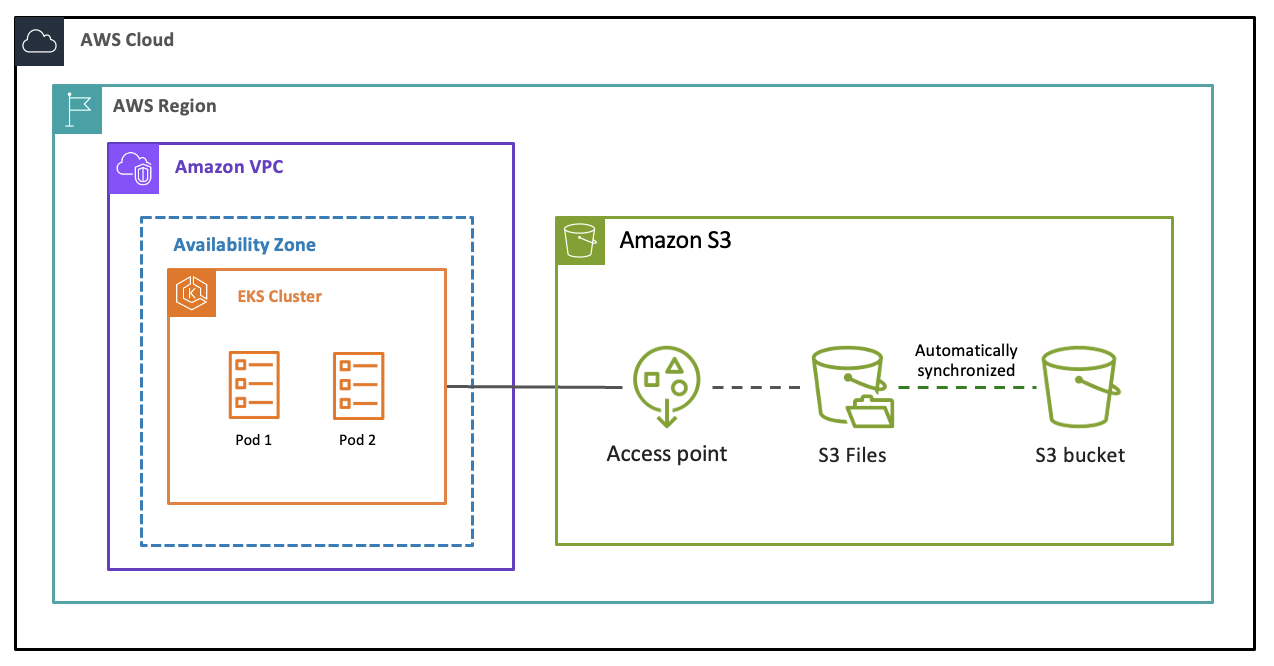
Puede adjuntar un sistema de archivos S3 a un clúster de Amazon EKS mediante el controlador de Container Storage Interface (CSI) de Amazon EFS, que admite tanto el aprovisionamiento dinámico como el aprovisionamiento estático. Esto implica instalar el controlador efs-csi, que es el controlador de CSI para Amazon EFS y archivos de S3.
Requisitos previos
Antes de adjuntar un sistema de archivos de S3 en un clúster de EKS, asegúrese de que dispone de lo siguiente:
Tiene un sistema de archivos de S3 que tiene al menos un destino de montaje disponible.
Ha configurado los Grupos de seguridad necesarios.
El clúster de EKS debe estar en la misma VPC que el destino de montaje.
El controlador CSI de Amazon EFS necesita los permisos de AWS Identity and Access Management (IAM) para conectarse a los sistemas de archivos de S3 e interactuar con ellos. Para obtener más información, consulte Rol de IAM para adjuntar el sistema de archivos a los recursos informáticos de AWS.
AWS sugiere usar Pod Identities de EKS. Para obtener más información, consulte Información general de configuración de Pod Identities de EKS.
Para obtener información sobre los roles de IAM para las cuentas de servicio y la configuración de un proveedor de OpenID Connect (OIDC) de IAM para el clúster, consulte Crear un proveedor de OIDC de IAM para el clúster.
La herramienta de línea de comandos de
kubectlestá instalada en su dispositivo o AWS CloudShell. La versión puede ser la misma o hasta una versión secundaria anterior o posterior a la versión de Kubernetes de su clúster. Por ejemplo, si la versión del clúster es 1.29, puede utilizar la versión dekubectl1.28, 1.29 o 1.30 con él. Para instalar o actualizarkubectl, consulte Configurar kubectl y eksctl.
Cómo montar el sistema de archivos de S3 en un clúster de EKS
El controlador CSI de Amazon EFS requiere permisos de IAM para interactuar con el sistema de archivos. Cree un rol de IAM y adjúntelo a la política administrada AmazonS3FilesCSIDriverPolicy. Agregue el controlador CSI de EFS al clúster de EKS y especifique el rol de IAM para permitir que el controlador de CSI acceda a las API de AWS y al sistema de archivos. Puede usar la consola de administración de AWS o la API de AWS. Para obtener más información, consulte Uso del almacenamiento del sistema de archivos de S3 con Amazon EKS.
También puede utilizar los sistemas de archivos de S3 con AWS Batch en Amazon EKS. Para adjuntar el volumen del sistema de archivos de S3 al trabajo de AWS Batch en Amazon EKS, puede utilizar los pods de Amazon EKS con una reclamación de volúmenes persistentes. Para obtener más información, consulte la sección persistentVolumeClaim de las páginas Definiciones de trabajo de registro y Reclamación de volúmenes persistentes de EKS de la Guía de referencia de la API de AWS Batch.
Puede supervisar el almacenamiento, el rendimiento, las conexiones de los clientes y los errores de sincronización del sistema de archivos mediante Amazon CloudWatch.
