Automate Lambda test event generation using Amazon Bedrock AgentCore
Ishita Gupta and Kriti Gupta, Amazon Web Services
Summary
This pattern delivers an AI-powered approach for automatically generating comprehensive test cases for AWS Lambda functions using Amazon Bedrock's generative AI capabilities. This pattern implements a three-agent architecture (Analyzer, Generator, and Validator) deployed on Amazon Bedrock AgentCore that analyzes actual Lambda function code to extract input/output patterns and generates positive, negative, and edge-case test scenarios with realistic data.
The architecture establishes an intelligent workflow where the Analyzer Agent fetches and analyzes Lambda code using Amazon Bedrock, the Generator Agent creates test cases based on learned patterns, and the Validator Agent ensures quality through deduplication and ranking. An Amazon DynamoDB-based memory store enables continuous learning from user feedback, improving test generation accuracy over time. Amazon Cognito provides secure user authentication with JSON Web Token (JWT)-based API authorization. Amazon Bedrock Guardrails provide prompt attack filtering, sensitive information redaction, and content safety enforcement on all Amazon Bedrock API calls. Key Capabilities:
Multi-Language Support: Python, Java, C#, JavaScript/TypeScript, and Ruby Lambda functions
Intelligent Code Chunking: Automatically splits large codebases into manageable chunks for analysis
Parallel Processing: Concurrent Amazon Bedrock API calls for faster test generation (5 concurrent workers for code analysis, parallel per-chunk test generation)
Target-Specific Analysis: Focus on specific functions, classes, or files within Lambda code
Pattern Learning: Amazon DynamoDB-based memory store with target-specific and global pattern storage
Rejection Avoidance: Learns from rejected test cases to avoid common mistakes
Continuation Mechanism: Handles incomplete Amazon Bedrock responses with automatic continuation.
Ignore Patterns: Exclude test files, dependencies, and non-code files from analysis.
Serverless Deployment: Runs on Amazon Bedrock AgentCore with Cognito-based authentication
Security Guardrails: Amazon Bedrock Guardrails for prompt attack filtering, Personally identifiable information (PII) redaction, content safety, and denied topic blocking on all AI calls
This pattern is ideal for development teams and organizations that want to accelerate Lambda testing, improve test coverage, and maintain high code quality through AI-assisted test generation. This pattern uses AWS managed services to simplify test creation, enhance quality through learning, and scale to meet evolving testing needs.
Prerequisites and limitations
Prerequisites
To successfully implement this pattern, make sure that the following are in place:
An active AWS account - An AWS account with permissions to access Lambda functions, invoke Amazon Bedrock models, create DynamoDB tables, manage Cognito user pools, and deploy Amazon Bedrock AgentCore agents.
Amazon Bedrock model access - Anthropic Claude Sonnet 4 (us.anthropic.claude-sonnet-4-6) enabled in your AWS Region. For setup instructions, see Model access in the Amazon Bedrock documentation.
A development environment that consists of:
- AWS CLI installed and configured
- Git
for cloning the repository AWS Lambda functions - At least one deployed Lambda function with accessible source code for analysis. The function must include source files (.py, .js, .java, .cs, .rb) in the deployment package, not just compiled bytecode.
Supported Lambda runtimes:
- Python 3.x (all versions)
- Node.js (JavaScript/TypeScript)
- Java 8, 11, 17, 21 (requires .java source files in deployment package)
- .NET Core/.NET 6+ (C#) (requires .cs source files in deployment package)
- Ruby 2.7, 3.2
Limitations
This requires Amazon Bedrock model access in us-east-1 region for Claude Sonnet 4.6. AWS Lambda functions can be in any region.
Pattern data in Amazon DynamoDB expires after 90 days (configurable via Time to Live (TTL)) to maintain relevance and control costs.
Java and C# Lambda functions must include source files (.java, .cs) in deployment packages. Compiled-only packages (.class, .dll) cannot be analyzed.
The system implements in-memory per-user rate limiting (5 requests per 60 seconds). For distributed deployments with multiple AgentCore instances, rate limiting would need to be moved to DynamoDB or Redis for consistency.
Some AWS services aren't available in all AWS Regions. For Region availability, see AWS services by Region
. For specific endpoints, see the Service endpoints and quotas page, and choose the link for the service.
Product versions
Anthropic Claude Sonnet 4 (us.anthropic.claude-sonnet-4-6)
bedrock-agentcore 1.4.7 or later
bedrock-agentcore-starter-toolkit 0.3.3 or later
Architecture
Target architecture
The following diagram shows the architecture and workflow for this pattern:
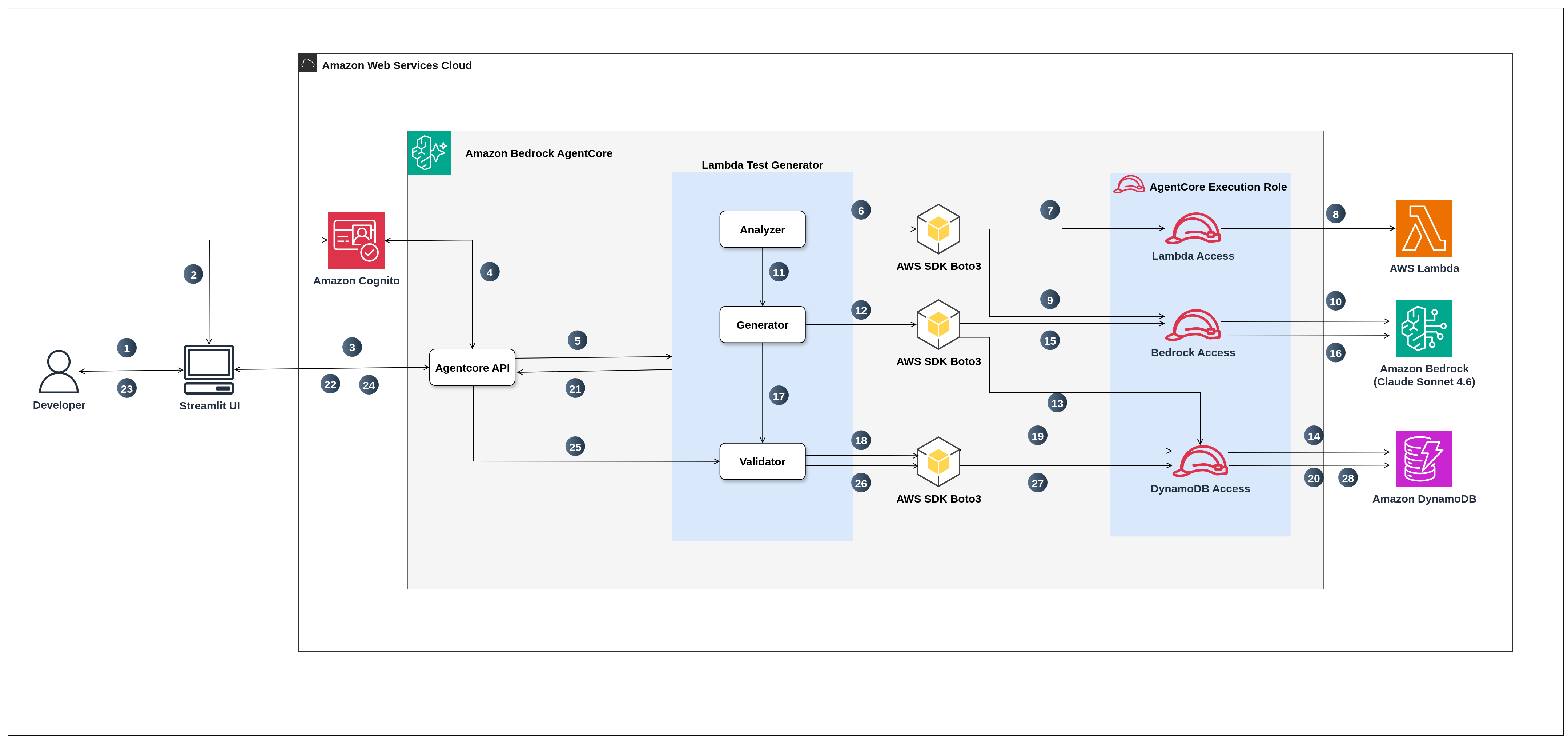
In this workflow:
User provides input: Developer interacts with Streamlit UI (app.py) running locally, provides Lambda function name, optional custom instructions for test generation, target filter to focus on specific functions/classes/files, and ignore patterns to exclude test files or dependencies.
Cognito Authentication: Application authenticates request with Cognito and returns JWT (ID/Access token) to Streamlit.
AgentCore API Invocation: Streamlit invokes AgentCore API with Bearer Token + payload (function name, filters, instructions, ignore patterns).
JWT Validation: AgentCore API validates JWT using Cognito token signature.
Request Routing: AgentCore API routes request to Lambda Test Generator workflow (AgentCore Runtime).
Code Analysis Request: Analyzer Agent initiates a request to fetch the target Lambda function's code and metadata.
AWS Authentication for Lambda Access: Boto3 authenticates with AWS using the AgentCore execution role, requesting read access permissions.
AWS Lambda Code Retrieval and Processing: IAM role authorizes access and fetches Lambda function code as a ZIP file, extracts source files, filters out dependencies (node_modules, venv, etc.) and non-code files, applies user-defined ignore patterns, and chunks code into manageable pieces.
Amazon Bedrock Authentication: Boto3 Amazon Bedrock client authenticates with AWS IAM for Amazon Bedrock access, requesting invoke model permissions to use Anthropic Claude Sonnet 4.6.
AI-Powered Code Analysis: IAM role authorizes and sends code chunks to Amazon Bedrock (us-east-1) using Anthropic Claude Sonnet 4 (us.anthropic.claude-sonnet-4-6) with Amazon Bedrock Guardrail applied for prompt attack filtering and content safety. Amazon Bedrock performs Regex + LLM enhanced analysis to extract actual input patterns (e.g., event['body'], headers['Authorization']), output patterns (e.g., statusCode, response body structure), dependencies, error handling patterns, and edge cases from the code.
Analysis results are packaged: Analyzer Agent packages the analysis results into an AnalysisResult object containing code chunks, input patterns, output patterns, dependencies, error patterns, and metadata, then passes it to the Generator Agent.
Test generation process starts: Generator Agent receives analysis results and initiates a request to generate test cases, first querying DynamoDB memory store for historical patterns to learn from.
Amazon DynamoDB Authentication for Memory Access: Boto3 DynamoDB client authenticates with AWS IAM for read access permissions to retrieve stored patterns.
Historical patterns are retrieved from Database: IAM role authorizes and queries DynamoDB memory store table (lambda-testcase-memory) to fetch previously accepted patterns and rejected patterns (failed tests with rejection reasons) for the specific Lambda function.
Amazon Bedrock Authentication for Test Generation: Boto3 Amazon Bedrock client authenticates again with AWS IAM for Amazon Bedrock access to generate test cases.
AI Test Case Generation: IAM role authorizes and sends analysis results combined with memory patterns to Amazon Bedrock. Amazon Bedrock generates test case schemas with realistic input events based on actual code patterns, creating positive tests (35%), negative tests (35%), and edge cases (30%). Generation happens per-chunk in parallel for efficiency, applies learned patterns from memory, avoids rejected patterns, and chunks generation if needed for large codebases. All Bedrock converse() calls include guardrailConfig for prompt attack filtering, PII redaction, and denied topic enforcement.
Test validation begins: Generator Agent passes the generated test case candidates to the Validator Agent for quality control, deduplication, and final selection.
Validation process is configured: Validator Agent receives test candidates and initiates validation process, requesting access to DynamoDB memory store for scoring and validation.
DynamoDB Authentication for Validation: Boto3 DynamoDB client authenticates with AWS IAM for read access to query memory patterns for validation scoring.
Test quality is assessed: IAM role authorizes and uses DynamoDB memory store to score test cases based on previous pattern success rates, function coverage and code complexity. Validator performs structural validation, deduplication using pattern hashing, quality scoring with confidence boosts for handler functions and error handling, diversity selection to cover different chunks and test types, and selects the top N highest-quality, most diverse test cases.
Final test cases returned to AgentCore: Validator Agent returns the final validated test cases with metadata (confidence scores, descriptions, input events, categories) to the main orchestrator, which formats and returns them back to the Amazon Bedrock AgentCore API
Results delivered to UI: AgentCore API returns the generated tests back to the Streamlit UI for display with analysis summary, generation metadata, and test case details.
User reviews and provides feedback: Developer reviews the displayed test cases in Streamlit UI, evaluates each test for quality and relevance, accepts good test cases or rejects poor ones with specific rejection reasons (missing_auth_headers, wrong_status_code, unrealistic_data, missing_required_fields, incorrect_event_source, etc.) and optional custom notes explaining the rejection, then submits feedback.
Feedback is submitted to the system: Streamlit UI sends the collected feedback (accepted/rejected status, rejection reasons, custom notes) to the AgentCore API (save_feedback).
AgentCore routes feedback: AgentCore API calls Validator agent which contains logic to store feedback in DynamoDB.
Feedback storage process begins: Validator Agent initiates the process to store the feedback.
DynamoDB write access is authenticated: Boto3 DynamoDB client authenticates with AWS IAM (AgentCore Execution role) for write access permissions to store feedback patterns.
Learning patterns are stored: IAM role authorizes and stores user feedback in DynamoDB memory store table. Each pattern is stored with a composite partition key (function_name#target_function or function_name#GLOBAL), composite sort key (FEEDBACK#accepted/rejected#PATTERN#hash), pattern hash for deduplication, test type, input pattern structure, feedback status, rejection reason (if rejected), custom notes, usage count, success rate, timestamp, and TTL of 90 days for automatic cleanup. This stored data enables the system to learn from user feedback and improve future test generation.
Automation and scale
This pattern scales automatically using AWS managed services. Amazon Bedrock handles AI inference on-demand with a 200K token context window and 64K token output per call, and Amazon DynamoDB uses on-demand billing that automatically adjusts to traffic patterns. The system uses parallel processing for speed, the Analyzer Agent makes 5 concurrent Bedrock calls to analyze code chunks (ThreadPoolExecutor with max_workers=5), while the Generator Agent processes chunks in parallel with 5 concurrent workers. A continuation mechanism handles incomplete responses by automatically retrying requests. Rate limiting (5 requests per 60 seconds per user) prevents cost abuse from excessive Bedrock API calls.
Cost optimization includes TTL-based cleanup that removes patterns older than 90 days, composite key queries with begins_with() for instant lookups without table scans, and BatchWriteItem operations that reduce DynamoDB write operations by approximately 90%. Performance depends on function size, small functions (under 10 files) generate 10 test cases in 30–60 seconds, medium functions (10–50 files) take 1–3 minutes, and large functions (50+ files) take 3–5 minutes, though using target filters to focus on specific code sections reduces time by 50–70%.
Tools
AWS services
Amazon Bedrock
– Provides generative AI capabilities through Anthropic Claude Sonnet 4 for code analysis, test generation, validation, and rejection summarization. Always uses us-east-1 region for model access. Amazon Bedrock AgentCore – Provides serverless agent runtime for deploying and hosting the test generation backend with automatic scaling, OAuth-based authorization, and CloudWatch observability.
Amazon Bedrock Guardrails
– Provides ML-based security filtering on all Bedrock API calls including prompt attack detection (HIGH strength), content filtering, PII anonymization (email, phone, name), blocking of AWS access keys/private keys/JWT tokens, and denied topic enforcement (exploit code generation, raw source code output). Deployed via CloudFormation. AWS CloudFormation
– Automates complete infrastructure provisioning including DynamoDB table, Cognito User Pool, Amazon Bedrock Guardrail with versioning, and IAM execution role for AgentCore. Amazon Cognito – Provides user authentication with email-based sign-up, JWT token issuance, and secure API authorization for the AgentCore backend.
Amazon DynamoDB
– Stores accepted and rejected test patterns with usage statistics for continuous learning and improvement. Uses composite keys (function_target, pattern_sk) for zero-scan queries and target-specific pattern storage. AWS Lambda
– Source of function code for analysis, the GetFunction API retrieves code and configuration. The tool supports Python, Node.js, Java, .NET, and Ruby runtimes.
Other tools
Python 3.11+
– Runtime environment for the application and agent orchestration. Streamlit
– Web-based user interface for authentication, test generation, feedback collection, and system status monitoring. Boto3 – AWS SDK for Python to interact with Lambda, Amazon Bedrock, DynamoDB, and Cognito services.
Code repository
The code for this pattern is available in Github - Lambda Test Event Generator
Best practices
This pattern implements the following best practices:
Uses least-privilege IAM policies for AWS Lambda (read-only), Amazon Bedrock (invoke), Amazon DynamoDB (query/write), and Amazon Cognito (authentication) access.
Implement target-specific pattern learning with global fallback for improved test accuracy.
Enable DynamoDB TTL for automatic cleanup of old patterns (90 days) to control storage costs.
Use zero-scan queries with composite keys (function_target, pattern_sk) for fast pattern retrieval.
Apply ignore patterns to exclude test files, dependencies, and non-code files from analysis.
Use multi-language code chunking with Abstract Syntax Tree (AST) parsing (Python) and regex patterns (Java, C#, JS, Ruby).
Store patterns with actual values (not just structure) for true deduplication.
Deploy backend on Amazon Bedrock AgentCore for serverless scaling and managed infrastructure.
Authenticate users via Amazon Cognito with JWT token validation on every API request.
Apply Amazon Bedrock Guardrails on all converse() calls for prompt attack filtering, PII redaction, sensitive data blocking (AWS keys, private keys, JWTs), and denied topic enforcement.
Sanitize analysis results before returning to users - all raw source code chunks are removed from responses, ensuring Lambda source code never leaves the AgentCore runtime boundary.
Validate all API inputs with regex patterns and length limits (function name max 170 chars, custom instructions max 2000 chars, max 50 ignore patterns) to prevent injection and abuse.
Implement per-user rate limiting (5 requests per 60 seconds) to prevent cost abuse from excessive Bedrock API calls.
Sanitize error messages before returning to users - internal file paths, AWS SDK details, and infrastructure information are never exposed in error responses.
Consider the following additional best practices:
Provide specific feedback reasons when rejecting test cases to improve learning accuracy.
Generate tests iteratively (2-3 times) for the same function to allow the system to learn and improve.
Provide custom instructions when you need specific test scenarios or data formats.
Enable IAM Access Analyzer to monitor resource permissions and identify unintended access.
Start with small Lambda functions to understand the system before analyzing large codebases.
Review IAM policies regularly and remove unused permissions.
Use strong password policies and enable Cognito AdvancedSecurityMode for threat detection.
Epics
| Task | Description | Skills required |
|---|---|---|
Clone the repository. | Clone the GitHub repository to your local system and navigate to the project directory:
This repository contains the Python application, CloudFormation template, and configuration files. | App developer |
Configure AWS Credentials. | Configure your AWS credentials to enable the AWS CLI to interact with your AWS account and to enable the application to access Lambda functions you want to test. You can do this using the AWS CLI configuration command:
When prompted, provide the following information:
| App developer |
| Task | Description | Skills required |
|---|---|---|
Deploy infrastructure using CloudFormation. |
What gets created:
NoteThe stack creates all required resources. Ensure the CloudFormation template completes successfully before proceeding to the next step. | App developer |
Export configuration variables. | Export all values from the CloudFormation stack outputs as environment variables:
These variables are used in subsequent steps for AgentCore configuration and .env file creation. | AWS administrator |
| Task | Description | Skills required |
|---|---|---|
Create virtual environment. |
| App developer |
Configure and deploy AgentCore. |
| App developer |
Create .env file for local development. | Create a .env file in the project root directory with all configuration values:
Test connectivity to AWS services:
Both commands should return successful responses. If you encounter permission errors, verify that the IAM policies are properly configured. | App developer |
| Task | Description | Skills required |
|---|---|---|
Create a new Cognito User. | The Cognito User Pool is configured with admin-only user creation for security, so users cannot self-register. Create a user via the AWS CLI using the Cognito Pool ID and Client ID exported from the CloudFormation stack outputs.
Create a new user (replace
Set a permanent password (minimum 8 characters, must include uppercase, lowercase, and a number):
Use these credentials to sign in through the Streamlit UI in the next step. | App developer |
| Task | Description | Skills required |
|---|---|---|
Launch Streamlit UI. | Start the application:
The UI will open in your default browser at Sign in with the credentials created in the previous step | App developer |
Configure generation options | In the UI, configure the following options:
| App developer |
Generate test cases. | Click the "Generate Test Cases" button. The system will:
| App developer |
Review generated tests. | Review each generated test case, which includes:
| DevOps engineer, App developer |
Provide feedback. | For each test case, provide feedback: To accept a test case:
To reject a test case:
| Test engineer |
Save feedback to memory. | After reviewing all test cases:
| Test engineer |
Iterate for improvement. | Generate tests 2-3 more times for the same function to improve quality:
NoteThe learning system becomes more effective with repeated use. Each feedback cycle helps the AI understand your testing preferences and generate more relevant test cases for your Lambda functions. | App developer |
| Task | Description | Skills required |
|---|---|---|
Invoke AgentCore API directly. | For automation and integration, invoke the AgentCore backend directly using API calls with Cognito authentication. Get a Cognito token:
Invoke test generation:
Or using curl:
| App developer |
| Task | Description | Skills required |
|---|---|---|
Monitor DynamoDB patterns and track costs. |
NoteRegular monitoring helps identify cost optimization opportunities and ensures the system continues to learn effectively. The TTL configuration on your DynamoDB table automatically cleans up old patterns, helping manage storage costs over time. | AWS administrator |
| Task | Description | Skills required |
|---|---|---|
Delete deployed resources. | To remove all deployed resources: Delete the AgentCore agent:
Delete the CloudFormation stack (deletes DynamoDB table, Cognito User Pool, and IAM role):
| AWS administrator |
Troubleshooting
| Issue | Solution |
|---|---|
"Access Denied" error when fetching Lambda code |
|
"DynamoDB write errors" |
|
No test cases generated | Possible causes and solutions:
|
Java/C# Lambda shows "No source code found" | Java and C# Lambdas require source files in the deployment package: Java (Maven):
C# (.NET):
|
DynamoDB write errors |
|
Slow test generation | Optimize generation speed:
|
AgentCore: "Agent not found" | Verify agent is deployed:
|
AgentCore: "Permission denied" at runtime | Verify execution role has correct policies:
|
Cognito: "Invalid username or password" | Verify your credentials are correct. You can create a new user using the Streamlit UI's "Create Account" flow, or via the AWS CLI:
|
"Bedrock Guardrail not configured" warning in logs | Verify Check CloudFormation outputs:
|
"Rate limit exceeded" error | The system limits to 5 requests per 60 seconds per user. Wait the indicated time before retrying. For production use with higher throughput needs, adjust |
Related resources
AWS documentation
