Create an outbound campaign using event triggers
Set up event triggers in the Connect Customer admin website
-
On the Campaign set up page, select Customer event under Recipients.

-
Select an Event source to specify where the data originates, and configure the attribute conditions that will activate the event trigger.
Event sources are based on integrations in your Customer Profiles domain. details on setting up your external application, see Integrate with external applications. You can also integrate with Kinesis or S3.

-
Select the Delivery mode and additional communication settings.

Important
To create a communication widget campaign, you must have a Customer Profiles integration between your Customer Profiles domain and your instance. The required object type name is
Campaign-WebNotification. You can do this by choosing the upgrade button in the Connect Customer admin website console by selecting your instance and then going to the Outbound campaigns subpage.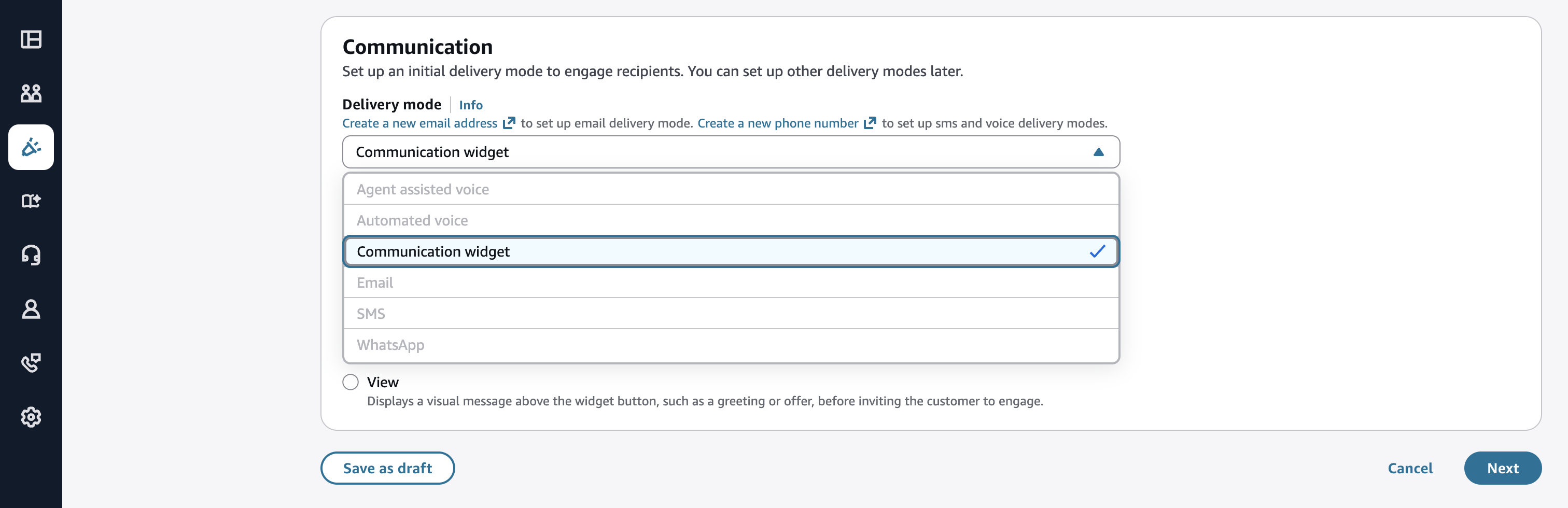
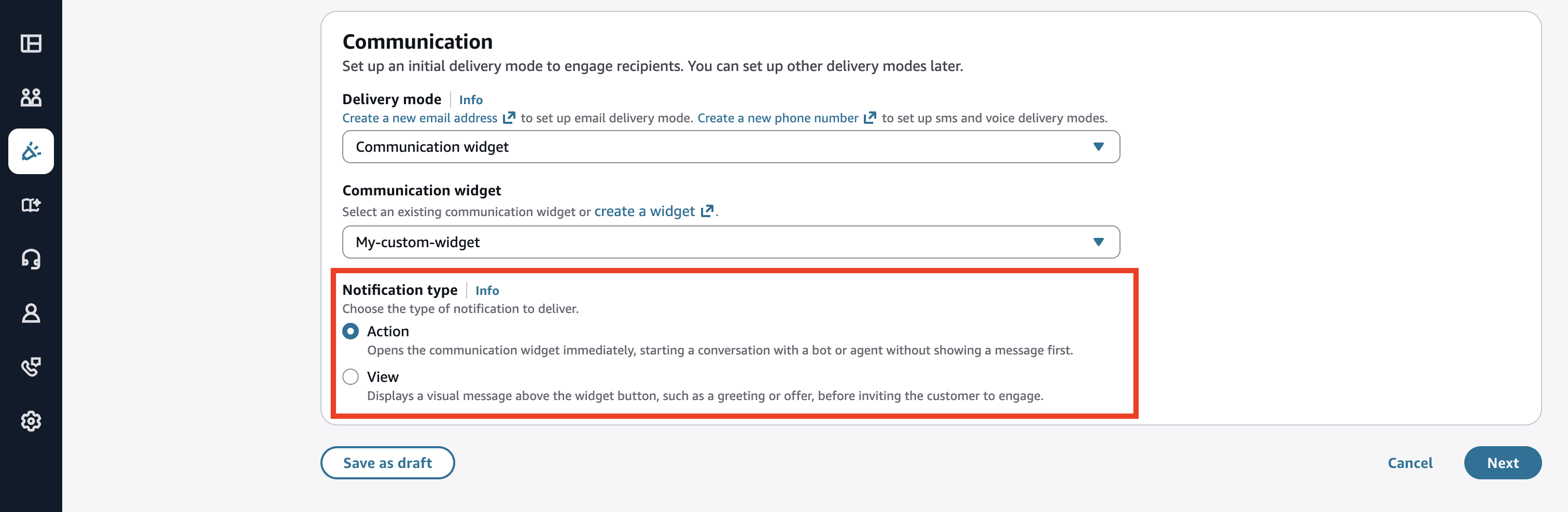
There are two notification types to choose from: View and Action.
- View
-
A View notification displays a visual message or prompt above the communication widget button. It presents information to the end user, such as a greeting, offer, or contextual message. The notification invites the end user to engage in a conversation with an agent or bot.
Select View when you want to surface a message, promotion, or contextual nudge to the end user before they start a conversation. This gives the end user a moment to read and decide whether to engage.
Examples:
-
A proactive banner saying "Hi! We noticed you've been on this page for a while. Need help finding the right plan?"
-
A promotional message: "Limited time offer — chat with us to get 20% off your upgrade."
-
A contextual nudge: "Having trouble completing your order? We're here to help."
-
- Action
-
An Action notification bypasses any visual message and immediately triggers the communication widget to open, and starts a conversation directly with a bot or human agent.
Select Action when you want to skip the notification step entirely and launch the end user straight into a live conversation. No intermediate message is shown.
Examples:
-
The system immediately connects a high-intent customer on a checkout page to a support agent.
-
The system routes a returning customer with an open case directly into a bot flow to check status.
-
A VIP customer triggers an instant connection to a dedicated agent upon visiting the help page.
-

Recommenders are only available when you select the View notification type and the selected view has a Web Notification Service integration type. If you select the Action notification type, or if your selected view does not have this integration, the recommender option does not appear.
-
(Optional) Configure the Recommendations section to integrate Predictive Insights with your event-triggered campaign. This enables you to deliver personalized template content through email and SMS channels.
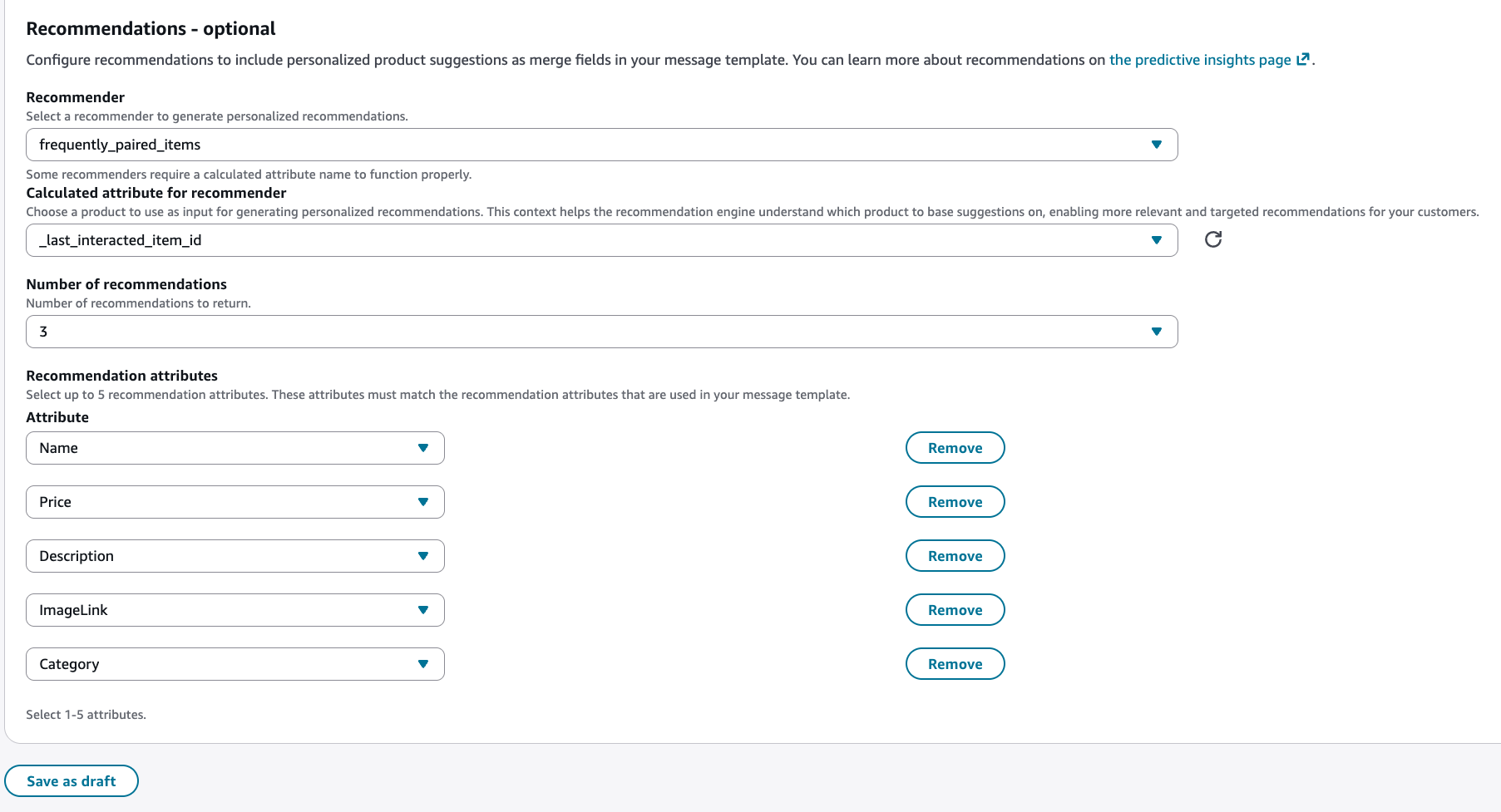
Configure the following settings:
-
Recommender name – Select the name of the recommender you want to use to generate recommendations for the profiles associated with the campaign. You can only use recommenders that are active to generate recommendations.
Predictive Insights offers several types of recommendations. For more information, see Step 3: Creating Predictive Insights.
-
Calculated Attribute for recommender – This setting is only required when using a Similar items or Frequently paired items recommender type. This context helps the recommendation engine understand which product to base suggestions on, enabling more relevant and targeted recommendations for your customers.
For example, you might use a calculated attribute like
_last_interacted_item_idthat captures the purchased item ID. -
Number of recommendations – The maximum number of recommendations to generate for a profile. This can range between 1 to 3 recommendations.
-
Recommendation attributes – Define which attributes of the recommendations response are used in your message template.
For more information about Predictive Insights, see Get started with Predictive Insights.
-
-
Verify your configurations and choose Publish.

Create outbound campaigns with event triggers using APIs
Connect Customer Customer Profiles event trigger APIs
-
Two API calls are made to create a functioning event trigger:
-
CreateEventTrigger: Defines which action to perform based on a specified condition.
-
PutIntegration: Defines the action to use.
-
Example of an event trigger request:
{
"Description": "string",
"EventTriggerConditions": [
{
"EventTriggerDimensions": [
{
"ObjectAttributes": [
{
"ComparisonOperator": "string",
"FieldName": "string",
"Source": "string",
"Values": [ "string" ]
}
]
}
],
"LogicalOperator": "string"
}
],
"EventTriggerLimits": {
"EventExpiration": number,
"Periods": [
{
"MaxInvocationsPerProfile": number,
"Unit": "string",
"Unlimited": boolean,
"Value": number
}
]
},
"ObjectTypeName": "string",
"SegmentFilter": "string",
"Tags": {
"string" : "string"
}
}
The ComparisonOperator supports the following
values:
| ComparisonOperator | Comment | Supported type |
|---|---|---|
| INCLUSIVE | Checks if the target includes all the specified values. | String |
| EXCLUSIVE | Checks if the target does not contain all the specified values. | String |
| CONTAINS | Checks if the target contain any of the specified values. | String |
| BEGINS_WITH | Checks if the target begins with the specified value. | String |
| ENDS_WITH | Checks if the target ends with the specified value. | String |
| GREATER_THAN | True if the target is greater than the specified value. | Number |
| LESS_THAN | True if the target is less than the specified value. | Number |
| GREATER_THAN_OR_EQUAL | True if the target is greater than or equal to the specified value. | Number |
| LESS_THAN_OR_EQUAL | True if the target is less than or equal to the specified value. | Number |
| EQUAL | True if the target is equal to the specified value. | Number |
| BETWEEN | True if the target is within specific value range or timestamp. | Number/Date* |
| NOT_BETWEEN | True if the target is not within specific value range or timestamp. | Number/Date* |
| BEFORE | True if the target is before the specified timestamp. | Date |
| AFTER | True if the target is after the specified timestamp. | Date |
| ON | True if the target is on the specified timestamp. | Date |
-
Source: Used to define an attribute in the object.
-
Only one attribute is allowed in a single
ObjectAttributeentry.
-
-
FieldName: Used to point to the mapped attribute in Data Mapping.
-
Only one attribute is allowed in a single
ObjectAttributeentry.
-
-
ObjectTypeName: Supports all default and custom object type names, but not standard object types, such as
_profile,_asset,_order, and others. -
EventTriggerLimits:
-
Allow max of concurrent 20 event triggers per customer domain by default.
-
Default limit of 10 invocations per day, per profile, per trigger. You can override this by specifying
UNLIMITEDinMaxInvocationPerProfile. -
MaxInvocationPerProfile:
-
Valid Range: Minimum value of 1. Maximum value of 1000. (or
UNLIMITED)
-
-
Unit:
-
Valid Values: HOURS, DAYS, WEEKS, MONTHS
-
-
Value:
-
Valid Range: Minimum value of 1. Maximum value of 24
-
-
-
Time range comparison
-
Customer Profiles uses standard libraries to parse time values. For global services, it is important to account for timezone conversions to ensure accurate processing.
-
-
The
EventExpirationvalue is specified in milliseconds. When used to trigger a campaign, the maximum expiration time is capped at 15 minutes.
Outbound campaigns event trigger APIs
-
CreateCampaignV2
The only changes needed for creating an event triggered campaign are the highlighted fields. The rest of the fields are the same as Scheduled Campaigns.
{ "name": "string", "connectInstanceId": "string", "channelSubtypeConfig": { // or other channel parameters "email": { "outboundMode": { "agentless":{ } }, "defaultOutboundConfig":{ "connectSourceEmailAddress":"example@example.com", "wisdomTemplateArn":"arn:aws:wisdom:us-west-2:123456789012:message-template/dXXXXX0Pc8-195a-776f-0000-EXAMPLE/51219d5c-b1f4-4bad-b8d3-000673332", "sourceEmailAddressDisplayName": "testEmailDisplayName" } } }, "connectCampaignFlowArn":<Flow ARN>, "schedule": { "endTime": "2024-12-11T21:22:00Z", "startTime": "2024-10-31T20:14:49Z", "timeZone": "America/Los_Angeles" }, "source": { "eventTrigger": { "customerProfilesDomainArn":<Domain ARN>} -
PutProfileOutboundRequestBatch
You are not able to directly invoke this API, but it will be logged within your Cloudtrail logs. This API is used to trigger a campaign after receiving an event, and is the mechanism that initiates a voice call, email, or SMS.
