Connect Customer Global Resiliency requirements
If you have decided that Connect Customer Global Resiliency is the appropriate deployment for you, ensure you adhere to the following pre-requisites before onboarding:
-
Port all phone numbers you want to enable to be multi-region to Connect Customer.
-
AWS Enterprise Support or AWS Unified Operations is required to onboard to Connect Customer Global Resiliency. For more information about AWS Support plans, see AWS Support Plans
. -
You must have an existing production SAML 2.0-enabled Connect Customer instance in a Region where Connect Customer Global Resiliency is available. To confirm, see Global Resiliency availability by Region.
-
It is recommended to onboard and test Connect Customer Global Resiliency services in a test environment before onboarding production traffic.
-
Request that ALL service quotas in the replica instance match the service quotas in the source instance: Create a service quota increase case in the AWS Management Console > Support.
-
Ensure your Lambda functions across AWS Regions have the same name.
-
Update your flows to replace any hardcoded Regions with a
$.AwsRegionor$['AwsRegion']parameter.Note
In the AWS Lambda function block,
$.AwsRegionis not allowed in the flowArn.To use
$.AwsRegion, you need to use a Set contact attributes block to set the flow, for example:flowIdKey:arn:aws:connect:$.AwsRegion:123456789012:instance/12345678-1234-1234-1234-123456789012/contact-flow/12345678-1234-1234-1234-123456789012Then later use that attribute key in the AWS Lambda function block as
${flowIdKey}.$.AwsRegionis supported only for Lambda ARN and Lex ARN. -
For Amazon Lex bots, you can do one of the following:
-
Use Amazon Lex Global Resiliency to replicate bots across AWS Regions and retain the bot ID.
-
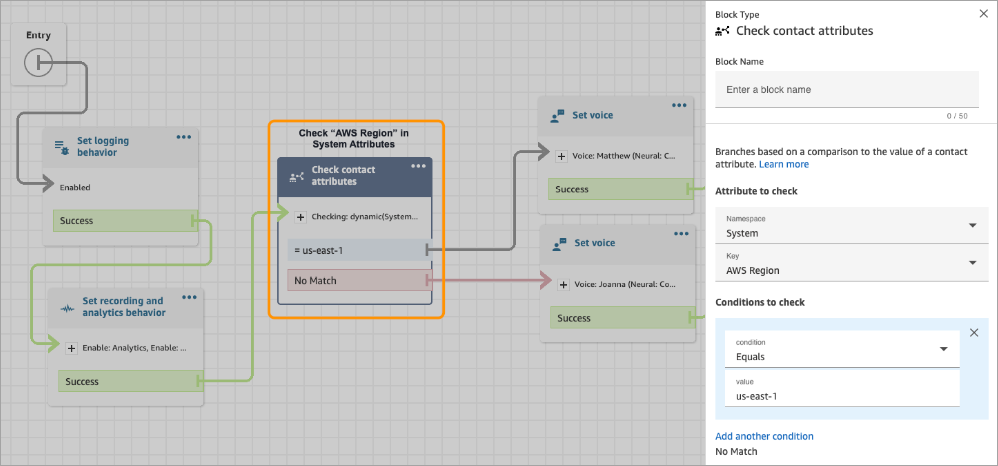
Change your flows to branch based on the AWS Region where the flow is running. At flow runtime, these parameters are replaced with the Region where the flow is run, as shown in the following example.
-
