Routing calls and events to AWS Lambda functions for Amazon Chime SDK PSTN audio
The PSTN audio service provides the following ways to route incoming phone calls to your AWS Lambda function for treatment.
-
You can route calls based on the called number. To do this, an Amazon Chime SDK administrator creates a SIP rule with the Trigger Type set to To phone number. This phone number must exist in the Amazon Chime SDK phone number inventory, in the same AWS account as the SIP rule.
-
You can route calls to the AWS Lambda function based on the request URI of an incoming Voice Connector SIP call. To do this, an Amazon Chime SDK administrator creates a SIP rule with the Trigger Type set to Request URI hostname. This field must contain a fully-qualified domain name specified in the “outbound host name” field of a Voice Connector that is provisioned in the same AWS account as the SIP rule.
Note
When using the Request URI hostname trigger type, the PSTN
audio service validates the user part of the incoming
Request-URI (the portion before the @ sign). You must use Augmented Backus-Naur
Formata-z, A-Z, 0-9, &, =, +, $, /, %, -, _, !, ~, *,
(,), (.). If your SIP provider needs to pass
longer values, use a custom SIP header instead. For more
information, see Using SIP headers in the Amazon Chime SDK PTSN audio service.
Next, the administrator provisions at least one target SIP media application. Optionally, you can provision multiple SIP media applications in priority order to support redundancy and failover. For example, you can provision two SIP media applications in two different AWS regions and specify their order of priority. If a SIP rule has more than one target SIP media application, the SIP media application’s Lambda functions are invoked in the order of priority. The AWS Lambda function in the SIP media application with the highest order of priority (the smallest number, such as 1) runs first. If the PSTN audio service can't invoke that AWS Lambda function, the AWS Lambda function in the SIP media application with the next highest order of priority (the next least number, such as 2) is invoked. If all attempts to run the SIP media applications specified in the SIP rule fail, the PSTN audio service hangs up.
Once the necessary SIP rules and SIP media applications are provisioned, the PSTN audio service routes incoming calls to your AWS Lambda function. The following diagram shows a typical sequence using the To phone number trigger type.

In the diagram:
-
The PSTN audio service receives an incoming call to a phone number that is provisioned in a SIP rule in the same AWS account.
-
The PSTN audio service then evaluates the SIP rule and fetches the SIP media application with the highest order of priority (in this case, priority 1).
-
The service then invokes the AWS Lambda function associated with the SIP media application.
-
Optional. If the service can't invoke the associated AWS Lambda with the highest order of priority, it will attempt to run the SIP media application with the next highest order of priority (in this case, priority 2), if one exists.
-
Optional. If all the target SIP media applications fail, the PSTN audio service hangs up the call.
The following diagram shows a typical rule that uses a Request URI hostname trigger type.
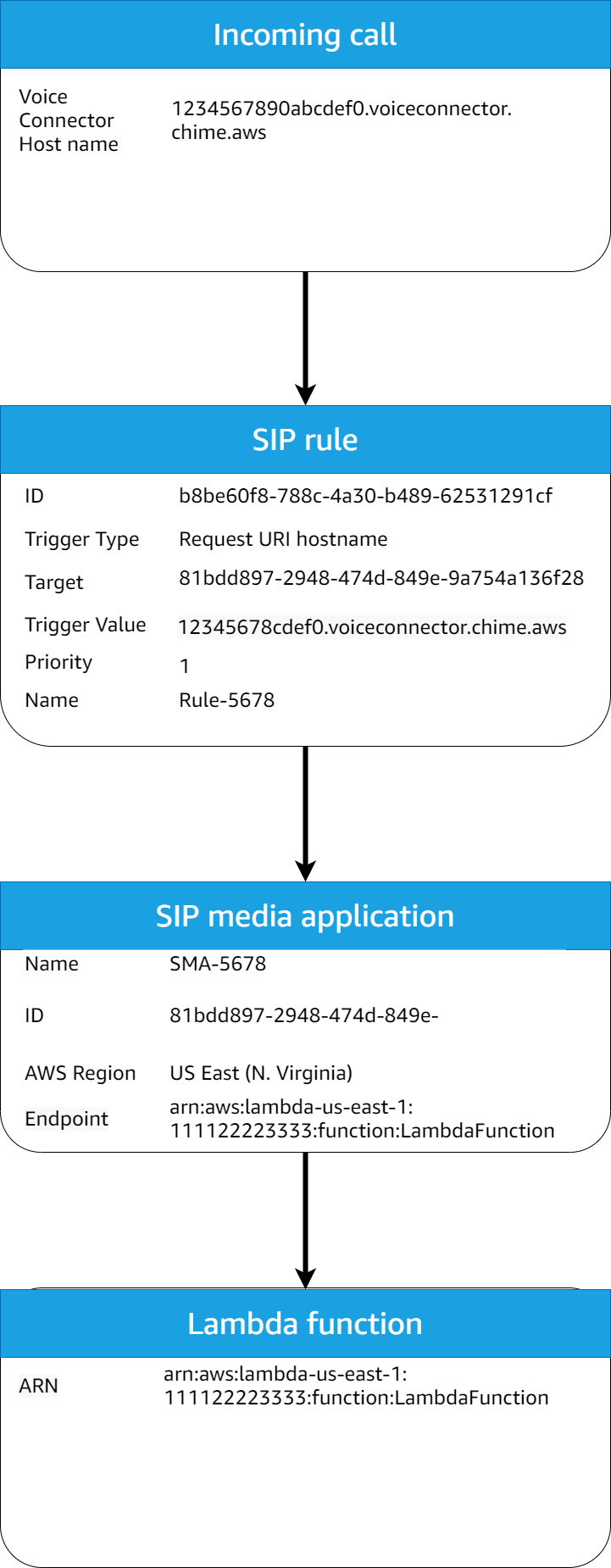
In the diagram:
-
The PSTN audio service receives an incoming call on an Amazon Chime SDK Voice Connector with a Request URI hostname that matches a provisioned SIP rule in the same AWS account.
-
The service then evaluates the SIP rule and fetches the SIP media application with the lowest priority (in this case, the only target SIP media application with priority 1).
-
The service then invokes the AWS Lambda function associated with the SIP media application.
-
Optional. If the service cannot invoke the associated AWS Lambda with the lowest priority, it tries to run the SIP media application with the next lowest priority, if one exists. In this case, there is only one target SIP media application.
-
Optional. If all the target SIP media applications fail, the PSTN audio service hangs up the call.
Additionally, you can create an outbound call, and subsequently invoke your AWS Lambda function for additional processing, using the CreateSIPMediaApplicationCall API. To use this API, you specify the provisioned SIP media application ID as a parameter.
Finally, you can trigger your AWS Lambda function at any time while a call is active using the UpdateSIPMediaApplicationCall API. To use the API, you specify the provisioned SIP media application ID as a parameter.
