Mounting S3 file systems on Amazon ECS
You can attach an S3 file system to an Amazon ECS task definition and then deploy the task to access your S3 data from your containers.
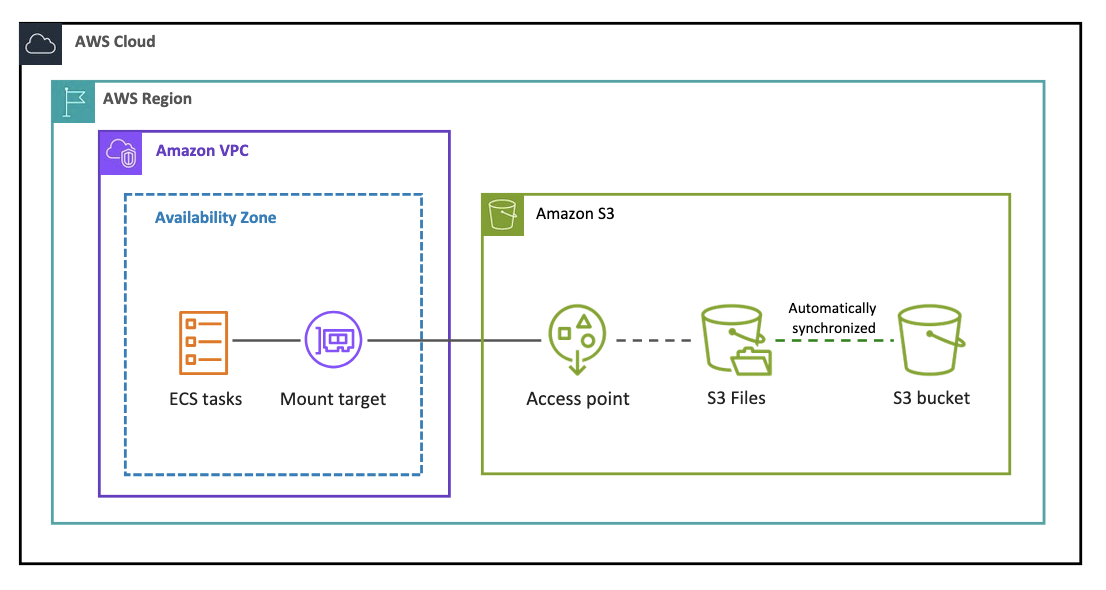
In Amazon ECS, S3 Files volume support is available for AWS Fargate and ECS Managed Instances at General Availability. S3 Files volumes are not supported on the Amazon EC2 launch type. If you configure an S3 Files volume in a task definition and attempt to run it on the EC2 launch type, the task will fail.
Prerequisites
Before you attach an S3 file system to an ECS task, make sure that you have the following:
You have an S3 file system with at least one mount target in available state.
The ECS task must be in the same VPC as the mount target.
Add the permissions to your ECS task IAM role to access S3 file systems. For details, see IAM role for attaching your file system to AWS compute resources.
You have configured the required Security groups.
How to mount your S3 file system on an ECS task
On the S3 Console, choose File systems in the left navigation pane.
Select the file system you want to mount.
In the Overview tab, choose Attach under Attach to an ECS task.
Select your desired ECS task definition from the drop down.
Specify the local mount path.
You can optionally specify an access point, a root directory, and a transit encryption port.
-
Once the file system is attached in the task definition, you can start a task using this task definition in following ways:
You can deploy the task as a standalone, one-time run. For details, see Running an application as an Amazon ECS task in the Amazon ECS Developer Guide.
You can also deploy the task definition as a service. For details, see View service history using Amazon ECS service deployments in the Amazon ECS Developer Guide.
For details, see Using S3 file system storage with Amazon ECS.
You can monitor your file system storage, performance, client connections, and synchronization errors using Amazon CloudWatch.
