Restoring previous versions
You can use versioning to retrieve previous versions of an object. There are two approaches to doing so:
-
Copy a previous version of the object into the same bucket.
The copied object becomes the current version of that object and all object versions are preserved.
-
Permanently delete the current version of the object.
When you delete the current object version, you, in effect, turn the previous version into the current version of that object.
Because all object versions are preserved, you can make any earlier version the current version by copying a specific version of the object into the same bucket. In the following figure, the source object (ID = 111111) is copied into the same bucket. Amazon S3 supplies a new ID (88778877) and it becomes the current version of the object. So, the bucket has both the original object version (111111) and its copy (88778877). For more information about getting a previous version and then uploading it to make it the current version, see Retrieving object versions from a versioning-enabled bucket and Uploading objects.

A subsequent GET retrieves version 88778877.
The following figure shows how deleting the current version (121212) of an object leaves the previous version (111111) as the current object. For more information about deleting an object, see Deleting a single object.
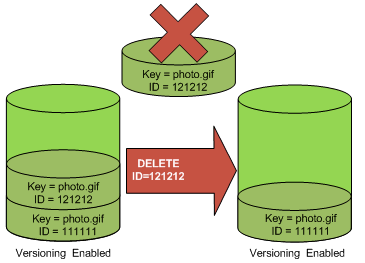
A subsequent GET retrieves version 111111.
Note
To restore object versions in batches, you can use the
CopyObject operation. The CopyObject operation copies each
object that is specified in the manifest. However, be aware that objects aren't
necessarily copied in the same order as they appear in the manifest. For
versioned buckets, if preserving current/non-current version order is important,
you should copy all non-current versions first. Then, after the first job is
complete, copy the current versions in a subsequent job.
To restore previous object versions
For more guidance on restoring deleted objects, see How can I retrieve an Amazon S3 object that was deleted in a versioning-enabled bucket?
You can restore a previous version of an object using the Amazon S3 console by deleting the current version. Deleting the current version makes the previous version the new current version.
To restore a previous version by deleting the current version
Sign in to the AWS Management Console and open the Amazon S3 console at https://console.aws.amazon.com/s3/
. -
In the Buckets list, choose the name of the bucket that contains the object.
-
In the Objects list, choose the name of the object.
-
Choose Versions.
Amazon S3 shows all the versions for the object.
-
Select the check box next to the Version ID of the current (latest) version that you want to delete.
-
Choose Delete.
-
In the Delete objects dialog box, enter
permanently delete, and then choose Delete objects.After you delete the current version, the previous version becomes the current version.
To download a previous version
Sign in to the AWS Management Console and open the Amazon S3 console at https://console.aws.amazon.com/s3/
. -
In the Buckets list, choose the name of the bucket that contains the object.
-
In the Objects list, choose the name of the object.
-
Choose Versions.
Amazon S3 shows all the versions for the object.
-
Select the check box next to the Version ID for the versions that you want to retrieve.
-
Choose Actions, choose Download, and save the object.
You also can view, download, and delete object versions in the object overview panel. For more information, see Viewing object properties in the Amazon S3 console.
Note
To copy a previous version in place (making it the new current version), use the AWS CLI or AWS SDKs — this approach isn't available in the Amazon S3 console. For an example, see the AWS CLI tab.
Important
You can undelete an object only if it was deleted as the latest (current) version. You can't undelete a previous version of an object that was deleted. For more information, see Retaining multiple versions of objects with S3 Versioning.
To restore a previous version by copying it in place, use the
copy-object command. For the --copy-source
parameter, specify the version ID of the previous version that you want
to restore:
aws s3api copy-object \ --bucketamzn-s3-demo-bucket\ --keymy-object.jpg\ --copy-sourceamzn-s3-demo-bucket/my-object.jpg?versionId=previous-version-id
This creates a new current version of the object with the content from the specified previous version. Amazon S3 preserves all existing versions.
For information about using other AWS SDKs, see the AWS Developer Center
